1. Вступ
The TAKSTAR DA10 is a versatile 2-in-1 device designed to function as both a wireless microphone and a portable voice amplifier with an integrated speaker. It is suitable for various applications including karaoke, singing, home parties, meetings, outdoor events, and speeches. This manual provides detailed instructions for the proper setup, operation, and maintenance of your DA10 device.
Note: This device cannot connect to external speakers, amplifiers, or audio receivers like PA systems or karaoke systems.
2. Що в коробці
- TAKSTAR DA10 Wireless Microphone & Voice Ampлібератор
- Зарядний кабель USB Type-C
- Посібник користувача
3. Продукт закінчивсяview & Особливості
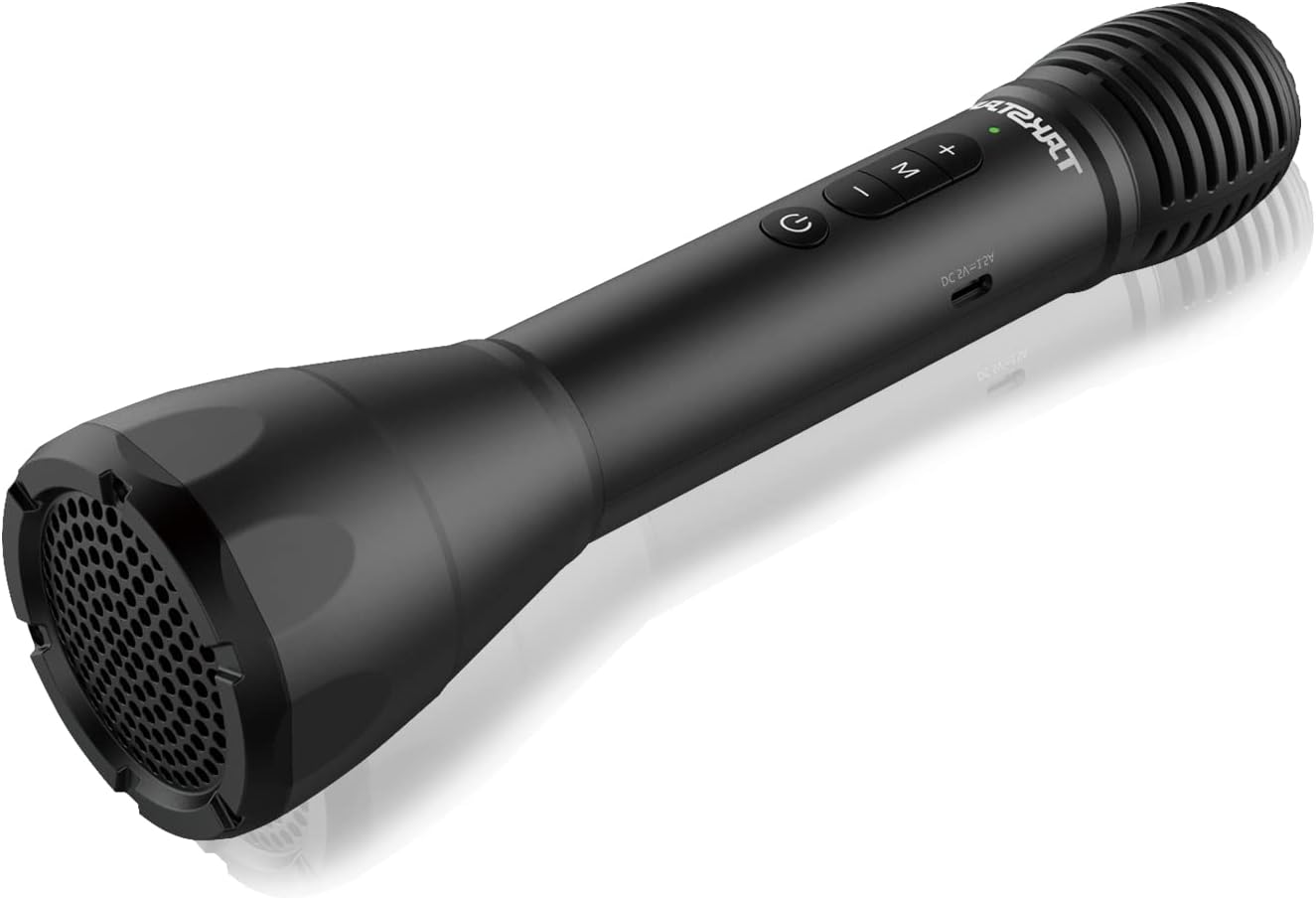
Figure 1: TAKSTAR DA10 Main Unit. A sleek black handheld microphone with integrated speaker at the base and control buttons on the handle.

Figure 2: Cardioid Pickup Pattern. The microphone features a cardioid pickup pattern for focused sound capture and clearer vocals, enhanced by a built-in DSP anti-howling chip.
Ключові характеристики:
- Функціональність 2-в-1: Combines microphone, power amplifier, and speaker.
- Бездротова Bluetooth: Convenient wireless playing and connectivity to mobile phones, computers, and tablets.
- Професійна якість звуку: Built-in DSP chip for effective howling reduction and clear, natural sound. Rear earth material speaker for lightweight portability and strong audio.
- Режим караоке: Features reverb effects for an enhanced singing experience.
- Тривалий: Up to 8 hours of working time on a single charge, with ultra-long standby and automatic power-off after 15 minutes of no input.
- Регулювання гучності: Adjustable loudspeaker volume to suit different situations.
- Кілька режимів: Switch between Speech Mode, Host Mode, Karaoke Mode, and Bluetooth Mode.
- Широке охоплення: Covers an area of approximately 1,000 sq ft (100m²), suitable for about 25 people.
4. Налаштування
4.1 Зарядка пристрою
Before first use, fully charge your TAKSTAR DA10. Connect the provided USB Type-C charging cable to the charging port on the microphone and to a suitable USB power source (e.g., computer, USB wall adapter). A full charge takes approximately 3 hours.
4.2 Створення пари Bluetooth
- Power on the TAKSTAR DA10 by pressing and holding the power button.
- Press the 'M' button to switch to Bluetooth Mode. The device will indicate it is ready for pairing.
- On your mobile phone, computer, or tablet, enable Bluetooth and search for available devices.
- Select 'TAKSTAR DA10' from the list of devices to pair. Once paired, the device will confirm the connection.

Figure 3: Bluetooth Connection. The diagram illustrates how to connect the TAKSTAR DA10 to a smartphone or laptop/PC via Bluetooth 5.0.
5. Інструкція з експлуатації
5.1 Увімкнення/вимкнення живлення
Натисніть і утримуйте кнопку живлення, щоб увімкнути або вимкнути пристрій.
5.2 Вибір режиму
Натискайте кнопку «M», щоб перемикатися між доступними режимами:
- Режим мовлення: Optimized for clear vocal delivery.
- Режим хоста: Suitable for presentations and public speaking.
- Режим караоке: Adds reverb effects for singing.
- Режим Bluetooth: For wireless audio playback from a paired device.
5.3 Регулювання гучності
Use the volume control buttons (+/-) on the device to adjust the loudspeaker volume to your desired level.
5.4 Karaoke Reverb Effects
In Karaoke Mode, the built-in reverb effects are automatically applied to enhance your singing experience.

Figure 4: Voice Amplifier Coverage. The TAKSTAR DA10 provides 8W output power, covering up to 1000+ sq.ft (100+ m²) for effective voice ampзвільнення.

Figure 5: Versatile Usage. The image displays various applications for the TAKSTAR DA10, including karaoke, lectures/seminars, weddings, and teaching.
6. Технічне обслуговування
- Тримайте пристрій сухим і чистим.
- Уникайте впливу на пристрій екстремальних температур або прямих сонячних променів.
- Do not disassemble the device. Contact customer support for repairs.
- Регулярно заряджайте пристрій, щоб підтримувати його в робочому стані, навіть якщо він використовується нечасто.
7. Вирішення проблем
| проблема | Можливе рішення |
|---|---|
| Немає звуку з динаміка | Ensure device is powered on and volume is adjusted. Check Bluetooth connection. |
| Не вдається підключити пристрій через Bluetooth | Ensure device is in Bluetooth Mode. Turn off and on Bluetooth on your external device. Restart the TAKSTAR DA10. |
| Howling/Feedback noise | Reduce microphone volume. Avoid pointing the microphone directly at the speaker. |
| Короткий час автономної роботи | Ensure device is fully charged before use. Reduce usage time at maximum volume. |
8. Технічні характеристики
| Особливість | Деталь |
|---|---|
| Бренд | ТАКСТАР |
| Назва моделі | DA10 |
| Технологія підключення | Bluetooth |
| Форм-фактор мікрофона | Портативний |
| Джерело живлення | Живлення від акумулятора (літій-іонний) |
| Час роботи | До 8 годин |
| Час зарядки | Приблизно 3 годин |
| Вихідна потужність | 8W |
| Зона покриття | Approx. 1,000 sq ft (100m²) |
| Аудіо Чутливість | 47.5 децибели |
| Співвідношення сигнал-шум | 66 дБ |
| АЧХ | 8 кГц |
| Тип роз'єму | USB Type-C |
| Вага товару | 0.035 унції (1 грама) |
| Розміри упаковки | 11.26 x 4.09 x 3.31 дюймів |
9. Офіційне відео продукту
Video 1: TAKSTAR DA10S Bluetooth Wireless Microphone. This video provides an overview of the TAKSTAR DA10S, highlighting its features and functionality as a Bluetooth wireless microphone. Note: The DA10S is a variant of the DA10 model.
10. Гарантія та підтримка
For warranty information or technical support, please refer to the contact card included in your product packaging or visit the official TAKSTAR website. You may also contact the seller, Takstar Official Store, directly through the Amazon platform for assistance.


