1. Вступ
Дякуємо за покупкуasing the ONIKUMA K1 RGB Gaming Headset. This manual provides detailed instructions for setup, operation, maintenance, and troubleshooting to ensure optimal performance and longevity of your headset. Please read this manual carefully before use and retain it for future reference.
2. Продукт закінчивсяview
The ONIKUMA K1 is a wired gaming headset designed for multi-platform compatibility, featuring vibrant RGB lighting, 7.1 surround sound, and a noise-cancelling microphone. It is built for comfort during extended gaming sessions.
Ключові характеристики:
- Об'ємний звук 7.1: Provides immersive audio for an enhanced gaming experience.
- Мікрофон із шумопоглинанням: Забезпечує чітке спілкування, зменшуючи фоновий шум.
- RGB освітлення: Dynamic lighting effects for an aesthetic appeal.
- Мультиплатформна сумісність: Works with PC, PlayStation (PS3, PS4), Mobile devices, and Xbox (Xbox One requires an adapter, not included).
- Зручний дизайн: Features soft protein earpads, an adjustable headband, and cozy head cushions.
- Вбудовані елементи керування: Легкий доступ до регулювання гучності та вимкнення мікрофона.
Компоненти:
The headset includes the main unit with integrated microphone and a wired connection featuring a 3.5mm audio jack and a USB connector for RGB lighting.

Figure 1: Headset with in-line volume and microphone mute control, USB connector for RGB lighting, and 3.5mm audio jack.

Figure 2: Flexible microphone with 160-degree adjustment and 360-degree voice pick-up for clear communication.

Figure 3: Soft protein earpads, adjustable headband, and cozy head cushions designed for supreme comfort.
3. Інструкції з налаштування
Follow these steps to connect your ONIKUMA K1 headset to your device.
Мультиплатформна сумісність:
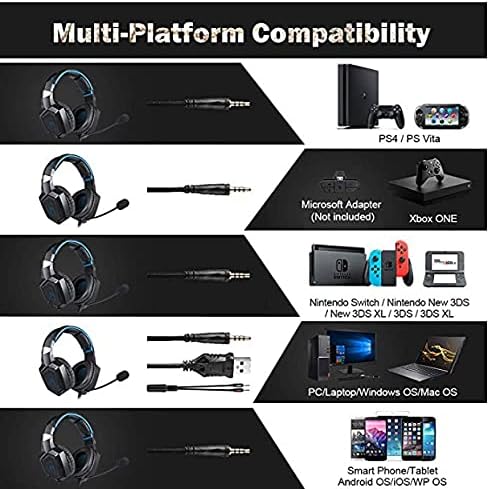
Рисунок 4: Сумісність заview for PC, PlayStation, Xbox, Nintendo Switch, and mobile devices.
- For PC/Laptop (Windows OS/Mac OS):
Connect the 3.5mm audio jack to your computer's audio output/input port. Connect the USB cable to a USB port for RGB lighting. Ensure your sound settings are configured to use the headset. - For PlayStation (PS4/PS Vita/PS3):
Connect the 3.5mm audio jack to the controller or console's audio port. For PS4, go to Settings > Devices > Audio Devices > Output to Headphones > All Audio. Connect the USB for RGB lighting if a USB port is available. - For Xbox ONE:
An additional Microsoft Adapter (not included) is required for older Xbox One controllers. Connect the 3.5mm audio jack to the adapter, then connect the adapter to your controller. Newer Xbox One controllers have a built-in 3.5mm jack. Connect the USB for RGB lighting if a USB port is available on the console. - For Nintendo Switch/New 3DS XL/3DS/3DS XL:
Connect the 3.5mm audio jack directly to the console's audio port. - For Smart Phone/Tablet (Android OS/iOS/WP OS):
Connect the 3.5mm audio jack directly to your mobile device's headphone jack.
4. Інструкція з експлуатації
Once connected, you can begin using your headset. Here are the basic operating functions:
- Регулювання гучності: Use the in-line volume roller to adjust the audio output level. Roll up to increase volume, roll down to decrease.
- Вимкнення мікрофона: Use the in-line switch to mute or unmute the microphone. Slide the switch to the 'OFF' position to mute and 'ON' to unmute.
- Регулювання мікрофона: The microphone is flexible. Adjust its position closer to your mouth for optimal voice pickup or away when not in use.
- RGB освітлення: The RGB lighting is powered via the USB connection. Once the USB is plugged in, the lighting will activate automatically. There are no user-adjustable controls for the RGB lighting patterns on the headset itself.
- Підходить для гарнітури: Adjust the headband to ensure a comfortable and secure fit over your ears. The earpads should fully cover your ears for optimal sound isolation and comfort.
5. Технічне обслуговування
Правильний догляд продовжить термін служби вашої гарнітури.
- Прибирання: Використовуйте м’яку суху тканину для очищення гарнітури. Не використовуйте рідкі засоби для чищення або абразивні матеріали.
- Зберігання: Зберігайте гарнітуру в прохолодному, сухому місці, подалі від прямих сонячних променів та екстремальних температур.
- Догляд за кабелем: Avoid sharp bends or excessive pulling on the cables to prevent damage. The cable is designed to be tangle-free.
- Уникайте вологи: The headset is not water-resistant. Keep it away from liquids.
6. Вирішення проблем
Якщо у вас виникли проблеми з гарнітурою, зверніться до наступних поширених рішень:
| проблема | Можливе рішення |
|---|---|
| Ні звуку, ні низької гучності |
|
| Мікрофон не працює |
|
| Не працює RGB освітлення |
|
| Sound quality issues (e.g., no 7.1 surround sound) |
|
7. Технічні характеристики
| Особливість | Деталь |
|---|---|
| Назва моделі | K1-B-Black RGB |
| Технологія підключення | Провідний |
| Гніздо для навушників | 3.5 мм джек |
| Чутливість | 104 дБ |
| АЧХ | Not specified (Original data: 3045 Unknown Rate) |
| Контроль шуму | Активне шумозаглушення |
| Форм-фактор навушників | Надвушні |
| Розташування вуха | Надвушні |
| Колір | чорний |
| Торгова марка | ОНІКУМА |
| Розміри продукту | 22.5 х 19.5 х 10.5 см |
| Вага товару | 394 грами |
| Функція кабелю | Без клубок |
| Тип управління | Регулювання гучності |
| Сумісні пристрої | Мультиплатформенність |
| Рекомендоване використання | Gaming, Making Calls |
| Конкретне використання продукту | Ігрова гарнітура |
| Матеріали | Plastic, Polycarbonate Leather (PC) |
| Опис вікового діапазону | Дорослий |
| Рівень водонепроникності | Не водостійкий |
8. Гарантія та підтримка
Щоб отримати інформацію про гарантію або технічну підтримку, зверніться до документації, що додається до вашої покупки, або зверніться безпосередньо до продавця. Зберігайте підтвердження покупки для будь-яких гарантійних претензій.


