вступ
The ZIPRO Dash Rowing Machine is designed to provide an effective and smooth full-body workout in the comfort of your home. Featuring a magnetic braking system, it offers quiet operation and adjustable resistance levels to suit individual training needs. The integrated training computer is compatible with the iConsole+ mobile application, allowing for wireless control via Bluetooth from your smartphone or tablet. Additionally, it supports the Kinomap application for enhanced training experiences. The computer tracks essential workout data such as time, stroke count, calorie consumption, and heart rate (with the included Polar telemetry band), displaying them on its LCD screen. Its foldable design ensures convenient storage.

Image: The ZIPRO Dash Foldable Rowing Machine, showcasing its sleek black design with green accents, magnetic resistance unit, and comfortable seat on a sturdy rail.
Важлива інформація з безпеки
Please read all instructions carefully before assembling and using the ZIPRO Dash Rowing Machine. Keep this manual for future reference.
- Проконсультуйтеся з лікарем перед початком будь-якої програми вправ.
- Тримайте дітей і домашніх тварин подалі від машини під час використання.
- Розмістіть гребний тренажер на рівній, стійкій поверхні з достатнім простором навколо нього.
- Перед кожним використанням перевіряйте машину на наявність нещільно прикріплених або зношених деталей. Не використовуйте її, якщо вона пошкоджена.
- Під час тренувань одягайте відповідне спортивне взуття та одяг.
- Не перевищуйте максимальну вагу користувача 135 кг (297 фунтів).
- Використовуйте машину лише за призначенням, як описано в цьому посібнику.
- Негайно припиніть тренування, якщо ви відчуваєте слабкість, запаморочення або біль.
Вміст упаковки
Carefully unpack all components and ensure you have received the following parts:
- Main Frame Assembly (with magnetic resistance unit and console mount)
- Сидіння залізничне
- Розсувне сидіння
- Передній стабілізатор
- Задній стабілізатор
- Footrests (2)
- Кермо
- Training Computer (LCD display)
- Polar T34 Telemetry Heart Rate Band
- Комплект кріпильних матеріалів (болти, шайби, гайки, інструменти)
- Посібник користувача
Якщо будь-які деталі відсутні або пошкоджені, негайно зверніться до служби підтримки клієнтів.
Збірка та налаштування
Assembly typically takes 30-60 minutes. It is recommended to have two people for assembly. Ensure all parts are present before beginning.
- Прикріпити стабілізатори: Securely attach the front and rear stabilizers to the main frame using the provided bolts and tools. Ensure the stabilizing pads are properly aligned.
- Встановлення рейки сидіння: Connect the seat rail to the main frame. Make sure it is firmly attached and aligned.
- Кріплення сидіння: Slide the seat onto the seat rail. Verify that the ball bearings allow for smooth movement.
- Attach Footrests: Secure the two footrests to the main frame. Ensure they are stable and the straps are adjustable.
- Підключення керма: Attach the handlebar to the pulling strap/chain mechanism.
- Встановити консоль: Mount the training computer onto its designated holder. Insert the included batteries (AA Mignon cells). Connect any necessary cables from the main unit to the console.
- Остаточна перевірка: Before first use, double-check all bolts and connections to ensure they are tight and secure. Test the rowing motion and resistance adjustment.
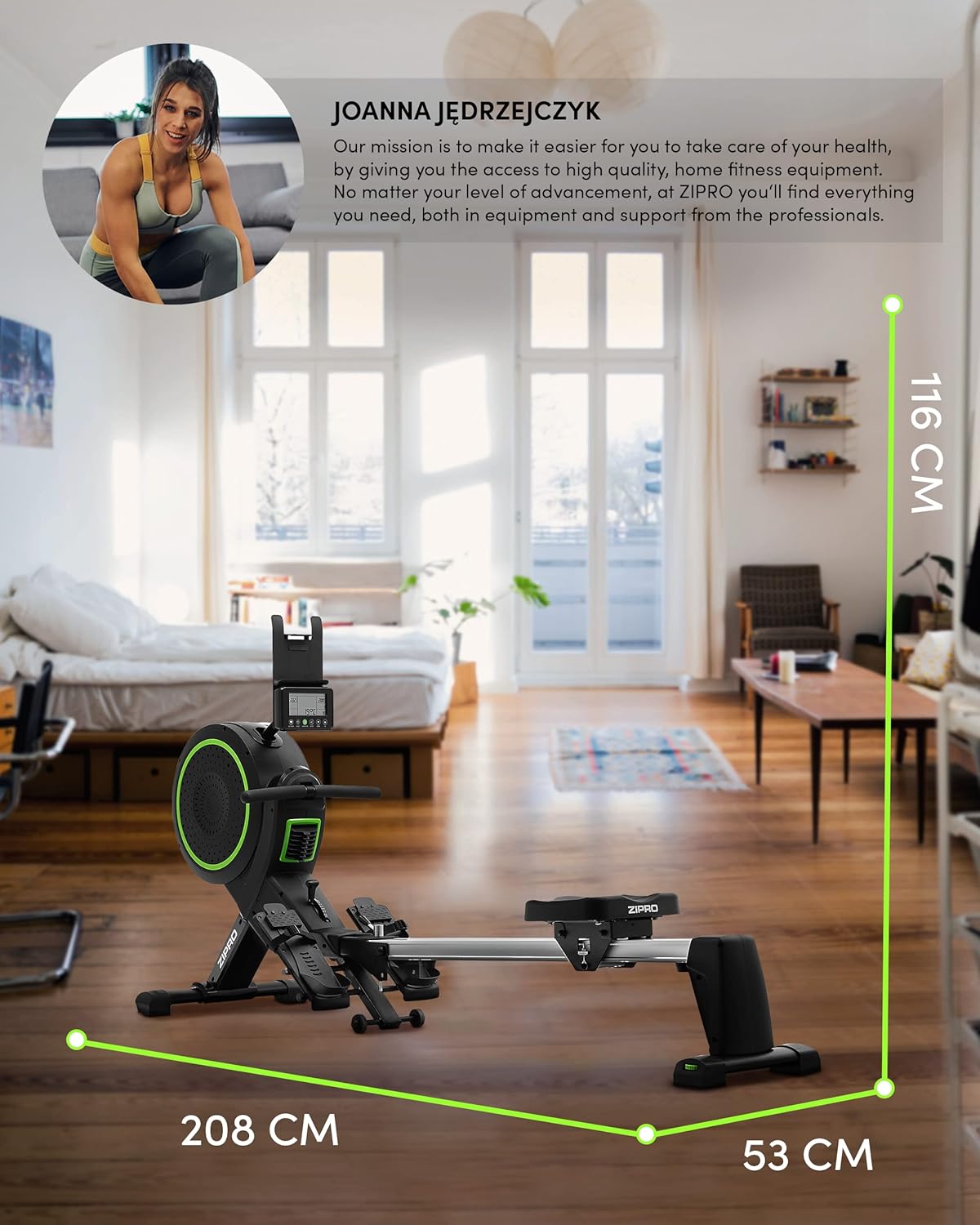
Image: Diagram showing the dimensions of the ZIPRO Dash Rowing Machine (208 cm length, 53 cm width, 116 cm height), useful for planning placement.
Інструкція з експлуатації
Powering On the Console
The LCD training computer powers on automatically when you begin rowing or press any button. It is powered by AA batteries (included).

Зображення: Крупний план view of the ZIPRO Dash Rowing Machine's LCD console, showing various workout metrics and control buttons.
Регулювання опору
The ZIPRO Dash features an 8-step magnetic resistance system. To adjust the resistance, locate the resistance knob or lever on the main unit (often near the fan/flywheel housing). Turn the knob clockwise to increase resistance and counter-clockwise to decrease it. Choose a level that challenges you appropriately for your fitness level.
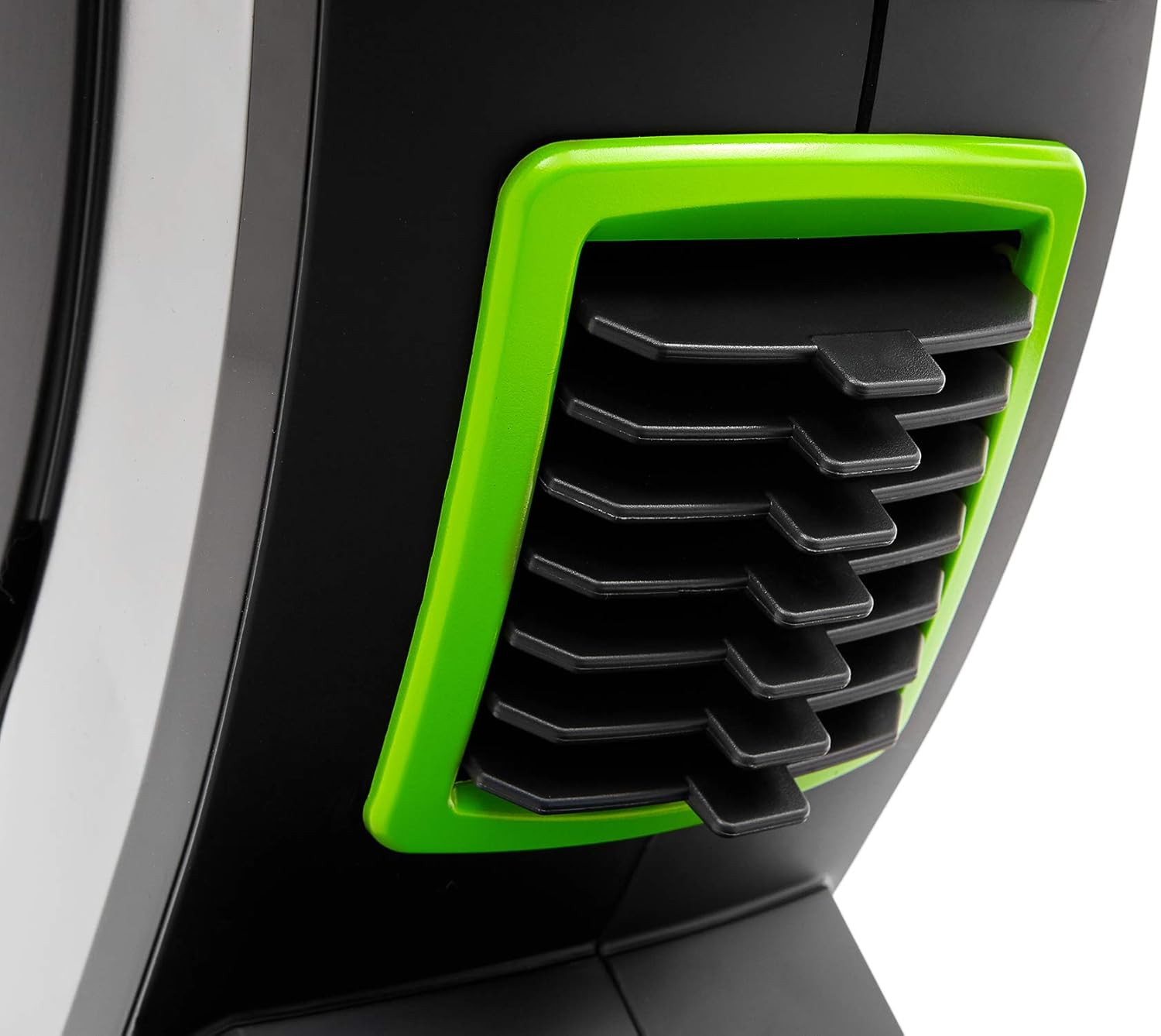
Image: Detail of the resistance adjustment mechanism on the ZIPRO Dash Rowing Machine, showing the numbered settings.
Використання навчального комп’ютера
The LCD display shows various workout metrics:
- ЧАС: Тривалість вашого тренування.
- СТРОКИ: Загальна кількість виконаних гребків.
- КАЛОРІЇ: Розрахункова кількість спалених калорій.
- ЧАСТОТА ПУЛЬСУ: Your heart rate, measured via the Polar T34 telemetry band (if worn and connected).
- Other metrics may include distance, strokes per minute, etc.
Use the buttons on the console (e.g., MODE, SET, RESET) to navigate through display modes, set target values, or reset your workout data. Refer to the console's specific instructions for detailed button functions.
Connecting to Mobile Applications (iConsole+ & Kinomap)
The ZIPRO Dash computer is Bluetooth-enabled for connectivity with mobile apps.
- Завантажити програми: Download the "iConsole+" and/or "Kinomap" applications from your device's app store.
- Увімкнути Bluetooth: Переконайтеся, що на вашому смартфоні або планшеті увімкнено Bluetooth.
- Підключити: Open the chosen app and follow the in-app instructions to search for and connect to your ZIPRO Dash rowing machine. The app will typically detect the machine automatically.
- особливості:
- iConsole+: Allows wireless control of the rowing computer, access to workout programs, and virtual routes.
- Кіномапа: Tracks your progress and offers virtual routes with real-world video, allowing you to compete with other users.

Image: A user rowing on the ZIPRO Dash, with logos for Kinomap and iConsole+ apps, highlighting the machine's smart connectivity features.
Складання та зберігання
The ZIPRO Dash is designed to be foldable for convenient storage.
- Механізм випуску: Locate the folding release pin or knob, usually near the connection point of the seat rail to the main frame.
- Fold Up: Carefully lift the seat rail upwards until it locks into the vertical storage position. Ensure it is securely latched.
- Перемістити: Use the integrated transport wheels (located on the front stabilizer) to easily move the folded machine for storage.

Image: The ZIPRO Dash Rowing Machine shown in its folded, upright storage position, demonstrating its space-saving design.
Технічне обслуговування
Regular maintenance will prolong the life of your rowing machine.
- Прибирання: Протріть машину рекламоюamp тканиною після кожного використання, щоб видалити піт і пил. Не використовуйте абразивні засоби для чищення.
- Змащення: Періодично перевіряйте плавність ходу рейки сидіння. За потреби нанесіть на рейку невелику кількість мастила на основі силікону.
- Перевірки: Regularly check all bolts, nuts, and moving parts for tightness and wear. Tighten any loose fasteners. Inspect the pulling strap/chain for fraying or damage.
- Заміна батареї: If the console display becomes dim or unresponsive, replace the AA batteries. Note that the battery compartment might require unscrewing the console from its mount.
Усунення несправностей
| проблема | Можлива причина | Рішення |
|---|---|---|
| Консоль не відображає дані. | Батарейки розряджені або неправильно встановлені. Нещільне з'єднання. | Замініть батарейки. Перевірте всі кабельні з'єднання з консоллю. |
| Resistance feels inconsistent or too weak/strong. | Resistance setting is incorrect. Internal mechanism issue. | Adjust the resistance knob. If problem persists, contact support. |
| Сидіння не ковзає плавно. | Dirt or debris on the rail. Rail needs lubrication. | Clean the seat rail. Apply silicone lubricant. |
| Машина видає незвичайні звуки. | Loose bolts or components. Worn parts. | Check and tighten all bolts. Inspect for worn parts and contact support if necessary. |
| App (iConsole+/Kinomap) not connecting via Bluetooth. | Bluetooth off on device. App permissions. Console not active. | Ensure Bluetooth is on. Grant app permissions. Start rowing to activate console. Restart app/device. |
Технічні характеристики
| Назва моделі | ZIPRO Dash |
| Номер моделі | 6299212 |
| Колір | чорний |
| Механізм опору | Магнітний (8 рівнів) |
| Тип дисплея | ЖК |
| Tracked Metrics | Time, Strokes, Calories, Heart Rate (with Polar T34 band) |
| Підключення | Bluetooth (iConsole+, Kinomap compatible) |
| Максимальна вага користувача | 135 кг (297 фунта) |
| Максимальний рекомендований зріст користувача | 200 см (6 фути 7 дюймів) |
| Розміри продукту (Д x Ш x В) | 207 x 53 x 115 см (81.5 x 20.9 x 45.3 дюйма) |
| Розміри у складеному вигляді (приблизно) | (Vertical storage, specific dimensions not provided but implied by foldable feature) |
| Вага товару | 40 кг (88 фунта) |
| Матеріал рами | Метал / Легована сталь |
| Джерело живлення | Manual (hand-operated), Console: Batteries (AA) |
| Особливості | Foldable design, Anti-slip footrests, Portable device holder, Stabilizing pads, Transport wheels |
Гарантія та підтримка
Щоб отримати інформацію про гарантію, зверніться до гарантійного талона, що додається до вашого продукту, або відвідайте офіційний веб-сайт ZIPRO. webсайт. Зберігайте чек про покупку для гарантійних претензій.
If you encounter any issues not covered in the troubleshooting section or require further assistance, please contact ZIPRO customer support. Contact details can typically be found on the manufacturer's webсайті або на упаковці продукту.
Виробник: Morele.net Sp. z oo


