вступ
This manual provides detailed instructions for the installation, operation, maintenance, and troubleshooting of the ADVANTECH PS8-500FATX-GB 80+ Gold Flex ATX Power Supply. This power supply unit (PSU) is designed to deliver stable and efficient power to your system, featuring 500W output with 3.3V, 5V, 12V, and -12V outputs, and RoHS compliance.
Інформація про безпеку
Please read all safety instructions carefully before installing or operating the power supply. Failure to follow these instructions may result in electric shock, fire, or damage to the product and connected equipment.
- Ensure the power supply is disconnected from the AC power source before installation or maintenance.
- Не відкривайте блок живлення casinг. Високий об'ємtage components inside pose a risk of electric shock.
- Встановіть блок живлення в добре провітрюваному приміщенні, щоб запобігти перегріву.
- Use only the cables provided or approved by ADVANTECH for this power supply.
- Цей виріб призначений лише для використання в приміщенні.
Вміст упаковки
Перевірте наявність усіх елементів в упаковці:
- ADVANTECH PS8-500FATX-GB Power Supply Unit
- Шнур живлення змінного струму
- Монтажні гвинти
- Посібник користувача (цей документ)
Налаштування та встановлення
Follow these steps to properly install the power supply into your system:
- Підготуйте свою систему: Ensure your computer system is powered off and disconnected from the AC outlet. Open the computer case.
- Видаліть старий блок живлення (якщо є): Disconnect all cables from the old power supply. Unscrew and remove the old PSU from the chassis.
- Встановлення нового блоку живлення: Carefully place the ADVANTECH PS8-500FATX-GB into the power supply bay of your computer case. Ensure the fan is facing the correct direction for optimal airflow (usually facing down or out of the case). Secure the PSU with the provided mounting screws.
- Підключення основних кабелів живлення:
- Connect the 20+4 pin ATX main power connector to the motherboard.
- Connect the 4+4 pin EPS/ATX 12V connector to the motherboard CPU power socket.
- Підключення периферійних кабелів: Connect SATA power connectors to hard drives, SSDs, and optical drives. Connect PCIe power connectors to graphics cards if required. Connect Molex connectors to other peripherals as needed.
- Управління кабелем: Акуратно прокладіть кабелі для покращення потоку повітря та естетики.
- Закрийте корпус та підключіть живлення змінного струму: Close your computer case. Connect the AC power cord to the power supply and then to a wall outlet or surge protector.
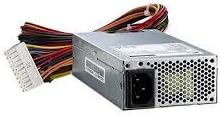
Зображення 1: The ADVANTECH PS8-500FATX-GB 500W Flex ATX Power Supply, showing its compact form factor and various power connectors. This image illustrates the physical appearance of the unit and its attached cabling.
Інструкція з експлуатації
Once installed, operating the power supply is straightforward:
- Увімкнення: After connecting all necessary cables and the AC power cord, press the power button on your computer case. The power supply will automatically provide power to your system.
- Вимкнення живлення: Shut down your computer through the operating system. The power supply will enter a low-power state. For complete power disconnection, switch off the power supply's main switch (if present) or unplug the AC power cord.
- Моніторинг: Modern motherboards and operating systems often provide tools to monitor power supply voltages. Refer to your motherboard manual for details.
Технічне обслуговування
Правильне обслуговування забезпечує довговічність та оптимальну роботу вашого блоку живлення:
- Очищення від пилу: Periodically clean the power supply fan and vents to prevent dust buildup, which can impede airflow and cause overheating. Use compressed air for this purpose, ensuring the system is powered off and unplugged.
- Перевірка кабелю: Regularly check all power cables for any signs of wear, fraying, or damage. Replace damaged cables immediately.
- Умови навколишнього середовища: Operate the power supply within its specified temperature and humidity ranges. Avoid extreme conditions.
Усунення несправностей
Якщо у вас виникли проблеми з блоком живлення, зверніться до наступних поширених проблем та способів їх вирішення:
| проблема | Можлива причина | Рішення |
|---|---|---|
| Система не вмикається. |
|
|
| Система вмикається, але одразу вимикається. |
|
|
| Незвичайні звуки з блоку живлення. |
|
|
If the problem persists after trying these solutions, contact ADVANTECH customer support for further assistance.
Технічні характеристики
| Особливість | Деталь |
|---|---|
| Модель | PS8-500FATX-GB |
| Бренд | ADVANTECH |
| Форм-фактор | Flex ATX |
| Вихідна ватtage | 500 Вт |
| Рейтинг ефективності | 80+ Gold |
| Вихідний випtages | 3.3V, 5V, 12V, -12V |
| Тип роз'єму | ATX (20+4 pin, 4+4 pin EPS/ATX 12V, SATA, PCIe, Molex) |
| Відповідність | RoHS |
| Вага товару | 12.99 фунта |
| Виробник | Advantech Co |
| ASIN | B08SMRH5V8 |
| UPC | 040048829683 |
Гарантія та підтримка
ADVANTECH products are designed for reliability and performance. For warranty information and technical support, please refer to the official ADVANTECH webсайту або зв’яжіться зі своїм відділом обслуговування клієнтів.
- Офіційний Webсайт: www.advantech.com
- Підтримка клієнтів: Зверніться до розділу «Зв’яжіться з нами» на офіційному сайті webсайт для отримання детальної інформації про регіональну підтримку.
Зберігайте підтвердження покупки для гарантійних претензій.


