1. Вступ
The Lepro PR902103-US Smart Table Lamp offers versatile lighting solutions for your home. This LED touch lamp features RGB color changing capabilities, tunable warm to cool white light, and dimmable brightness. It is designed for seamless integration with smart home ecosystems, supporting both Amazon Alexa and Google Assistant for voice control, as well as control via a dedicated mobile application. This manual provides comprehensive instructions for setup, operation, and maintenance.

Figure 1: Lepro Smart Table Lamp шоукasing its app control interface.
2. Що в коробці
Будь ласка, перевірте наявність усіх компонентів в упаковці:
- 1 x Lepro Smart Table Lamp (Model: PR902103-US)
- 1 x 4.9 ft USB Cable
- 1 x адаптер живлення
- 1 x Посібник користувача (цей документ)
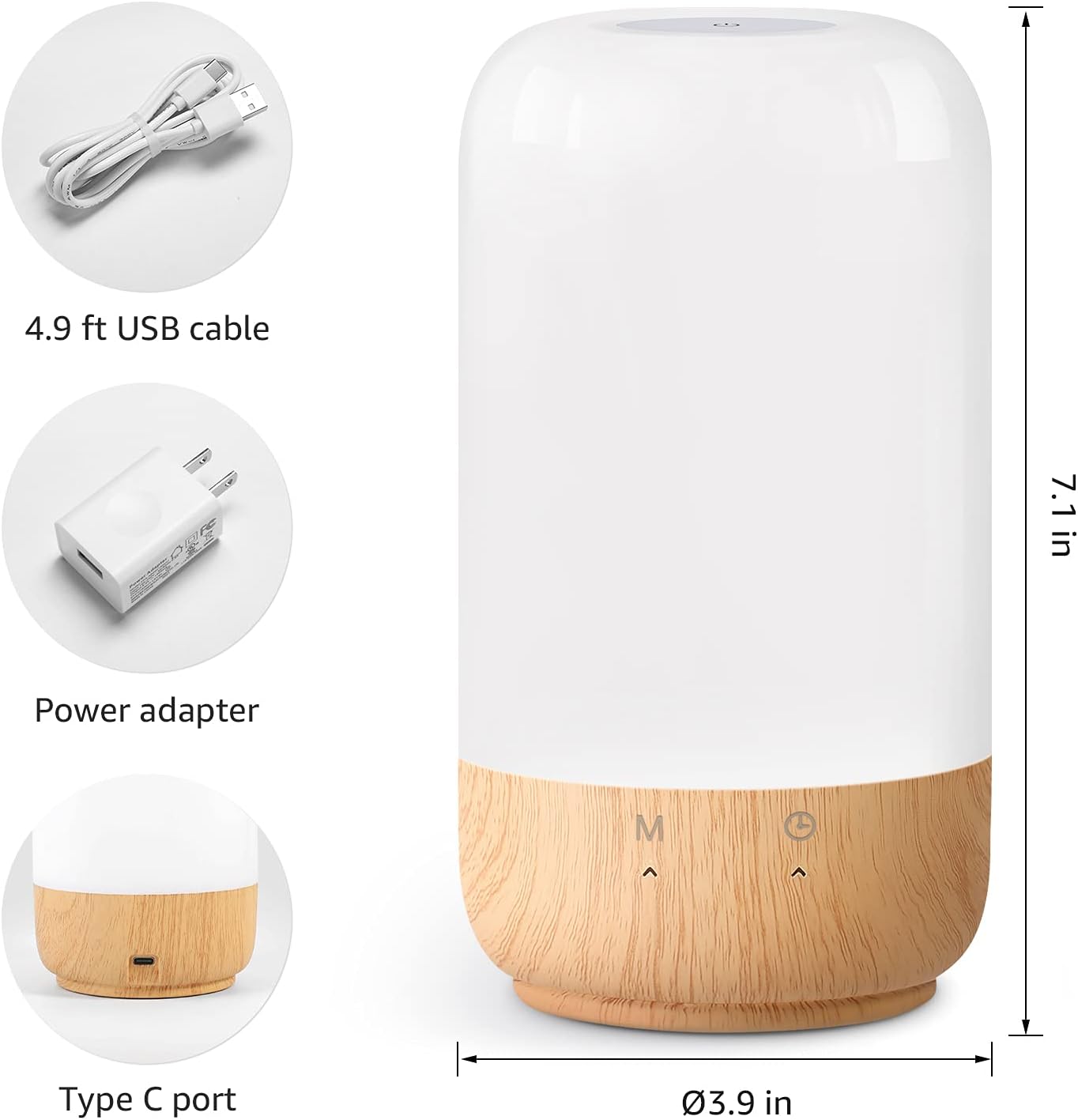
Рисунок 2: Комплектація та розміри виробу.
3. Налаштування
Follow these steps to set up your Lepro Smart Table Lamp:
- Підключення живлення: Під’єднайте наданий USB-кабель до lamp's Type-C port and the power adapter. Plug the power adapter into a standard wall outlet. The lamp буде висвітлюватися.
- Завантаження програми: Download the 'Lepro LampUX' app from your mobile device's App Store (iOS) or Google Play Store (Android).
- Реєстрація облікового запису: Open the 'Lepro LampUX' app and register a new account or log in if you already have one.
- Сполучення пристроїв:
- У застосунку натисніть «Додати пристрій» або значок «+».
- Select 'Table Lamp' from the lighting category.
- Переконайтеся, що lamp is powered on. Long press the timer button on the lamp's base for at least 5 seconds until the indicator light blinks rapidly.
- Переконайтеся, що індикатор у застосунку швидко блимає, і продовжуйте.
- Select your 2.4 GHz Wi-Fi network and enter the password. (Note: The lamp only supports 2.4 GHz Wi-Fi networks. If your router is 5 GHz, please set it to 2.4 GHz during setup.)
- The app will begin adding the device. Once successfully added, you can rename your lamp for easier identification.
Video 1: Detailed steps on how to set up your Lepro Smart Lamp using the mobile application.
4. Інструкція з експлуатації
The Lepro Smart Table Lamp can be controlled via touch, the mobile app, or voice commands.
4.1. Торкніться Елементи керування
- Увімкнення/вимкнення живлення: Short press the power button (marked 'M') on the lampбаза.
- Регулювання яскравості: Slide your finger along the left side of the lamp's base to adjust brightness.
- Color Change (RGB): Slide your finger along the right side of the lamp's base to cycle through RGB colors.
- Перемикач режимів: Short press the timer button (clock icon) to switch between white light modes (warm white, cool white) and RGB color mode.
4.2. Mobile App Controls
The 'Lepro LampUX' app provides comprehensive control over your lamp:
- Brightness & Color Temperature: Adjust the brightness level and select color temperatures from 2700K (warm white) to 5700K (cool white).
- Вибір кольору RGB: Choose from 16 million colors using the color wheel in the app.
- Сцени: Select from pre-set scenes like 'Night', 'Read', 'Meeting', 'Leisure', or customize your own scenes with specific colors and effects.
- Timer & Wake-up: Встановіть розклади для lamp to turn on/off automatically. Utilize the 'Sunrise Simulation' feature to gradually increase light for a gentle wake-up.

Figure 3: Mobile application interface for controlling lamp налаштування.

Малюнок 4: lamp's timer and wake-up functions in use.
4.3. Голосове керування
The Lepro Smart Table Lamp сумісний з Amazon Alexa та Google Assistant. Щоб увімкнути голосове керування:
- Переконайтеся, що ваш lamp is successfully paired with the 'Lepro LampUX' app.
- Відкрийте додаток Amazon Alexa або Google Home.
- Перейдіть до розділу «Навички та ігри» (Alexa) або «Працює з Google» (Google Home).
- шукати and enable the 'Lepro LampUX' skill/service.
- Link your 'Lepro LampUX' account with your Alexa/Google account.
- Після підключення ви можете використовувати голосові команди, такі як:
- «Алексо, увімкни [Lamp Ім'я].
- "Окей, Google, встановіть [Lamp [Ім'я] до теплого білого.
- «Алексо, зміни [Lamp Ім'я] до синього.
- "Гей, Google, тьмяний [L]"amp Ім'я] до 50%.

Figure 5: Voice control integration with Amazon Alexa.
Video 2: Demonstration of the Lepro Smart Table Lamp working with Alexa and Google Home.
5. Технічне обслуговування
To ensure the longevity and optimal performance of your Lepro Smart Table Lamp, please follow these maintenance guidelines:
- Прибирання: Від’єднайте живлення перед чищенням. Використовуйте м’яку суху тканину, щоб протертиamp's surface. Avoid using abrasive cleaners, solvents, or harsh chemicals, as these may damage the finish or electronic components.
- Зберігання: Якщо зберігати lamp протягом тривалого періоду, переконайтеся, що він чистий і сухий. Зберігайте його в прохолодному, сухому місці, подалі від прямих сонячних променів та екстремальних температур.
- Обробка: Обробляти lamp обережно. Уникайте падінь та сильних ударів.
6. Вирішення проблем
If you encounter issues with your Lepro Smart Table Lamp, зверніться до наступних поширених проблем та рішень:
| проблема | Можлива причина | Рішення |
|---|---|---|
| Lamp не включається. | Немає джерела живлення. | Перевірте, чи адаптер живлення надійно підключено до розеткиamp та розетку. Переконайтеся, що розетка справна. |
| Неможливо підключитися до Wi-Fi. | Incorrect Wi-Fi band (5 GHz). Невірний пароль. Слабкий сигнал Wi-Fi. | Ensure your Wi-Fi network is 2.4 GHz. Verify the Wi-Fi password. Move the lamp closer to your router. |
| Голосове керування не працює. | Skill not enabled/linked. Incorrect device name. | Ensure the 'Lepro LampUX' skill is enabled and linked in your Alexa/Google Home app. Use the exact device name configured in the app. |
| Lamp не відповідає. | Тимчасовий збій програмного забезпечення. | Від'єднайте lamp from the power outlet for 10 seconds, then plug it back in to perform a soft reset. |
7. Технічні характеристики
| Особливість | Деталь |
|---|---|
| Бренд | Лепро |
| Номер моделі | PR902103-US |
| Розміри продукту | 3.9" Г x 3.9" Ш x 7.1" В |
| Вага товару | 1.19 фунта |
| матеріал | Пластик, Дерево |
| Тип джерела світла | LED |
| Wattage | 7 Вт |
| Яскравість | 350 люмен |
| Світлий колір | RGB + CCT (Tunable White 2700-5700K) |
| Спосіб контролю | Додаток, сенсорний, голосовий (Alexa, Google Assistant) |
| Підключення | 2.4 GHz WiFi Only |
| Використання в приміщенні/зовні | закритий |
8. Гарантія та підтримка
Lepro products are designed and manufactured to the highest quality standards. For warranty information and technical support, please refer to the contact details provided on the product packaging or visit the official Lepro webсайт. Зберігайте чек про покупку як підтвердження покупки для гарантійних претензій.


