1. Продукт закінчивсяview
The Forte TEZAUR Computer Desk is designed to provide a functional workspace with integrated features. It includes an elevated monitor shelf, a metal headphone holder, a cup holder, and cable management openings. The desk features integrated LED lighting with adjustable colors, powered via USB. An additional storage unit with open compartments can be positioned on either the left or right side of the main desk.

Зображення 1.1: закінченоview of the Forte TEZAUR Computer Desk with its integrated features.
2. Попередження про безпеку
Attention: This desk requires assembly. Please follow all instructions carefully and use appropriate tools. Ensure the desk is fully assembled and stable before placing any items on it or using it. Failure to do so may result in injury or damage to the product.
- Завжди збирайте стіл на м’якій, чистій поверхні, щоб запобігти подряпинам.
- Рекомендується, щоб цей виріб збирали двоє дорослих.
- Не перетягуйте гвинти, оскільки це може пошкодити матеріал.
- Зберігайте дрібні деталі та пакувальні матеріали подалі від дітей.
- Перед початком складання перевірте наявність усіх компонентів.
3. Інструкції з налаштування та складання
Будь ласка, повторноview all steps before beginning assembly. Ensure you have sufficient space and the necessary tools (e.g., screwdriver, hammer).
3.1 Ідентифікація компонентів
Unpack all components and identify them against the parts list provided in your packaging. Familiarize yourself with the different panels and hardware.
3.2 Main Desk Assembly
- Begin by assembling the main desk frame according to the provided diagrams. Attach the side panels to the main desktop using the designated hardware.
- Secure the back panel to enhance stability.
- Install the elevated monitor shelf onto the main desktop. Ensure it is securely fastened.
3.3 Storage Unit Assembly and Placement
The additional storage unit can be mounted on either the left or right side of the main desk, offering flexibility to suit your space and preference.
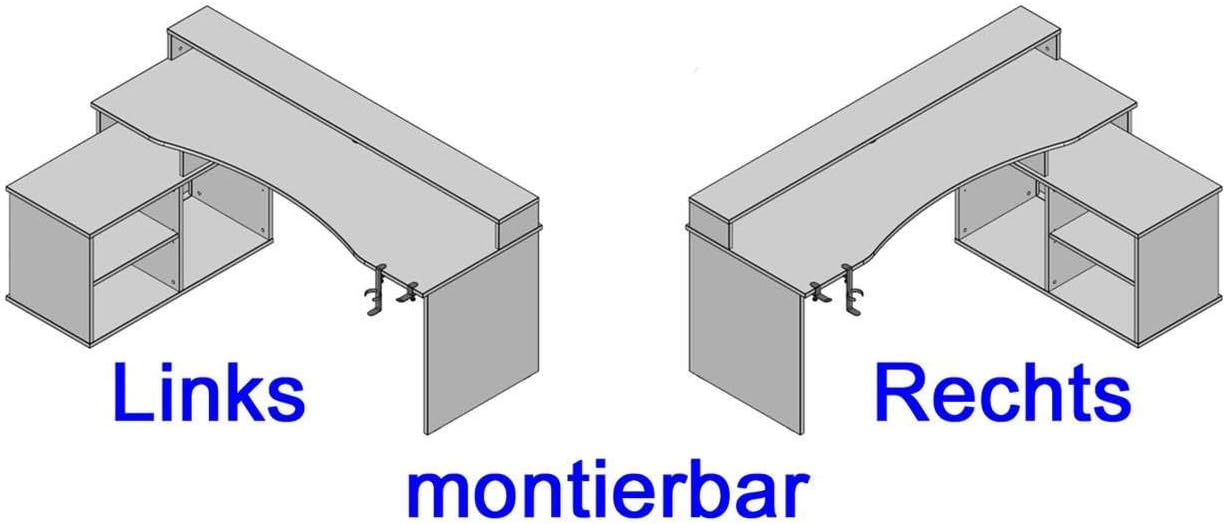
Image 3.1: The storage unit can be configured on either the left or right side of the desk.
- Assemble the storage unit's frame and internal shelves.
- Attach the assembled storage unit to the main desk structure on your preferred side (left or right) using the provided connectors.
3.4 Приєднання аксесуарів
- Attach the metal headphone holder and cup holder to the underside of the desk. These are typically clamp-on designs.

Image 3.2: Detail of the headphone holder attachment.

Image 3.3: Headphone and cup holder in position.
3.5 Встановлення світлодіодного освітлення
- Carefully place the LED strip into the designated channel on the elevated monitor shelf.
- Connect the LED strip's USB cable to a compatible USB power source (e.g., computer, USB wall adapter).
3.6 Організація кабелів
Utilize the cable grommets and openings on the desk surface and back panel to route and organize your cables, maintaining a tidy workspace.

Image 3.4: Cable grommet for organized cable routing.
4. Інструкція з експлуатації
4.1 світлодіодне освітлення
The integrated LED lighting is powered via a USB connection. Once connected, use the provided remote control to turn the lights on/off and change colors. Refer to the remote control's specific instructions for detailed functionality.
4.2 Headphone and Cup Holder
The detachable headphone and cup holders can be positioned as desired along the desk edge. Ensure they are securely clamped before use to prevent items from falling.
5. Технічне обслуговування
5.1 Очищення
To clean the desk surfaces, use a soft, damp cloth. Avoid abrasive cleaners, harsh chemicals, or solvents, as these can damage the finish. Wipe spills immediately.
5.2 Перевірка стійкості
Periodically check all screws and fasteners to ensure they remain tight. Retighten if necessary to maintain the desk's stability.
6. Вирішення проблем
6.1 Світлодіодні індикатори не працюють
- Ensure the USB cable is securely connected to a functioning USB power source.
- Перевірте батарейку пульта дистанційного керування та замініть її за потреби.
- Verify the LED strip is correctly seated in its channel.
6.2 Нестійкість столу
- Перевірте всі монтажні гвинти та затягніть ті, що ослабли.
- Переконайтеся, що стіл стоїть на рівній поверхні.
- Перевірте, чи всі компоненти правильно зібрані згідно з інструкціями.
7. Технічні характеристики продукту
| Особливість | Деталь |
|---|---|
| Бренд | Форте |
| Номер моделі | TZRB214B3-Z113 |
| Колір | Чорний матовий |
| Розміри (Д x Ш x В) | 200 см x 125.4 см x 91.1 см (78.7 дюйма x 49.4 дюйма x 35.9 дюйма) |
| матеріал | Engineered Wood, Metal, Melamine |
| Вага товару | 86.2 кг (190 фунта) |
| Особливості | Elevated Monitor Shelf, Ergonomic Design, Cup Holder, Headphone Holder, LED Lighting (USB, color changeable) |
| Max Load - Tabletop | 40 кг (88 фунта) |
| Max Load - Monitor Shelf | 10 кг (22 фунта) |
| Max Load - Storage Compartment | 5 кг (11 фунта) |

Image 7.1: Detailed dimensions and maximum load capacities of the desk.
8. Гарантія та підтримка
This product is covered by a manufacturer's warranty. Please refer to your purchase documentation for specific warranty terms and conditions. Spare parts availability is typically 2 years from the date of purchase.
For technical assistance, missing parts, or warranty claims, please contact your retailer or the Forte customer support directly. Keep your proof of purchase handy when contacting support.


