1. Продукт закінчивсяview
The FSP Twins Pro 700W is an ATX PS2 size redundant power supply unit (PSU) designed for continuous operation in critical systems such as mail, web, and home servers. It features a 1+1 dual module design, allowing for hot-swappable replacement of individual power modules without system downtime. The PSU is 80 Plus Gold certified, ensuring high power efficiency, and complies with the latest UL 62368 safety standards. It also includes comprehensive protection mechanisms and integrates with the FSP Guardian monitoring software for real-time status updates.

Рисунок 1: Загалом view of the FSP Twins Pro 700W Redundant Power Supply Unit.
Ключові характеристики:
- ATX PS2 Size Redundant PSU: Designed to fit standard ATX PS2 chassis without requiring a front-end bracket, making it suitable for various server and office environments.
- Hot-Swappable Modules: Allows for the replacement of individual power modules while the system remains operational, ensuring 24/7 uptime.
- FSP Guardian Software: Included monitoring software provides real-time status and control over the PSU's performance.
- Сертифіковано 80+ Gold: Achieves an efficiency of 90% or higher at typical loads, reducing energy consumption and heat generation.
- Комплексний захист: Equipped with Over Current Protection (OCP), Over Voltage Protection (OVP), Short Circuit Protection (SCP), Over Power Protection (OPP), Over Temperature Protection (OTP), Fan Failure Protection (FFP), and Under Voltage Protection (UVP) for system safety.
- Світлодіодний індикатор стану: Provides visual feedback on the operational status of each power module.
2. Налаштування та встановлення
Proper installation of the FSP Twins Pro PSU is crucial for optimal performance and system stability. This unit is designed for easy integration into compatible ATX PS2 chassis.
Кроки встановлення:
- Підготовка шасі: Ensure your PC case or server chassis has a compatible ATX PS2 power supply bay. No special front-end bracket is required for this unit.
- Insert Power Modules: Carefully slide each power module into its designated slot in the PSU frame. Ensure they are fully seated and secured. The hot-swappable design allows for easy insertion and removal.
- Підключення кабелів живлення: Connect the necessary power cables (24-pin ATX, CPU, PCIe, SATA, etc.) from the PSU modules to your motherboard and other components. Ensure all connections are firm.
- Безпечні шнури живлення: Utilize the integrated power cord locking device to prevent accidental disconnection of the AC power cables. This ensures stable operation, especially in server environments.
- Початкове ввімкнення: After all connections are made, connect the AC power cords to a reliable power source and power on your system. Observe the LED indicators on the PSU modules for proper operation.

Figure 2: Illustration of inserting a hot-swappable power module into the FSP Twins Pro PSU frame.

Figure 3: The power cord locking device helps secure the AC input cable to prevent accidental disconnections.
3. Операція
The FSP Twins Pro PSU is designed for reliable and efficient power delivery. Its redundant nature ensures continuous operation even if one power module fails.
Резервна операція:
The 1+1 dual module design means that the system can operate fully on a single power module. If one module experiences an issue, the other module automatically takes over the full load without interruption to the system. This feature is critical for applications requiring high availability.
FSP Guardian Monitoring Software:
The FSP Guardian software provides a user-friendly interface to monitor the real-time status of your PSU. This includes voltage outputs, current draw, fan speeds, temperature, and overall power consumption for each module. The software allows for proactive management and helps identify potential issues before they impact system stability.

Figure 4: Screenshot of the FSP Guardian software interface, displaying various parameters for both power modules.
Світлодіодні індикатори стану:
Each power module is equipped with an LED indicator. A green light typically indicates normal operation, while a red light or no light may signal a fault or module failure. Refer to the troubleshooting section for specific LED interpretations.
Video 1: This video demonstrates the key features of the FSP Twins Pro, including hot-swappable modules, LED indicators, and the FSP Guardian software. It highlights the PSU's suitability for server applications.
4. Технічне обслуговування
Regular maintenance helps prolong the lifespan and ensure the stable operation of your FSP Twins Pro PSU.
Прибирання:
- Periodically clean the exterior of the PSU and the fan grilles to prevent dust buildup, which can impede airflow and lead to overheating.
- Use compressed air to gently remove dust from internal components, ensuring the system is powered off and unplugged before cleaning.
Управління кабелем:
- Ensure all power cables are neatly routed and securely connected. Loose connections can cause instability or damage.
- Avoid excessive bending or pinching of cables, which can damage the internal wiring.
Екологічні міркування:
- Operate the PSU in a well-ventilated area to prevent heat accumulation.
- Maintain a stable room temperature and humidity level as specified in the environmental operating conditions (refer to specifications).
5. Вирішення проблем
This section provides solutions to common issues you might encounter with your FSP Twins Pro PSU.
Система не вмикається:
- Перевірте підключення живлення: Ensure the AC power cord is securely plugged into both the PSU and the wall outlet. Verify that the power cord locking device is engaged.
- Перевірте внутрішні підключення: Confirm that all PSU cables (24-pin, CPU, PCIe, etc.) are correctly and firmly connected to the motherboard and other components.
- Test Wall Outlet: Plug another device into the wall outlet to confirm it is receiving power.
- Перевірте вимикач живлення: Ensure the main power switch on the PSU is in the 'ON' position.
Red LED Indicator or Module Failure:
- A red LED on a power module indicates a fault or failure of that specific module.
- Thanks to the hot-swappable design, you can replace the faulty module without shutting down the system. Carefully remove the failed module and insert a new, compatible FSP Twins Pro module.
- If both modules show a red LED or the system shuts down, check for system-wide issues such as short circuits in other components or excessive power draw.
Нестабільність системи або випадкові вимкнення:
- Перевантаження: Ensure your system's power consumption does not exceed the PSU's 700W capacity. Use the FSP Guardian software to monitor power draw.
- Перегрів: Check for proper ventilation around the PSU and within the chassis. Clean any dust buildup.
- Component Fault: A faulty component (e.g., GPU, CPU, motherboard) can cause system instability. Isolate components to identify the source.
- Захист спрацював: The PSU's built-in protections (OCP, OVP, OTP, etc.) may be triggering due to abnormal conditions. Address the underlying cause.
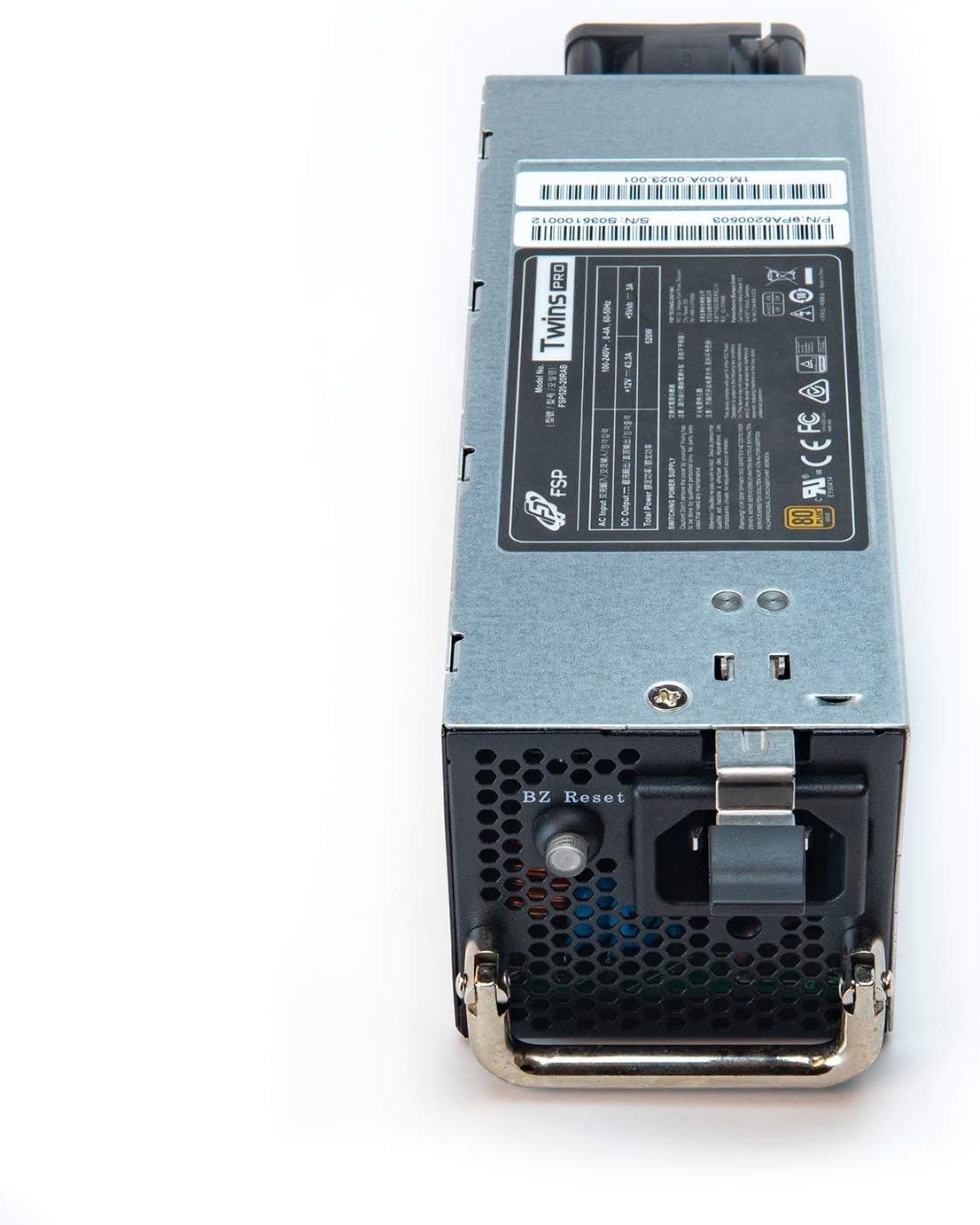
Малюнок 5: Задня частина view of the FSP Twins Pro PSU module, showing the AC power input and the BZ Reset button. The BZ Reset button can be used to reset the module in case of certain errors.

Figure 6: Visual representation of the comprehensive safety protections integrated into the FSP Twins Pro PSU, including OCP, OVP, SCP, OPP, OTP, FFP, and UVP.
6. Технічні характеристики
Detailed technical specifications for the FSP Twins Pro 700W Redundant Digital PC Power Supply Module.

Figure 7: Product label displaying electrical ratings and certifications for the FSP Twins Pro 700W PSU.
| Особливість | Специфікація |
|---|---|
| Назва моделі | Twins Pro (FSP720-20RAB) |
| Номер моделі товару | 9PA7200503 |
| Вихідна ватtage | 720 Вт |
| Форм-фактор | ATX PS2 |
| Сертифікація ефективності | 80 Plus Gold (≥90%) |
| Вхідний об'ємtage | 100-240V~, 10-5A, 60-50Hz |
| Вихід постійного струму (+12 В) | 60А |
| Вихід постійного струму (+5 В sbm) | 3A |
| Спосіб охолодження | повітря |
| Конструкція джерела живлення | Повністю модульний |
| Розміри продукту | 7.48 x 5.91 x 3.39 дюймів |
| Вага товару | 2.1 фунта |
| Виробник | FSP |
| Дата першої доступності | 4 грудня 2020 р |
7. Гарантія та підтримка
Інформація про гарантію:
The FSP Twins Pro 700W PSU comes with a 5-year manufacturer's warranty. This warranty covers defects in materials and workmanship under normal use. Please retain your proof of purchase for warranty claims.
Підтримка клієнтів:
For technical assistance, troubleshooting, or warranty inquiries, please contact FSP customer support through their official website or the contact information provided in your product packaging. Do not attempt to open the PSU casing, as this will void the warranty and poses a risk of electric shock.


