1. Вступ
Thank you for choosing the KLARSTEIN VapoAir Opal Smart Humidifier. This device is designed to improve air quality and comfort in your home by adding moisture to dry air. It features smart control via an app, an ionizer, a large 5-liter water tank, and multiple mist levels. Please read this manual carefully before use to ensure proper operation and maintenance.
2. Техніка безпеки
- Always place the humidifier on a firm, flat, waterproof surface away from direct sunlight and heat sources.
- Не ставте зволожувач повітря поблизу меблів або приладів, чутливих до вологи.
- Тримайте прилад у недоступному для дітей та домашніх тварин місці.
- Не занурюйте пристрій у воду або інші рідини.
- Від’єднайте зволожувач від розетки перед його наповненням, очищенням або переміщенням.
- Використовуйте лише чисту, прохолодну водопровідну воду. Рекомендується використовувати дистильовану або демінералізовану воду, щоб запобігти накопиченню мінералів.
- Do not add essential oils directly into the water tank; use the designated aroma diffuser tray.
- Якщо шнур живлення пошкоджено, його має замінити виробник, його сервісний агент або особа з аналогічною кваліфікацією, щоб уникнути небезпеки.
- Не блокуйте вихід туману.
3. Вміст упаковки
Будь ласка, перевірте упаковку на наявність наступних предметів:
- KLARSTEIN VapoAir Opal Smart Humidifier
- Пульт дистанційного керування
- Інструкція з експлуатації
- Щітка для чищення (може бути в комплекті)
4. Продукт закінчивсяview і компоненти
Ознайомтеся з основними частинами вашого зволожувача повітря:

Зображення: спереду view of the KLARSTEIN VapoAir Opal Smart Humidifier, showcasing its sleek design and LED display.
- Вихід туману: Where the mist is released into the air.
- Бак для води: Знімний резервуар для зберігання води.
- Базовий блок: Містить ультразвуковий перетворювач та нагрівальний елемент.
- Control Panel/LED Display: Touch-sensitive buttons and digital display for settings.
- Піднос для ароматичного дифузора: Small tray for essential oils (located at the bottom/side).
- Шнур живлення: Для підключення до електричної розетки.

Image: The KLARSTEIN VapoAir Opal Smart Humidifier with its dimensions labeled: 23cm (depth), 18cm (width), 37cm (height).
5. Налаштування
5.1 Розпакування
Carefully remove all packaging materials. Retain the packaging for future storage or transport.
5.2 Розміщення
Place the humidifier on a flat, stable surface at least 15 cm away from walls and furniture. Ensure the mist outlet is not directed towards any objects or walls.
5.3 Наповнення резервуара для води
- Переконайтеся, що зволожувач повітря відключено від мережі.
- Carefully lift the water tank from the base unit.
- Invert the water tank and unscrew the cap at the bottom.
- Fill the tank with clean, cool tap water. Distilled or demineralized water is recommended to minimize mineral residue. Do not fill past the MAX line.
- Щільно закрутіть кришку.
- Place the filled water tank back onto the base unit, ensuring it is seated correctly. The auto-stop function will prevent operation if the tank is not properly placed or if water is absent.
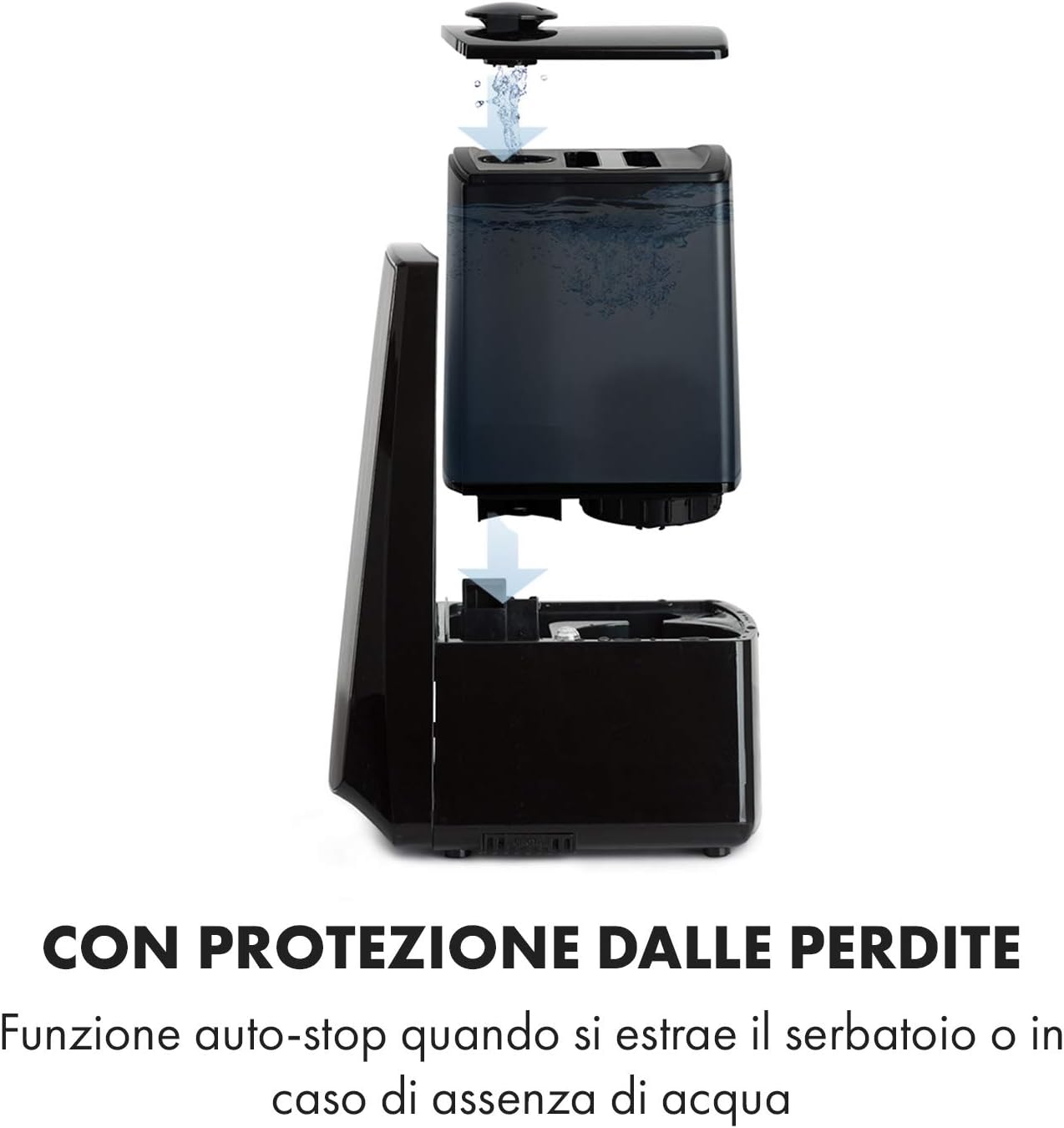
Image: Diagram illustrating the removal and refilling process of the water tank, highlighting the auto-stop feature when the tank is removed or empty.
5.4 Підключення живлення
Підключіть шнур живлення до відповідної електричної розетки (230 В).
6. Інструкція з експлуатації
6.1 Панель керування надview

Зображення: Крупний план view of the humidifier's LED display and touch controls, showing a hand interacting with the buttons.
The LED display shows current humidity, temperature, and selected settings. The touch buttons allow control over various functions.
6.2 Увімкнення/вимкнення живлення
Натисніть УВІМК./ВИМК кнопку на панелі керування або пульті дистанційного керування, щоб увімкнути або вимкнути пристрій.
6.3 Регулювання рівня туману
The humidifier offers 7 levels of mist output. Press the ТУМАН button repeatedly to cycle through the mist intensity levels. The current level will be displayed on the screen.
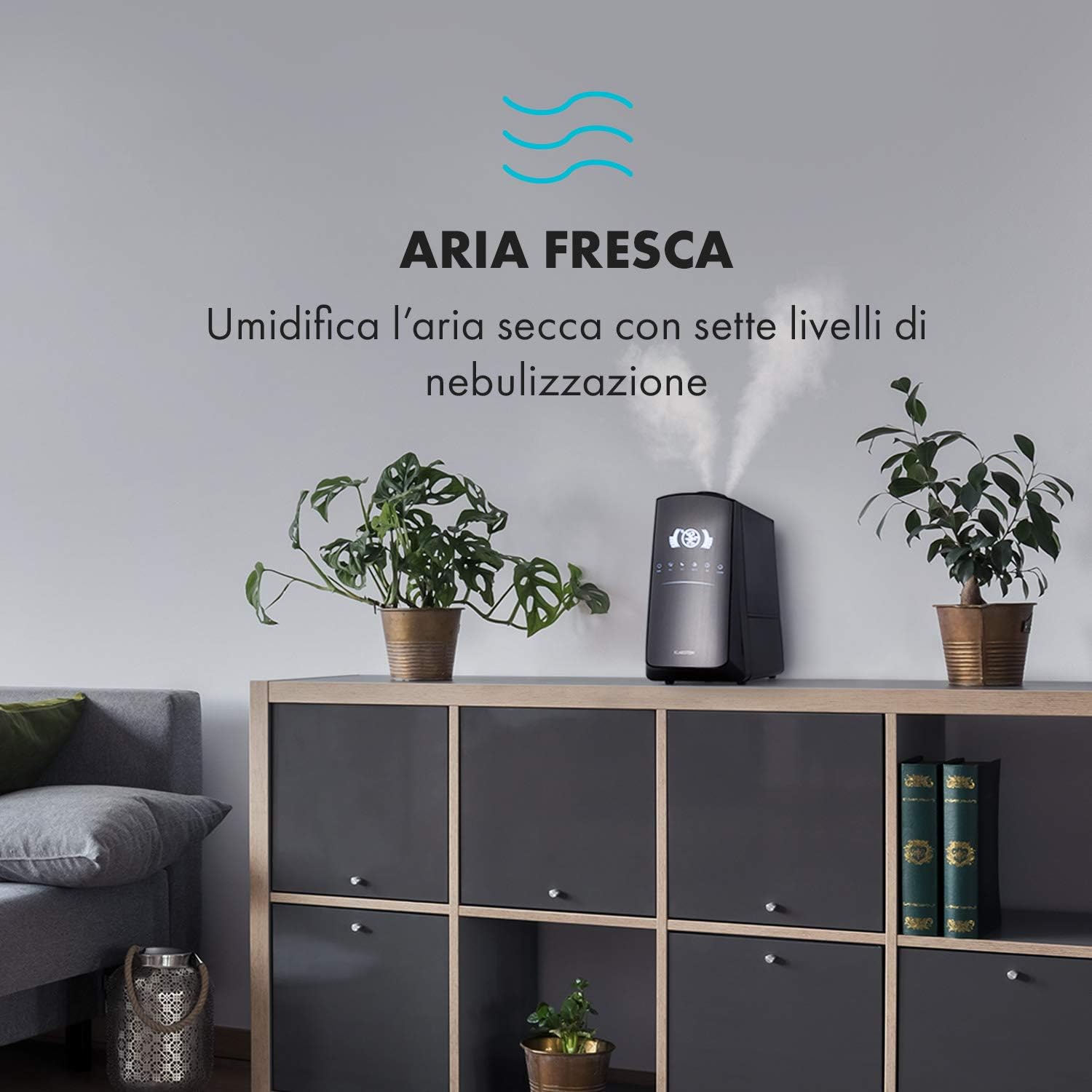
Image: The humidifier operating in a room, releasing mist to humidify the air.
6.4 Humidity Setting (Humidistat)
Натисніть ВОЛОГІСТЬ button to set your desired humidity level (e.g., 40% to 80% RH). The unit will automatically maintain this level, turning on and off as needed.
6.5 Warm/Cool Mist
Натисніть ТЕПЛО button to activate the warm mist function. Press again to switch back to cool mist. Warm mist can help raise room temperature slightly and is often preferred in colder climates.

Image: A close-up shot of the mist output, illustrating the option for either cool or warm mist.
6.6 Функція таймера
Натисніть ТАЙМЕР button to set an operating duration from 1 to 12 hours. The unit will automatically turn off after the set time.
6.7 Функція іонізатора
Натисніть ION button to activate the ionizer. This function releases negative ions to help purify the air by attracting dust and other particles.
6.8 Аромадифузор
Pull out the aroma diffuser tray located at the bottom of the unit. Add a few drops of essential oil onto the sponge pad. Slide the tray back in. The mist will carry the aroma into the air.

Image: The integrated aroma diffuser tray, shown pulled out with an essential oil bottle and lemon slices nearby, indicating its use for adding scents.
6.9 Нічний режим
Натисніть НІЧ button to dim the LED display and reduce operational noise for undisturbed sleep.

Image: The humidifier in a modern living space, illustrating its versatile functions like auto mode, heating, health, baby, night mode, and timer.
7. Контроль додатків
The KLARSTEIN VapoAir Opal Smart Humidifier can be controlled via a dedicated smartphone application.

Image: A person using a smartphone with the Klarstein app open, showing controls for the humidifier's settings and current humidity levels.
7.1 Завантаження програми
шукати the 'Klarstein App Experience' in your smartphone's app store (available for Android and iOS).
7.2 Підключення до Wi-Fi
- Ensure your humidifier is plugged in and turned on.
- Open the Klarstein App and follow the on-screen instructions to add a new device.
- The humidifier requires a 2.4 ГГц мережа Wi-Fi for connection. It is not compatible with 5 GHz networks. Ensure your router is configured to support 2.4 GHz or that your phone is connected to the 2.4 GHz band during setup.
- Once connected, you can control all humidifier functions remotely via the app.

Image: A smartphone displaying the Klarstein app interface, indicating smart home control via WiFi for Android and iOS devices.
8. Технічне обслуговування та очищення
Регулярне чищення є важливим для оптимальної продуктивності та гігієни.
8.1 Щоденне технічне обслуговування
- Щодня спорожняйте та промивайте резервуар для води.
- Wipe the inside of the water tank with a clean cloth.
8.2 Щотижневе прибирання
- Від’єднайте пристрій від мережі перед чищенням.
- Вийміть резервуар для води та злийте залишки води з резервуара та базового блоку.
- Очищення резервуара для води: Fill the tank with a mixture of water and white vinegar (1:1 ratio). Let it sit for 30 minutes, then rinse thoroughly.
- Очищення базового блоку: Gently wipe the ultrasonic transducer (the small disc in the center of the base) with a soft brush or cloth to remove mineral deposits. Do not scrape or use abrasive cleaners. You can use a cotton swab dipped in vinegar for hard-to-reach areas.
- Піднос для ароматичного дифузора: Remove and clean the sponge pad with mild soap and water. Allow it to dry completely before reinserting.
- Wipe all external surfaces with a soft, damp тканина.
8.3 Зберігання
Якщо зволожувач повітря не використовуватиметься протягом тривалого часу, ретельно його очистіть, переконайтеся, що всі деталі сухі, і зберігайте його в оригінальній упаковці в прохолодному сухому місці.
9. Вирішення проблем
| проблема | Можлива причина | Рішення |
|---|---|---|
| Немає туману або низький рівень туману |
|
|
| Пристрій не вмикається |
|
|
| Неприємний запах |
|
|
| Білий пил навколо пристрою | Hard water with high mineral content | Використовуйте дистильовану або демінералізовану воду. Регулярно очищуйте пристрій. |
| Проблеми з підключенням Wi-Fi |
|
|
10. Технічні характеристики
| Особливість | Специфікація |
|---|---|
| Бренд | KLARSTEIN |
| Номер моделі | XJ3-VapoAirOpalSmart |
| Колір | чорний |
| Розміри (Д x Ш x В) | 23 х 18 х 37 см |
| вага | 2.5 кг |
| потужність | 110 Вт |
| томtage | 230 вольт |
| Ємність резервуара для води | 5 літра |
| Час роботи | Up to 2 hours (continuous, depending on mist level) |
| Особливості | Remote Control, Timer, App Control, Ionizer, LED Display, 7 Mist Levels, Warm/Cool Mist, Aroma Diffuser |
| Тип кімнати | Вітальня |
11. Гарантія та підтримка
KLARSTEIN products are covered by a manufacturer's warranty. For detailed warranty information, please refer to the warranty card included with your product or visit the official KLARSTEIN website. For technical support, spare parts, or service inquiries, please contact KLARSTEIN customer service through their official channels.
Зберігайте підтвердження покупки для гарантійних претензій.


