1. Вступ
Thank you for choosing the Vivolink VLQICHR QI Wireless Charger. This device provides a convenient and efficient way to charge your QI-compatible devices without the need for cables. Please read this manual carefully before using the product to ensure proper operation and to maximize its lifespan. Keep this manual for future reference.
2. Інформація про безпеку
- Не піддавайте зарядний пристрій впливу води, вологи або екстремальних температур.
- Уникайте падіння або сильних ударів зарядного пристрою.
- Do not disassemble, repair, or modify the charger. This may void the warranty and pose safety risks.
- Keep the charger away from medical implants (e.g., pacemakers) to prevent potential interference.
- Use only certified power adapters and cables with the charger.
- Ensure there are no metal objects (e.g., coins, keys, credit cards) between the charging surface and your device during charging, as this can cause overheating or damage.
- Від’єднуйте зарядний пристрій від мережі під час грози або якщо він не використовується протягом тривалого часу.
3. Вміст упаковки
Будь ласка, перевірте упаковку на наявність наступних предметів:
- Vivolink VLQICHR QI Wireless Charger
- USB Power Cable (Type-C or Micro-USB, depending on model)
- Посібник користувача (цей документ)
4. Продукт закінчивсяview
The Vivolink VLQICHR is a compact and efficient wireless charging solution. It features a charging surface where QI-compatible devices are placed for power transfer. An LED indicator typically signals charging status.
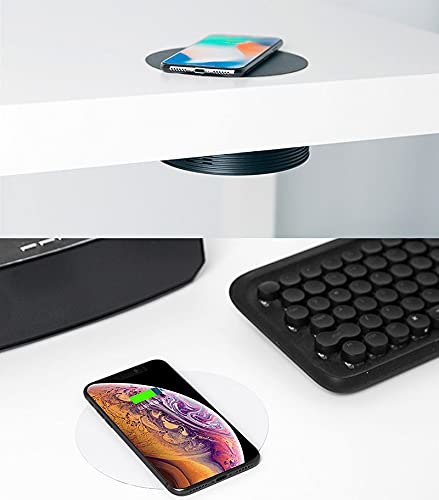
This image illustrates the Vivolink VLQICHR QI Wireless Charger in two common usage scenarios. The top portion shows a smartphone wirelessly charging on a pad seamlessly integrated into a desk surface. The bottom portion displays another smartphone charging on a separate, standalone wireless charging pad, highlighting the versatility of QI wireless charging technology.
5. Налаштування
- Підключення до живлення: Plug the provided USB power cable into the charging port on the Vivolink VLQICHR wireless charger.
- Підключення до джерела живлення: Connect the other end of the USB cable to a compatible USB power adapter (not included) or a USB port on a computer. Ensure the power adapter meets the charger's power requirements (e.g., 5V/2A, 9V/1.67A for fast charging).
- Увімкнення: Once connected, the LED indicator on the charger may light up briefly to confirm it is powered on and ready for use.
6. Інструкція з експлуатації
- Розмістіть пристрій: Place your QI-compatible smartphone or other device directly onto the center of the Vivolink VLQICHR charging surface.
- Підтвердження заряджання: The LED indicator on the charger should change color or illuminate steadily to indicate that charging has begun. Your device's screen should also show a charging icon or notification.
- Оптимальне розміщення: If charging does not start, slightly adjust the position of your device on the charging pad. Some devices may have specific coil locations that require precise alignment.
- Заряджання завершено: Once your device is fully charged, remove it from the charging pad. The charger's LED indicator may change or turn off.
Примітка: Charging speed may vary depending on the device, power adapter, and environmental conditions. Thick phone cases may interfere with wireless charging; consider removing them for optimal performance.
7. Технічне обслуговування
- Прибирання: Disconnect the charger from the power source before cleaning. Use a soft, dry cloth to wipe the surface. Do not use harsh chemicals or abrasive cleaners.
- Зберігання: Зберігайте зарядний пристрій у прохолодному сухому місці, коли він не використовується.
- Догляд за кабелем: Avoid bending or twisting the power cable excessively to prevent damage.
8. Вирішення проблем
- Пристрій не заряджається:
- Переконайтеся, що зарядний пристрій правильно підключено до робочого джерела живлення.
- Verify your device is QI-compatible.
- Adjust the placement of your device on the charging pad to ensure proper alignment.
- Remove any thick phone cases or metal objects from your device.
- Спробуйте інший кабель USB або адаптер живлення.
- Повільна зарядка:
- Ensure you are using a power adapter that supports the charger's fast charging capabilities (e.g., Quick Charge 2.0/3.0 or Power Delivery).
- Check for proper device alignment.
- Закрийте непотрібні програми на вашому пристрої.
- Блимання світлодіодного індикатора:
- Refer to your device's specific LED indicator guide. Often, flashing indicates a foreign object detection (FOD) or improper device placement.
- Remove the device and any foreign objects, then place the device back on the charger.
9. Технічні характеристики
| Бренд | Vivolink |
| Номер моделі | VLQICHR |
| Виробник | Vivolink |
| ASIN | B08NHGFYVC |
| Введення | (Typical: 5V/2A, 9V/1.67A - check product packaging for exact details) |
| Вихід | (Typical: 5W, 7.5W, 10W, 15W - check product packaging for exact details) |
| Стандарт зарядки | QI Wireless Charging Standard |
Note: Specific input/output power ratings may vary. Please refer to the product packaging or the device itself for precise specifications.
10. Гарантія та підтримка
Specific warranty information for the Vivolink VLQICHR QI Wireless Charger is not provided in the available product data. For detailed warranty terms, technical support, or service inquiries, please refer to the documentation included with your purchase or contact Vivolink customer support directly through their official webсайт або канали зв'язку.


