1. Вступ
The Aputure Amaran 200d is a high-output 200W LED video light designed for professional and enthusiast filmmakers and photographers. It offers exceptional color fidelity, versatile control options, and a robust build, making it suitable for various lighting scenarios. This manual provides detailed instructions for the safe and effective use of your Amaran 200d.

Figure 1.1: The Amaran 200d LED Video Light with its standard reflector mounted on a light stand.
2. Інформація про безпеку
Будь ласка, прочитайте та зрозумійте всі попередження та інструкції з техніки безпеки перед використанням цього виробу. Недотримання цих інструкцій може призвести до ураження електричним струмом, пожежі або серйозних травм.
- Do not expose the light to water or high humidity.
- Do not disassemble or modify the light. Refer all servicing to qualified personnel.
- Ensure the power supply is compatible with the local voltagе (100-240В).
- Do not block the ventilation openings on the light fixture. Overheating can cause damage.
- Avoid direct eye exposure to the LED light source when it is powered on.
- Always secure the light fixture properly on a stable light stand before operation.
3. Що в коробці
Переконайтеся, що всі компоненти присутні після розпакування:
- Amaran 200d LED Lamp Голова
- Standard Bowens Mount Reflector
- Блок живлення змінного струму
- Кабель змінного струму

Figure 3.1: Included components of the Amaran 200d package.
4. Налаштування
4.1 Mounting the Light Head
- Attach the Amaran 200d lamp head to a compatible light stand using the integrated mounting bracket.
- Secure the light head by tightening the locking knob on the mounting bracket.

Figure 4.1: The Amaran 200d securely mounted on a light stand.
4.2 Кріплення відбивача
- Align the three mounting prongs of the standard reflector with the Bowens Mount on the front of the lamp голова.
- Insert the reflector into the mount and twist clockwise until it locks securely into place.
4.3 Підключення живлення
The Amaran 200d supports both AC and DC (48V) power input.
- Connect the AC power cable to the power supply unit.
- Connect the power supply unit's output cable to the 48V DC input port on the rear of the Amaran 200d lamp голова.
- Plug the AC power cable into a suitable wall outlet.
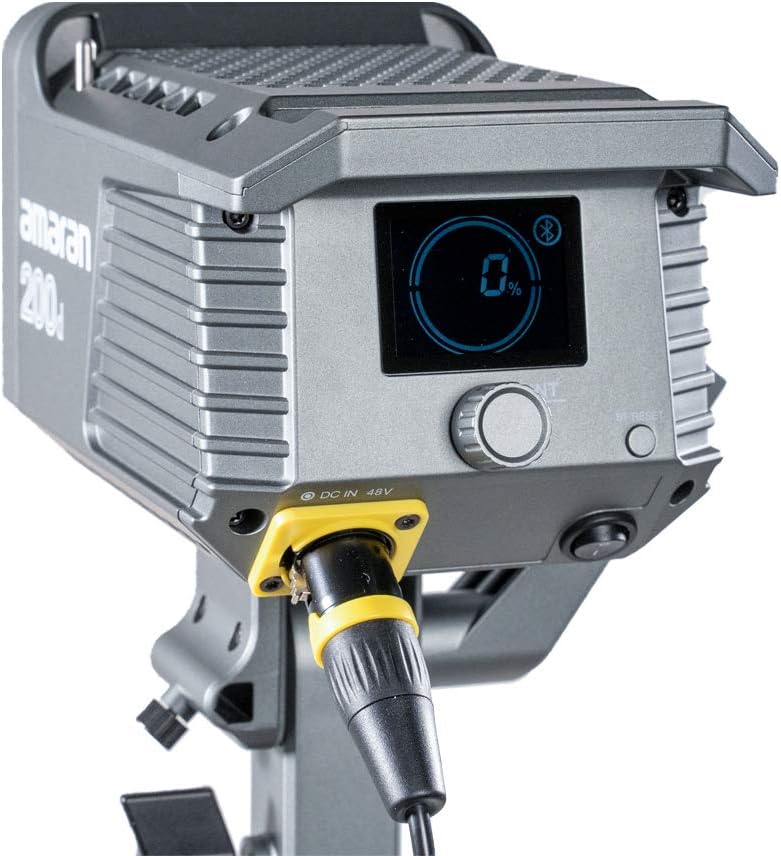
Figure 4.2: Detail of the DC 48V power input on the Amaran 200d.
5. Операційна
5.1 Увімкнення/вимкнення
Locate the power switch on the rear panel of the light head. Flip the switch to the 'ON' position to power on the device. Flip it to 'OFF' to power down.
5.2 Регулювання яскравості
The Amaran 200d features an INT adjustment knob for brightness control (0-100%).
- Rotate the INT knob clockwise to increase brightness.
- Rotate the INT knob counter-clockwise to decrease brightness.
- Press the INT knob to quickly cycle through preset brightness levels: 20%, 40%, 60%, 80%, 100%.
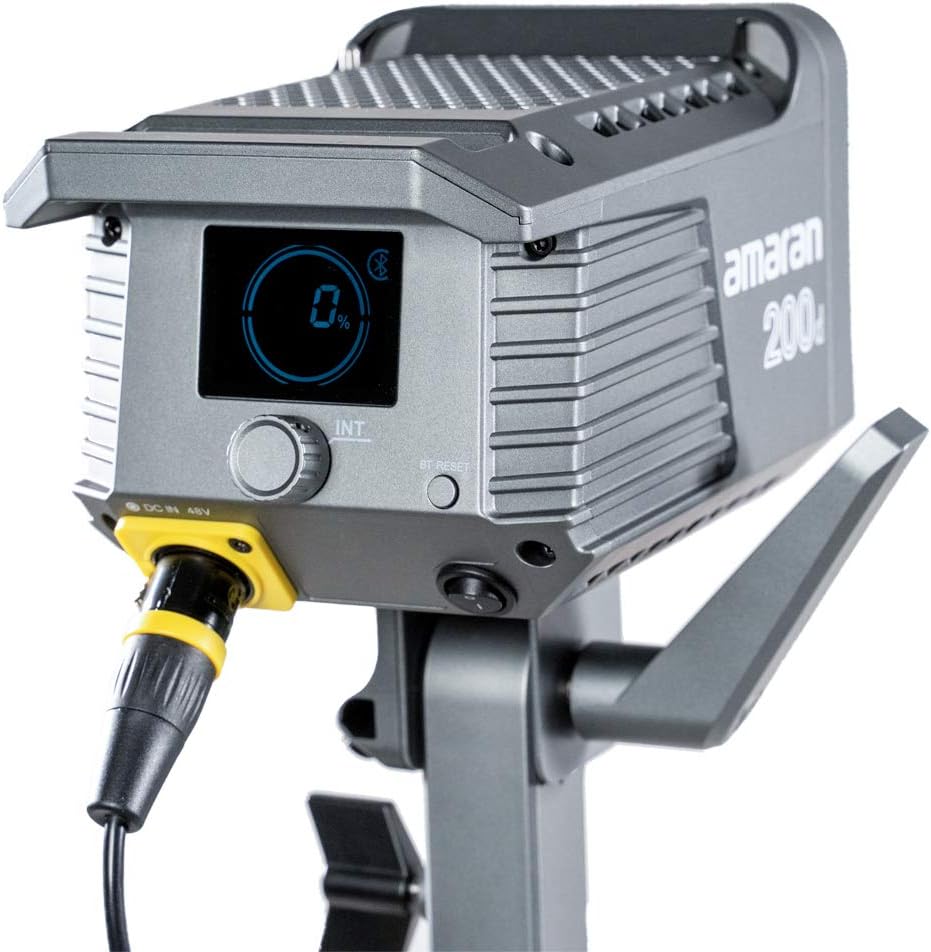
Figure 5.1: The control panel of the Amaran 200d, showing the display and adjustment knob.
5.3 світлових ефектів
The Amaran 200d includes 8 pre-programmed lighting effects:
- Папараці
- Феєрверк
- Блискавка
- Несправна лампочка
- TV
- Дихання
- Спалах
- вибух
These effects can be accessed and controlled via the Sidus Link App.
5.4 Sidus Link App Control
The Amaran 200d supports 2.4G Bluetooth control via the Sidus Link App, allowing remote adjustment of brightness, lighting effects, and frequency.
- Download the Sidus Link App from your device's app store.
- Переконайтеся, що Bluetooth увімкнено на вашому мобільному пристрої.
- Open the Sidus Link App and follow the on-screen instructions to connect to your Amaran 200d.
- Once connected, you can control various parameters of the light remotely.

Figure 5.2: Controlling the Amaran 200d via the Sidus Link App.
6. Технічне обслуговування
6.1 Очищення
- Завжди вимикайте живлення перед чищенням.
- Use a soft, dry cloth to wipe the surface of the light.
- Не використовуйте агресивні хімікати або абразивні матеріали.
6.2 Зберігання
- Зберігайте лампу в прохолодному, сухому місці, подалі від прямих сонячних променів.
- If storing for extended periods, disconnect the power supply.
7. Вирішення проблем
| проблема | Можлива причина | Рішення |
|---|---|---|
| Світло не вмикається. | No power supply; loose connection; faulty power supply. | Check power cable connection; ensure outlet is working; test with another power supply if available. |
| Світло мерехтить або працює нестабільно. | Loose power connection; overheating; interference. | Secure all connections; ensure proper ventilation; move away from other electronic devices. |
| Sidus Link App cannot connect. | Bluetooth вимкнено; індикатор не в режимі сполучення; проблема з додатком. | Ensure Bluetooth is on; restart light and app; try pairing again. |
8. Технічні характеристики
- Розміри продукту: 13 x 11.4 x 21 дюймів
- Вага товару: 10.34 фунта
- Номер моделі: 200D
- Бренд: Aputure
- Технологія підключення: Bluetooth, радіочастота
- Опис режимів спалаху: Constant illumination, adjustable brightness, 8 built-in lighting effects
- Колірна температура: 5600K (денне світло)
- CRI: ≥95
- TLCI: ≥96
- Освітленість: Up to 65,000 lux@1m (with Hyper-Reflector)
- Кріплення: Universal Bowens Mount
- Споживана потужність: 48 В постійного струму
9. Гарантія та підтримка
Aputure products are designed for durability and performance. For specific warranty details and terms, please refer to the warranty card included with your product or visit the official Aputure website. For technical support, troubleshooting assistance, or service inquiries, please contact Aputure customer support through their official channels.
Optional protection plans are available for purchase, such as 2-Year and 3-Year Protection Plans, which can provide extended coverage beyond the standard manufacturer's warranty.
Для отримання додаткової інформації відвідайте Aputure Store.


