1. Вступ
Thank you for choosing the R-MUSIC Booster S High Power Wireless Bluetooth Speaker. This manual provides important information regarding the setup, operation, and maintenance of your new speaker. Please read this manual thoroughly before using the product to ensure proper function and to prevent damage.
2. Вміст упаковки
Будь ласка, перевірте вміст упаковки після розпакування. Якщо будь-які елементи відсутні або пошкоджені, зверніться до продавця.
- R-MUSIC Booster S Speaker Unit
- Адаптер живлення/зарядний кабель
- Wired Microphone (if included with your model)
- Посібник користувача

Image: Wired Microphone. This microphone is typically included for karaoke or public address functions.
3. Особливості продукту
The R-MUSIC Booster S speaker is designed for powerful and versatile audio playback. Key features include:
- High Power Audio Output (40 Watts Max)
- Бездротове підключення Bluetooth
- USB-порт для відтворення MP3
- MicroSD Card Reader for MP3 Playback
- 3.5mm AUX Input for Wired Connections
- Microphone Input with Echo Control
- Integrated LED Display
- Динамічне світлодіодне світлове шоу
- Portable Design with Integrated Handle

Зображення: спереду view of the R-MUSIC Booster S speaker, highlighting the speaker grille and LED lighting.

Зображення: Кутове view спікера, шоуasing its compact yet powerful design.
4. Елементи управління та підключення
Familiarize yourself with the control panel located on the rear of the speaker.
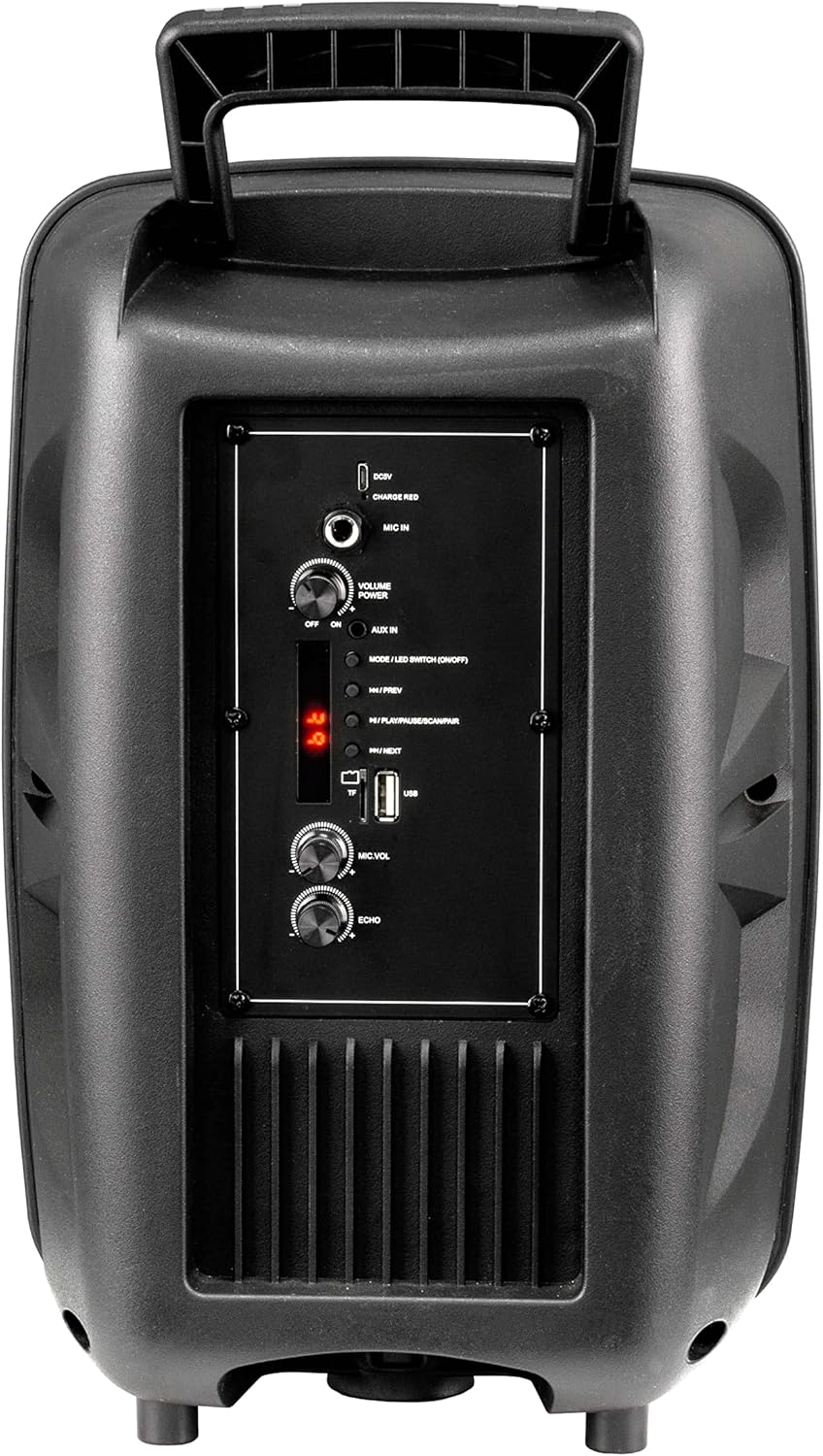
Image: Rear Control Panel Overview.
- Вхід DC 5V: Вхід живлення для заряджання динаміка.
- CHARGE RED Indicator: Lights up red when charging.
- ВХІД МІКРОФОНА: 6.35mm jack for connecting a wired microphone.
- VOLUME POWER (OFF/ON): Rotary knob to turn the speaker ON/OFF and adjust the master volume.
- AUX IN: 3.5mm audio input for connecting external audio devices.
- MODE / LED SWITCH (ON/OFF): Press to switch between input modes (Bluetooth, USB, MicroSD, AUX). Press and hold to turn the LED light show ON/OFF.
- |<< / PREV: Натисніть, щоб перейти до попереднього треку.
- >>| / NEXT: Натисніть, щоб перейти до наступної доріжки.
- >|| / PLAY/PAUSE / SCAN/PAIR: Press to play or pause audio. In FM mode, press and hold to scan for stations. In Bluetooth mode, press and hold to initiate pairing.
- Слот для картки TF (MicroSD): Insert a MicroSD card for MP3 playback.
- Порт USB: Вставте флеш-накопичувач USB для відтворення MP3.
- MIC.VOL: Rotary knob to adjust the microphone volume.
- ЕХО: Rotary knob to adjust the microphone echo effect.
5. Налаштування
5.1. Заряджання динаміка
Before first use, fully charge the speaker. Connect the provided charging cable to the DC 5V input on the rear panel and plug the other end into a suitable USB power source (e.g., USB wall adapter, computer USB port). The "CHARGE RED" indicator will light up during charging and turn off when fully charged.
5.2. Увімкнення/вимкнення живлення
Rotate the "VOLUME POWER" knob clockwise to turn the speaker ON. Rotate it counter-clockwise until it clicks to turn the speaker OFF.
6. Інструкція з експлуатації
6.1. Режим Bluetooth
- Turn on the speaker. It will automatically enter Bluetooth pairing mode, indicated by a flashing "BLUE" on the LED display.
- Увімкніть Bluetooth на своєму мобільному пристрої (смартфоні, планшеті, комп’ютері).
- шукати "R-MUSIC BOOSTER S" (or similar name) in your device's Bluetooth list and select it to pair.
- Once successfully paired, the speaker will emit a confirmation tone, and the "BLUE" indicator will stop flashing.
- You can now play audio from your device through the speaker. Use the speaker's control buttons or your device to control playback.
6.2. USB / MicroSD Card Playback
- Insert a USB flash drive or MicroSD card (pre-loaded with MP3 audio files) у відповідний порт.
- The speaker will automatically switch to USB or TF (MicroSD) mode and begin playing the first compatible audio file.
- Use the "|<<" and ">>|" buttons to navigate between tracks. Use the ">||" button to play or pause.
6.3. Режим входу AUX
- Підключіть один кінець аудіокабелю 3.5 мм (не входить до комплекту) до порту AUX IN на динаміку.
- Підключіть інший кінець до роз'єму для навушників або аудіовиходу вашого зовнішнього пристрою (наприклад, MP3-плеєра, ноутбука).
- Press the "MODE" button until "AUX" is displayed on the LED screen.
- Play audio from your external device. Volume can be controlled via the speaker's master volume knob or your external device.
6.4. Використання мікрофона
- Connect a wired microphone to the "MIC IN" jack.
- Adjust the microphone volume using the "MIC.VOL" knob.
- Adjust the echo effect using the "ECHO" knob.
6.5. Світлове шоу зі світлодіодами
Press and hold the "MODE / LED SWITCH" button to toggle the dynamic LED light show ON or OFF.
7. Технічне обслуговування
- Протирайте динамік м’якою сухою тканиною. Не використовуйте абразивні засоби для чищення або розчинники.
- Тримайте динамік подалі від води, вологи та екстремальних температур.
- Не блокуйте вентиляційні отвори.
- Зберігайте динамік у прохолодному, сухому місці, якщо він не використовується протягом тривалого часу.
8. Вирішення проблем
| проблема | Можлива причина | Рішення |
|---|---|---|
| Немає живлення | Battery is depleted; Power knob is off. | Charge the speaker; Rotate the VOLUME POWER knob clockwise to turn on. |
| Ні звуку | Занадто низька гучність; вибрано неправильний режим; пристрій не сполучено (Bluetooth); кабель не підключено (AUX). | Increase volume; Press MODE button to select correct input; Re-pair Bluetooth device; Check AUX cable connection. |
| Помилка з’єднання Bluetooth | Гучномовець не в режимі сполучення; Пристрій занадто далеко; Перешкоди. | Ensure speaker is in Bluetooth mode (flashing BLUE); Move device closer; Turn off other Bluetooth devices. |
| USB/MicroSD не відтворюється | Не підтримується file формат; пошкоджено files; Картку/диск вставлено неправильно. | Забезпечити files are MP3 format; Try another USB/MicroSD; Re-insert card/drive. |
9. Технічні характеристики
- модель: RM301891 (Booster S)
- Бренд: Р-МУЗИКА
- Підключення: Bluetooth, USB, MicroSD, 3.5mm AUX
- Максимальна вихідна потужність: 40 Вт
- Тип динаміка: Subwoofer (as per product data, likely refers to bass capability)
- Тип монтажу: Постійна поверхня
- Розміри (упаковка): 44.4 x 30.1 x 22.6 см (приблизно 17.5 x 11.8 x 8.9 дюймів)
- Вага (упаковка): 1.9 кілограма (приблизно 4.2 фунта)
- Споживана потужність: 5 В постійного струму
10. Інформація про безпеку
- Do not disassemble or modify the speaker. This may cause electric shock, fire, or product damage.
- Не піддавайте динамік впливу дощу, вологи або екстремальних температур.
- Уникайте падіння та сильних ударів динаміка.
- Зберігати в недоступному для дітей місці.
- Використовуйте лише зазначений зарядний кабель та адаптер живлення.
- Тривале прослуховування на високих рівнях гучності може призвести до пошкодження слуху.
11. Гарантія та підтримка
R-MUSIC products are designed and manufactured to the highest quality standards. For warranty information and technical support, please refer to the warranty card included with your product or contact your local retailer. Keep your purchase receipt as proof of purchase.
For further assistance, you may visit the official R-MUSIC webсайту або зв’яжіться зі своїм відділом обслуговування клієнтів.


