1. Вступ
The MOES WiFi WS-EUR-C Intelligent Touch Panel Roller Blind Switch provides versatile control for motorized roller blinds and curtains. This device supports manual touch control, RF remote control, voice commands via smart assistants, and intelligent control through the Smart Life/Tuya App. It allows for flexible operation and integration into smart home systems.
2. Інформація про безпеку
Warning: Electrical installation should only be performed by a qualified electrician. Ensure power is disconnected before installation to prevent electric shock.
- Завжди відключайте живлення за допомогою автоматичного вимикача перед встановленням або обслуговуванням вимикача.
- Ensure the switch is installed in a dry environment, away from moisture.
- Do not exceed the maximum load rating of 2.5A / 500W.
- Verify all wiring connections are secure and correct according to the wiring diagram.
- Цей пристрій призначений лише для використання в приміщенні.
3. Технічні характеристики продукту
| Особливість | Специфікація |
|---|---|
| Номер моделі | WS-EUR-C |
| Розміри (ДxШxВ) | 8.5 х 8.5 х 3.5 см |
| матеріал | пластик |
| Робочий випtage | 90-250 В змінного струму 50/60 Гц |
| Макс. навантаження | 2.5А / 500Вт |
| Протокол бездротового зв'язку | Wi-Fi 2.4 ГГц + радіочастота |
| Тип перемикача | Touch Panel, Single Pole |
| Сертифікати | CE, IP44 |

4. Посібник із встановлення
4.1 Схема підключення

Виконайте такі кроки для проводки:
- Відключити живлення: Перед початком роботи переконайтеся, що головне живлення кола вимкнено автоматичним вимикачем.
- Визначення проводів: Identify the Live (L), Neutral (N), Ground, Open (for curtain up), and Close (for curtain down) wires from your existing setup and the motorized blind.
- Connect Live (L): Connect the Live wire from your power supply to the 'L' terminal on the switch.
- Connect Neutral (N): Connect the Neutral wire from your power supply to the 'N' terminal on the switch.
- Підключення проводів двигуна: Connect the 'Open' wire from your motorized blind to the 'OPEN' terminal on the switch. Connect the 'Close' wire from your motorized blind to the 'CLOSE' terminal on the switch.
- Підключити землю: Connect the Ground wire to the appropriate terminal, typically indicated by a ground symbol.
- Безпечні з'єднання: Переконайтеся, що всі з'єднання проводів щільні та належним чином ізольовані.
4.2 Фізичне встановлення
After wiring, carefully place the switch module into the wall box. Secure the switch to the wall box using screws. Attach the glass touch panel cover. Restore power at the circuit breaker.
5. Налаштування та сполучення застосунку
The MOES Smart Curtain Switch is compatible with the Smart Life and Tuya Smart applications. Follow these steps to pair your device:
- Завантажити додаток: Download the "Smart Life" or "Tuya Smart" app from your mobile device's app store (iOS or Android).
- Реєстрація/Вхід: Відкрийте застосунок і зареєструйте новий обліковий запис або увійдіть, використовуючи існуючий.
- Увійдіть у режим сполучення: With the switch powered on, press and hold the 'Pause' button on the switch for approximately 5-10 seconds until the Wi-Fi indicator light on the switch starts blinking rapidly. This indicates pairing mode.
- Додати пристрій: In the app, tap the '+' icon (usually in the top right corner) to add a device. The app should automatically detect the switch via Wi-Fi and Bluetooth for quick pairing.
- Confirm Network: Select your 2.4GHz Wi-Fi network and enter the password. The switch does not support 5GHz Wi-Fi.
- Повне сполучення: Follow the on-screen prompts to complete the pairing process. Once successfully paired, the Wi-Fi indicator light on the switch will stop blinking and remain solid.

6. Інструкція з експлуатації
6.1 Ручне сенсорне керування
The touch panel allows for direct control of your roller blinds:
- Open Button (<>): Touch to open the roller blind.
- Pause Button (||): Touch to pause the roller blind at its current position.
- Close Button (X): Touch to close the roller blind.
6.2 Керування програмами
Once paired with the Smart Life/Tuya app, you can control your blinds remotely and set schedules:
- Пульт дистанційного керування: Use the app interface to open, close, or pause your blinds from anywhere.
- Планування: Set timers and schedules for automatic opening and closing of blinds at specific times (e.g., 7:30 AM open, 6:00 PM close).
- Зворотний відлік: Utilize countdown functions (e.g., 1/5/30 minutes, 1 hour) for temporary operations.
- Статус реле: Configure the switch to remember its last state (open/closed/paused) after a power outage.


6.3 Голосове керування
Integrate the switch with Amazon Alexa or Google Home for hands-free voice control:
- Зв'язати облікові записи: In the Alexa or Google Home app, link your Smart Life/Tuya account.
- Відкрийте для себе пристрої: Ask your smart assistant to discover new devices.
- Голосові команди: Use commands like "Alexa, open the curtains" or "Hey Google, close the blinds."

6.4 радіочастотний пульт дистанційного керування
The switch supports RF433 remote control for an additional layer of convenience. Pair a compatible RF remote (sold separately) to control your blinds without Wi-Fi or app access.

6.5 Контроль підсвічування
The switch features an optional backlight. You can turn the backlight ON or OFF via the Smart Life/Tuya app settings to avoid disturbance during sleep or to suit your preference.

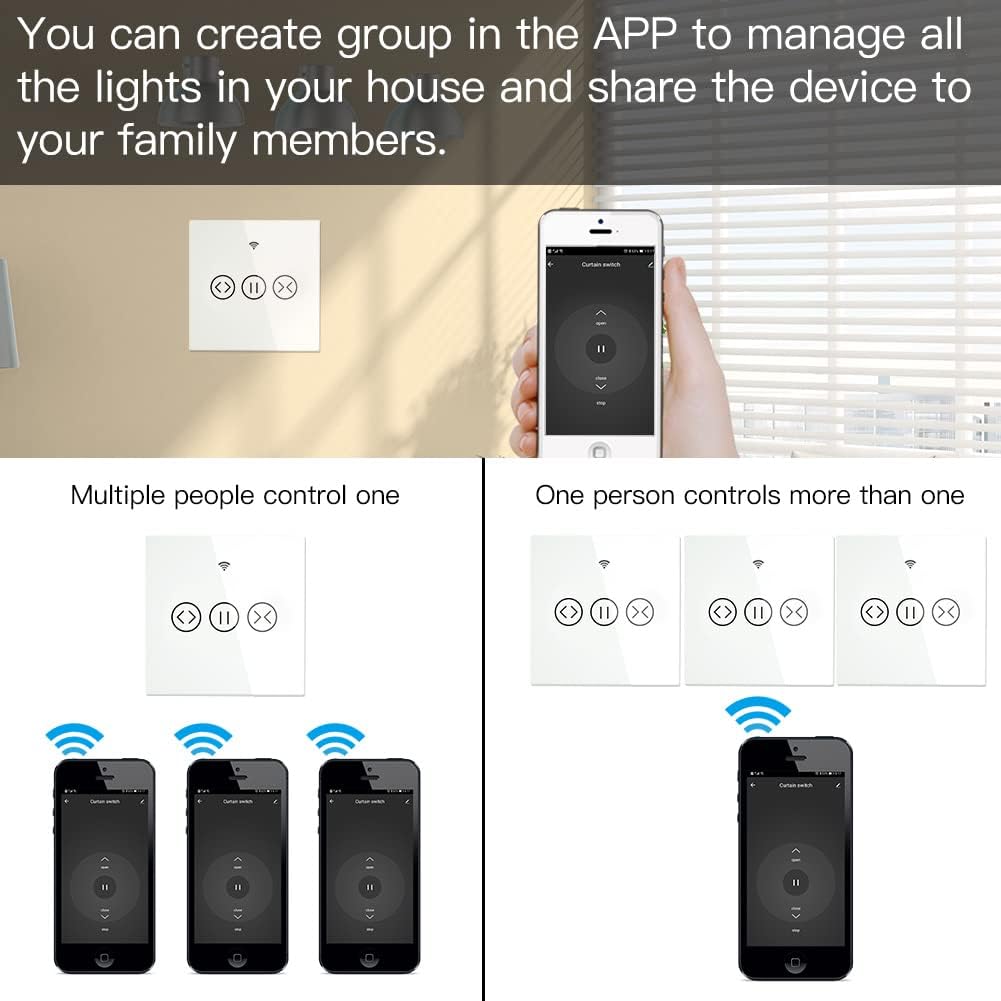
6.6 Group Control and Sharing
The app allows you to create groups of switches for simultaneous control and share device access with family members.
- Груповий контроль: Manage multiple switches as a single group within the app.
- Спільне використання пристрою: Share control of the switch with other users who have the Smart Life/Tuya app, granting them access to operate the blinds.
7. Технічне обслуговування
- Прибирання: Use a soft, dry cloth to clean the touch panel. Avoid abrasive cleaners or solvents.
- Оновлення прошивки: Періодично перевіряйте додаток Smart Life/Tuya на наявність оновлень прошивки, щоб забезпечити оптимальну продуктивність і безпеку.
- Умови навколишнього середовища: Ensure the switch is not exposed to extreme temperatures or humidity, which can affect its operation and lifespan.
8. Вирішення проблем
- Перемикач не відповідає: Check if the power supply is connected correctly. Ensure the circuit breaker is ON.
- Помилка сполучення програм:
- Переконайтеся, що ваша мережа Wi-Fi працює на частоті 2.4 ГГц. Мережі 5 ГГц не підтримуються.
- Verify the switch is in pairing mode (Wi-Fi indicator blinking rapidly).
- Перевірте правильність пароля від Wi-Fi.
- Move the switch closer to your Wi-Fi router during pairing.
- Голосове керування не працює:
- Confirm that your Smart Life/Tuya account is correctly linked to Alexa or Google Home.
- Ensure the device is discovered and named appropriately in the smart assistant app.
- Перевірте підключення до Інтернету.
- RF Remote Not Controlling: Ensure the RF remote is properly paired with the switch according to its own instructions.
- Переривчасте підключення: Check your Wi-Fi signal strength. Consider repositioning your router or using a Wi-Fi extender.
9. Гарантія та підтримка
This MOES product comes with a Гарантія 2 рік і а 60-day refund guarantee to ensure your satisfaction. For technical support or warranty claims, please contact MOES customer service through the retailer where you purchased the product or visit the official MOES webсайт для контактної інформації.


