1. Вступ
This manual provides essential information for the installation, operation, and maintenance of the Fortinet FortiSwitch FS-448E-POE Layer 2/3 PoE+ Switch. Please read this manual thoroughly before using the device to ensure proper setup and functionality.
2. Продукт закінчивсяview
The FortiSwitch FS-448E-POE is a high-performance Layer 2/3 Power over Ethernet Plus (PoE+) switch designed for secure access and network aggregation. It offers advanced security, performance, and manageability, integrating seamlessly with the Fortinet Security Fabric via FortiLink for unified management.
Ключові характеристики:
- Delivers outstanding security, performance, and manageability.
- Secure, simple, and scalable design suitable for businesses of all sizes.
- Tightly integrated into the Fortinet Security Fabric via FortiLink for direct management from the FortiGate interface.
- Provides complete visibility and control of users and devices on the network.
- Ideal for SD-Branch deployments, supporting applications from desktop to data center aggregation.
- Features Universal Zero Trust Network Access (ZTNA), SASE support, and 128 MB Flash memory.

Зображення 2.1: FortiSwitch FS-448E-POE highlighting key features such as Universal ZTNA, PoE and PoE+ support, SASE support, and 128 MB Flash.
Що в коробці:
The FortiSwitch FS-448E-POE package includes the following:
- Fortinet FortiSwitch FS-448E-POE Unit
- Accessories (e.g., power cord, rackmount kit)
3. Інструкції з налаштування
Follow these steps to properly set up your FortiSwitch FS-448E-POE.
3.1 Фізичне встановлення
- Розпакуйте комутатор: Обережно вийміть вимикач та всі аксесуари з упаковки. Перевірте на наявність пошкоджень.
- Монтаж: The FortiSwitch FS-448E-POE is designed for rack mounting. Use the provided rackmount kit to secure the switch in a standard 19-inch equipment rack. Ensure adequate ventilation around the unit.
- Підключення живлення: Connect the provided power cord to one of the AC input ports on the rear of the switch and then to a grounded electrical outlet.
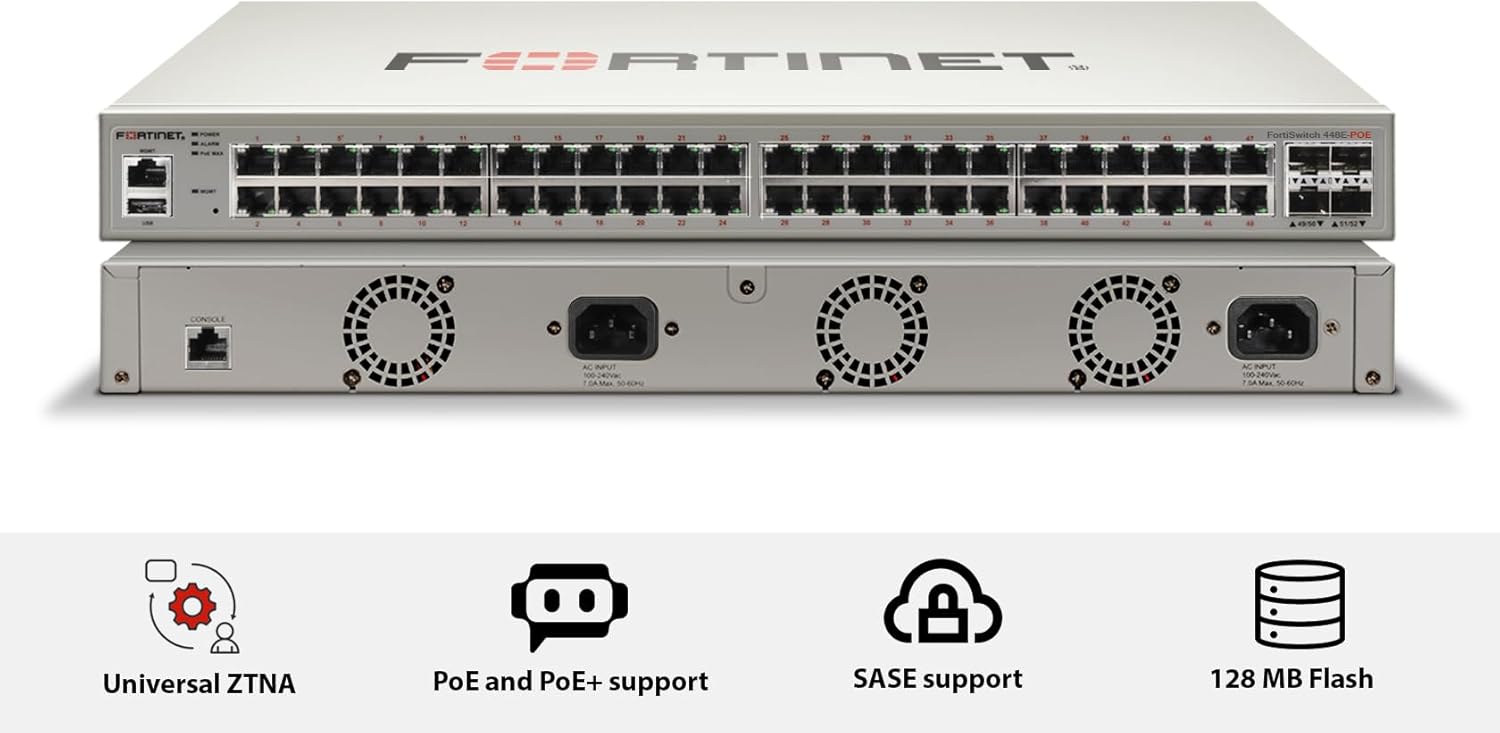
Зображення 3.1: Передня і задня views of the FortiSwitch FS-448E-POE, showing the 48 PoE+ ports on the front and AC input, console port, and cooling fans on the rear.

Зображення 3.2: Деталізована задня частина view of the FortiSwitch FS-448E-POE, highlighting the console port, AC power inputs, and cooling fan exhausts.
3.2 Мережеві підключення
- З'єднання висхідного каналу: Connect an Ethernet cable from one of the uplink ports (SFP+ or RJ45) on the FortiSwitch to your network's core switch or router.
- Підключення пристрою: Connect your network devices (e.g., IP phones, wireless access points, computers) to the RJ45 ports on the front of the FortiSwitch. The PoE+ ports will automatically provide power to compatible devices.
- Підключення консолі (необов'язково): For initial configuration or troubleshooting, connect a console cable from your management workstation to the console port on the rear of the switch.
4. Інструкція з експлуатації
Once physically installed and connected, the FortiSwitch FS-448E-POE can be managed and operated.
4.1 Увімкнення
After connecting the power cord, the switch will automatically power on. Observe the LED indicators on the front panel to confirm power status and port activity.
4.2 Інтерфейс управління
The FortiSwitch FS-448E-POE is designed for integration with a FortiGate firewall using FortiLink. This allows for centralized management of the switch directly from the FortiGate interface, providing a single pane of glass for network and security control.
- FortiLink Integration: Refer to the FortiGate documentation for detailed instructions on configuring FortiLink and managing connected FortiSwitches.
- Local Management (CLI): For advanced configuration or in standalone deployments, the switch can be managed via its Command Line Interface (CLI) through the console port or SSH.
4.3 PoE+ Functionality
The switch's PoE+ ports automatically detect and provide power to connected PoE-compatible devices. Ensure that the total power consumption of all connected devices does not exceed the switch's maximum PoE power budget (421 Watts).
5. Технічне обслуговування
Regular maintenance helps ensure the longevity and optimal performance of your FortiSwitch.
- Прибирання: Тримайте вимикач та його вентиляційні отвори чистими та без пилу. Використовуйте м’яку суху тканину для очищення. Не використовуйте рідкі або аерозольні засоби для чищення.
- Оновлення прошивки: Regularly check the Fortinet support website for the latest firmware updates. Keeping the firmware up-to-date ensures access to new features, performance improvements, and security patches.
- Умови навколишнього середовища: Ensure the switch operates within its specified environmental conditions (temperature, humidity) to prevent overheating and component failure.
6. Вирішення проблем
У цьому розділі наведено рішення поширених проблем, з якими ви можете зіткнутися.
6.1 Немає живлення
- Перевірте шнур живлення: Переконайтеся, що шнур живлення надійно підключений як до вимикача, так і до електричної розетки.
- Перевірте розетку: Test the electrical outlet with another device to confirm it is functioning.
- Джерело живлення: If the switch has redundant power supplies, check the status of both.
6.2 Немає підключення до мережі
- Перевірте кабелі: Ensure all Ethernet cables are securely connected to the correct ports on both the switch and the connected devices.
- Світлодіодні індикатори: Observe the port status LEDs. A solid green or amber light typically indicates a link, while a blinking light indicates activity. No light suggests no link.
- Конфігурація: Verify the network configuration on the FortiGate (if using FortiLink) or the switch's CLI. Ensure VLANs, IP addresses, and routing are correctly configured.
- Сумісність пристрою: Ensure connected devices are compatible with the switch's port speeds and settings.
6.3 Пристрій PoE не отримує живлення
- Сумісність з PoE: Confirm that the connected device is PoE or PoE+ compatible.
- Якість кабелю: Use high-quality Ethernet cables (Cat5e or higher) for PoE connections.
- Бюджет потужності: Check the switch's PoE power budget. If the total power draw exceeds the budget, some devices may not receive power. Disconnect non-essential PoE devices or add an additional PoE power source.
- Статус порту: Check the PoE status of the port via the management interface.
7. Технічні характеристики
Detailed technical specifications for the Fortinet FortiSwitch FS-448E-POE.

Зображення 7.1: Comprehensive specifications table for the FortiSwitch FS-448E-POE, including hardware specifications, system specifications, dimensions, environmental conditions, and warranty information.

Зображення 7.2: Physical dimensions (Height x Depth x Width: 1.73 x 16.1 x 17.3 inches) and weight (13.8 pounds) of the FortiSwitch FS-448E-POE as depicted in this visual reference.
| Особливість | Специфікація |
|---|---|
| Номер моделі товару | FS-448E-POE |
| Бренд | FORTINET |
| Кількість портів | 48 |
| Тип інтерфейсу | PoE+ |
| Швидкість передачі даних | 1000 мегабіт за секунду (1 Гбіт/с) |
| Максимальна потужність (бюджет PoE) | 421 Вт |
| Розміри продукту | 23 x 22 x 6 дюймів |
| Вага товару | 18.56 фунта (8.44 кілограма) |
| UPC | 842382178607 |
| Виробник | Фортінет |
| Сумісні пристрої | Desktop (general network devices) |
8. Гарантія та підтримка
Fortinet products are backed by comprehensive warranty and support services.
- Інформація про гарантію: Fortinet provides a limited lifetime warranty on certain models. Please refer to the official Fortinet website or your purchase documentation for specific warranty terms applicable to the FS-448E-POE model.
- Технічна підтримка: For technical assistance, documentation, and software downloads, visit the official Fortinet support portal at support.fortinet.com.
- Контактна інформація: For sales or general inquiries, visit the Fortinet webсайт за адресою www.fortinet.com.


