вступ
The Directed Electronics DS3 Remote Start Interface System is designed to enhance vehicle security and convenience. As a global leader in security and control telematics, this system aims to make your vehicle experience more secure, comfortable, and enjoyable. This manual provides essential information for the proper setup, operation, and maintenance of your DS3 system.
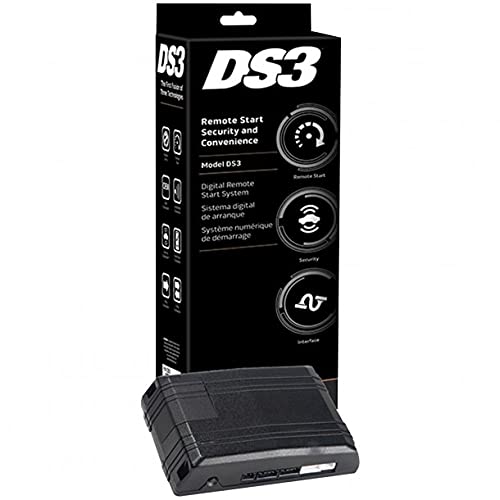
Figure 1: Directed Electronics DS3 Remote Start Interface System module.
Налаштування та встановлення
Proper installation of the DS3 system is crucial for its functionality and your vehicle's safety. It is highly recommended that installation be performed by a qualified professional installer.
Загальні кроки встановлення (рекомендується професійне встановлення):
- Підготовка транспортного засобу: Перед початком будь-яких електромонтажних робіт переконайтеся, що акумулятор автомобіля відключено.
- Розміщення модуля: Select a secure and discreet location within the vehicle for mounting the DS3 module, away from excessive heat or moisture.
- Підключення проводів: Carefully follow the detailed wiring diagrams provided with the professional installation kit. This typically involves connecting to the vehicle's ignition, power, ground, data bus, and other relevant circuits.
- Програмування модуля: Once all physical connections are made, the DS3 module will need to be programmed to your specific vehicle using specialized tools and software. This step integrates the system with the vehicle's onboard computer.
- Тестування: After programming, thoroughly test all functions of the remote start and interface system to ensure correct operation and vehicle compatibility.
Note: Incorrect installation can lead to vehicle damage, system malfunction, or safety hazards. Always consult the professional installation guide or a certified technician.
Інструкція з експлуатації
Once installed and programmed, the DS3 system allows for remote control of various vehicle functions. Specific operations may vary based on your vehicle and the remote control device used (e.g., factory key fob, dedicated remote, smartphone app).
Загальні операції:
- Дистанційний запуск: Typically activated by pressing a specific button sequence on your remote control (e.g., lock button three times, or a dedicated remote start button). The vehicle will start and run for a pre-set duration.
- Дистанційна зупинка: To turn off the engine after remote starting, repeat the remote start button sequence or press a dedicated stop button.
- Передача ключів: After remote starting, enter the vehicle, insert the key into the ignition, turn it to the ON/RUN position, and press the brake pedal. This transfers control from the remote start system to the vehicle's ignition.
- Door Lock/Unlock: Use your remote control to lock or unlock the vehicle doors.
- Випуск багажника: If configured, a dedicated button on your remote may release the vehicle's trunk.
Refer to your specific remote control's user guide for exact button functions and sequences.
Технічне обслуговування
The Directed Electronics DS3 system is designed for reliable operation with minimal maintenance. Follow these general guidelines:
- Зберігати сухим: Переконайтеся, що модуль та його з'єднання залишаються сухими та не містять вологи.
- Уникайте екстремальних температур: While designed for automotive environments, prolonged exposure to extreme temperatures outside normal operating ranges can affect performance.
- Батареї пульта дистанційного керування: Replace batteries in your remote control devices as needed to ensure consistent performance. Refer to your remote's manual for battery type and replacement instructions.
- Оновлення програмного забезпечення: Periodically, your installer may recommend software updates for the DS3 module to improve performance or add new features. These updates should only be performed by a qualified technician.
Усунення несправностей
If you experience issues with your DS3 system, consider the following common troubleshooting steps:
- Система не відповідає:
- Перевірте батарейку у вашому пульті дистанційного керування.
- Ensure you are within range of the vehicle.
- Verify that the vehicle's hood is closed, and the parking brake is engaged (if required by your vehicle's setup).
- Автомобіль не запускається дистанційно:
- Confirm the vehicle is in Park (automatic transmission) or Neutral with the parking brake engaged (manual transmission, if configured).
- Check if the vehicle's check engine light is on, which can prevent remote start.
- Ensure all doors, trunk, and hood are securely closed.
- Short Remote Range:
- Замініть батарею пульта дистанційного керування.
- Avoid areas with high radio frequency interference.
If problems persist, contact your authorized Directed Electronics dealer or professional installer for assistance.
Технічні характеристики
| Номер моделі: | DS3 |
| Розміри продукту: | 10.5 x 4 x 3.5 дюймів |
| Вага товару: | 1.1 фунта |
| Бренд: | Режисер |
| Виробник: | Гадюка |
| Країна походження: | Китай |
| Інші функції дисплея: | Бездротовий |
Гарантія та підтримка
Directed Electronics products are backed by a limited warranty. For specific warranty terms and conditions, please refer to the documentation provided with your purchase or visit the official Directed Electronics website. For technical support, service, or warranty claims, please contact your authorized dealer or the Directed Electronics customer support team.
Зберігайте чек про покупку для гарантійних потреб.


