вступ
The Epson EpiqVision Mini EF11 Laser Projector delivers a versatile and immersive viewing experience. Designed for portability and ease of use, this projector features advanced 3LCD technology for vibrant Full HD 1080p images up to 150 inches. With 1000 lumens of color and white brightness, a built-in dual-speaker audio system, and flexible connectivity options, it's ideal for various entertainment and presentation needs.
Ключові особливості:
- Stunning Picture Quality: Enjoy immersive Full HD 1080p images up to 150 inches.
- Висока яскравість: Delivers 1000 lumens of color and white brightness for clear visuals.
- Integrated Dual-Speaker Audio System: Features a high-quality internal speaker system for rich audio.
- Elegant Compact Design: Portable and modern design allows for easy placement and transport.
- Epson MicroLaser Array Technology: Provides exceptional brightness and enhanced black density.
- Advanced Scene Adaptive Color Correction: Automatically adjusts color for a natural picture.
- True 3-Chip Projector Design: Ensures outstanding color accuracy and brightness without "rainbowing."
- Auto Picture Skew Correction: Automatically corrects vertical image geometry for optimal viewінж.
- Single HDMI Input: Standard HDMI port for video and audio connections.
Що в коробці
Upon unboxing your Epson EpiqVision Mini EF11 Laser Projector, ensure all the following items are present:
- Лазерний проектор Epson EF-11
- Шнур живлення
- Пульт дистанційного керування з батарейками типу AAA
- Посібник швидкого встановлення

Image: Contents of the Epson EpiqVision Mini EF11 box, including the projector, remote, power cord, and quick setup guide.
Налаштування
- Розміщення: Position the projector on a stable, flat surface. Ensure there is adequate space around the projector for ventilation. The projector can be placed in front of the screen or wall, or mounted on a ceiling.
- Підключення живлення: Connect the provided power cord to the projector's power input and then to an electrical outlet.
- Підключення пристроїв:
- HDMI: Connect your streaming device (e.g., Apple TV, Roku, Amazon Fire TV, Android TV, game console) to the projector's HDMI port using an HDMI cable.
- USB: The projector features a USB Type-A port (5V/2A power supply) for connecting compatible devices.
- Увімкнення: Press the power button on the projector or the remote control to turn on the device. The projector will automatically perform initial setup and image adjustments.
- Регулювання зображення: The projector features Auto Picture Skew Correction to automatically adjust the vertical geometry of the picture. Manual adjustments for focus and keystone can be made via the projector's settings menu if needed.

Image: The Epson EpiqVision Mini EF11 Projector showcasing its compact design and projected image quality.
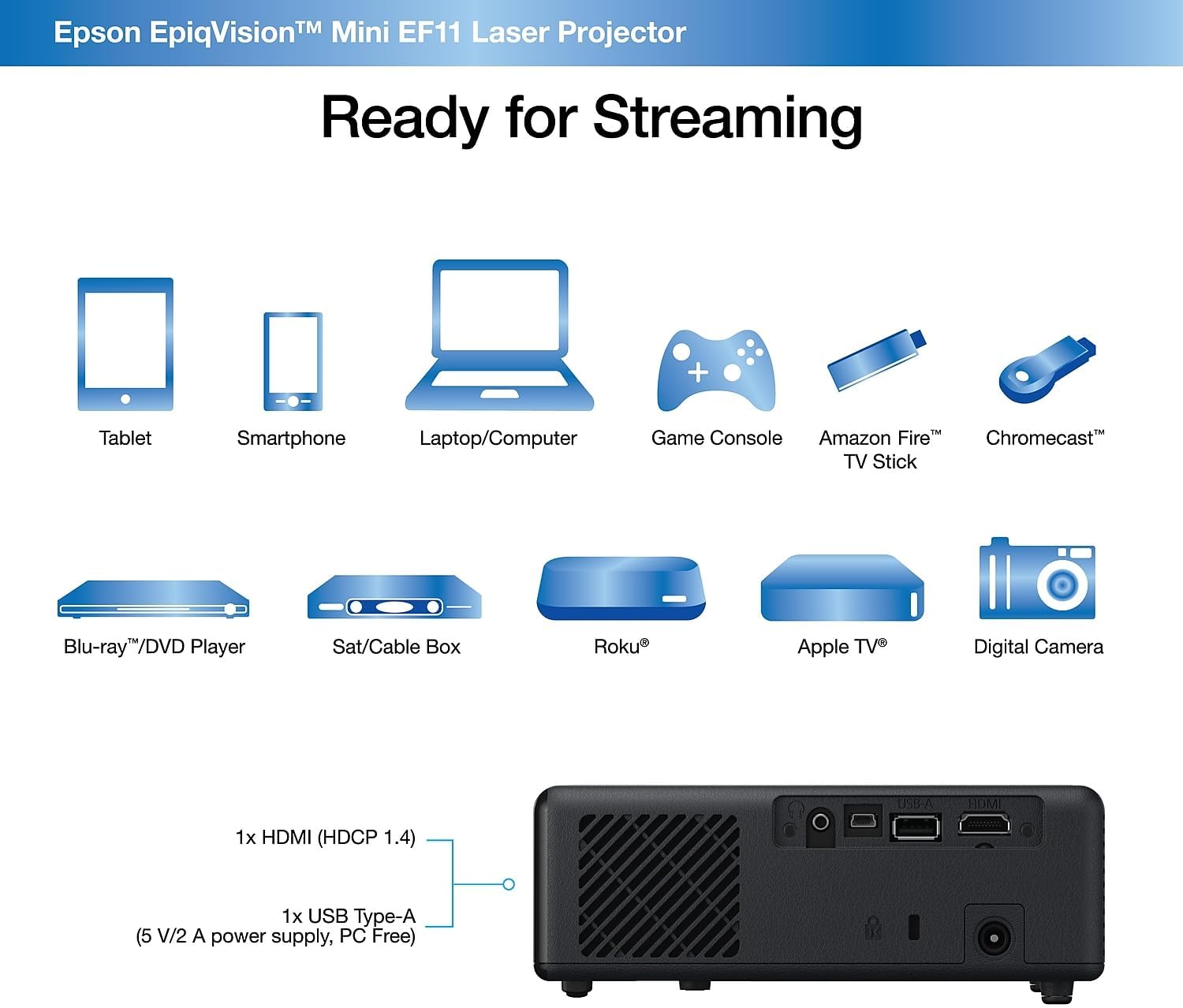
Зображення: Задня частина view of the Epson EpiqVision Mini EF11 Projector, highlighting the HDMI and USB ports for connecting various devices.
Операційна
- Увімкнення/вимкнення живлення: Натисніть кнопку живлення на верхній панелі проектора або на пульті дистанційного керування, щоб увімкнути пристрій.
- Вибір джерела: Use the "Source" button on the remote or projector to cycle through available input sources (e.g., HDMI).
- Регулювання гучності: Adjust the volume using the '+' and '-' buttons on the remote control or the projector's top panel.
- Доступ до вмісту:
- If using an external streaming device, navigate its interface using its remote.
- The projector is compatible with various streaming solutions like Apple TV, Roku, Amazon Fire TV, or Android TV.
- Параметри зображення: Access the projector's menu to adjust picture settings such as color mode, light output, scene adaptive gamma, color temperature, dynamic contrast, and noise reduction.
- Налаштування звуку: Customize your audio experience through sound settings, including sound mode (e.g., Theatre, TV, Studio), virtual surround, clear voice, auto loudness, and bass extension.

Image: The Epson EpiqVision Mini EF11 Laser Projector displaying a high-quality, vibrant image on a wall.

Image: A visual representation of the Epson EpiqVision Mini EF11 Projector's capability to project images at different sizes, from 70 inches to 150 inches.
Інтеграція медіа
Official Product Video: EF12 Plug and Play
Video: This official video from Epson America Inc. demonstrates the "Plug and Play" functionality of the EpiqVision Mini EF12 (similar to EF11), highlighting its ease of setup and immediate use for various media content.
Технічні характеристики
| Особливість | Деталь |
|---|---|
| Розміри продукту | 6.89 x 6.89 x 2.28 дюймів |
| Вага товару | 2.7 фунта |
| Номер моделі товару | EF11 |
| Бренд | Epson |
| Рекомендоване використання | Ігри |
| Особливості | Вбудований динамік, легкий |
| Технологія підключення | HDMI |
| Роздільна здатність дисплея | 1920 x 1080 (Full HD) |
| Яскравість | 1000 люменів (кольорове та біле освітлення) |
| Проекційна технологія | 3LCD, Laser |
Технічне обслуговування
Правильне обслуговування забезпечує довговічність та оптимальну роботу вашого проектора:
- Очищення лінзи: Use a soft, dry, lint-free cloth to gently wipe the projector lens. Avoid using abrasive cleaners or solvents.
- Очищення вентиляційних отворів: Regularly check and clean the air vents to prevent dust buildup, which can lead to overheating. Use a soft brush or a vacuum cleaner with a brush attachment.
- Зберігання: Якщо проектор не використовується протягом тривалого часу, зберігайте його в прохолодному, сухому місці, подалі від прямих сонячних променів та екстремальних температур.
Усунення несправностей
If you encounter issues with your projector, try the following common troubleshooting steps:
- Немає живлення:
- Ensure the power cord is securely connected to both the projector and the electrical outlet.
- Перевірте справність електричної розетки, підключивши інший пристрій.
- Без зображення:
- Перевірте, чи на проекторі вибрано правильне джерело вхідного сигналу.
- Ensure the HDMI cable (or other video cable) is securely connected to both the projector and the source device.
- Переконайтеся, що джерело сигналу увімкнено та виводить його.
- Розмите зображення:
- Adjust the focus using the projector's settings menu.
- Ensure the projector is placed at an appropriate distance from the screen or wall.
- Перевірте наявність будь-яких перешкод перед об'єктивом.
- Немає звуку:
- Збільште гучність як на проекторі, так і на пристрої-джерелі.
- Перевірте налаштування аудіовиходу на вашому пристрої-джерелі, щоб переконатися, що він надсилає звук через HDMI.
- Якщо ви використовуєте зовнішні динаміки, переконайтеся, що вони правильно підключені та увімкнені.
Гарантія та підтримка
The Epson EpiqVision Mini EF11 Laser Projector comes with a standard 2-year limited warranty, including full-unit replacement. Free technical phone support is available for the life of the product.
For further assistance or to explore other Epson products, please visit the Магазин Epson.


