вступ
Дякуємо за покупкуasing the EARISE M15 Karaoke Machine. This portable PA loudspeaker system is designed to provide high-quality audio for various entertainment and public address needs. Featuring powerful sound output, versatile connectivity options, and vibrant LED lights, the M15 is perfect for parties, gatherings, and karaoke sessions. Please read this manual thoroughly before operating the device to ensure proper use and to maximize its lifespan.
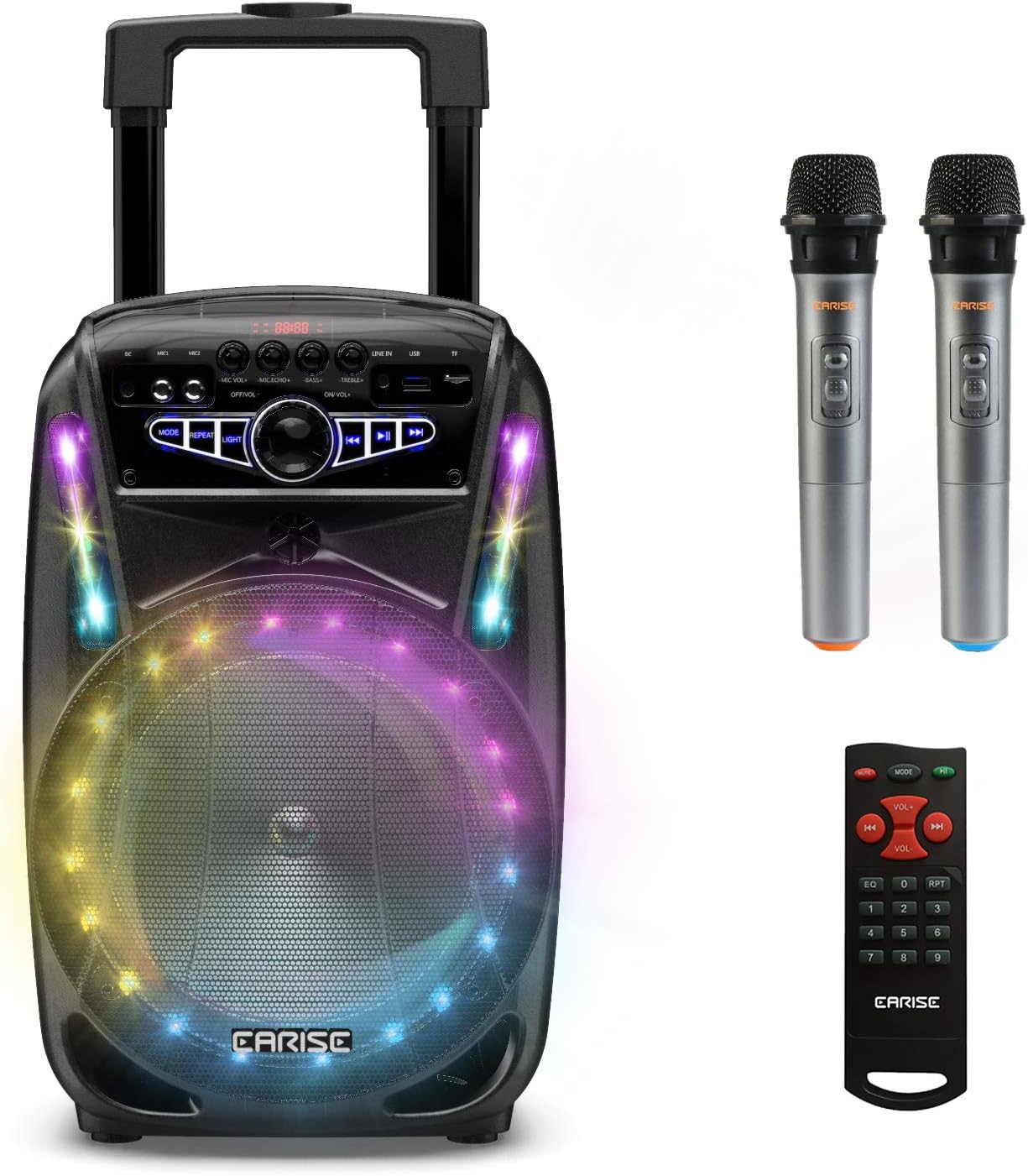
Image: The EARISE M15 Karaoke Machine, a black portable speaker with colorful LED lights on the front, shown with two wireless microphones and a remote control.
Що в коробці
Будь ласка, перевірте вміст вашої упаковки, щоб переконатися, що всі предмети присутні та знаходяться у належному стані.
- 1 x M15 Trolley PA System
- 2 бездротові мікрофони (батареї не входять)
- 1 x Пульт дистанційного керування
- 1 x шнур живлення
- 1 x AUX кабель
- 1 x Посібник користувача (цей документ)

Image: A visual representation of the package contents, showing the M15 speaker, two wireless microphones, a remote control, an AUX cable, and a charging cable.
Посібник із налаштування
1. Зарядка пристрою
Before first use, fully charge the M15 Karaoke Machine. The built-in 3600mAh 7.4V Lithium rechargeable battery provides portability. A full recharge takes approximately 3 hours.
- Connect the included power cord to the DC Charging Port (6) on the back of the unit.
- Plug the other end of the power cord into a standard AC 100-240V power outlet.
- The charging indicator light will illuminate. Once fully charged, the light may change color or turn off depending on the unit's design.
2. Встановлення батарейок мікрофона
The wireless microphones require batteries (not included). Open the battery compartment of each microphone and insert the required batteries, ensuring correct polarity.
3. Початкове увімкнення
Locate the Power On/Off switch (15) on the control panel. Turn the switch to the "ON" position to power on the unit.
Інструкція з експлуатації
Панель управління завершенаview
Ознайомтеся з панеллю керування для оптимальної роботи.

Image: Close-up of the M15's control panel, highlighting various buttons and ports with corresponding numbers for easy identification.
- Екран дисплея: Відображає поточний режим, номер треку та іншу інформацію.
- Гучність мікрофона: Регулює гучність підключених мікрофонів.
- Мікрофон Ехо: Керує ефектом луни для мікрофонів.
- Бас: Регулює рівень басів аудіовиходу.
- ВЧ: Регулює рівень високих частот аудіовиходу.
- Порт зарядки постійного струму: For connecting the power adapter to charge the unit.
- Mic 1 Port: Вхід для дротового мікрофона.
- Mic 2 Port: Input for a second wired microphone.
- Line In Port (AUX): Для підключення зовнішніх аудіопристроїв через AUX-кабель.
- Гніздо USB Flash Drive: Для відтворення аудіо files з USB-накопичувача.
- Слот для карт TF/SD: Для відтворення аудіо files from a TF or SD card.
- режим: Switches between Bluetooth, USB, TF, AUX, and FM Radio modes.
- повторити: Repeats the current track or playlist.
- світло: Toggles or changes the LED light patterns.
- Power On/Off, Master Volume: Turns the unit on/off and adjusts the overall volume.
- Попередній трек: Перехід до попередньої доріжки.
- Відтворення/пауза: Відтворює або призупиняє поточну доріжку.
- Наступний трек: Перехід до наступного треку.
1. Підключення Bluetooth
Connect your smartphone, tablet, or other Bluetooth-enabled device to the M15 for wireless audio streaming.
- Power on the M15 unit.
- Натисніть Режим button (12) until "Bluetooth" or "BT" appears on the Display Screen (1).
- Enable Bluetooth on your device and search for "EARISE M15" in the list of available devices.
- Select "EARISE M15" to pair. A confirmation sound will indicate successful pairing.
- You can now play audio from your device through the M15.

Image: A person sitting outdoors, connecting their smartphone to the EARISE M15 speaker via Bluetooth, indicated by the Bluetooth logo.
2. Відтворення з USB/TF-картки
Відтворити аудіо files directly from a USB flash drive or TF/SD card.
- Insert a USB flash drive into the USB Flash Drive Slot (10) or a TF/SD card into the TF/SD Card Slot (11).
- The unit should automatically switch to USB or TF mode and begin playing compatible audio files. Якщо ні, натисніть кнопку Режим кнопку (12), щоб вибрати потрібний режим.
- Використовуйте Попередній трек (16), Відтворення/Пауза (17) і Наступний трек (18) кнопок для керування відтворенням.
3. Вхід AUX
Connect external audio devices that do not have Bluetooth capability using the AUX cable.
- Connect one end of the included AUX cable to the Line In Port (9) on the M15.
- Підключіть інший кінець кабелю AUX до аудіовиходу вашого зовнішнього пристрою (наприклад, MP3-плеєра, ноутбука).
- Натисніть Режим button (12) until "AUX" or "LINE" appears on the Display Screen (1).
- Керуйте відтворенням із зовнішнього пристрою.
4. Використання мікрофона
The M15 supports up to two wireless microphones and two wired microphones simultaneously for karaoke fun.
- Бездротові мікрофони: Turn on the wireless microphones. They should automatically connect to the M15.
- Дротові мікрофони: Plug wired microphones into Mic 1 Port (7) or Mic 2 Port (8).
- Adjust the Microphone Volume (2) and Microphone Echo (3) knobs to achieve desired sound effects.

Image: A group of people enjoying karaoke, with the EARISE M15 speaker providing sound and multiple microphones in use, demonstrating its multi-user capability.
5. Світлодіодні ліхтарі
Enhance your party atmosphere with the M15's colorful LED disco lights.
- Натисніть світло button (14) to toggle the LED lights on/off or to cycle through different light patterns.

Image: The EARISE M15 speaker with its front-facing LED lights glowing in multiple colors, creating a vibrant visual effect.
6. Використання дистанційного керування
The included remote control provides convenient operation from a distance.
- Переконайтеся, що пульт дистанційного керування має справні батареї.
- Point the remote control towards the front of the M15 unit.
- Use the buttons on the remote to control volume, mode, track selection, EQ, and other functions.
Технічне обслуговування
Proper maintenance will ensure the longevity and optimal performance of your EARISE M15 Karaoke Machine.
- Прибирання: Use a soft, dry cloth to wipe the exterior of the unit. Do not use abrasive cleaners, waxes, or solvents as they may damage the finish.
- Догляд за акумулятором: To prolong battery life, avoid fully discharging the battery frequently. If storing the unit for an extended period, charge it to about 50% every few months.
- Зберігання: Зберігайте пристрій у прохолодному, сухому місці, подалі від прямих сонячних променів, екстремальних температур та високої вологості.
- Обробка: While the unit is portable with wheels and a handle, avoid dropping or subjecting it to strong impacts.

Image: A person demonstrating the portability of the EARISE M15 by pulling it with its retractable handle and built-in wheels.
Усунення несправностей
If you encounter issues with your M15, please refer to the following common problems and solutions.
| проблема | Можлива причина | Рішення |
|---|---|---|
| Немає живлення / Пристрій не вмикається. | Акумулятор розрядився. Шнур живлення не підключено належним чином. | Повністю зарядіть пристрій. Ensure power cord is securely connected to both the unit and the power outlet. |
| Немає звуку з динаміка. | Гучність занадто низька. Вибрано неправильний режим. External device volume is low. | Increase the Master Volume (15). Натисніть Режим button (12) to select the correct input source (Bluetooth, USB, AUX). Increase volume on the connected external device. |
| Мікрофон не працює. | Microphone batteries are dead or incorrectly inserted. Microphone volume is too low. Wireless microphone not paired. | Replace microphone batteries, ensuring correct polarity. Increase Microphone Volume (2). Ensure wireless microphones are turned on and within range. |
| Не вдалося створити пару Bluetooth. | M15 is not in Bluetooth mode. Device is too far from M15. Bluetooth на пристрої вимкнено. | Прес Режим button (12) to select Bluetooth mode. Move your device closer to the M15. Увімкніть Bluetooth на своєму пристрої. |
| USB/TF-карта не відтворюється. | Невірно file формат. Card/drive not inserted correctly. Unit not in USB/TF mode. | Забезпечити звук fileмають сумісний формат (наприклад, MP3). Re-insert the USB drive or TF card firmly. Прес Режим button (12) to select USB or TF mode. |
Технічні характеристики
Detailed technical specifications for the EARISE M15 Karaoke Machine.
| Особливість | Специфікація |
|---|---|
| Модель | M15 |
| Вихідна потужність | 400 Вт Макс. |
| R.Frequency | 90 Гц-20 КГц |
| Літій-іонний акумулятор | 3.7V / 2600mAh (Built-in) |
| Приводний блок | 8" 4Ω*1 + 1" tweeter*1 |
| Співвідношення S/N | ≥60 дБ |
| Джерело живлення | Змінний струм 100-240 В |
| Розміри продукту (Д x Ш x В) | 27.94 x 25.4 x 40.64 см (11 x 10.4 x 16.3 дюйма) |
| Вага товару | 4.08 кг |
| Технологія підключення | Bluetooth, USB, AUX |
| Сумісні пристрої | Ноутбук, Смартфон |

Image: A diagram illustrating the physical dimensions of the EARISE M15 speaker, showing its height, width, and depth.
Гарантія та підтримка
For warranty information or technical support, please refer to the contact details provided with your purchase documentation or visit the official EARISE webсайт. Зберігайте чек про покупку як підтвердження покупки для будь-яких гарантійних претензій.


