1. Вступ
This manual provides essential information for the proper installation, configuration, and operation of your GIGABYTE B550 AORUS ELITE AX motherboard. This motherboard is designed to support 3rd Gen AMD Ryzen Processors and offers advanced features for high-performance computing.

Зображення 1.1: закінченоview of the GIGABYTE B550 AORUS ELITE AX Motherboard. This image displays the full motherboard with its various components, including the CPU socket, RAM slots, PCIe slots, and heatsinks.
Key features include a True 12+2 Phases Digital VRM Solution, advanced thermal design with enlarged surface heatsinks, an Ultra Durable PCIe 4.0 x16 Slot, dual ultra-fast NVMe PCIe 4.0/3.0 x4 M.2 slots with dual thermal guards, and integrated Intel WiFi 6 802.11ax with Bluetooth 5.
2. Налаштування та встановлення
Перед початком встановлення переконайтеся, що ваша система вимкнена та від’єднана від розетки. Завжди тримайте материнську плату за краї, щоб уникнути статичного розряду.
2.1. Ідентифікація компонента
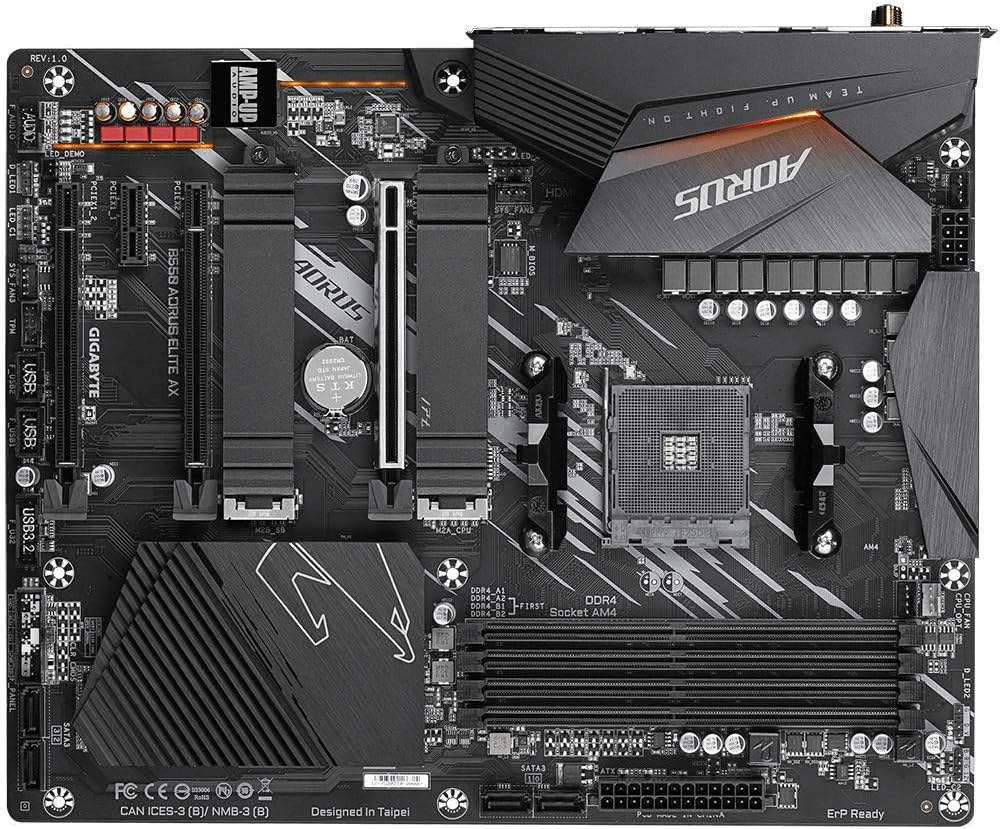
Зображення 2.1: Зверху вниз view of the GIGABYTE B550 AORUS ELITE AX Motherboard. This image highlights the layout of the CPU socket, four DDR4 DIMM slots, multiple PCIe slots, and two M.2 slots with their thermal guards.
2.2. Встановлення процесора
- Locate the AM4 CPU socket. Lift the load lever to open the socket.
- Carefully align the triangular mark on the CPU with the mark on the socket. Gently place the CPU into the socket without forcing it.
- Опустіть важіль навантаження назад на місце, щоб закріпити процесор.
2.3. Встановлення оперативної пам'яті
This motherboard supports Dual Channel ECC/Non-ECC Unbuffered DDR4 memory across 4 DIMM slots.
- Відкрийте затискачі з обох кінців гнізда DIMM.
- Зіставте виїмку на модулі пам'яті DDR4 з ключем на слоті DIMM.
- Міцно натисніть на обидва кінці модуля пам’яті, доки затискачі не зафіксуються на місці.
2.4. Встановлення твердотільного накопичувача M.2
The motherboard features dual ultra-fast NVMe PCIe 4.0/3.0 x4 M.2 slots with dual thermal guards.
- Unscrew and remove the M.2 thermal guard from the desired slot.
- Вставте твердотільний накопичувач M.2 у слот під кутом.
- Обережно натисніть на SSD-диск і закріпіть його за допомогою наданого гвинта.
- Reattach the M.2 thermal guard to ensure optimal cooling.
2.5. Встановлення карти PCIe
Install graphics cards or other expansion cards into the PCIe slots. The top slot is an Ultra Durable PCIe 4.0 x16 slot.
- Align the PCIe card with the chosen slot.
- Міцно натисніть, доки карта повністю не встане на місце, а фіксатор не зафіксується.
2.6. Підключення живлення
Підключіть 24-контактний основний роз'єм живлення ATX та 8-контактний роз'єм живлення процесора від блока живлення до материнської плати.
2.7. Роз’єми передньої панелі
Connect the power button, reset button, HDD LED, and USB/audio headers from your PC case to the corresponding pins on the motherboard. Refer to the motherboard diagram for exact pin locations.
2.8. Задня панель вводу/виводу

Image 2.2: Rear I/O Panel of the GIGABYTE B550 AORUS ELITE AX Motherboard. This image shows the various ports available, including USB 3.2 Gen 1, USB 3.2 Gen 2, DisplayPort, HDMI, 2.5GbE LAN, Wi-Fi antenna connectors, and audio jacks. The pre-installed I/O shield is visible.
The motherboard features a pre-installed I/O shield for easy and quick installation. Connect your peripherals such as monitor, keyboard, mouse, and network cable to the appropriate ports on the rear I/O panel.
3. Інструкція з експлуатації
3.1. Перше завантаження
After assembling all components and connecting power, press the power button on your PC case. The system should power on and display the GIGABYTE splash screen.
3.2. Доступ до BIOS/UEFI
Щоб увійти до утиліти налаштування BIOS/UEFI, натисніть DEL key repeatedly during the initial boot process when the GIGABYTE logo appears. The BIOS allows you to configure system settings, boot order, and enable features like XMP for memory profiles.
3.3. Встановлення драйвера
After installing your operating system, install the necessary drivers for the motherboard's components. These include chipset drivers, LAN drivers, Wi-Fi/Bluetooth drivers, and audio drivers. Drivers can typically be found on the GIGABYTE official webсайт для вашої конкретної моделі материнської плати.
4. Технічне обслуговування
4.1. Очищення системи
Regularly clean your computer's interior to prevent dust buildup, which can lead to overheating and reduced performance. Use compressed air to remove dust from fans, heatsinks, and other components. Ensure the system is powered off and unplugged before cleaning.
4.2. Оновлення BIOS
GIGABYTE provides BIOS updates to improve system stability, add support for new hardware, and fix bugs. The B550 AORUS ELITE AX supports Q-Flash Plus, allowing you to update the BIOS without installing the CPU, memory, or graphics card. Refer to the GIGABYTE website for detailed instructions on using Q-Flash Plus and for the latest BIOS versions.
5. Вирішення проблем
У цьому розділі розглядаються поширені проблеми, з якими ви можете зіткнутися.
5.1. Немає живлення / Немає завантаження
- Перевірте, чи всі кабелі живлення (24-контактний ATX, 8-контактний процесор) надійно підключені до материнської плати та блока живлення.
- Переконайтеся, що вимикач живлення знаходиться в положенні «УВІМК.».
- Перевірте, чи роз'єм кнопки живлення на передній панелі правильно підключений до материнської плати.
- Якщо можливо, протестуйте з іншим блоком живлення.
5.2. Немає виводу на дисплей
- Ensure your monitor is connected to the graphics card (if installed) or the motherboard's HDMI/DisplayPort (if using an APU with integrated graphics).
- Перевстановіть відеокарту та модулі пам'яті.
- Спробуйте завантажитися лише з однією встановленою планкою оперативної пам'яті.
5.3. Bluetooth / Wi-Fi Connectivity Issues
- Ensure the external Wi-Fi antenna is securely connected to the rear I/O panel.
- Update your Wi-Fi and Bluetooth drivers to the latest version from the GIGABYTE webсайт.
- If Bluetooth devices disconnect after sleep mode, try disabling USB selective suspend settings in Windows Power Options or updating the BIOS to the latest version, as this has resolved similar issues in some cases.
5.4. BIOS Reset
If you encounter issues after changing BIOS settings, you may need to reset the BIOS to default settings. This motherboard does not feature a dedicated BIOS reset button. To clear CMOS (BIOS settings), power off your system, unplug it, and remove the small circular battery (CMOS battery) from the motherboard for a few minutes. Reinsert the battery and power on the system.
6. Технічні характеристики
Below are the key technical specifications for the GIGABYTE B550 AORUS ELITE AX Motherboard:
| Особливість | Специфікація |
|---|---|
| Бренд | GIGABYTE |
| Назва моделі | B550 AORUS ELITE AX |
| Гніздо ЦП | Розетка AM4 |
| Сумісні процесори | AMD 3-го покоління Ryzen |
| Тип чіпсета | AMD B550 |
| Технологія оперативної пам'яті | DDR4 |
| Швидкість пам'яті | 2133 MHz (Base), up to 4733MHz (OC) |
| Ємність пам'яті | 128 ГБ (макс.) |
| Бездротовий тип | 802.11ax (Intel WiFi 6) |
| LAN | 2.5 гігабітний Ethernet |
| PCIe слоти | 1x PCIe 4.0 x16, 2x PCIe 3.0 x16 (x4 mode), 1x PCIe 3.0 x1 |
| Слоти M.2 | 2x NVMe PCIe 4.0/3.0 x4 with Thermal Guards |
| Порти USB 2.0 | 2 (ззаду) |
| Порти USB 3.2 Gen 1 | 4 (ззаду) |
| Порти USB 3.2 Gen 2 | 2 (Rear, Type-A) |
| Відеовихід | HDMI, DisplayPort |
| Аудіо | Realtek ALC1200 Codec, AMP-UP Audio |
| Форм-фактор | ATX |
| Вага товару | 4.07 фунта |
| Розміри продукту | 13.18 x 10.62 x 3.14 дюймів |
7. Інформація про гарантію
GIGABYTE products are covered by a limited warranty. The specific terms and duration of the warranty may vary by region and product type. Please retain your proof of purchase for warranty claims. For detailed warranty information, including coverage, limitations, and the claims process, please visit the official GIGABYTE webсайт або зверніться до місцевого продавця.
8. Технічна підтримка
If you encounter issues that cannot be resolved using this manual or require further assistance, please contact GIGABYTE technical support. You can find support resources, FAQs, driver downloads, and contact information on the official GIGABYTE webсайт:
When contacting support, please have your motherboard model (B550 AORUS ELITE AX) and a detailed description of your issue ready.


