GOKOO Smart Watch B08FMBHSWD User Manual
вступ
This manual provides essential information for the proper setup, operation, and maintenance of your GOKOO Smart Watch B08FMBHSWD. Please read it thoroughly before using the device to ensure optimal performance and longevity.
The GOKOO Smart Watch is a versatile fitness tracker and smartwatch designed to monitor various health metrics and assist with daily activities. It features a full touch screen, heart rate and blood oxygen monitoring, sleep tracking, multiple sports modes, and notification capabilities.
Продукт закінченийview
The GOKOO Smart Watch B08FMBHSWD is equipped with advanced features to support your active lifestyle and health monitoring needs.
- All-day Activity Tracking: Records steps, calories, and mileage. Supports 10 sports modes including walking, running, yoga, and swimming.
- Комплексний моніторинг стану здоров'я: Continuously monitors heart rate and blood oxygen levels. Features automatic sleep tracking, breathing training, and sedentary reminders.
- Міцний та водонепроникний дизайн: IP68 waterproof rating suitable for daily use and swimming.
- Настроюваний дисплей: 1.3-inch round high-definition screen with personalized UI interfaces.
- Розумні сповіщення: Synchronizes messages and allows management of incoming calls.
- Тривалий термін служби батареї: Up to 10 days of usage on a single charge (200MA battery).
- Широка сумісність: Works with Android 5.0+ and iOS 9.0+ devices.

Figure 1: GOKOO Smart Watch highlighting its design and core functionalities.
Налаштування
1. Зарядка пристрою
Before initial use, fully charge your GOKOO Smart Watch. Connect the magnetic charging cable to the charging contacts on the back of the watch and plug the USB end into a power adapter (not included) or a computer's USB port. The watch display will indicate charging status.
A full charge typically takes approximately 2 hours and provides up to 10 days of usage, depending on individual use patterns.

Figure 2: Illustration of the watch's IP68 waterproof capability and its extended battery life.
2. Встановлення та сполучення програм
- Завантажте додаток: шукати the official GOKOO companion app in your smartphone's app store (Apple App Store for iOS, Google Play Store for Android).
- Встановлення та реєстрація: Встановіть програму та дотримуйтесь інструкцій на екрані, щоб створити обліковий запис або увійти.
- Увімкнути Bluetooth: Переконайтеся, що Bluetooth увімкнено на вашому смартфоні.
- Підключіть годинник: Open the GOKOO app, navigate to the device pairing section, and select your GOKOO Smart Watch from the list of available devices. Confirm the pairing request on both your phone and the watch if prompted.
- Надати дозволи: Надайте необхідні дозволи (наприклад, сповіщення, місцезнаходження, дані про здоров’я) для коректної роботи програми.
The watch will synchronize its language with your phone upon successful connection.
Інструкція з експлуатації
1. Основна навігація
- Сенсорний екран: The watch features a full touch screen for interaction.
- Проведіть вгору/вниз: Прокручуйте меню та сповіщення.
- Проведіть вліво/вправо: Доступ до різних віджетів або швидких функцій.
- Торкніться: Виберіть елемент або підтвердіть дію.
- Бічна кнопка: Typically used to return to the home screen or activate/deactivate the display.

Figure 3: The watch interface displaying multiple functions and touch screen interaction methods.
2. Відстеження активності
The watch automatically tracks your daily steps, calories burned, and distance traveled. For specific activities, you can select from 10 sports modes:
- ходьба
- Біг
- йога
- Плавання
- Велоспорт
- Скелелазіння
- Баскетбол
- футбол
- Бадмінтон
- Пропуск
To start a workout, navigate to the 'Sports' menu on your watch, select the desired activity, and tap to begin. The watch will record your exercise data, which can be reviewу супутньому додатку.

Figure 4: The watch interface showing available sports monitoring modes.

Figure 5: The watch tracking an outdoor run, displaying distance, calories, and a trajectory map.
3. Моніторинг здоров'я
- ЧСС: Годинник постійно відстежує ваш пульс. View дані в режимі реального часу на годиннику або детальні історичні дані в додатку.
- Кисень крові (SpO2): Monitor your blood oxygen levels throughout the day.
- Відстеження сну: The watch automatically records your sleep quality, including deep sleep, light sleep, and wake times. Review sleep patterns in the app to help adjust your habits.
- Тренування дихання: Access guided breathing exercises on the watch to help reduce stress and improve relaxation.
- Сидячі нагадування: Set reminders in the app to prompt you to move after periods of inactivity.

Figure 6: The watch displaying real-time heart rate and blood oxygen data during exercise.
4. Сповіщення та розумні функції
Once paired with your smartphone, the GOKOO Smart Watch can display notifications for incoming calls, messages, and various app alerts. You can read messages directly on your wrist and manage incoming calls (answer/reject) without reaching for your phone.
- Керування дзвінками: Swipe on the watch screen to accept or reject incoming calls.
- Message Display: View text messages and app notifications.
- Прогноз погоди: Access current weather information.
- Керування музикою: Керуйте відтворенням музики на своєму смартфоні.
- Пульт дистанційного керування камерою: Використовуйте годинник як пульт дистанційного керування затвором для камери вашого телефону.
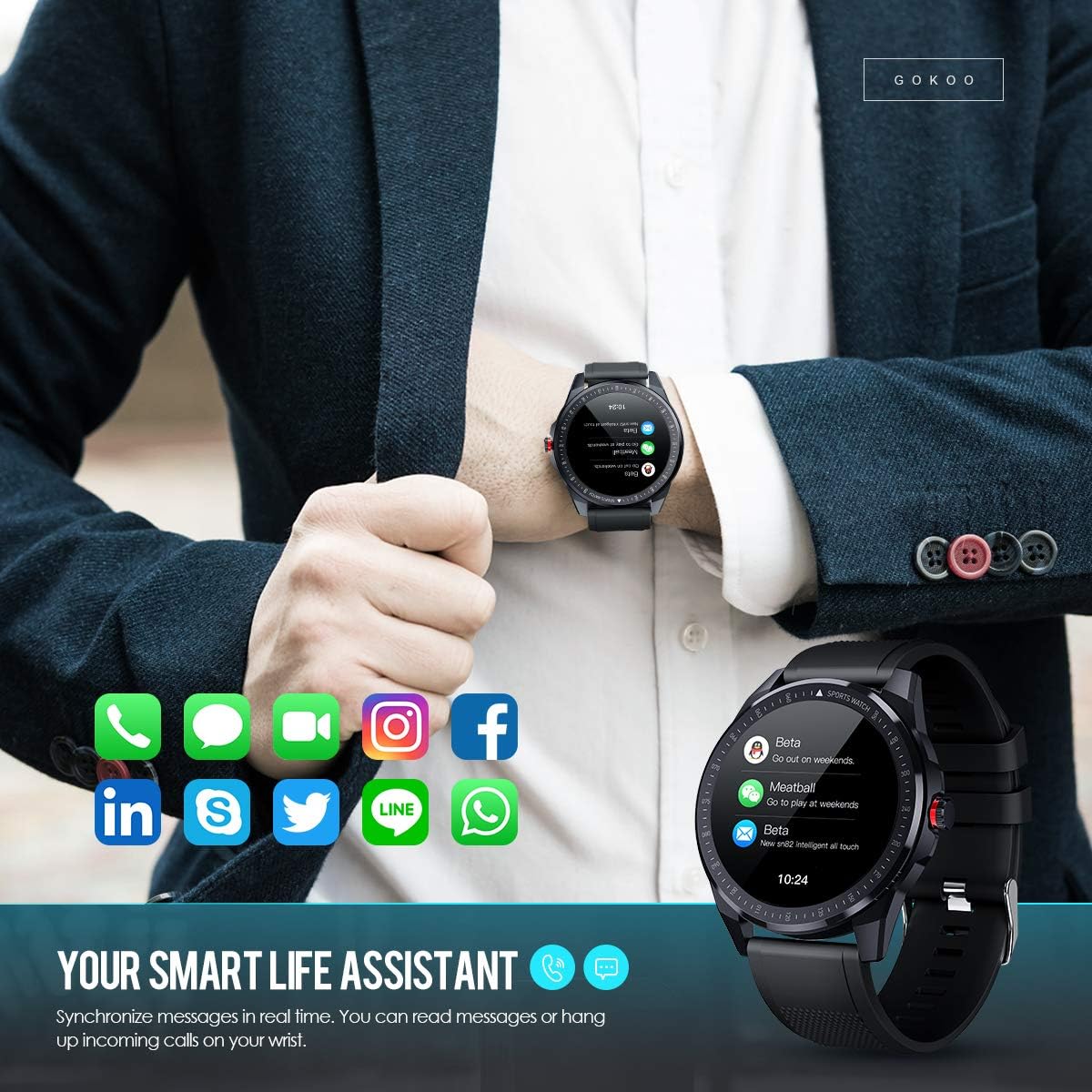
Figure 7: The watch showing synchronized notifications from a smartphone.
5. Налаштування
The GOKOO Smart Watch allows for personalization of its interface. You can select from various pre-installed watch faces or download additional styles through the companion app to match your preference.
Технічне обслуговування
1. прибирання
Regularly clean your watch and strap to prevent skin irritation and maintain device hygiene. Use a soft, lint-free cloth. If necessary, slightly dampпромийте тканину водою. Уникайте використання агресивних хімікатів, абразивних засобів для чищення або аерозольних спреїв.
2. Рекомендації щодо водостійкості
The GOKOO Smart Watch has an IP68 waterproof rating, meaning it is resistant to dust and can withstand immersion in water up to 1.5 meters for 30 minutes. It is suitable for daily use, hand washing, rain, and swimming.
Важливо: Do not use the watch in hot water baths, saunas, or during diving. High temperatures and high pressure can compromise the waterproof seals and cause damage.
3. Догляд за акумулятором
- Уникайте частого повного розряджання акумулятора.
- Charge the watch using the provided magnetic charging cable.
- Зберігайте годинник у прохолодному, сухому місці, якщо він не використовується протягом тривалого часу.
Усунення несправностей
- Годинник не вмикається: Переконайтеся, що годинник повністю заряджений. Підключіть його до зарядного пристрою щонайменше на 30 хвилин.
- Не вдається підключитися до телефону:
- Переконайтеся, що на вашому телефоні ввімкнено Bluetooth.
- Переконайтеся, що годинник знаходиться в зоні дії Bluetooth вашого телефону.
- Перезавантажте і телефон, і годинник.
- Check if the app has necessary permissions.
- Неточні дані про стан здоров'я: Переконайтеся, що годинник щільно прилягає до зап'ястя, приблизно на ширину одного пальця вище зап'ястя. Очистіть датчик на задній панелі годинника.
- Сповіщення не відображаються:
- Verify that notification permissions are granted in the app and your phone's settings.
- Переконайтеся, що годинник підключено через Bluetooth.
- Перевірте, чи на годиннику або телефоні активовано режим «Не турбувати».
- Короткий час автономної роботи: Reduce screen brightness, disable continuous heart rate monitoring if not needed, and limit the number of active notifications.
Технічні характеристики
| Особливість | Деталь |
|---|---|
| Бренд | ГОКОО |
| Модель | B08FMBHSWD |
| Розмір екрана | 1.3 дюймів |
| Операційна система | Android 5.0 або вище, iOS 9.0 або вище |
| Сумісні пристрої | Смартфон |
| Термін служби батареї | До 10 днів (залежно від використання) |
| Тип батареї | Літій-полімер |
| Водонепроникність | IP68 |
| Бездротове підключення | Bluetooth |
| Введення людського інтерфейсу | Сенсорний екран |
| Розміри продукту | 27 x 5 x 1.08 см; 168 g |

Figure 8: Detailed product dimensions of the GOKOO Smart Watch.
Гарантія та підтримка
For warranty information or technical support, please refer to the contact details provided with your purchase or visit the official GOKOO website. If you require a copy of this manual or have any questions regarding your GOKOO Smart Watch B08FMBHSWD, please contact customer service.