Продукт закінченийview
The Shark IQ Robot Self-Empty XL combines the convenience of a self-empty base with IQ Navigation total home mapping for complete, efficient cleaning. It features powerful suction and a self-cleaning brushroll, designed for homes with pets to capture dust, dander, and pet hair from carpets and hard floors. After each cleaning session, the robot automatically empties into the bagless base, which holds up to 45 days of dirt and debris.

Image: The Shark IQ Robot Vacuum and its XL Self-Empty Base, alongside a smartphone displaying the SharkClean app.
Посібник із налаштування
Follow these steps to set up your Shark IQ Robot Vacuum for optimal performance.
1. Розпакування та початкова підготовка
Carefully remove all components from the packaging. Ensure all protective films and tapes are removed from the robot and the self-empty base. Locate the power switch on the side of the robot and turn it to the ON position before charging.
Video: An unboxing demonstration of the Shark IQ Robot Vacuum, showing all included components and initial preparation steps.
2. Base Setup and Placement
Place the self-empty base against a wall on a bare floor. Plug in the base power cord. For best results, leave at least 3 feet of open space on both sides of the base and 5 feet in front of it. When the base is plugged in, the power indicator light will turn GREEN.
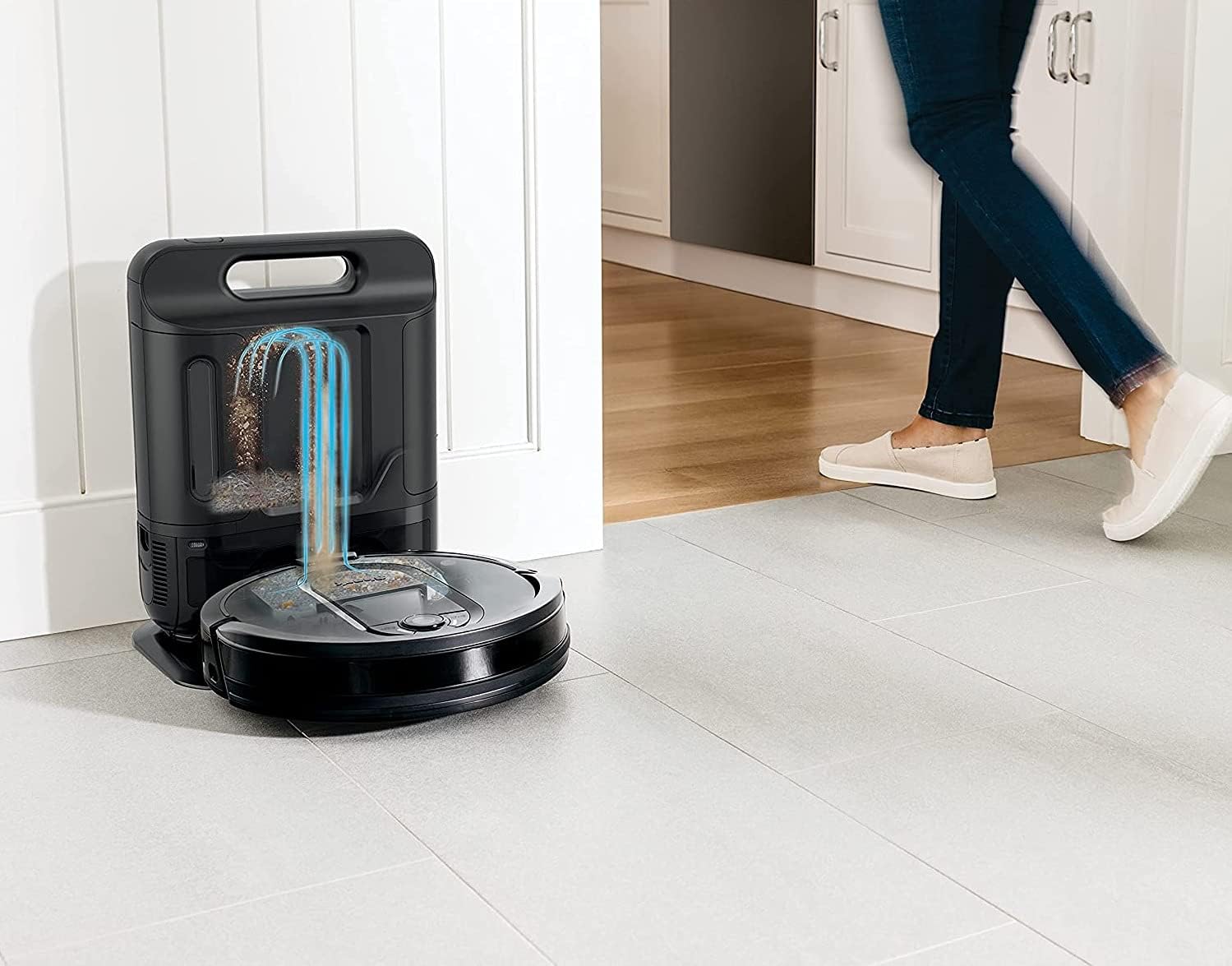
Image: The Shark IQ Robot Vacuum returning to its self-empty base, illustrating the automatic emptying process.
Video: A step-by-step guide on how to set up the Shark IQ Robot Vacuum, including base placement and initial charging.
3. App Integration and Mapping
Download the SharkClean app to unlock advanced features. The robot will run several cleaning cycles to map your home's layout, identifying walls and open areas. Once mapped, you can view and edit the map within the app, defining rooms and setting "No-Go Zones" to restrict the robot from certain areas (e.g., around cords or delicate items).

Image: The SharkClean app displaying a mapped floor plan with defined rooms and no-go zones.
Інструкція з експлуатації
Початок прибирання
You can initiate a cleaning session using the physical buttons on the robot (Clean or Dock) or through the SharkClean app. The app allows for scheduling whole-home cleaning or targeting specific rooms/areas. The robot methodically cleans row by row and then navigates room to room for complete coverage.
Режими очищення
Select from different power levels: Eco, Normal, or Max, depending on your cleaning needs. Higher power levels provide deeper cleaning but may consume battery faster.
Навігація та уникнення перешкод
The Shark IQ Robot uses advanced navigation to efficiently clean your home. It is designed to avoid obstacles and will automatically turn if it encounters an object. If the battery runs low during a cleaning cycle, the robot will return to its base to recharge and then resume cleaning from where it left off.
Технічне обслуговування
Regular maintenance ensures your Shark IQ Robot continues to perform optimally.
1. Emptying the Dustbin/Canister
The XL Self-Empty Base holds up to 45 days of dirt and debris, reducing the frequency of manual emptying. To empty the base canister, simply press the release button and remove the canister. Empty its contents into a trash bin. The bagless design makes this process clean and easy.
2. Очищення та заміна фільтра
Both the robot's internal dustbin filter and the base's foam filter should be cleaned periodically. The base's foam filter is reusable and can be cleaned with water, but ensure it is completely dry before reinserting. Replace filters as needed to maintain suction performance.
3. Brushroll Cleaning
The multi-surface brushroll is designed to minimize hair wrap, but occasional cleaning may be necessary, especially in homes with pets or long hair. Access the brushroll compartment on the underside of the robot to remove any tangled hair or debris.
4. Очищення датчика
Wipe the robot's sensors periodically with a clean, dry cloth to ensure accurate navigation and obstacle detection.
Усунення несправностей
If your Shark IQ Robot encounters an issue, consider the following common solutions:
- Робот застряг: If the robot gets stuck, check for obstructions around the wheels and brushroll. Clear any tangled hair or debris.
- Підключення програми: Ensure your robot and smartphone are connected to a stable 2.4 GHz Wi-Fi network. Restarting the app or robot may resolve connectivity issues.
- Погане всмоктування: Check and clean the dustbin, filters, and brushroll. Ensure the self-empty base's canister is not full.
- Mapping Issues: Allow the robot to complete several full cleaning cycles to improve map accuracy. Ensure the base is placed in an open area as recommended.
Технічні характеристики
| Бренд | акула |
| Назва моделі | Shark AV1010AE |
| Особливість | Smart Mapping, Bagless, Self-Emptying |
| Колір | Сірий |
| Розміри продукту | 14.69 см (Д) x 10.24 см (Ш) x 19.37 см (В) |
| Вага товару | 16.96 фунта |
| Джерело живлення | Працює від батареї |
| Спосіб контролю | Voice (Amazon Echo, Google Home) |
| Включені компоненти | (1) Shark IQ Robot, (1) Self-Empty Base, (2) Side Brushes, (1) Filter |
Гарантія та підтримка
For warranty information or technical support, please refer to the official Shark website or contact their customer service. A digital version of the user manual is available for download at це посилання.