1. Продукт закінчивсяview
The Philips SRP5016/10 is a modern and elegant 6-in-1 universal remote control designed to simplify your home entertainment experience. It allows you to control up to six different devices, such as televisions, DTVs, DVRs, home theater systems, soundbars, and streaming devices. This remote features a learning function, enabling it to receive and store infrared codes from your original remote controls, providing comprehensive control over various brands and models.
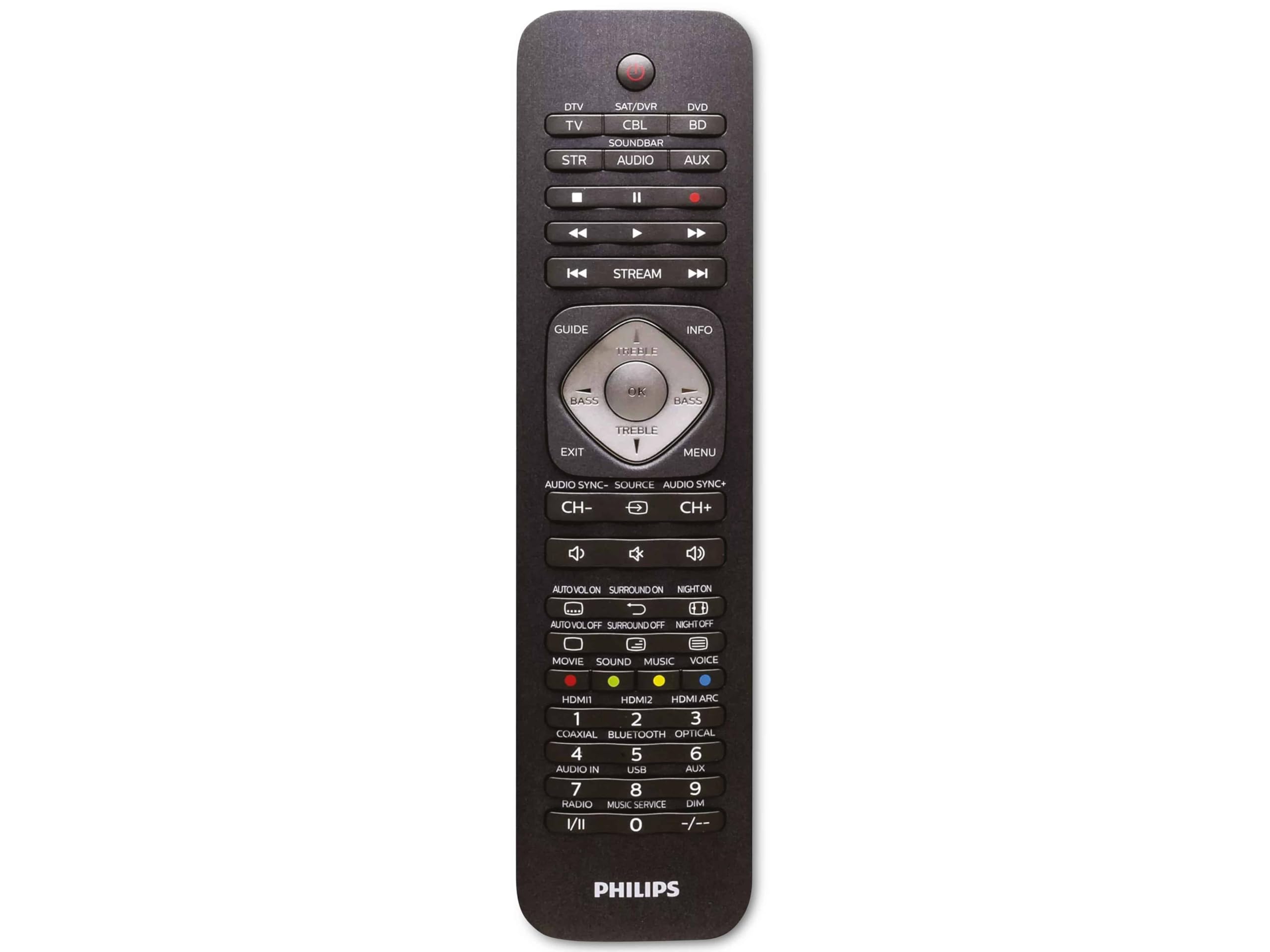
Image 1.1: Philips SRP5016/10 6-in-1 Universal Remote Control. This image displays the front view of the black universal remote control, highlighting its ergonomic design and button layout.
2. Налаштування
2.1. Встановлення батареї
- Відкрийте кришку відсіку для батарейок, розташовану на задній панелі пульта дистанційного керування.
- Вставте дві батарейки типу AAA, дотримуючись правильної полярності (+ та -), як зазначено всередині відсіку.
- Надійно закрийте кришку батарейного відсіку.
Примітка: Батарейки не входять до комплекту та повинні бути придбані окремо.
2.2. Programming Devices
The Philips SRP5016/10 can be programmed using either direct code entry or the learning function.
2.2.1. Direct Code Entry (Recommended for common brands)
- Увімкніть пристрій, яким ви хочете керувати (наприклад, телевізор, DVD-програвач).
- Press and hold the desired device button on the universal remote (e.g., TV, DVD) for approximately 3 seconds until the device button lights up.
- Enter the 4-digit code for your device's brand (refer to the code list provided with your remote, if available, or search online for Philips universal remote codes).
- If the device turns off or responds, the code is correct. Press the device button again to save the code. If not, try the next code for your brand.
2.2.2. Learning Function (For devices not in the code list or advanced functions)
- Place the universal remote and your original remote control head-to-head, approximately 1-3 cm apart.
- Press and hold the desired device button on the universal remote (e.g., TV) for approximately 3 seconds until the device button lights up.
- Натисніть і утримуйте НАВЧАЙТЕСЯ button on the universal remote until the device button starts blinking.
- On your original remote, press the button you wish to teach (e.g., ПОТУЖНІСТЬ). The device button on the universal remote will blink rapidly and then stay solid, indicating successful learning.
- Repeat step 4 for all other buttons you wish to learn.
- Натисніть НАВЧАЙТЕСЯ button again to exit learning mode.
3. Інструкція з експлуатації
3.1. Вибір пристрою
To control a specific device, press the corresponding device button (e.g., TV, DVD, SAT, ДОП, Звукова панель, ПОТОК) once. The selected device button will light up briefly to confirm your selection. You can then use the remote's buttons to control that device.
3.2. Основні функції
- ПОТУЖНІСТЬ: Вмикає або вимикає вибраний пристрій.
- ОБ'ЄМ +/-: Регулює гучність вибраного аудіопристрою.
- КАНАЛ +/-: Changes channels on the selected TV or DTV device.
- МУК: Вимкнення звуку.
- КНОПКИ З НОМЕРОМ (0-9): Для прямого введення каналу або інших числових даних.
- NAVIGATION (Arrow buttons, OK): Для навігації та вибору в меню.
4. Технічне обслуговування
4.1. Заміна батареї
When the remote control's range decreases or buttons become unresponsive, it is time to replace the batteries. Follow the battery installation steps in Section 2.1. Always replace both AAA batteries simultaneously with new ones.
4.2. прибирання
Для очищення пульта дистанційного керування використовуйте м’яку суху тканину. Для стійкого бруду злегкаampen the cloth with water or a mild cleaning solution. Avoid using abrasive cleaners, solvents, or alcohol, as these can damage the remote's surface or internal components.
5. Вирішення проблем
- Пульт не працює:
- Перевірте, чи батарейки вставлені правильно та чи не розряджені. За потреби замініть їх.
- Переконайтеся, що між пультом і пристроєм немає перешкод.
- Verify that the correct device button (e.g., TV, DVD) is selected.
- Пристрій не реагує на команди:
- The device code may be incorrect. Try reprogramming the device using a different code from the code list or use the learning function.
- Ensure the remote's infrared emitter is pointed directly at the device's infrared receiver.
- Функція навчання не працює:
- Ensure the original remote's batteries are fresh and it is functioning correctly.
- Make sure the remotes are positioned correctly (head-to-head, 1-3 cm apart) during the learning process.
- Try learning the button again. Some original remotes have weaker IR signals that require multiple attempts.
6. Технічні характеристики
| Особливість | Специфікація |
|---|---|
| Бренд | Philips |
| Назва моделі | 6-в-1 |
| Номер моделі | SRP5016/10 |
| Сумісні пристрої | Home Theater, DVD/Blu-ray Player, SoundBar, Television, Streaming Device |
| Особливість | Універсальна, функція навчання |
| Технологія підключення | Інфрачервоний |
| Maximum Number of Supported Devices | 6 |
| Тип контролера | Кнопкове керування |
| Кількість кнопок | Not specified (typical universal remote layout) |
| Максимальна дальність | 10 метрів |
| Джерело живлення | 2 батареї AAA (не входять в комплект) |
| Тип матеріалу | пластик |
| Розміри продукту | 21.4 х 5.3 х 2.2 см |
| Вага продукту | 130 г |
7. Гарантія та підтримка
For warranty information, please refer to the documentation provided at the time of purchase or contact your retailer. Philips offers customer support for their products. If you encounter issues that cannot be resolved using this manual, please visit the official Philips support webвеб-сайті або зверніться по допомогу до їхньої служби підтримки клієнтів.
Зберігайте підтвердження покупки для гарантійних претензій.


