1. Вступ
This manual provides detailed instructions for the setup, operation, maintenance, and troubleshooting of your MYPIN Infrared Remote Control. This remote is specifically designed to work with MYPIN 4K Media Players, including models B07WPY8VKL and B07PGFCPTV.
Будь ласка, уважно прочитайте цей посібник перед використанням пульта дистанційного керування, щоб забезпечити належну функціональність та максимально покращити враження від користування.
2. Вміст упаковки
- 1 x MYPIN Infrared Remote Control
Примітка: батарейки типу AAA не входять до комплекту та мають бути придбані окремо.
3. Налаштування
3.1 Встановлення батареї
- Знайдіть батарейний відсік на задній панелі пульта дистанційного керування.
- Посуньте кришку відсіку для батарейок вниз, щоб відкрити її.
- Вставте дві (2) батарейки типу AAA, переконавшись, що позитивний (+) та негативний (-) полюси правильно збігаються з позначками всередині відсіку.
- Засуньте кришку батарейного відсіку назад на місце, доки вона надійно не клацне.
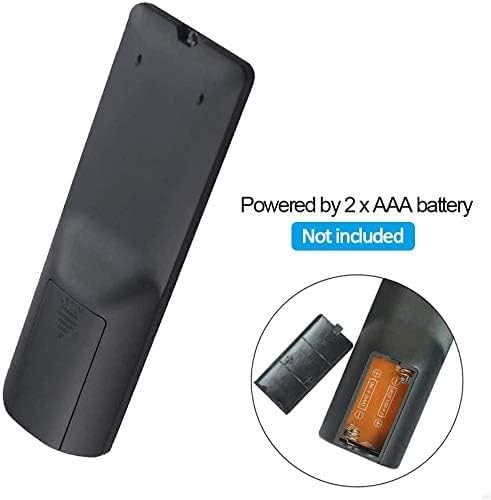
малюнок 3.1: Battery installation for the MYPIN Infrared Remote Control. Ensure correct polarity when inserting two AAA batteries.
3.2 Сумісність
This remote control is designed exclusively for MYPIN 4K Media Players. It is compatible with models such as B07WPY8VKL and B07PGFCPTV. It may not function correctly with other brands or models of media players.
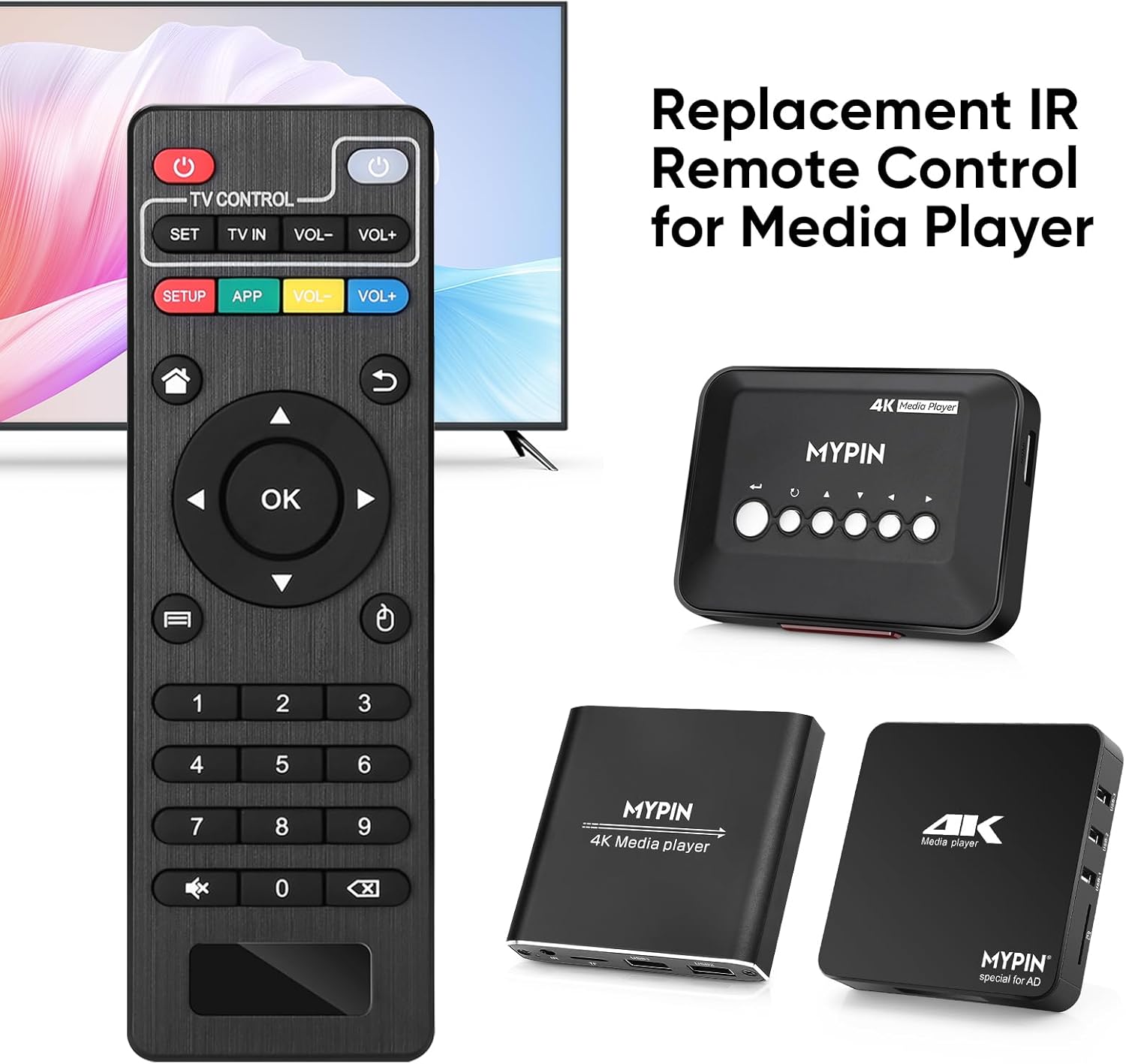
малюнок 3.2: The MYPIN remote control shown with compatible MYPIN 4K Media Players.
3.3 Початкове підключення
The MYPIN Infrared Remote Control operates via infrared (IR) signals. No pairing process is required. Simply point the remote control directly at the IR receiver of your MYPIN 4K Media Player. Ensure there are no obstructions between the remote and the media player.

малюнок 3.3: Using the MYPIN remote control with an optional IR cable for discreet placement of the media player.
4. Інструкція з експлуатації
The MYPIN Infrared Remote Control features a standard layout for intuitive control of your media player. Below is a guide to its primary functions:

малюнок 4.1: Key functional areas of the MYPIN Remote Control.
4.1 Функції кнопок
- Power Button (Red, Top Left): Turns the media player on or off.
- TV Control Section (Top Row):
- TV Learning Button (1): Used to program basic TV functions (e.g., TV Power, Volume). Refer to your TV's manual for learning remote functions.
- НАСТРОЙКА: Used for TV learning mode.
- TV IN: Switches TV input source.
- ГУЧНІСТЬ- / ГУЧНІСТЬ+: Регулює гучність телевізора.
- SETUP / APP / VOL- / VOL+ (Colored Buttons): These buttons provide quick access to specific media player functions or applications. Their exact function may vary depending on the media player's software.
- Кнопка «Додому» (іконка «Будиночок»): Returns to the main menu or home screen of the media player.
- Return/Back Button (Arrow Icon): Повернення до попереднього екрана або меню.
- Direction Keys (2 - Up, Down, Left, Right): Navigates through menus and content. When playing videos or music, Up/Down typically selects previous/next track, and Left/Right performs fast backward/forward.
- Кнопка OK (центральна): Confirms selections or plays content.
- Menu Key (3 - Three Horizontal Lines Icon): Accesses context-sensitive menus or playback options.
- Цифрова клавіатура (0-9): Used for direct input of numbers, such as channel selection or specific menu options.
- Mute Button (Crossed Speaker Icon): Mutes or unmutes the media player's audio.
- Context Menu Button (Box with Arrow Icon): Відкриває додаткові опції або налаштування.

малюнок 4.2: Accessing playback options using the Menu key on the MYPIN remote control.
5. Технічне обслуговування
5.1 Заміна батареї
When the remote control's performance degrades (e.g., reduced range, unresponsive buttons), it is likely time to replace the batteries. Follow the battery installation steps in Section 3.1 to replace the two AAA batteries.
5.2 Очищення
Щоб очистити пульт дистанційного керування, обережно протріть його поверхню м’якою сухою тканиною. Для видалення стійкого бруду злегкаampПротріть тканину водою або м’яким неабразивним засобом для чищення. Уникайте використання агресивних хімікатів або надмірної вологи, оскільки це може пошкодити електроніку пульта дистанційного керування.
5.3 Зберігання
Зберігайте пульт дистанційного керування в прохолодному, сухому місці, подалі від прямих сонячних променів та екстремальних температур. Якщо пульт дистанційного керування не використовуватиметься протягом тривалого часу, рекомендується вийняти батарейки, щоб запобігти витіканню та можливому пошкодженню.
6. Вирішення проблем
- Remote is unresponsive:
- Переконайтеся, що нові батарейки типу AAA встановлені правильно.
- Point the remote directly at the media player's IR receiver.
- Remove any obstructions between the remote and the media player.
- Check the operating distance; the remote has an infrared range of approximately 7 meters.
- If the remote initially seems unresponsive after battery installation, allow a short period for it to initialize, as some users have reported spontaneous functionality after a delay.
- Buttons not performing expected functions:
- Verify that the remote is compatible with your specific MYPIN media player model.
- Some buttons (e.g., SETUP, APP) may have functions determined by the media player's software and may not be universally assigned.
- TV Control buttons not working:
- Ensure you have successfully programmed the TV Learning Button functions according to your TV's instructions.
7. Технічні характеристики
| Особливість | Деталь |
|---|---|
| Технологія підключення | Інфрачервоний (ІЧ) |
| Сумісні пристрої | MYPIN media players (e.g., B07WPY8VKL, B07PGFCPTV) |
| Максимальна кількість підтримуваних пристроїв | 1 (for media player control) |
| Особливість | Ергономічний дизайн |
| Джерело живлення | 2 батареї AAA (не входять в комплект) |
| Інфрачервоне відстань | До 7 метрів |
| Інфрачервоний кут | 30 градусів |
| Вага товару | 1.13 унції |
| Розміри упаковки | 5.43 x 1.81 x 0.71 дюймів |
| Номер моделі | B08CDNZMJG |
8. Інформація про гарантію
MYPIN products are manufactured to high-quality standards. For specific warranty details regarding your remote control, please refer to the documentation included with your MYPIN 4K Media Player or visit the official MYPIN webсайт. Зберігайте чек про покупку як підтвердження покупки для будь-яких гарантійних претензій.
9. Підтримка
If you encounter any issues not covered in this manual or require further assistance, please contact MYPIN customer support through the retailer where you purchased the product or visit the official MYPIN support webсайт для контактної інформації.


