1. Вступ
Thank you for choosing the Xtorm 15W Go Power Bank XG1021. This manual provides essential information for the safe and efficient operation, maintenance, and troubleshooting of your device. Please read this manual thoroughly before using the power bank and retain it for future reference.
2. Продукт закінчивсяview
The Xtorm 15W Go Power Bank XG1021 is a compact and portable external battery designed to charge your mobile devices on the go. Featuring a 10,000 mAh capacity and 15W USB-C output, it offers efficient power delivery.

Figure 2.1: The Xtorm 15W Go Power Bank XG1021 in Space Grey, showcasinйого елегантний, компактний дизайн.
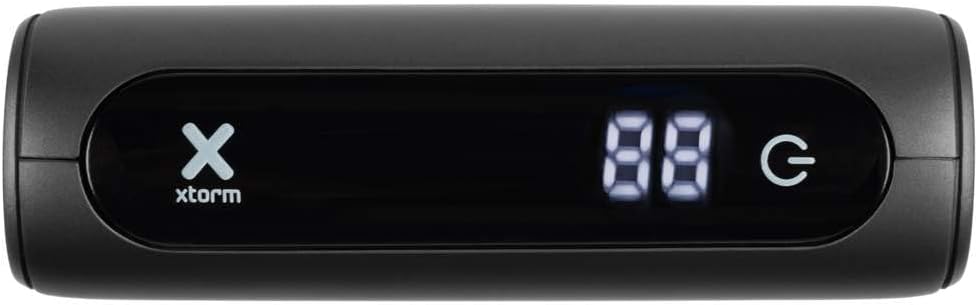
Figure 2.2: Front display of the power bank, indicating battery percentagе та стан живлення.
2.1. Універсальна сумісність
This power bank is designed for broad compatibility, capable of charging various devices including smartphones, tablets, and portable gaming consoles.

Figure 2.3: Illustration of the power bank's compatibility with different device types.
2.2. Портативний дизайн
The Xtorm Go Power Bank is engineered for portability, making it an ideal travel companion. Its compact dimensions and light weight ensure it can be easily carried.

Figure 2.4: The power bank's compact size, suitable for travel.
3. Налаштування
3.1. Розпакування та первинний огляд
Upon opening the package, ensure all components are present and undamaged. The box should contain the Xtorm 15W Go Power Bank, a USB-C cable, and this user manual.

Figure 3.1: Contents included in the Xtorm Power Bank Go package.
3.2. Початкове заряджання портативного зарядного пристрою
Before first use, it is recommended to fully charge the Xtorm Go Power Bank. Connect the provided USB-C cable to the power bank's USB-C input port and the other end to a compatible USB wall charger (not included). The digital display will show the charging progress. Once 100% is displayed, the power bank is fully charged and ready for use.
4. Інструкція з експлуатації
4.1. Заряджання зовнішніх пристроїв
- Підключіть зарядний кабель вашого пристрою до одного з вихідних портів портативного зарядного пристрою (USB-A або USB-C).
- Підключіть інший кінець кабелю до свого пристрою.
- Зовнішній зарядний пристрій автоматично почне заряджати ваш пристрій. Цифровий дисплей відображатиме залишок заряду батареї у відсотках.tage павербанку.
- Щоб зупинити заряджання, просто від’єднайте пристрій.
The 15W USB-C output allows for faster charging of compatible devices.

Figure 4.1: Fast charging an external device using the power bank.
4.2. Перевірка рівня заряду батареї
The digital display on the front of the power bank indicates the current battery percentage. Цей дисплей активується автоматично, коли підключено пристрій або коли заряджається портативний зарядний пристрій.
5. Технічне обслуговування
- Прибирання: Використовуйте м’яку суху тканину для очищення портативного зарядного пристрою. Уникайте використання агресивних хімікатів або абразивних матеріалів.
- Зберігання: Зберігайте зовнішній акумулятор у прохолодному, сухому місці, подалі від прямих сонячних променів та екстремальних температур. Для тривалого зберігання рекомендується заряджати зовнішній акумулятор приблизно до 50-70% кожні три місяці, щоб підтримувати його в робочому стані.
- Догляд за акумулятором: Do not expose the power bank to water or moisture. Avoid dropping or subjecting the device to strong impacts.
6. Вирішення проблем
- Зовнішній акумулятор не заряджається: Ensure the USB-C cable is securely connected to both the power bank's input and the wall charger. Try a different cable or wall charger.
- Пристрій не заряджається від портативного зарядного пристрою: Ensure the charging cable is securely connected to both the power bank's output and your device. Check if the power bank has sufficient charge. Try a different cable or output port.
- Повільна зарядка: Ensure you are using a compatible cable and that your device supports fast charging. The power bank's output may be limited by the connected device's input capabilities.
- Зовнішній акумулятор нагрівається під час використання: It is normal for the power bank to become slightly warm during charging or discharging. If it becomes excessively hot, disconnect it immediately and contact support.
7. Технічні характеристики
Detailed technical specifications for the Xtorm 15W Go Power Bank XG1021:
| Особливість | Специфікація |
|---|---|
| Назва моделі | XG1021 |
| Бренд | Xtorm |
| Ємність акумулятора | 10,000 mAh (9800mAh / 36.2Wh Li-ion) |
| Тип роз'єму | USB типу C |
| Вхід (USB-C) | 5 В = 3 А (15 Вт) |
| Вихід (USB-C) | 5 В = 3 А (15 Вт) |
| Вихід (USB-A) | 5В=3А |
| Загальний вихід | 15 Вт |
| Склад батареї | Літій-іонний |
| Особливість | Компактний |
| Рекомендоване використання | Смартфон |
| Джерело живлення | Електричний кабель |
| Колір | Космічний сірий |

Figure 7.1: Back of the power bank displaying printed specifications and regulatory marks.
8. Інформація про безпеку
Щоб забезпечити безпечну роботу та запобігти пошкодженню пристрою чи травмам, дотримуйтесь наступних правил безпеки:
- Do not expose the power bank to extreme temperatures (above 45°C or below -10°C) or direct sunlight.
- Do not expose the power bank to water, moisture, or high humidity.
- Do not disassemble, modify, or attempt to repair the power bank yourself. This will void the warranty and may cause safety hazards.
- Уникайте падіння та сильних ударів на павербанк.
- Keep the power bank away from flammable materials and explosive environments.
- Використовуйте лише сертифіковані зарядні кабелі та адаптери.
- Зберігати в недоступному для дітей місці.

Figure 8.1: Internal safety mechanisms of the Xtorm Power Bank.
9. Гарантія та підтримка
Xtorm products are manufactured to high quality standards. For information regarding warranty terms and conditions, please refer to the official Xtorm webсайт або гарантійний талон, що додається до вашої покупки.
For technical support, troubleshooting assistance, or general inquiries, please visit the Xtorm Support Helpdesk online or contact their customer service. You can also find more information and updates on Xtorm's official social media channels.
- Xtorm Support Helpdesk: www.xtorm.eu/support
- Соціальні мережі: шукати "Xtorm" on major platforms.