1. Важлива інформація з безпеки
Уважно прочитайте всі інструкції перед складанням та використанням. Недотримання цих інструкцій може призвести до травмування або пошкодження виробу.
- Цей стіл призначений лише для використання в приміщенні.
- Ensure all screws are tightened securely before use. Periodically check and re-tighten all fasteners.
- Не перевантажуйте стіл. Максимальна рекомендована вага становить 80 кг (176 фунти).
- Тримайте дітей та домашніх тварин подалі від столу під час роботи.
- Avoid placing the desk in direct sunlight or in damp середовищ.
- Do not disassemble or modify the desk's electrical components. Contact customer support for service.
Warning: The product will arrive in two separate packages and may be shipped separately. Do not discard any packaging until assembly is complete and the desk is fully functional.
2. Вміст упаковки
Your FLEXISPOT EN2 Electric Standing Desk is shipped in two packages. Please ensure you have received both packages before beginning assembly.
- Пакет 1: Desktop (48" Mahogany Top)
- Пакет 2: Desk Frame (Gray Frame), Motor, Control Panel, Power Strip, Cable Management Tray, Hardware, and User Manual.

Figure 2.1: The FlexiSpot EN2 desk components are shipped in two separate packages for safe delivery.
3. Налаштування та складання
Assembly typically requires one person and approximately 30-60 minutes. An electric drill (not included) may be helpful for certain steps.
- Розпакуйте компоненти: Carefully remove all parts from both packages and lay them out on a soft, clean surface to prevent scratches. Verify all components are present against the packing list.
- Збірка каркаса столу: Attach the lifting columns to the feet. Ensure the crossbeam is correctly oriented.
- Attach Crossbeam: Secure the crossbeam to the lifting columns. Note that while some holes are pre-drilled for legs, the center holes for the crossbeam and cable tray may require self-tapping screws. Apply firm pressure with an electric drill for easy installation.
- Install Motors and Control Box: Follow the manual to connect the motor cables to the control box and secure the control box to the frame.
- Прикріпити робочий стіл: Carefully place the desktop onto the assembled frame. Align the pre-drilled holes on the desktop with the frame and secure with screws.
- Install Control Panel and Power Strip: Mount the 6-button digital control panel and the clamp-on power strip to the desired location on the desktop. The power strip can be clipped to the back or side.
- Управління кабелем: Utilize the included cable management device to organize and secure all power and data cables underneath the desk. This helps prevent cables from snagging during height adjustments.

Figure 3.1: Assembled FLEXISPOT EN2 Electric Standing Desk.

Figure 3.2: Effective cable management keeps your workspace tidy and safe.
4. Інструкція з експлуатації
The desk features a 6-button digital controller for easy height adjustment and memory presets.
4.1 Регулювання висоти
- Підняти стіл: Press and hold the 'Up' arrow button (▲) to raise the desk. The LED display will show the current height.
- Нижній стіл: Press and hold the 'Down' arrow button (▼) to lower the desk. The LED display will show the current height.
- The motorized system adjusts smoothly from 28.1 inches to 45.7 inches. The motor operates quietly at less than 50 dB.
4.2 Попередні налаштування пам'яті
The controller features 4 programmable memory presets to quickly switch between your preferred sitting and standing heights.
- Adjust the desk to your desired height using the Up/Down arrow buttons.
- Press the 'M' button (Memory). The display will show 'S-'.
- Press one of the number buttons (1, 2, 3, or 4) within 3 seconds. The display will show 'S-1', 'S-2', etc., indicating the height is saved to that preset.
- To recall a saved height, simply press the corresponding number button (1, 2, 3, or 4). The desk will automatically move to the saved position.
4.3 Integrated Power Strip and USB Ports
The desktop is equipped with a removable power strip for convenient device charging and power access.
- Подовжувач живлення має 3 розетки змінного струму (125 В/12 А) та 2 порти USB для зарядки (5 В/2 А).
- It can be clipped to the back or side of your desk to suit your setup.

Figure 4.1: Digital control panel for height adjustment and memory presets.

Figure 4.2: Integrated power strip with AC outlets and USB charging ports.
4.4 Timer Function (if available on your model)
Some models may include a timer function to remind you to switch between sitting and standing positions. Refer to your specific model's manual for details on setting and using this feature.
5. особливості
- Повний робочий стіл: The 1-inch eco-friendly desktop provides a seamless and spacious work surface, offering enhanced stability compared to multi-piece desktops.
- Міцна конструкція: Constructed with an industrial-grade steel frame and solid tabletop, the desk can support up to 176 pounds (80 kg). Each frame undergoes rigorous testing for performance and durability.
- Закруглені кути: The desktop features rounded corners for safety and to prevent accidental bumps or damage.
- Тиха робота: The motor operates at less than 50 dB, ensuring a quiet work environment during height adjustments.

Figure 5.1: The whole-piece desktop offers enhanced stability and a smooth surface.

Figure 5.2: The desk operates with a quiet motor, producing less than 50 dB of noise.

Figure 5.3: The desk's robust construction supports up to 176 lbs.
6. Технічне обслуговування
- Прибирання: Протріть робочий стіл і рамку м’якою серветкоюamp тканина. Уникайте абразивних засобів чи агресивних хімікатів, які можуть пошкодити покриття.
- Огляд: Періодично перевіряйте всі гвинти та болти, щоб переконатися, що вони затягнуті. За потреби підтягніть.
- Управління кабелем: Ensure cables remain neatly organized and are not pinched or strained during height adjustments.
7. Вирішення проблем
- Стіл не рухається: Check all cable connections, especially the power cord and motor cables. Ensure the power outlet is functional.
- Нерівномірний рух: Perform a reset procedure (refer to the full user manual for specific steps). Ensure the desk is not overloaded or obstructed.
- Коди помилок: If an error code appears on the LED display, consult the comprehensive user manual for specific troubleshooting steps related to that code.
8. Технічні характеристики
| Особливість | Деталь |
|---|---|
| Бренд | FLEXISPOT |
| Номер моделі | EN2 |
| Розмір робочого столу | 48"D x 24"W (Dimensions may vary slightly by 0 to 1") |
| Матеріал для робочого столу | Wood (Mahogany Top) |
| Матеріал рами | Alloy Steel (Gray Frame) |
| Діапазон регулювання висоти | від 28.1 до 45.7 дюймів |
| Підйомний механізм | Електричний |
| Рівень шуму двигуна | Менше 50 дБ |
| Максимальна вантажопідйомність | 176 фунтів (80 кг) |
| Панель керування | 6-кнопковий цифровий контролер з 4 пресетами пам'яті |
| Розетка живлення | 3 AC outlets (125V/12A) |
| USB-порти для зарядки | 2 USB-порти (5 В/2 А) |
| Потрібна збірка | так |
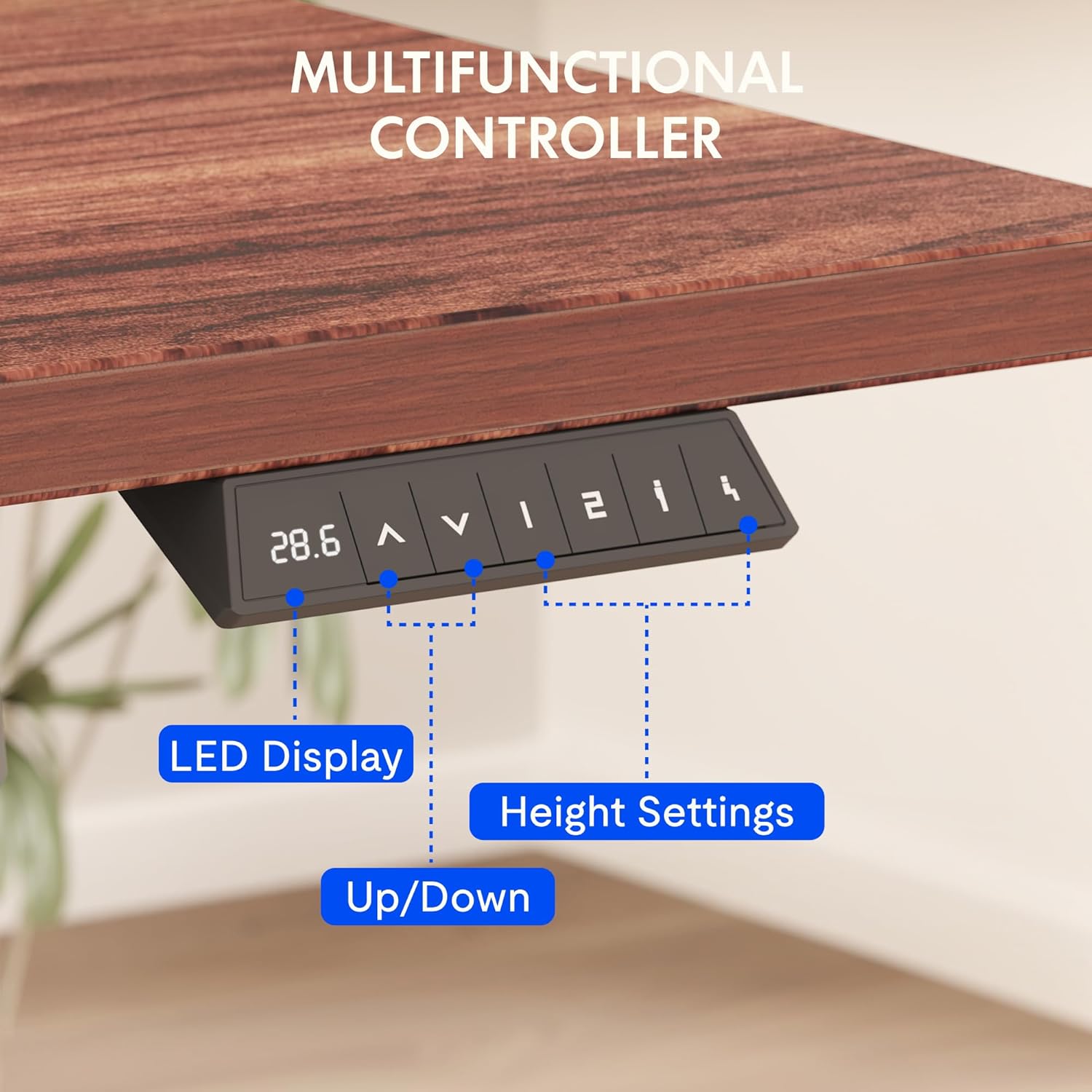
Figure 8.1: Key dimensions and features of the FLEXISPOT EN2 desk.
9. Гарантія та підтримка
FLEXISPOT provides comprehensive warranty coverage for your EN2 Electric Standing Desk:
- 5-річна гарантія: Applies to frames, motors, and other mechanical devices.
- 2-річна гарантія: Applies to controllers, switches, and electronics.
For customer support, troubleshooting assistance, or warranty claims, please visit the official FLEXISPOT webсайт або зверніться безпосередньо до їхнього відділу обслуговування клієнтів.
10. Офіційні відео про продукт
10.1 Computer Workstation Table Test
Video 10.1: A demonstration of the FLEXISPOT EN2 desk's stability and functionality as a computer workstation.
10.2 Flexispot Classic Height Adjustable Standing Desk Series
Відео 10.2: Оверview of the FlexiSpot Classic Height Adjustable Standing Desk Series, highlighting key features and design.
10.3 FLEXISPOT Brand Introduction
Video 10.3: A brief introduction to the FLEXISPOT brand and its commitment to ergonomic solutions.


