вступ
This manual provides detailed instructions for the Rapoo E9100M Multimode Wireless Keyboard. Designed for versatility and portability, this ultra-slim keyboard features a durable aluminum base and offers seamless connectivity across multiple devices using 2.4 GHz wireless, Bluetooth 3.0, and Bluetooth 4.0 (Smart) technologies. Its energy-saving features ensure a battery life of up to 12 months, minimizing the need for frequent battery replacement.
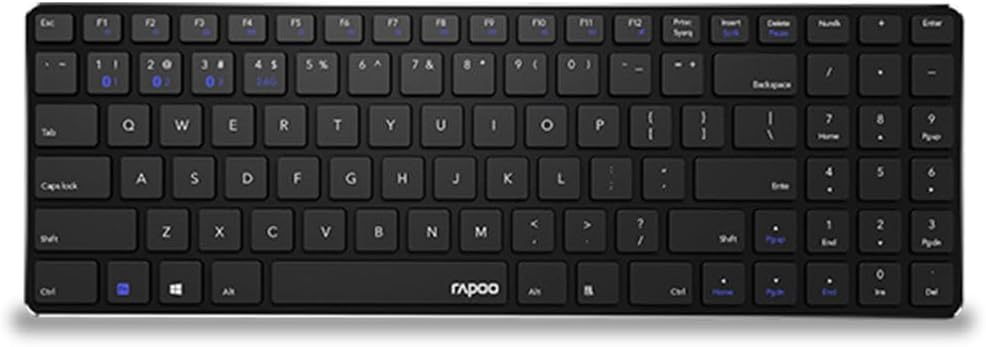
Image: Rapoo E9100M Multimode Wireless Keyboard, showcasing its full QWERTY US layout and slim profile.
Вміст упаковки
- Rapoo E9100M Multimode Wireless Keyboard
- USB-приймач
- Короткий посібник
Особливості продукту
- Multimode Wireless Connectivity: Connect via Bluetooth 3.0, 4.0, and 2.4 GHz.
- Робочий діапазон: Up to 10 meters with 360-degree coverage.
- Підключення до кількох пристроїв: Підключення до кількох пристроїв одночасно.
- Ультратонкий дизайн: Compact 4.9 mm profile.
- Мультимедійні гарячі клавіші: Fn shortcuts for quick access to media functions.

Зображення: Детальне view of the keyboard's key mechanism, highlighting its slim design and key structure.
Налаштування
1. Встановлення батареї
The keyboard requires 2 Lithium-ion batteries. Open the battery compartment on the underside of the keyboard and insert the batteries, ensuring correct polarity.
2. Connecting via 2.4 GHz Wireless
- Знайдіть USB-приймач, який зазвичай знаходиться у відсіку для батареї або у спеціальному слоті на клавіатурі.
- Підключіть USB-приймач у вільний USB-порт на комп’ютері.
- Увімкніть клавіатуру за допомогою вимикача живлення. Клавіатура має автоматично підключитися до приймача.
- The 2.4G indicator light (often labeled '1' or '2' on the keyboard) will illuminate briefly to confirm connection.
3. Підключення через Bluetooth
The E9100M supports Bluetooth 3.0 and 4.0 (Smart) for connecting to multiple devices.
- Увімкніть клавіатуру.
- Натисніть і утримуйте Fn key and one of the Bluetooth keys (e.g., F1, F2, або F3, indicated by Bluetooth icons) for 3-5 seconds until the corresponding indicator light starts blinking rapidly. This indicates the keyboard is in pairing mode.
- На своєму пристрої (комп’ютері, планшеті, смартфоні) перейдіть до налаштувань Bluetooth та знайдіть нові пристрої.
- Select "Rapoo E9100M" from the list of available devices.
- Follow any on-screen prompts to complete the pairing process. The indicator light will stop blinking and remain solid for a few seconds once connected.
- Repeat for additional Bluetooth devices, assigning each to a different Bluetooth channel (e.g., F1 for device 1, F2 for device 2).
Інструкція з експлуатації
Перемикання між підключеними пристроями
To switch between connected devices (2.4 GHz, Bluetooth 1, Bluetooth 2, etc.), simply press the corresponding Fn key in combination with the designated F-key (e.g., Fn + F1 for Bluetooth 1, Fn + F2 for Bluetooth 2, or a dedicated 2.4G key).
Multimedia Hotkeys (Fn Functions)
The keyboard features multimedia hotkeys accessible by pressing the Fn key in combination with the F-keys (F1-F12). Refer to the key legends for specific functions such as volume control, media playback, and more.
Режим енергозбереження
The keyboard automatically enters power-saving mode after a period of inactivity. Press any key to wake it up.
Технічне обслуговування
прибирання
Для очищення клавіатури використовуйте м’яку тканину без ворсу, злегка вологуampened with water or a mild cleaning solution. Avoid excessive moisture. Do not use abrasive cleaners or solvents.
Догляд за акумулятором
If the keyboard will not be used for an extended period, it is recommended to remove the batteries to prevent leakage.
Усунення несправностей
Клавіатура не відповідає
- Переконайтеся, що клавіатуру ввімкнено.
- Перевірте рівень батареї та замініть її, якщо необхідно.
- For 2.4 GHz connection, ensure the USB receiver is securely plugged in and try a different USB port.
- For Bluetooth connection, ensure Bluetooth is enabled on your device and the keyboard is paired correctly. Try re-pairing the keyboard.
- Move the keyboard closer to the receiver/device to rule out range issues.
Lag or Disconnections
- Ensure there are no strong electromagnetic interferences nearby (e.g., Wi-Fi routers, other wireless devices).
- Try switching to a different wireless channel if available (for Bluetooth, try re-pairing).
Технічні характеристики
| Особливість | Деталь |
|---|---|
| Бренд | Rapoo |
| Номер моделі | RP E9100M UI-B |
| Технологія підключення | Bluetooth 3.0, Bluetooth 4.0 (Smart), 2.4 GHz Wireless |
| Сумісність операційної системи | Windows 10, Windows 7, Windows 8, Windows Vista, Windows XP |
| Сумісні пристрої | Ноутбук, ПК, планшет, смартфон |
| Опис клавіатури | QWERTY |
| Кількість клавіш | 104 |
| Колір | чорний |
| Особливість | Multimedia Hotkeys, Ultra-slim Design |
| Джерело живлення | 2 x Lithium-ion Batteries (required) |
| Розміри (Д x Ш x В) | Approximately 10L x 10W x 10H millimeters (Note: Dimensions provided in source may be generic) |
Гарантія та підтримка
For warranty information and technical support, please refer to the warranty card included with your product or visit the official Rapoo webсайт. Зберігайте чек про покупку для гарантійних претензій.
Official Rapoo Webсайт: www.rapoo.com


