1. Вступ
This manual provides comprehensive instructions for the IFYOO X208 2.4G Wireless and Wired Gaming Controller. It covers product features, setup procedures, operating modes, and important compatibility information to ensure optimal use of your device.

Figure 1: IFYOO X208 Gaming Controller. This image displays the front view of the black and silver controller, highlighting its ergonomic design and button layout.
2. Вміст упаковки
Перевірте, чи всі перелічені нижче предмети входять до вашої упаковки:
- 1x IFYOO X208 Gaming Controller
- 1x 1M USB Charging Cable (Micro-USB)
- 1 USB-ключ 2.4 ГГц
- 1x Посібник користувача (цей документ)
- 1x гарантійний талон

Figure 2: Package Contents. This image shows the IFYOO X208 controller alongside its USB charging cable, 2.4GHz USB dongle, user manual, and warranty card.
3. Продукт закінчивсяview
3.1 Основні характеристики
- Подвійне підключення: Supports 2.4GHz wireless and wired connections.
- Multi-mode Support: Xinput, Dinput, Android, and PS3 modes.
- Подвійний вібраційний зворотний зв'язок: Provides immersive haptic feedback in supported games.
- JD-SWITCH Function: Allows switching between D-pad and Left Stick functions.
- Функція TURBO: Enables rapid, continuous button presses.
- Ергономічний дизайн: Features a comfortable grip, high-precision D-pad, wear-resistant anti-slip joysticks, and linear Hall magnetic induction triggers.
3.2 Схема контролера

Figure 3: Front Features. This image highlights the high-precision D-pad, engraved ABXY buttons, excellent non-slip grip, and wear-resistant anti-slip joysticks.

Figure 4: Top Features. This image illustrates the revolutionary designed shoulder buttons (L1/R1) and the 255-level magnetic induction triggers (L2/R2).
4. Налаштування та сумісність
4.1 Сумісність системи
- PC / Laptop: Windows 10/8/7/XP, Steam. (Windows XP may require driver installation).
- Пристрої Android: Mobile Phones, Tablets, TVs, TV Boxes (version 4.0 or above, device must support OTG function). An OTG adapter or cable is required for Android devices with Type-C or Micro-USB ports.
- PlayStation 3 (PS3): Compatible with most PS3 games.
Important Note: This device is NOT compatible with Xbox 360, Xbox One, Mac OS, or PS4.
4.2 Методи підключення
The IFYOO X208 controller supports both 2.4GHz wireless and wired connections.
4.2.1 Бездротове з'єднання 2.4 ГГц
- Insert the 2.4GHz USB dongle into an available USB port on your PC, Android device (via OTG adapter), or PS3 console.
- Увімкніть контролер. Він автоматично спробує підключитися до электронного ключа.
- Once connected, the indicator light on the controller will stabilize, indicating a successful wireless connection.
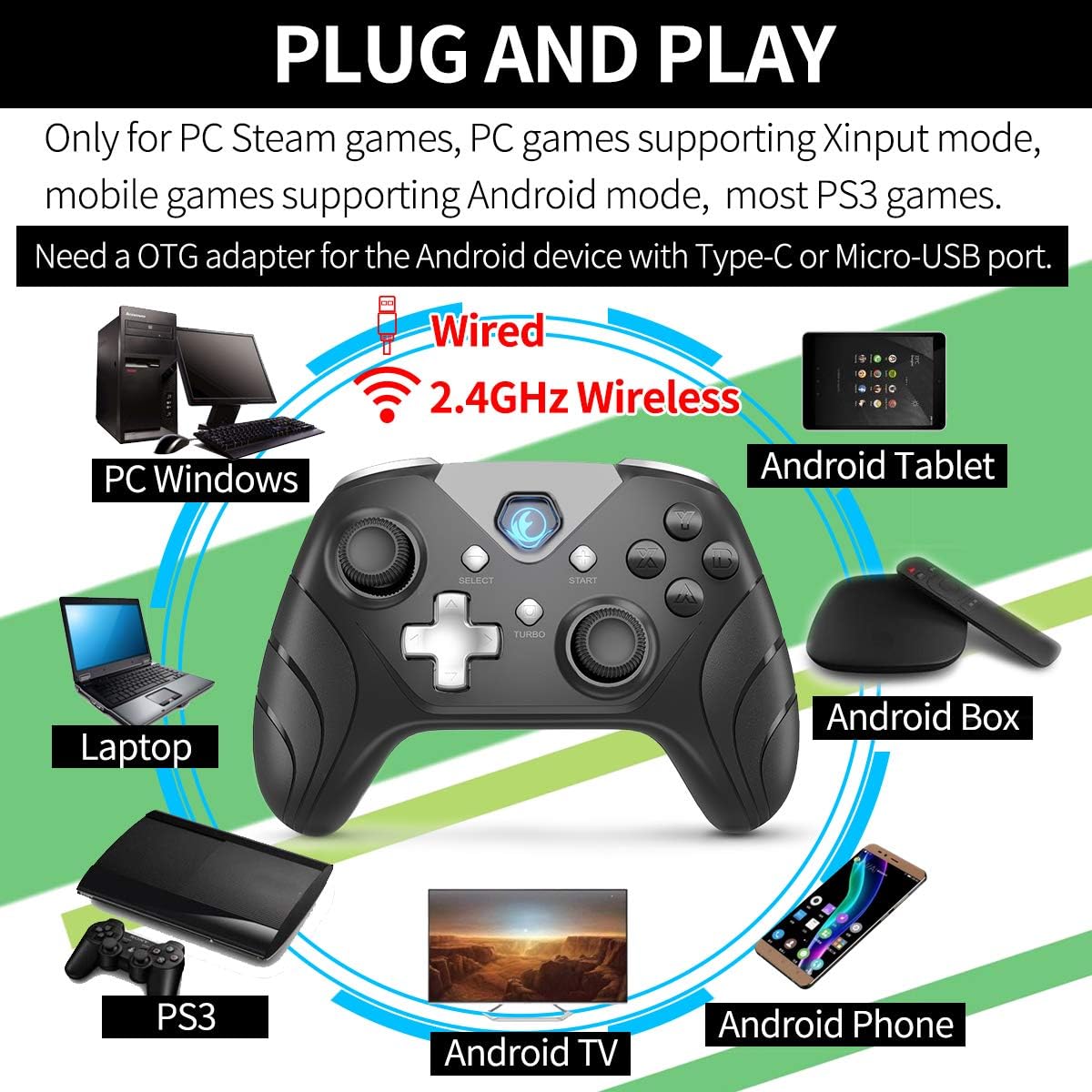
Figure 5: Connectivity Overview. This image illustrates the controller's compatibility with various devices (PC, Laptop, Android Tablet, Android Box, Android TV, Android Phone, PS3) via both wired and 2.4GHz wireless connections. It also notes the requirement for an OTG adapter for Android devices.

Figure 6: Android Device Connection. This image shows the IFYOO X208 controller connected wirelessly to an Android phone via an OTG adapter, demonstrating gameplay.

Figure 7: PC Connection. This image depicts the IFYOO X208 controller being used with a laptop for PC gaming.
4.2.2 Дротове підключення
- Connect the Micro-USB end of the charging cable to the controller.
- Connect the USB-A end of the charging cable to an available USB port on your PC or PS3 console.
- The controller will automatically be recognized as a wired device.
The wired connection also charges the controller's internal battery.
5. Інструкція з експлуатації
5.1 Multi-Mode Functionality
The controller supports multiple modes for different platforms:
- Режим Xinput: Primarily for PC games that support Xinput. This mode often enables dual vibration feedback.
- Dinput Mode: For older PC games or specific applications that require DirectInput.
- Режим Android: For compatible Android mobile games.
- Режим PS3: For PlayStation 3 consoles.
The controller typically switches modes automatically based on the connected device. Some games may require manual button mapping or third-party software for optimal performance.
5.2 JD-SWITCH Function
The JD-SWITCH function allows you to swap the input functionality between the D-pad and the Left Analog Stick. This can be useful for games where one input method is preferred for movement or specific actions.
- To activate/deactivate JD-SWITCH, press and hold the "TURBO" а потім натисніть кнопку "SELECT" кнопку.
- The indicator light may change to confirm the switch.
5.3 Функція TURBO
The TURBO function enables rapid, continuous input for a selected button, reducing the need for repeated presses. This can be beneficial in games requiring fast button mashing.
- Press and hold the button you wish to assign TURBO functionality to (e.g., A, B, X, Y).
- While holding that button, press the "TURBO" кнопку один раз.
- Release both buttons. The assigned button will now activate continuously when held down.
- To clear the TURBO function for a specific button, repeat the process: hold the button, then press the "TURBO" кнопку.

Figure 8: Practical Functions. This image visually explains the JD-SWITCH function (swapping D-pad and Left Stick) and the TURBO function (creating continuous button presses).
5.4 Dual Vibration Feedback
The controller features dual vibration motors for enhanced gaming immersion. This function is primarily available in PC games that support Xinput mode and may need to be enabled within the game's settings.
6. Важливі примітки та усунення несправностей
- Встановлення драйвера: For Windows 10 or above, DirectX 9.0c or higher may be required. If the controller is not recognized in Windows, try installing the latest version of the Microsoft Xbox 360 Controller gamepad driver. Windows XP systems specifically require driver installation.
- Android OTG: Ensure your Android device supports OTG (On-The-Go) functionality for wireless connection via the USB dongle. An OTG adapter or cable is necessary for devices with Type-C or Micro-USB ports.
- Налаштування гри: Some games may require manual configuration of buttons or the use of third-party software to function correctly with the controller.
- Вібрація: Dual vibration feedback is only active in PC games that support Xinput mode and where the feature is enabled in the game's settings.
6.1 Поширені проблеми та рішення
- Контролер не підключається:
- Ensure the 2.4GHz USB dongle is securely inserted into a working USB port.
- Перевірте, чи контролер увімкнено.
- For wired connection, ensure the USB cable is fully connected to both the controller and the device.
- Спробуйте інший USB-порт.
- Buttons Not Responding / Incorrect Input:
- Check game settings for controller configuration.
- Ensure the correct mode (Xinput/Dinput/Android/PS3) is active for your platform.
- If on PC, ensure necessary drivers are installed (e.g., Xbox 360 Controller driver for Windows).
- Без вібраційного зворотного зв'язку:
- Confirm the game supports Xinput mode.
- Check the game's settings to ensure vibration is enabled.
7. Технічні характеристики
| Розміри продукту | 160 x 113 x 63 мм |
| Вага продукту | 205 ± 10 г. |
| Інтерфейс зарядки | Micro-USB |
| Спосіб підключення | 2.4GHz Wireless and Wired |
| Час зарядки | 2-3 годин |
| Бездротова відстань | Approx. 7 Meters |
| Ємність акумулятора | Літій-полімерний 600 мАг |
| Тривалість роботи батареї | Більше 10 годин |
8. Технічне обслуговування
- Прибирання: Використовуйте м’яку суху тканину для очищення контролера. Уникайте використання агресивних хімікатів або абразивних матеріалів.
- Зберігання: Зберігайте контролер у прохолодному, сухому місці, подалі від прямих сонячних променів та екстремальних температур.
- Догляд за акумулятором: Щоб продовжити термін служби батареї, уникайте частого повного розряджання контролера. Регулярно заряджайте його, навіть якщо він не використовується постійно.
- Уникайте крапель: Захищайте контролер від падінь та ударів, які можуть пошкодити внутрішні компоненти.
9. Гарантія та підтримка
IFYOO offers a warranty for the X208 Gaming Controller. You may return or request a refund for any reason, or exchange/replace the product for any quality issue within 3 months of purchase.
For any questions, concerns, or support needs, please contact IFYOO customer service. Refer to the included Warranty Card for specific contact details and warranty terms.


