1. Вступ
Thank you for choosing the STRONG SRT 24HC3023 24-inch TV. This television is designed for versatile use, offering a triple tuner for DVB-T2 HD, DVB-C, and DVB-S2 reception, making it suitable for both home entertainment and mobile applications such as motorhomes, caravans, or boats, thanks to its 12 Volt compatibility. This manual provides essential information for setting up, operating, and maintaining your new television. Please read it thoroughly before use to ensure proper functionality and safety.

Figure 1.1: STRONG SRT 24HC3023 24-inch TV
2. Інформація про безпеку
Для забезпечення безпечної роботи та запобігання пошкодженням, будь ласка, дотримуйтесь наступних запобіжних заходів:
- Не піддавайте телевізор впливу дощу або вологи, щоб запобігти пожежі або ураженню електричним струмом.
- Не блокуйте вентиляційні отвори. Забезпечте достатній простір навколо телевізора для належної циркуляції повітря.
- Use only the power adapter supplied with the TV. For 12V operation, ensure the power source is stable and within the specified voltagе діапазон.
- Захищайте шнур живлення від наступання або защемлення, особливо біля вилок, розеток і в місці виходу з пристрою.
- Не намагайтеся самостійно обслуговувати цей виріб. Зверніть усі послуги до кваліфікованого обслуговуючого персоналу.
- Clean the TV only with a dry cloth. Do not use liquid cleaners or aerosol cleaners.
- Keep batteries for the remote control out of reach of children.
3. Вміст упаковки
Carefully unpack your TV and check that all items listed below are included and undamaged. If any items are missing or damaged, contact your retailer.
- LED-телевізор STRONG SRT 24HC3023
- Remote Control (including 2x AAA Batteries)
- Stand (Base and Screws)
- Power Adapter (Standard Euro; 12V power cable not included)
- Посібник користувача

Рисунок 3.1: Упаковка продукту

Рисунок 3.2: Пульт дистанційного керування
4. Налаштування
4.1 Прикріплення підставки
- Place the TV face down on a soft, clean surface to prevent scratching the screen.
- Вирівняйте підставку з монтажними отворами на нижній панелі телевізора.
- Закріпіть підставку за допомогою наданих гвинтів. Не перетягуйте.
4.2 Підключення периферійних пристроїв
Your TV offers a variety of connection ports for different devices.
- Антена/Супутник: Connect your DVB-T/T2 antenna to the "ANT In" port or your satellite dish to the "SAT In" port.
- HDMI: For high-definition devices like Blu-ray players, game consoles, or streaming sticks.
- SCART: For older devices like DVD players or VCRs.
- USB: Для відтворення медіафайлів з USB-накопичувачів.
- AV In / Mini YPbPr: For analog video and audio sources.
- Навушники: Для приватного прослуховування.
- S/PDIF: Для цифрового аудіовиходу на зовнішні звукові системи.
- CI слот: For CI+ modules (e.g., for freenet-TV).
- Живлення 12 В: This TV is 12V compatible, ideal for mobile use. A 12V power cable is not included and must be purchased separately.

Рисунок 4.1: Розміри телевізора
4.3 Початкове увімкнення та сканування каналів
- Connect the TV to a power source (either the supplied AC adapter or a compatible 12V source).
- Натисніть кнопку живлення на телевізорі або пульті дистанційного керування.
- Follow the on-screen instructions for initial setup, including language selection and channel scanning. The triple tuner allows you to scan for DVB-T/T2, DVB-C, and DVB-S2 channels.
5. Інструкція з експлуатації
5.1 Основні функції
- Увімкнення/вимкнення живлення: Натисніть потужність кнопку на пульті дистанційного керування.
- Вибір каналу: Використовуйте CH +/- кнопки для послідовного перемикання каналів або введіть номери каналів безпосередньо за допомогою цифрової клавіатури.
- Регулювання гучності: Використовуйте VOL +/- кнопки для регулювання гучності.
- Вибір джерела: Натисніть ДЖЕРЕЛО button to switch between input sources (HDMI, SCART, TV, etc.).
5.2 Робота потрійного тюнера
The integrated triple tuner supports DVB-T/T2 (terrestrial), DVB-C (cable), and DVB-S2 (satellite) reception. During the initial setup, you will be prompted to select your preferred reception type and perform a channel scan. You can switch between these modes via the input source menu.
5.3 Електронний гід (EPG)
Натисніть EPG button on the remote control to access the Electronic Program Guide. This displays program schedules for upcoming broadcasts and allows you to set timers for recording or viewінж.
5.4 Відтворення з USB
Insert a USB storage device into the USB port. The TV will typically detect the device and prompt you to access its media content (photos, music, videos). Navigate through the fileза допомогою пульта дистанційного керування.
5.5 CI+ Slot
The CI+ slot allows you to insert a Conditional Access Module (CAM) and a smart card (e.g., for freenet-TV in Germany) to decrypt encrypted channels. Follow the instructions provided with your CI+ module for installation and activation.
Відео 5.1: Офіційне відеопрезентація продуктуasing the STRONG 24HC3023 TV's features, including its 12V compatibility for mobile use in settings like camping or motorhomes.

Figure 5.1: STRONG TV in a mobile setting, highlighting 12V compatibility.
6. Технічне обслуговування
Proper maintenance helps extend the life of your TV.
- Очищення екрану: Обережно протріть екран м’якою тканиною без ворсу. Для стійких плям використовуйте спеціальний розчин для чищення екранів, нанесений на тканину, а не безпосередньо на екран.
- Прибирання шафи: Використовуйте м’яку суху тканину для протирання корпусу телевізора. Не використовуйте абразивні засоби для чищення або розчинники.
- Вентиляція: Ensure the ventilation openings are clear of dust and debris. Do not place the TV in an enclosed space without adequate airflow.
- Вимкнення живлення: Завжди від’єднуйте телевізор від розетки перед чищенням або якщо він не використовується протягом тривалого часу.
7. Вирішення проблем
If you encounter problems with your TV, refer to the following common issues and solutions.
| проблема | Можлива причина | Рішення |
|---|---|---|
| Немає живлення | Шнур живлення не підключено; немає живлення з розетки. | Перевірте підключення шнура живлення. Перевірте розетку з іншим пристроєм. |
| Немає зображення, але звук є | Вибрано неправильне джерело вхідного сигналу; нещільно прикріплений відеокабель. | Press SOURCE button to select correct input. Check video cable connections. |
| Звуку немає, але зображення є | Volume too low or muted; incorrect audio output setting. | Increase volume or unmute. Check audio settings in the menu. |
| Погана якість зображення | Weak signal; antenna/cable issue; picture settings. | Check antenna/cable connection. Adjust picture settings (brightness, contrast). |
| Пульт не працює | Батарейки розряджені або неправильно вставлені; є перешкода. | Замініть батарейки. Переконайтеся, що між пультом дистанційного керування та телевізором немає перешкод. |
Якщо проблема не зникає після спроби цих рішень, зверніться до кваліфікованого сервісного персоналу.
8. Технічні характеристики
| Особливість | Деталь |
|---|---|
| Номер моделі | SRT24HC3023 |
| Розмір екрана | 24 дюйма (61 см) |
| Технологія дисплея | LED |
| роздільна здатність | 720p (1366 x 768 пікселів) |
| Частота оновлення | 60 Гц |
| Тюнери | DVB-T2 HD, DVB-C, DVB-S2 (Triple Tuner) |
| Підключення | HDMI, SCART, USB, AV In, Mini YPbPr, Headphone, S/PDIF, PC Audio In, ANT In, SAT In, CI Slot |
| Джерело живлення | AC 220-240V, 50/60Hz; 12V DC compatible |
| Споживання енергії (увімкнено) | 25 Вт |
| Клас енергоефективності | F |
| Розміри (Ш x Г x В) | 55.07 x 16.1 x 36.73 см (з підставкою) |
| вага | 2.66 кг |
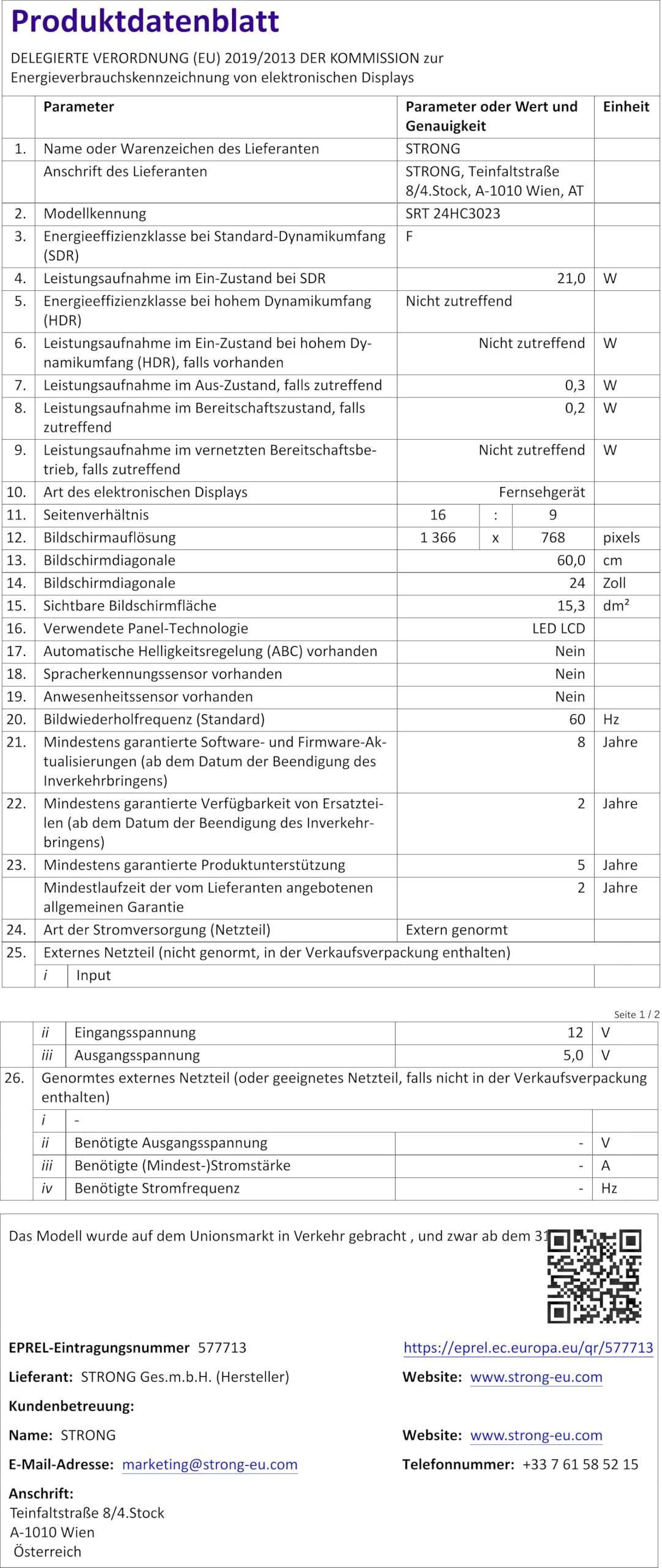
Figure 8.1: Product Fiche (Energy Label Information)
Для отримання детальнішої інформації про енергію, будь ласка, зверніться до База даних EPREL (посилання на QR-код).

Рисунок 8.2: Енергоефективність маркування
9. Гарантія та підтримка
Your STRONG SRT 24HC3023 TV comes with a standard manufacturer's warranty. Please refer to the warranty card included in your package for specific terms and conditions. For technical support, troubleshooting assistance beyond this manual, or warranty claims, please contact STRONG customer service or your local retailer.
You can find more information and support on the official STRONG webсайт: www.strong.tv


