1. Продукт закінчивсяview
The Billboard BB425 Gaming Headset is designed for an immersive audio experience across various gaming platforms. It features a boom microphone for clear communication, enhanced bass for rich sound, and convenient in-line controls for volume adjustment and instant muting. The headset is lightweight and adjustable, ensuring a comfortable fit during extended use, and comes with a durable fabric cord.
- Стрільний мікрофон: Для чіткого голосового зв'язку.
- Покращений бас: Delivers a rich audio experience.
- Вбудоване керування: Easily adjust volume and mute the microphone.
- Регульований дизайн: Lightweight and comfortable for prolonged gaming sessions.
- Durable Fabric Cord: Designed for longevity.
2. Інструкції з налаштування
Follow these steps to connect your Billboard BB425 Gaming Headset to your device.
- Визначте сполучники: The headset features a single 3.5mm TRRS jack for combined audio and microphone functionality. An included Y-splitter cable separates this into two 3.5mm TRS jacks: one for audio output (typically green) and one for microphone input (typically pink).
- For Devices with a Single 3.5mm Port (e.g., most laptops, gaming controllers, smartphones):
- Plug the headset's single 3.5mm TRRS jack directly into your device's combined audio/microphone port.
- For Devices with Separate Audio and Microphone Ports (e.g., most desktop PCs):
- Connect the headset's single 3.5mm TRRS jack into the female end of the Y-splitter cable.
- Plug the audio output jack (often green) of the Y-splitter into your device's audio output port.
- Plug the microphone input jack (often pink) of the Y-splitter into your device's microphone input port.
- Відрегулювати Fit: Place the headset over your ears and adjust the headband for a comfortable and secure fit. Position the boom microphone near your mouth for optimal voice pickup.
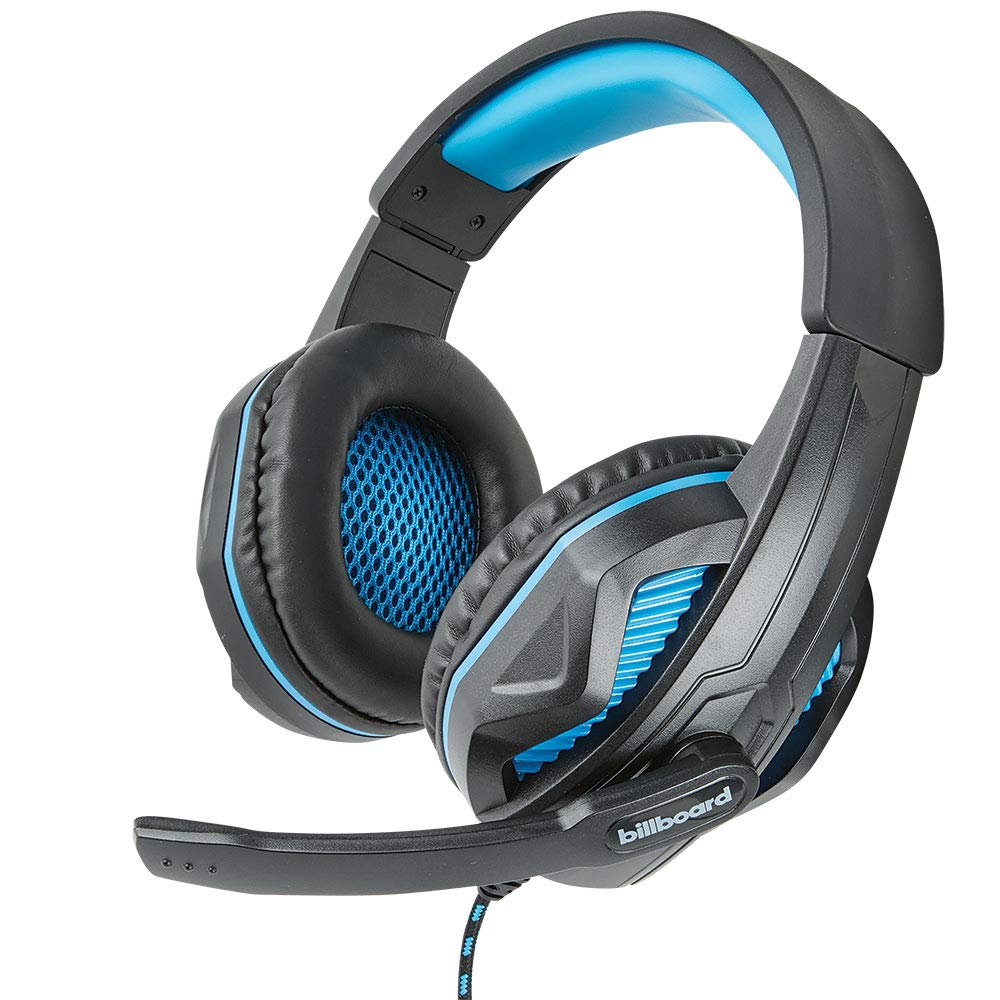
Image: The Billboard BB425 Gaming Headset's braided cable, in-line control unit, and the included Y-splitter cable with two 3.5mm TRS jacks for separate audio and microphone connections.
3. Інструкція з експлуатації
The in-line control unit provides easy access to essential audio functions.
- Регулювання гучності: Use the scroll wheel on the in-line control unit to adjust the audio volume. Scroll up to increase volume and down to decrease it.
- Вимкнення мікрофона: The in-line control unit features a switch to mute or unmute the microphone. Slide the switch to the "OFF" position to mute your microphone, and to the "ON" position to enable it.
- Boom Microphone Adjustment: The flexible boom microphone can be positioned closer or further from your mouth to optimize voice clarity.
4. Технічне обслуговування та догляд
Правильний догляд продовжить термін служби вашої гарнітури.
- Прибирання: Використовуйте м’яку суху тканину для протирання гарнітури. Для амбушур злегкаamp Можна використовувати тканину з м’яким милом, але переконайтеся, що вона повністю суха перед використанням. Не використовуйте агресивні хімікати або абразивні засоби для чищення.
- Зберігання: Зберігайте гарнітуру в чистому, сухому місці, подалі від екстремальних температур та прямих сонячних променів. Уникайте заплутування кабелю.
- Обробка: Do not pull on the cable to disconnect the headset. Always grasp the plug firmly. Avoid dropping or subjecting the headset to strong impacts.
5. Вирішення проблем
If you encounter issues with your Billboard BB425 Gaming Headset, refer to the following common solutions.
- Немає звуку або низька гучність:
- Ensure the headset's 3.5mm jack(s) are fully inserted into the correct port(s) on your device.
- Check the in-line volume control wheel and adjust it to an audible level.
- Verify your device's audio output settings. Ensure the headset is selected as the default playback device.
- Перевірте гарнітуру з іншим пристроєм, щоб виключити проблему, пов'язану з певним пристроєм.
- Мікрофон не працює:
- Ensure the microphone mute switch on the in-line control unit is in the "ON" position.
- If using the Y-splitter, ensure the microphone jack (typically pink) is correctly plugged into your device's microphone input port.
- Check your device's microphone input settings. Ensure the headset microphone is selected as the default recording device and that its input volume is not muted or set too low.
- Перевірте мікрофон за допомогою іншої програми або пристрою.
- Static or Distorted Audio:
- Ensure all connections are secure and free from dust or debris.
- Try connecting the headset to a different audio port or device to check if the issue persists.
- Уникайте розміщення кабелю поблизу джерел сильних електромагнітних перешкод.
6. Технічні характеристики
| Особливість | Деталь |
|---|---|
| Назва моделі | BB425 |
| Бренд | Рекламний щит |
| Технологія підключення | Провідний |
| Гніздо для навушників | 3.5 мм джек |
| Розташування вуха | Над вухом |
| Форм-фактор | На вухо |
| Сумісні пристрої | Gaming Consoles, Desktops, Laptops, Telephones |
| Особливості | Enhanced bass |
| Тип управління | In-line control (Volume, Mute) |
| Функція кабелю | Retractable, Durable Fabric Cord |
| матеріал | пластик |
| Колір | чорний |
| Розміри продукту | 25.15 х 22.86 х 8.89 см |
| Вага товару | 386 г |
| Потрібні батареї | немає |
7. Інформація про гарантію
This product is covered by a manufacturer's warranty. For specific details regarding warranty coverage, duration, and terms, please refer to the warranty card included with your product or visit the official Billboard webсайт. Зберігайте чек про покупку як підтвердження покупки для будь-яких гарантійних претензій.
8. Підтримка клієнтів
If you require further assistance or have questions not addressed in this manual, please contact Billboard customer support. Contact information can typically be found on the product packaging or the official Billboard webсайт.
Виробник: Корпуси та аксесуари ESI


