1. Вступ
Thank you for choosing the IMILAB EC2 Outdoor IP Security Camera. This manual provides essential information for the proper installation, operation, and maintenance of your device. The IMILAB EC2 is a versatile security camera designed for both indoor and outdoor use, featuring Full HD resolution, infrared night vision, motion detection, and two-way audio communication. Please read this manual thoroughly before using the product to ensure optimal performance and safety.
2. Вміст упаковки
Перевірте, чи всі перелічені нижче предмети входять до вашої упаковки. Якщо будь-які предмети відсутні або пошкоджені, зверніться до служби підтримки клієнтів.
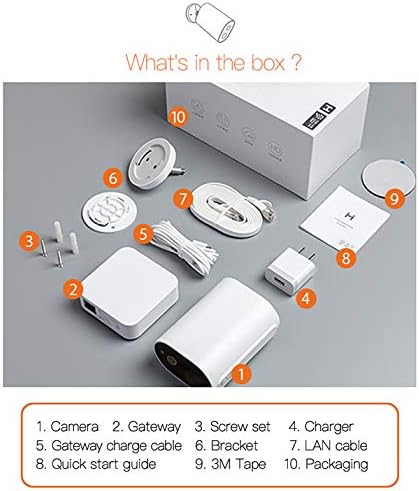
Image: Contents of the IMILAB EC2 package, including the camera, gateway, and accessories.
- Камера
- Шлюз
- Набір гвинтів
- Зарядний пристрій
- Gateway charge cable
- Кронштейн
- LAN-кабель
- Короткий посібник
- 3M стрічка
- Упаковка
3. Продукт закінчивсяview
The IMILAB EC2 camera is designed for robust security monitoring with several key features:
- Акумуляторний дизайн: Offers flexible placement without power cable limitations.
- AI Scanning: Advanced artificial intelligence for improved detection accuracy.
- Подовжений термін служби батареї: Up to 4 months on a single charge under typical usage conditions.
- Без щомісячної плати: Cloud storage for recorded events is available without subscription.
- IP66 Захист від атмосферних впливів: Certified for dust and water resistance, suitable for outdoor environments.
- Passive IR Detection: Utilizes Passive Infrared (PIR) for motion sensing.
- Нічне бачення: Integrated infrared LEDs for clear monitoring in low-light or dark conditions.
- Роздільна здатність 1080P HD: Забезпечує чітке та детальне відео footage.
- Шифрування AES128: Ensures secure data transmission and storage.

Image: Visual representation of the IMILAB EC2's main features.
4. Налаштування
Follow these steps to set up your IMILAB EC2 camera:
- Зарядіть фотоапарат: Before initial use, fully charge the camera using the provided charger and gateway charge cable.
- Завантажте додаток: Download the official IMILAB Home app (or compatible Xiaomi Home app) from your smartphone's app store (available for Android and iOS).
- Увімкніть шлюз: Connect the Gateway to a power source and to your router via the LAN cable. Wait for the indicator light to show it's ready for pairing.
- Сполучення камери: Open the app, create an account, and follow the on-screen instructions to add the Gateway and then the EC2 camera. Ensure your smartphone is connected to a 2.4GHz Wi-Fi network during setup.
- Встановити камеру: Choose a suitable location for mounting. The camera can be mounted on a wall or other flat surface using the provided bracket, screws, and 3M tape. Ensure the camera has a clear field of view and is within Wi-Fi range of the Gateway.

Image: The IMILAB EC2 camera shown mounted on a wall, illustrating its installation flexibility.
5. Інструкція з експлуатації
5.1 Живий View і Запис
Access the live video feed from your camera through the IMILAB Home app. You can manually record video or capture screenshots directly from the live view інтерфейс.
5.2 Виявлення руху та сигналізація
The camera features a PIR motion sensor and AI-powered human detection to minimize false alarms. When motion is detected, the camera can automatically record a short video clip and send a notification to your smartphone.
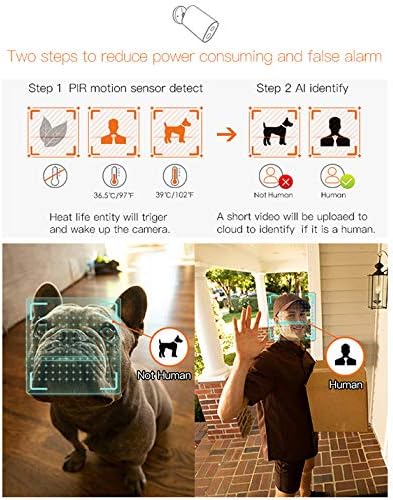
Image: Illustration of the camera's PIR motion detection and AI human identification process.
5.3 Нічне бачення
The IMILAB EC2 is equipped with infrared night vision, allowing it to capture clear video footage even in complete darkness. This feature activates automatically in low-light conditions.

Image: Comparison demonstrating the superior night vision capabilities of the IMILAB EC2 camera.
5.4 Двосторонній аудіозв'язок
Utilize the built-in microphone and speaker to communicate with individuals near the camera, directly through the app.
5.5 Хмарне сховище
The camera offers free cloud storage for recorded events for a limited duration (e.g., 7 days), eliminating the need for a local memory card. This ensures your footage is securely backed up.

Image: The IMILAB EC2 camera highlighting its free cloud storage feature.
6. Технічне обслуговування
6.1 Стійкість до погодних умов
The IMILAB EC2 camera has an IP66 rating, making it resistant to dust and powerful water jets. It is designed to withstand various outdoor weather conditions, including heat, wind, snow, and rain.

Image: The IMILAB EC2 camera's internal structure and its resilience to extreme weather conditions.
6.2 Заряджання акумулятора
The camera is powered by a rechargeable Lithium Polymer battery. When the battery level is low, you will receive a notification via the app. Recharge the camera using the provided charging cable and adapter. A full charge can last up to 4 months, depending on usage and environmental factors.

Image: The IMILAB EC2 camera demonstrating its long battery life, capable of 4 months on a single charge.
6.3 Очищення
Periodically clean the camera lens and housing with a soft, dry cloth to ensure clear image quality and proper operation. Do not use harsh chemicals or abrasive materials.
7. Вирішення проблем
If you encounter issues with your IMILAB EC2 camera, refer to the following common solutions:
- Камера не підключається до Wi-Fi: Ensure the Gateway is powered on and connected to your router. Verify your Wi-Fi network is 2.4GHz. Restart the camera and Gateway, then attempt pairing again.
- Погана якість відео: Check your Wi-Fi signal strength at the camera's location. Ensure the camera lens is clean and free from obstructions.
- Датчик руху не працює: Verify motion detection settings are enabled in the app. Adjust sensitivity levels if necessary. Ensure the camera's view не перешкоджає.
- Акумулятор швидко розряджається: Frequent motion detection events, live view access, or poor Wi-Fi signal can increase battery consumption. Reduce detection sensitivity or optimize camera placement.
- Без сповіщень: Check your smartphone's app notification settings and ensure they are enabled for the IMILAB Home app.
8. Технічні характеристики
Detailed technical specifications for the IMILAB EC2 Outdoor IP Security Camera (Model CMSXJ11A):
| Особливість | Специфікація |
|---|---|
| Назва моделі | Xiaomi CMSXJ11A |
| Роздільна здатність захоплення відео | 1080p (повна HD) |
| Ефективна роздільна здатність відео | 1080 |
| Частота кадрів | 30 кадрів в секунду |
| Технологія підключення | Бездротовий (Wi-Fi) |
| Технології бездротового зв'язку | Wi-Fi |
| Протокол підключення | Wi-Fi |
| Використання в приміщенні/на вулиці | В приміщенні, на відкритому повітрі |
| Особливості | Night Vision, Motion Detector |
| Джерело живлення | Працює від батареї |
| Акумулятори | Потрібен 1 літій-полімерний акумулятор (входить в комплект) |
| Вміст енергії літієвої батареї | 0.6 Вт годин |
| Літієва батарея Voltage | 5 вольт |
| Вага літієвої батареї | 0.9 грамів |
| Рейтинг IP | IP66 (захист від пилу та води) |
| Сумісні пристрої | Смартфон (Android, iOS) |
| Тип монтажу | Настінне кріплення |
| Колір | Білий |
| Розміри предмета (Д x Ш x В) | 3 х 2 х 4 см |
| Вага товару | 530 г |
9. Гарантія та підтримка
For warranty information, please refer to the documentation provided with your purchase or contact your retailer. Specific warranty terms may vary by region and seller.
For technical support or further assistance, please visit the official IMILAB website or contact their customer service. You may also find support resources on the IMILAB brand page on Amazon.


