вступ
Дякуємо за покупкуasing the Boytone BT-424FN 2.1 Multimedia Bluetooth Speaker System. This powerful shelf stereo system is designed to deliver high-quality audio with versatile connectivity options, including Bluetooth, FM radio, USB, SD card, and auxiliary input. This manual provides detailed instructions for setting up, operating, and maintaining your speaker system to ensure optimal performance and longevity.
Вміст упаковки
Будь ласка, уважно перевірте упаковку, щоб переконатися, що всі предмети є в наявності та у належному стані:
- Boytone BT-424FN Main Unit (Subwoofer with built-in ampліфтер)
- Two Satellite Speakers (3" x 2" Full range)
- Бездротовий пульт дистанційного керування
- Кабель AUX
- USB кабель
- SD Card (if included with specific models)
- 2 батарейки типу AAA (для пульта дистанційного керування)

Image: The Boytone BT-424FN 2.1 Multimedia Bluetooth Speaker System, showcasing the main subwoofer unit, two satellite speakers, and the included remote control.
Інформація про безпеку
To prevent fire or shock hazards, do not expose this appliance to rain or moisture. Do not open the cabinet. Refer servicing to qualified personnel only.
- Джерело живлення: Ensure the power source matches the requirements (AC 110/220V).
- Вентиляція: Не блокуйте вентиляційні отвори. Забезпечте достатній простір навколо пристрою для належної циркуляції повітря.
- Вода і вологість: Do not expose the unit to dripping or splashing. Do not place objects filled with liquids, such as vases, on the apparatus.
- Тепло: Тримайте пристрій подалі від джерел тепла, таких як радіатори, обігрівачі, печі чи інші прилади (включаючи ampліфікатори), які виробляють тепло.
- Прибирання: Перед чищенням від’єднайте пристрій від розетки. Використовуйте для чищення суху тканину.
- Розміщення: Розмістіть пристрій на стійкій, рівній поверхні, щоб запобігти його падінню.
Продукт закінченийview і особливості
The Boytone BT-424FN is a versatile 2.1 multimedia speaker system designed for a rich audio experience. It combines powerful sound output with multiple connectivity options and user-friendly controls.
Ключові характеристики:
- Потужний аудіовихід: 40 Watts (20W subwoofer + 2x10W satellite speakers) for a wide audio spectrum.
- Підключення Bluetooth: Easy wireless connection with a range of up to 33 feet, compatible with all Bluetooth-enabled devices.
- Кілька варіантів відтворення: USB port and SD card slot for MP3 file playback, FM tuner for radio, and a 3.5mm auxiliary jack for non-Bluetooth devices.
- Digital Display & Controls: Digital LED display for mode and track information, with digital bass control.
- Світло RGB: Integrated RGB lighting for enhanced visual appeal.
- Пульт дистанційного керування: Full-function wireless remote for convenient operation.
- Компактний дизайн: Tabletop mount design with a black wood finish.

Image: Diagram highlighting key features of the Boytone BT-424FN, including USB/SD port for MP3, wireless sound capability, all-in-one stereo system, and 40 Watts with RGB light.
Ідентифікація компонента:
Familiarize yourself with the various ports and controls on your speaker system.

Зображення: Задня та бічна частини view of the Boytone BT-424FN main unit, showing the USB port, SD slot, auxiliary jack, and DVD jack for various input connections.

Image: Close-up of the Boytone BT-424FN's front panel, displaying the LED screen, volume knob, and control buttons for source selection, tone, and tuning.
Налаштування
Follow these steps to set up your Boytone BT-424FN speaker system.
1. Підключення динаміка:
- Connect the two satellite speakers to the corresponding audio output jacks on the rear of the main subwoofer unit. Ensure a secure connection.
2. Підключення живлення:
- Plug the AC power cord from the main unit into a standard AC 110/220V wall outlet.
3. Налаштування дистанційного керування:
- Insert the two AAA batteries into the remote control, observing the correct polarity (+/-).
4. Початкове увімкнення:
- Press the power button on the main unit or the remote control to turn on the system. The LED display will light up.
Інструкція з експлуатації
Learn how to use the various functions of your Boytone BT-424FN speaker system.
1. Основна операція:
- Увімкнення/вимкнення живлення: Press the 'ST-BY/M' button on the main unit or the power button on the remote.
- Регулювання гучності: Rotate the 'VOLUME' knob on the front panel or use the 'VOL+' and 'VOL-' buttons on the remote control.
- Вибір джерела: Press the 'SOURCE' button on the main unit or the remote to cycle through input modes: Bluetooth, FM, USB, SD, AUX.
- Контроль тону: Use the 'TONE' button on the main unit or remote to adjust bass and treble settings (if available).
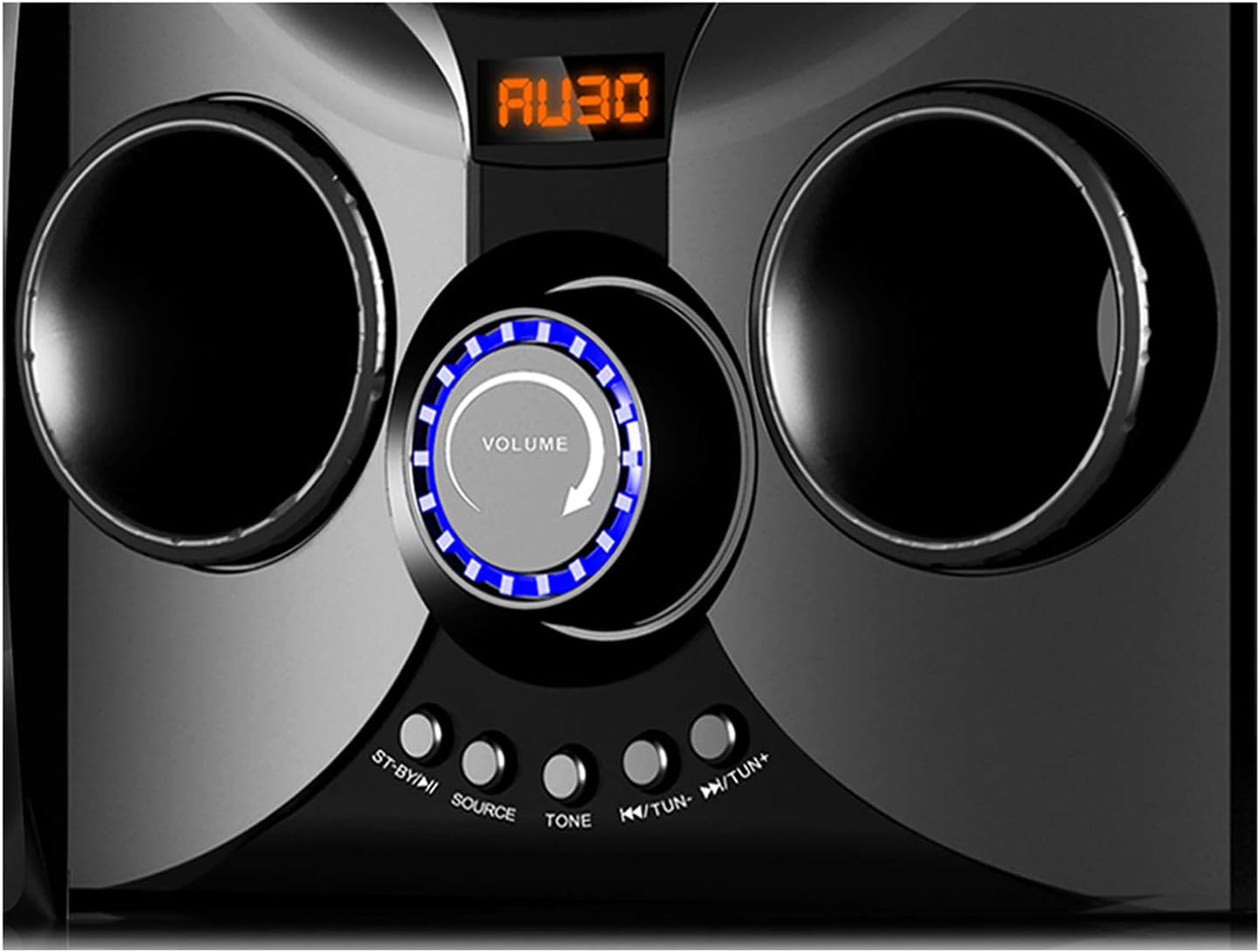
Image: Close-up of the Boytone BT-424FN's central control area, highlighting the illuminated volume knob and the function buttons below it.
2. Режим Bluetooth:
- Select 'Bluetooth' mode using the 'SOURCE' button. The LED display will show 'BT' or a similar indicator.
- На пристрої з підтримкою Bluetooth (смартфоні, планшеті тощо) увімкніть Bluetooth і виконайте пошук доступних пристроїв.
- Select 'BT-424FN' or 'Boytone' from the list of devices.
- Після сполучення ви можете відтворювати аудіо з вашого пристрою через систему динаміків.
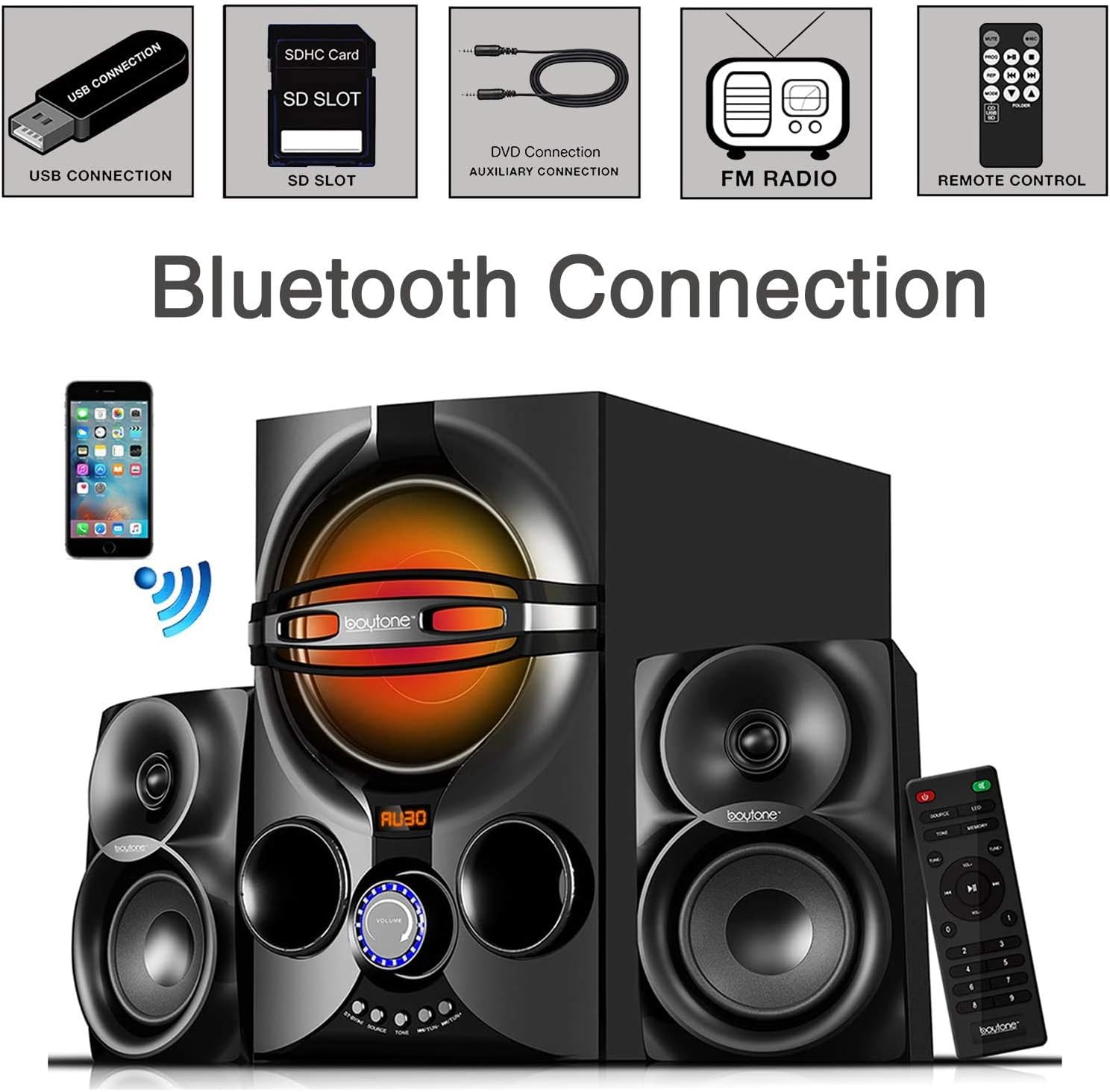
Image: A diagram illustrating the process of connecting a smartphone to the Boytone BT-424FN via Bluetooth, alongside icons representing other connectivity options like USB, SD, AUX, FM radio, and remote control.
3. Режим FM-радіо:
- Select 'FM' mode using the 'SOURCE' button.
- Use the 'TUN+/-' buttons on the main unit or the remote to manually tune to a desired radio station.
- To auto-scan and save stations, press and hold the 'PLAY/PAUSE' button (often doubles as auto-scan in FM mode) on the remote or main unit.
4. USB/SD Card Mode:
- Вставте USB-флеш-накопичувач або SD-карту, що містить аудіофайли у форматі MP3 fileу відповідний порт.
- Select 'USB' or 'SD' mode using the 'SOURCE' button. The system will automatically begin playing the first compatible audio file.
- Use the 'PREV/NEXT' buttons on the main unit or remote to skip tracks. Use 'PLAY/PAUSE' to control playback.
5. Режим AUX:
- Connect your external audio device (e.g., MP3 player, TV, computer) to the 'AUX' input jack on the main unit using the provided 3.5mm audio cable.
- Select 'AUX' mode using the 'SOURCE' button.
- Control playback and volume directly from your connected external device.
Технічне обслуговування
Правильний догляд та обслуговування забезпечать довговічність вашої акустичної системи.
- Прибирання: Використовуйте м’яку суху тканину для очищення зовнішніх поверхонь пристрою. Не використовуйте абразивні засоби для чищення, віск або розчинники.
- Пил: Regularly dust the speaker grilles and vents to prevent accumulation that could affect sound quality and ventilation.
- Зберігання: Якщо пристрій зберігатиметься протягом тривалого часу, від’єднайте його від розетки та зберігайте у прохолодному сухому місці.
- Уникайте рідин: Тримайте рідини подалі від пристрою, щоб запобігти пошкодженню внутрішніх компонентів.
Усунення несправностей
If you encounter any issues with your Boytone BT-424FN, refer to the following common problems and solutions.
| проблема | Можлива причина | Рішення |
|---|---|---|
| Немає живлення | Шнур живлення не підключено; розетка неактивна | Переконайтеся, що шнур живлення надійно підключений; спробуйте іншу розетку |
| Ні звуку | Занадто низька гучність; вибрано неправильне джерело; динаміки не підключені | Increase volume; Press 'SOURCE' to select correct input; Check speaker connections |
| Помилка з’єднання Bluetooth | Device too far; Bluetooth not enabled on device; Speaker not in pairing mode | Move device closer; Enable Bluetooth on your device; Ensure speaker is in Bluetooth mode and discoverable |
| Статичні проблеми з FM-радіо | Weak signal; Antenna not extended | Adjust antenna position; Try auto-scanning for stronger stations |
| USB/SD не відтворюється | Не підтримується file формат; пошкоджено files; Incorrect mode selected | Забезпечити files are MP3 format; Try a different USB/SD card; Select 'USB' or 'SD' mode |
| Пульт не працює | Batteries drained or incorrectly inserted; Obstruction between remote and unit | Replace batteries and check polarity; Remove any obstructions; Point remote directly at the unit's sensor |
Технічні характеристики
Detailed technical specifications for the Boytone BT-424FN speaker system.
| Особливість | Специфікація |
|---|---|
| Назва моделі | BT-424FN |
| Тип динаміка | 2.1 Channel Subwoofer System |
| Максимальна вихідна потужність динаміка | 40 Watts (20W Subwoofer + 2x10W Satellites) |
| Діаметр сабвуфера | 5 дюймів |
| Satellite Speaker Size | 3" x 2" Full Range |
| Технологія підключення | Bluetooth, USB, SD, AUX, FM Radio |
| Технологія бездротового зв'язку | Bluetooth |
| Діапазон Bluetooth | До 33 футів |
| Джерело живлення | Corded Electric (AC 110/220V) |
| Спосіб контролю | Пульт дистанційного керування, кнопки на пристрої |
| матеріал | Деревина |
| Колір | чорний |
| Розміри виробу (основний блок) | 8.5" Г x 16.5" Ш x 13" В |
| Вага товару | 9.5 фунта |
| Включені компоненти | AUX cable, USB cable, SD card, Remote control |
| Батареї для дистанційного керування | 2 батарейки AAA (входять в комплект) |
| Використання в приміщенні/зовні | закритий |
| UPC | 643307992373 |

Зображення: Задня частина view of the Boytone BT-424FN main unit and one satellite speaker, with dimensions indicated: 10.50 inches (height), 15 inches (depth), and 11 inches (width).
Гарантія та підтримка
The Boytone BT-424FN Multimedia Bluetooth Speaker System comes with a Limited Warranty. Please refer to the warranty card included in your package for specific terms and conditions, including coverage duration and claim procedures.
For technical support or service inquiries, please contact Boytone customer service through their official website or the contact information provided with your product documentation. Ensure you have your model number (BT-424FN) and proof of purchase ready when contacting support.


