вступ
Thank you for choosing the CREATE WINDCALM DC Ceiling Fan. This manual provides essential information for the safe and efficient installation, operation, and maintenance of your new ceiling fan. Please read this manual thoroughly before installation and keep it for future reference.

Figure 1: CREATE WINDCALM DC Ceiling Fan with natural wood blades and remote control.
Інструкції з техніки безпеки
Завжди дотримуйтесь основних запобіжних заходів під час встановлення та експлуатації електроприладів, щоб зменшити ризик пожежі, ураження електричним струмом та травмування.
- Перед встановленням або техобслуговуванням переконайтеся, що джерело живлення відключено.
- Встановлення має виконувати кваліфікований електрик відповідно до місцевих електротехнічних норм.
- Монтажна конструкція повинна бути здатною витримувати вагу вентилятора (приблизно 5.5 кг).
- Не вставляйте предмети на шлях обертових лез.
- Тримайте дітей та домашніх тварин подалі від вентилятора під час роботи.
Вміст упаковки
Перед початком встановлення перевірте наявність усіх компонентів та їх цілісність. Якщо якісь деталі відсутні або пошкоджені, зверніться до служби підтримки клієнтів.
- Збірка корпусу двигуна
- Лопаті вентилятора (3x)
- Дистанційне керування
- Монтажний кронштейн і фурнітура
- Інструкція з експлуатації
монтаж
1. Монтаж кронштейна
Secure the mounting bracket to a ceiling joist or a suitable electrical junction box capable of supporting the fan's weight. Use the provided screws and washers, ensuring a firm and stable attachment.
2. Підключення проводів
Connect the fan's electrical wires to your household wiring according to the wiring diagram provided in the separate wiring guide. Ensure all connections are secure and insulated. This fan operates on 240 Volts DC power.
3. Attaching the Fan Body
Carefully lift the fan body and attach it to the mounting bracket. Ensure it is securely seated and all safety clips or screws are engaged.

Figure 2: The CREATE WINDCALM DC ceiling fan installed in a bedroom, highlighting its quiet operation suitable for sleeping environments.
4. Attaching the Blades
Attach the three natural wood blades to the motor housing using the provided screws. Ensure each blade is firmly secured. The fan has a diameter of 132 cm and blade length of 66 cm.

Figure 3: Diagram illustrating the dimensions of the CREATE WINDCALM DC ceiling fan, including blade length and overall diameter.

Малюнок 4: Збільшений план view of the natural wood blade, showcasing the quality and finish of the fan's components.
Операція
Your CREATE WINDCALM DC Ceiling Fan is controlled by the included remote control.
Функції дистанційного керування
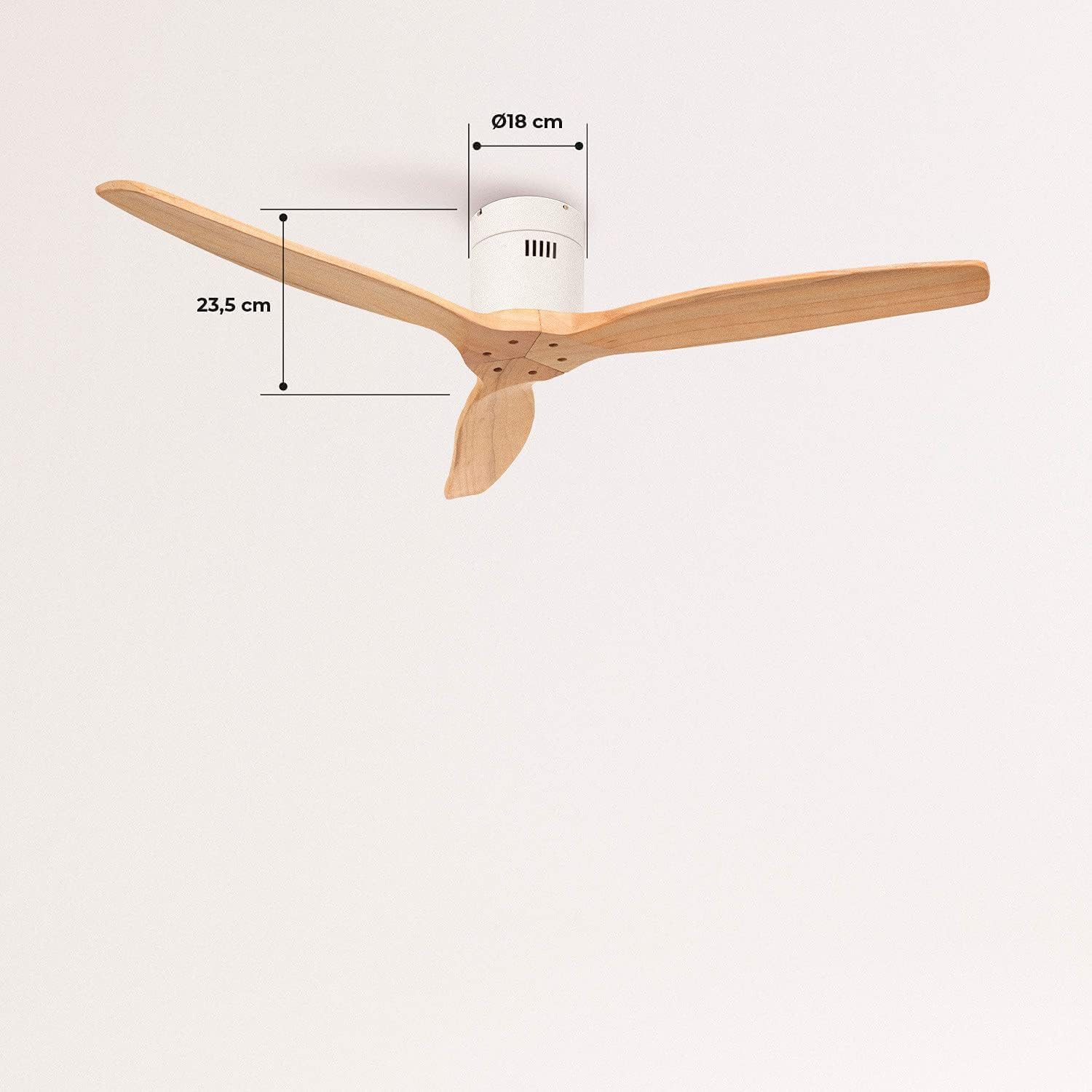
Figure 5: The remote control for the CREATE WINDCALM DC ceiling fan, showing buttons for speed, timer, and direction.
- Кнопка живлення: Вмикає/вимикає вентилятор.
- Контроль швидкості: Adjusts fan speed through 6 levels. The fan offers airflows from 85 to 210 CFM.
- Функція таймера: Налаштуйте автоматичне вимкнення вентилятора через 1, 2, 4 або 8 годин.
- Режим літо/зима: Змінює напрямок обертання лопаті.
Літній режим
In summer mode, the blades rotate counter-clockwise, pushing cool air downwards to create a refreshing breeze. This is ideal for cooling a room.

Figure 6: Diagram explaining the summer mode operation, where the fan blades rotate counter-clockwise to push cool air downwards.
Зимовий режим
In winter mode, the blades rotate clockwise, drawing warm air up towards the ceiling and circulating it gently throughout the room. This helps to distribute heat more evenly and can reduce heating costs.

Figure 7: Diagram explaining the winter mode operation, where the fan blades rotate clockwise to circulate warm air upwards.
Технічне обслуговування
Регулярне технічне обслуговування забезпечує оптимальну продуктивність та довговічність вашого стельового вентилятора.
- Прибирання: Регулярно очищайте лопаті вентилятора та корпус двигуна від пилу м’якою губкою.amp тканина. Не використовуйте абразивні засоби чи розчинники.
- Баланс леза: If the fan wobbles, check that all blade screws are tightened. A balancing kit may be used if necessary.
- Двигун: Двигун постійного струму розроблений для тривалої роботи без потреби в обслуговуванні. Змащення не потрібне.
Усунення несправностей
Якщо у вас виникли проблеми з вентилятором, зверніться до наступних поширених проблем та способів їх вирішення:
| проблема | Можлива причина | Рішення |
|---|---|---|
| Вентилятор не запускається | No power supply; Remote control battery low; Incorrect wiring. | Перевірте автоматичний вимикач; замініть батарею пульта дистанційного керування; перевірте з'єднання проводів. |
| Коливання вентилятора | Ослаблені гвинти леза; Незбалансовані леза; Ослаблений монтажний кронштейн. | Tighten all blade screws; Use a blade balancing kit; Ensure mounting bracket is secure. |
| Відсутність руху повітря | Fan running at lowest speed; Incorrect direction for season. | Increase fan speed; Switch to appropriate Summer/Winter mode. |
| Пульт не працює | Батарейка низька або неправильно вставлена; пульт дистанційного керування не сполучено. | Replace battery; Refer to remote pairing instructions (if applicable). |
Технічні характеристики
| Особливість | Специфікація |
|---|---|
| Номер моделі | 62301_134701 |
| Бренд | СТВОРИТИ |
| Тип двигуна | DC Motor (153*15 mm copper) |
| Споживана потужність | 40 Вт |
| томtage | 240 вольт |
| Діаметр вентилятора | 132 см |
| Довжина леза | 66 см |
| Кількість швидкостей | 6 |
| Потік повітря (макс.) | 210 Cubic Meters per Minute (CFM) |
| Рівень шуму | 50 дБ |
| Особливості | Timer (1-8h), Summer/Winter Function |
| вага | 5.5 кілограма |
Гарантія та підтримка
CREATE products are manufactured to the highest quality standards. For warranty information or technical support, please refer to the contact details provided with your purchase documentation or visit the official CREATE webсайт. Зберігайте чек про покупку для гарантійних претензій.
Для отримання додаткової допомоги ви можете відвідати CREATE Store on Amazon.