1. Вступ
The KLIM Light v2 is a high-performance wireless gaming keyboard designed for an optimal typing and gaming experience. Featuring a Spanish ES layout, vibrant RGB backlighting, and a long-lasting rechargeable battery, this keyboard offers instant connectivity and enhanced durability. This manual provides detailed instructions for setting up, operating, maintaining, and troubleshooting your KLIM Light v2 keyboard.
2. Налаштування
2.1 Вміст упаковки
- KLIM Light v2 Wireless Gaming Keyboard
- USB-приймач
- USB-кабель для зарядки
2.2 Підключення клавіатури
- Знайдіть USB-приймач, який зазвичай зберігається у відсіку на клавіатурі.
- Plug the USB receiver into an available USB port on your computer, console (PS4/PS5, Xbox), or other compatible device.
- The keyboard will automatically connect. No additional drivers are required for installation.

The KLIM Light v2 Wireless Gaming Keyboard, featuring a Spanish ES layout, is shown with its compact USB receiver, ready for instant plug-and-play connectivity.
2.3 Заряджання клавіатури
The KLIM Light v2 keyboard features a built-in rechargeable Lithium Ion battery. To charge:
- Connect the supplied USB charging cable to the keyboard's charging port.
- Підключіть інший кінець USB-кабелю до порту USB з живленням (наприклад, комп’ютера, USB-адаптера).
- Індикатор заряджання засвітиться. Після повного заряджання індикатор вимкнеться або змінить колір.
- The keyboard can be used while charging. A full charge typically takes 4-6 hours.

This image illustrates the keyboard's power management features, including adjustable backlighting brightness, an automatic stand-by mode after 120 seconds of inactivity, and its extended battery capacity.
3. Інструкція з експлуатації
3.1 Керування підсвічуванням
The KLIM Light v2 features stunning rainbow RGB backlighting. You can adjust the lighting to suit your preference:
- Регулювання яскравості: Use the dedicated keys (often Fn + arrow keys or specific lighting keys) to cycle through different brightness levels or turn the backlighting off completely.
- Режими освітлення: Switch between static and breathing modes using the designated function keys.
- Примітка: The colors of the rainbow backlighting are fixed and not customizable.

The keyboard's vibrant rainbow RGB backlighting is displayed, emphasizing its quiet membrane keys and soft-touch typing experience, ideal for use in low-light environments.
3.2 Основні функції
- Мембранні ключі: The keyboard utilizes membrane keys with a short travel distance, providing a responsive and quiet typing experience.
- Мультимедійні клавіші: Access various multimedia functions (e.g., volume control, play/pause) using the Fn key in combination with the corresponding function keys (F1-F12).
- Низький рівень професіоналівfile Дизайн: Низькопрофільнийfile keys contribute to comfortable and efficient typing.
3.3 Режим енергозбереження
To conserve battery life, the keyboard features an automatic stand-by mode. After approximately 120 seconds of inactivity, the keyboard will enter a low-power state. Press any key to wake it up instantly.
4. Технічне обслуговування
4.1 Керування батареєю
- Regularly charge the keyboard to maintain optimal battery performance.
- Уникайте частої повної розрядки акумулятора, оскільки це може скоротити його загальний термін служби.
- If the keyboard is not used for an extended period, charge it periodically to prevent deep discharge.
4.2 Очищення
To clean your KLIM Light v2 keyboard:
- Disconnect the keyboard from its power source and turn it off.
- Злегка протріть м’якою тканиною без ворсу dampпромити водою або м’яким миючим розчином.
- Wipe the keycaps and surface gently. Avoid excessive moisture.
- The keyboard has an IP03 water resistance rating, offering protection against light splashes, but it is not fully waterproof and should not be submerged.

Оверview of the KLIM Light v2's key features, including its wireless connectivity, RGB lighting, anti-ghosting technology, 2ms response time, compact design, IP03 water resistance, and long-lasting battery.
5. Вирішення проблем
5.1 Проблеми з підключенням
- Клавіатура не реагує: Переконайтеся, що USB-приймач надійно підключено до робочого USB-порту. Спробуйте інший USB-порт.
- Періодичне з'єднання: Ensure the keyboard is within the operating range (up to 10 feet) of the USB receiver and there are no significant obstructions.
- Затримка або відставання: Ensure the keyboard is sufficiently charged. Low battery can affect wireless performance.
5.2 Проблеми заряджання
- Клавіатура не заряджається: Verify the USB charging cable is properly connected to both the keyboard and a powered USB source. Try a different USB cable or port.
- Акумулятор не тримає заряд: If the battery life significantly decreases or the keyboard fails to hold a charge after repeated attempts, contact KLIM customer support.
5.3 Key Not Responding
- Переконайтеся, що клавіатура повністю заряджена.
- If specific keys are unresponsive, try cleaning around the keycap to remove any debris.
- Якщо проблема не зникне, зверніться до служби підтримки клієнтів, щоб отримати подальшу допомогу.
5.4 General Support
For any issues not covered in this section, please refer to the KLIM customer support resources mentioned in the Warranty and Support section.
6. Технічні характеристики
| Особливість | Специфікація |
|---|---|
| Розміри продукту | 17.13 x 5.47 x 1.14 дюймів |
| Вага товару | 1.19 фунта |
| Виробник | КЛІМ |
| Номер моделі товару | k69es |
| Акумулятори | Потрібен 1 літій-іонний акумулятор (у комплекті) |
| Бренд | КЛІМ |
| Сумісні пристрої | Laptop, Mac, PC, PS4/PS5, Xbox |
| Технологія підключення | Бездротовий |
| Опис клавіатури | Spanish ES Layout |
| Рекомендоване використання продукту | Письмовий стіл |
| Особливість | Travel, Water-resistant (IP03) |
| Колір | чорний |
| Підтримка кольорів підсвічування клавіатури | RGB (Веселка) |
| Включені компоненти | USB кабель |
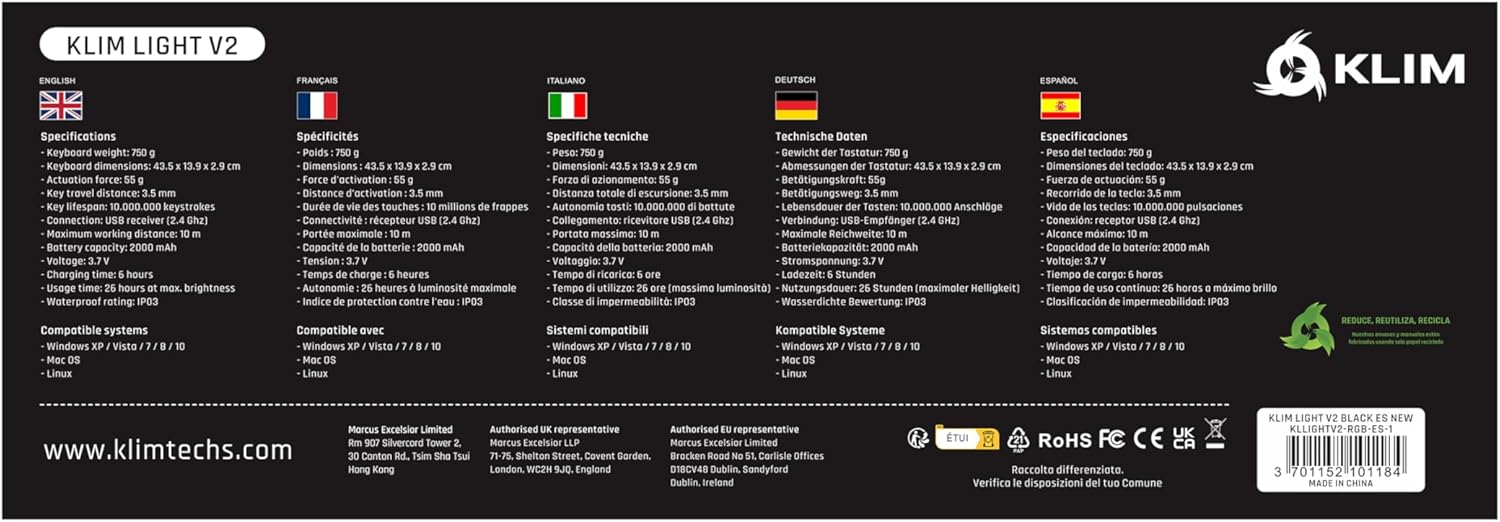
A comprehensive table detailing the technical specifications of the KLIM Light v2 keyboard, presented in multiple languages, covering aspects such as weight, dimensions, battery type, and system compatibility.
7. Гарантія та підтримка клієнтів
KLIM stands behind the quality of its products. The KLIM Light v2 Wireless Gaming Keyboard comes with an unbeatable Гарантія 5 рік.
If you encounter any issues or have questions regarding your product, KLIM provides Цілодобова підтримка клієнтів. Please visit the official KLIM website or contact their support team directly for assistance.

KLIM's commitment to quality and customer satisfaction is underscored by its 5-year product protection, ensuring long-term reliability for your keyboard.


