вступ
Thank you for choosing the Deli M007 Electronic Calculator. This manual provides essential information for the proper setup, operation, and maintenance of your calculator. Please read it thoroughly to ensure optimal performance and longevity of your device.
Продукт закінченийview
The Deli M007 is a 12-digit basic function electronic calculator designed for everyday use. It features a clear LCD display, dual power source (solar and battery), and essential arithmetic functions, along with memory and percentagе розрахунки.

Малюнок 1: Спереду view of the Deli M007 Calculator, showing the 12-digit display and key layout.
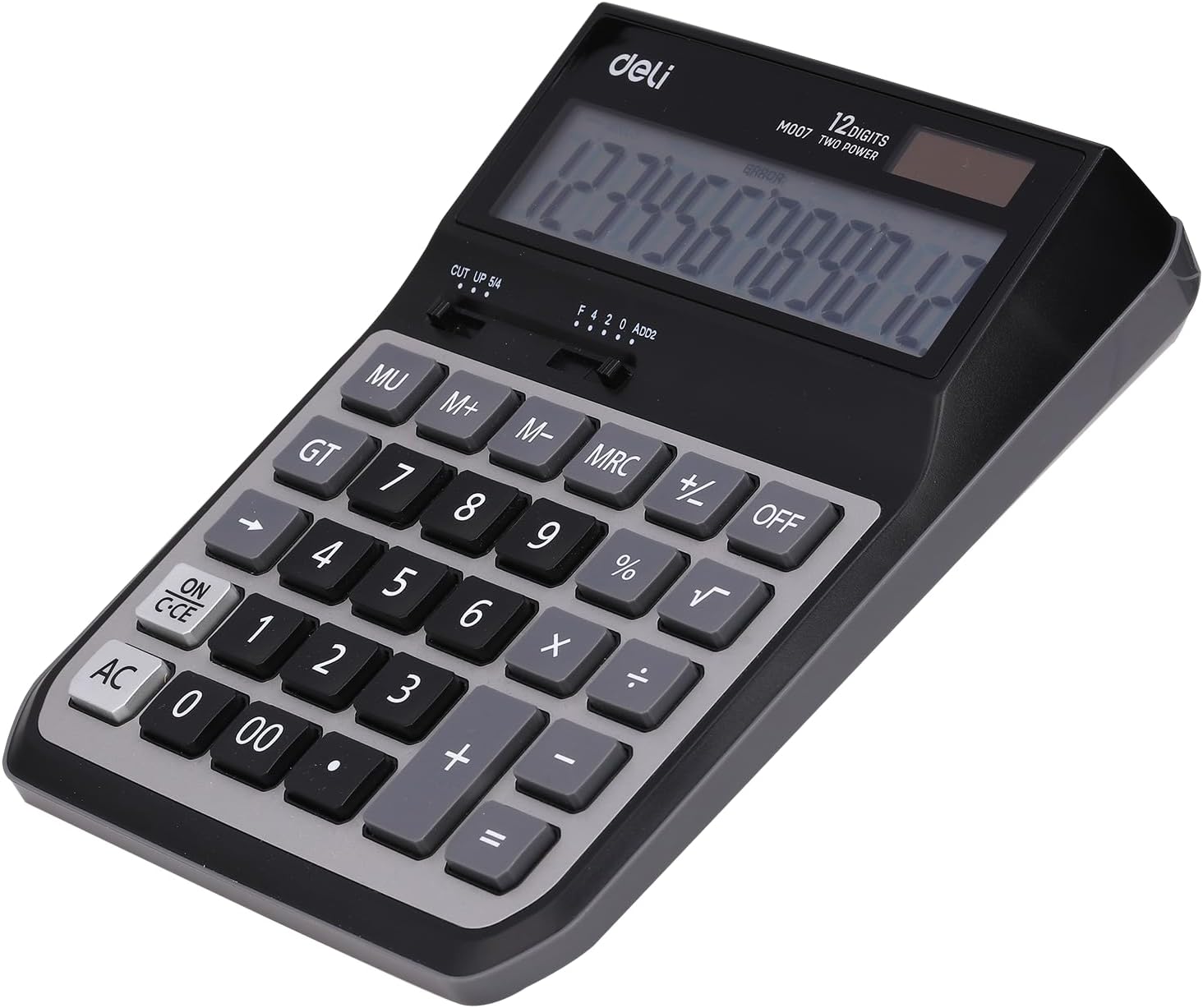
Малюнок 2: Задня частина view of the Deli M007 Calculator, illustrating the battery compartment and product details.
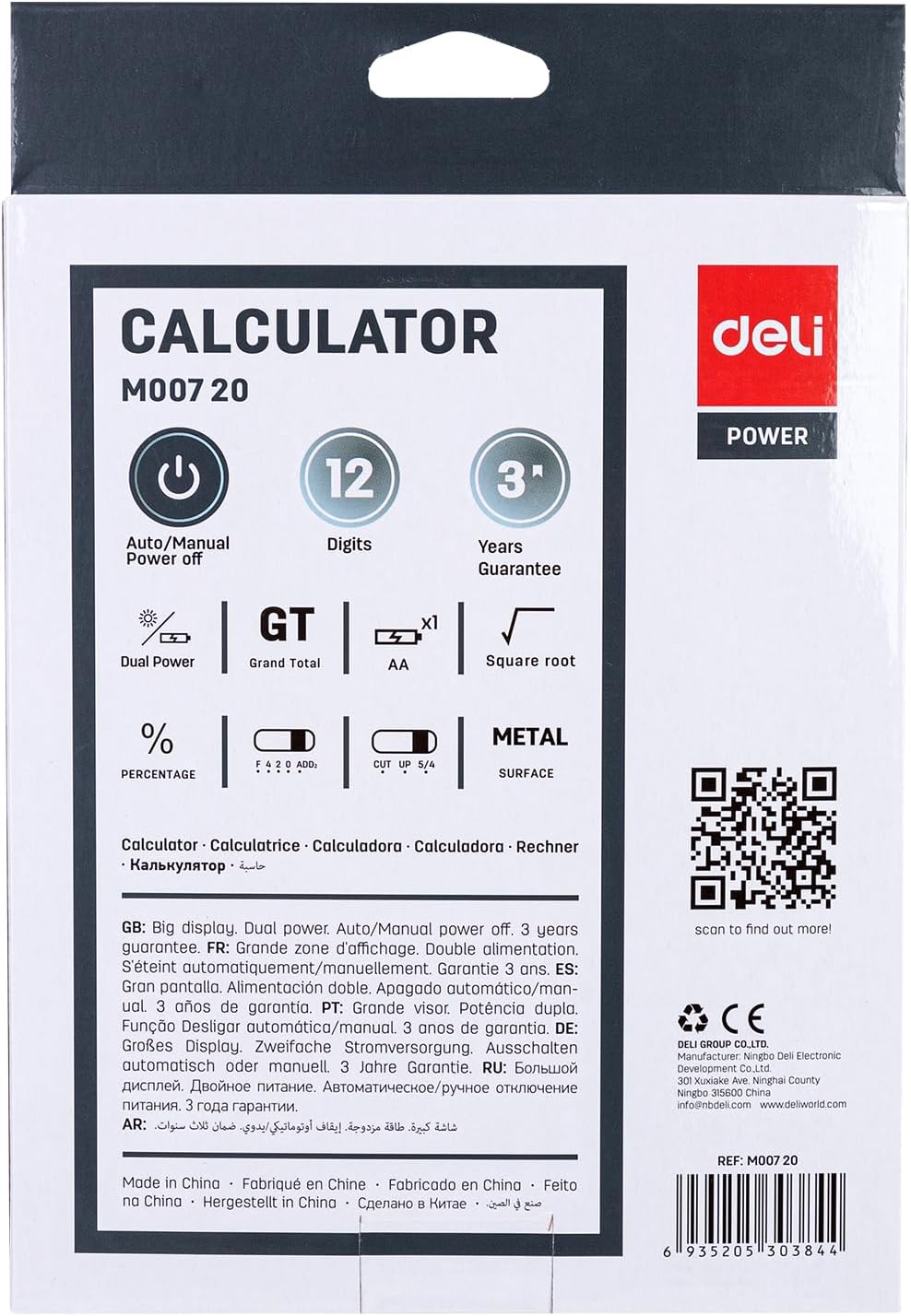
Figure 3: Packaging of the Deli M007 Calculator, detailing key features and specifications.
Налаштування
- Розпакування: Обережно вийміть калькулятор з упаковки.
- Джерело живлення: The Deli M007 operates on dual power (solar and battery). For initial use or in low light conditions, ensure a battery is installed. The battery compartment is located on the back of the calculator (refer to Figure 2). Open the cover, insert the required battery type (usually an AA battery, check compartment for specific type) with correct polarity, and close the cover.
- Початкове ввімкнення: Натисніть ON/C-CE button to turn on the calculator. The display should show '0'.
Інструкція з експлуатації
This section outlines the basic operations and functions of your Deli M007 calculator.
Основні арифметичні операції
- Доповнення (+): Введіть першу цифру, натисніть +, введіть друге число, а потім натисніть =.
- Віднімання (-): Введіть першу цифру, натисніть -, введіть друге число, а потім натисніть =.
- Множення (×): Введіть першу цифру, натисніть ×, введіть друге число, а потім натисніть =.
- Ділення (÷): Введіть першу цифру, натисніть ÷, введіть друге число, а потім натисніть =.
Ключові функції
- УВІМК./C-CE: Turns the calculator on. When on, a single press clears the last entry (Clear Entry). A second press clears all calculations (Clear All).
- кондиціонер: All Clear. Clears all entries and calculations, resetting the calculator to zero.
- ВИМКНЕНО: Turns the calculator off. The calculator also features an automatic power-off function to save energy.
- MU (Розмітка): Used for calculating mark-up percentagес.
- GT (Загальна сума): Recalls the grand total of all calculations performed since the last AC press.
- M+, M-, MRC (Memory Functions):
- М+: Додає відображене значення до пам'яті.
- М-: Віднімає відображене значення з пам'яті.
- MRC: First press recalls the memory content. Second press clears the memory.
- % (відсотокtagд): Використовується для відсотківtagе розрахунки. наприкладample, to calculate 10% of 200, enter 200 × 10 %, then press =.
- √ (Квадратний корінь): Обчислює квадратний корінь із відображеного числа.
- CUT UP 5/4 (Rounding Selector): This slider switch controls the rounding method for decimal places. 'CUT' truncates the number, 'UP' rounds up, and '5/4' rounds to the nearest digit.
- F 4 2 0 ADD2 (Decimal Place Selector / Add Mode): This slider switch sets the number of decimal places (F for floating, 4, 2, 0) or activates 'ADD2' mode, which automatically places two decimal places for currency calculations.
Технічне обслуговування
- Прибирання: Use a soft, dry cloth to clean the calculator's surface. Do not use liquid cleaners or abrasive materials, as they may damage the display or casing.
- Заміна батареї: When the display becomes dim or calculations are incorrect, it's time to replace the battery. Refer to the 'Setup' section for instructions on battery installation.
- Зберігання: Store the calculator in a cool, dry place away from direct sunlight and extreme temperatures. Avoid dropping the calculator or subjecting it to strong impacts.
Усунення несправностей
| проблема | Можлива причина | Рішення |
|---|---|---|
| Калькулятор не вмикається. | Низький або розряджений акумулятор; недостатнє освітлення для сонячної енергії. | Replace the battery. Ensure adequate lighting for solar panel. |
| Display shows 'ERROR'. | Calculation overflow; invalid operation (e.g., division by zero). | Прес AC to clear the error and restart the calculation. |
| Неправильні результати розрахунків. | Incorrect input; incorrect decimal or rounding settings. | Verify your input. Check the CUT UP 5/4 і F 4 2 0 ADD2 slider settings. |
Технічні характеристики
| Особливість | Деталь |
|---|---|
| Бренд | гастроном |
| Назва моделі | M007 |
| Тип дисплея | ЖК |
| Кількість цифр | 12 цифри |
| Джерело живлення | Dual Power (Solar & Battery) |
| Колір | Сірий Чорний |
| Розміри продукту | 15 х 8 х 4 см |
| Вага товару | 410 грами |
| Номер деталі виробника | 6935205303844 |
Гарантія та підтримка
The Deli M007 Electronic Calculator comes with a 3 років гарантії з дати покупки, що покриває виробничі дефекти за умов нормального використання. Будь ласка, збережіть чек про покупку для пред'явлення гарантійних претензій.
For further assistance, technical support, or warranty inquiries, please contact Deli customer service:
- Електронна пошта: info@imddeli.com
- Webсайт: www.deliworld.com
You can also scan the QR code below for more product information:
Scan this QR code for more details.


