1. Вступ
The LAUNCH CRP239 is an intelligent and networkable automotive diagnostic tool designed for passenger cars. It offers comprehensive OBD II full functionality and rapid testing capabilities for four major vehicle systems: Engine, Automatic Transmission (A/T), Anti-lock Braking System (ABS), and Supplemental Restraint System (SRS). Additionally, the CRP239 includes advanced reset functions such as Oil Reset, Steering Angle Reset, Brake-Pad Reset, Battery Matching, Throttle Adaptation, and Diesel Particulate Filter (DPF) Regeneration, catering to the needs of professional technicians and DIY enthusiasts.
2. Інформація про безпеку
Always observe the following safety precautions when operating the LAUNCH CRP239:
- Перед підключенням або відключенням діагностичного приладу переконайтеся, що запалювання автомобіля вимкнено.
- Не використовуйте інструмент у вологих умовах або поблизу легкозаймистих рідин чи газів.
- Wear appropriate personal protective equipment, such as safety glasses, when working on vehicles.
- Зверніться до посібника з обслуговування автомобіля, щоб дізнатися про конкретні діагностичні процедури та попередження щодо безпеки.
- Keep the tool away from strong magnetic fields.
- Використовуйте лише надані кабелі та аксесуари.
3. Вміст упаковки
Перевірте наявність усіх елементів в упаковці:
- LAUNCH CRP239 Main Unit
- Діагностичний кабель OBD II
- USB кабель
- Посібник користувача
- Чохол для транспортування

Figure 3.1: Contents of the LAUNCH CRP239 package, showing the diagnostic tool, cables, and storage case.
4. Продукт закінчивсяview
The LAUNCH CRP239 features a robust design with a 5.0-inch 720p touch screen for intuitive navigation. It includes physical buttons for common operations and a durable rubber exterior for protection.

Малюнок 4.1: Спереду view of the LAUNCH CRP239, highlighting the touch screen display and navigation buttons.
4.1. Компоненти
- 5.0-дюймовий сенсорний екран: High-resolution display for clear data presentation and touch input.
- Кнопки навігації: Directional pad, OK button, and Return button for menu navigation.
- Роз'єм OBD II: Standard 16-pin connector for vehicle communication.
- Порт USB: Для підключення до комп'ютера для оновлень або передачі даних.
- Індикатор живлення: LED light indicating power status.
5. Налаштування
Follow these steps for initial setup of your LAUNCH CRP239:
- Зарядіть пристрій: Connect the CRP239 to a power source using the provided USB cable to ensure the internal 4000mAh lithium-polymer battery is fully charged before first use.
- Увімкнення: Натисніть і утримуйте кнопку живлення, щоб увімкнути пристрій.
- Вибір мови: On the initial setup screen, select your preferred language. The device supports multilingual operation.
- Wi-Fi підключення: Navigate to the 'Settings' menu and select 'Wi-Fi'. Connect to an available wireless network to enable online updates and diagnostic report sharing.
- Оновлення програмного забезпечення: It is recommended to perform a software update immediately after connecting to Wi-Fi to ensure you have the latest features and vehicle coverage. Navigate to the 'Update' section and follow the on-screen prompts.

Figure 5.1: The LAUNCH CRP239 with its diagnostic cable connected, ready for vehicle communication.
6. Інструкція з експлуатації
The LAUNCH CRP239 provides a comprehensive suite of diagnostic functions. Below are instructions for common operations.
6.1. Підключення до транспортного засобу
- Locate the vehicle's 16-pin OBD II diagnostic port (usually under the dashboard).
- Переконайтеся, що запалювання автомобіля ВИМКНЕНО.
- Connect the OBD II diagnostic cable to the vehicle's OBD II port and to the CRP239.
- Turn the vehicle's ignition to the ON position (engine off). The CRP239 will power on automatically.
6.2. Навігація по головному меню
З головного меню ви можете отримати доступ до різних функцій:
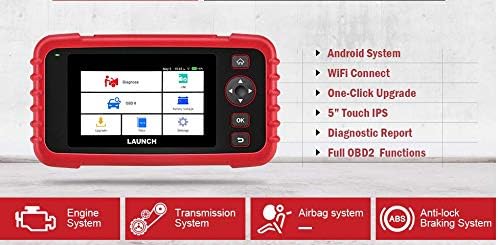
Figure 6.1: The main menu interface of the LAUNCH CRP239, providing access to all primary functions.
- Діагностувати: For full system diagnostics (Engine, A/T, ABS, SRS).
- В/М: Readiness status for emissions.
- OBD II: Standard OBD II functions (read/clear DTCs, live data, freeze frame, O2 sensor test, etc.).
- Скинути: Access various maintenance reset functions.
- Акумулятор Voltage: Displays real-time vehicle battery voltage.
- Оновлення: For software and firmware updates via Wi-Fi.
- дані: Review saved diagnostic data and reports.
- Налаштування: Configure device settings such as language, Wi-Fi, and display.
6.3. Виконання діагностичного сканування
- У головному меню виберіть "Diagnose".
- The tool will attempt to automatically identify the vehicle via VIN scan. If unsuccessful, you may need to manually select the vehicle make, model, and year.
- Choose the system you wish to diagnose (e.g., Engine, Transmission, ABS, SRS).
- Виберіть "Read Fault Codes" до view Diagnostic Trouble Codes (DTCs).
- Виберіть "Clear Fault Codes" to erase DTCs after repairs have been made. Caution: Clearing codes without addressing the underlying issue will result in the codes reappearing.
- Виберіть "Read Data Stream" до view live sensor data.
6.4. Using Reset Functions
The CRP239 supports several common maintenance reset functions:
- Скидання масла: Скидає нагадування про термін служби оливи після заміни оливи.
- Скидання кута повороту: Resets the steering angle sensor after alignment or component replacement.
- Brake-Pad Reset (EPB): Скидає налаштування електронної системи стоянкового гальма після заміни гальмівних колодок.
- Узгодження батарей (BMS): Реєструє новий акумулятор у системі керування акумулятором автомобіля.
- Адаптація дросельної заслінки: Перезавантажує положення дросельної заслінки після очищення або заміни.
- Регенерація DPF: Запускає процес регенерації сажового фільтра.
To use a reset function, select "Reset" from the main menu, then choose the desired function and follow the on-screen instructions.
6.5. Оновлення програмного забезпечення
The CRP239 supports one-click Wi-Fi updates for software and vehicle coverage, ensuring you always have the latest diagnostic capabilities.
- Переконайтеся, що пристрій підключено до стабільної мережі Wi-Fi.
- У головному меню виберіть "Update".
- The device will check for available updates. Select the updates you wish to install and confirm.
- Allow the update process to complete without interruption. The device may restart during this process.

Figure 6.2: The update screen on the LAUNCH CRP239, showing available software updates for various vehicle brands.
6.6. Генерація діагностичного звіту
The CRP239 can automatically generate diagnostic reports, which can be shared via email.
- After completing a diagnostic session, the tool will prompt you to generate a report.
- Confirm to generate the report.
- Перейдіть до "Data" меню до view saved reports.
- Select a report and choose the option to share via email. Ensure your Wi-Fi is connected and email settings are configured in the 'Settings' menu.
7. Технічне обслуговування
Proper maintenance ensures the longevity and optimal performance of your LAUNCH CRP239:
- Прибирання: Використовуйте м’яку суху тканину для очищення пристрою. Не використовуйте абразивні засоби для чищення або розчинники.
- Зберігання: Зберігайте пристрій у футлярі для перенесення в прохолодному сухому місці, коли він не використовується. Уникайте екстремальних температур.
- Догляд за акумулятором: Charge the battery regularly, even if the device is not in frequent use, to maintain battery health. Avoid fully discharging the battery for extended periods.
- Перевірка кабелю: Periodically inspect the diagnostic and USB cables for any signs of damage. Replace damaged cables immediately.
8. Вирішення проблем
This section addresses common issues you might encounter with the LAUNCH CRP239.
| проблема | Можлива причина | Рішення |
|---|---|---|
| Пристрій не включається. | Low battery; faulty connection to vehicle. | Charge the device fully. Ensure the OBD II cable is securely connected to both the CRP239 and the vehicle. Check vehicle's ignition is ON. |
| Не вдається зв'язатися з транспортним засобом. | Incorrect vehicle protocol; faulty OBD II port; damaged cable. | Verify vehicle compatibility. Check the vehicle's OBD II port for power. Try a different vehicle or cable if available. Ensure vehicle ignition is ON. |
| Не вдається оновити програмне забезпечення. | Нестабільне з'єднання Wi-Fi; недостатньо місця для зберігання. | Переконайтеся, що з’єднання Wi-Fi надійне та стабільне. Перевірте доступний обсяг пам’яті на пристрої. Перезапустіть процес оновлення. |
| Екран не реагує. | Збій програмного забезпечення; фізичне пошкодження. | Perform a soft reset by holding the power button until the device restarts. If the issue persists, contact customer support. |
9. Технічні характеристики
| Особливість | Деталь |
|---|---|
| Модель | CRP239 (CREADER PROFESSIONAL 239) |
| Дисплей | 5.0-inch 720p Touch Screen |
| Акумулятор | Літій-полімерний акумулятор 4000 мАг (в комплекті) |
| Підключення | OBD II, Wi-Fi, USB |
| Покриття автомобіля | Domestic, Asian, European vehicles (1996 and newer OBD2) |
| Підтримувані системи | Engine, Automatic Transmission (A/T), ABS, SRS |
| Спеціальні функції | Oil Reset, Steering Angle Reset, Brake-Pad Reset (EPB), Battery Matching (BMS), Throttle Adaptation, DPF Regeneration |
| Розміри | 32.4 x 25.4 x 8 см (упаковка) |
| Вага товару | 560 г |
| Зовнішній матеріал | гумовий |
10. Інформація про гарантію
The LAUNCH CRP239 comes with a standard manufacturer's warranty. For specific warranty terms and conditions, please refer to the warranty card included in your product package or visit the official Launch webсайт. Зберігайте чек про покупку як підтвердження покупки для гарантійних претензій.
Варіанти розширеної гарантії можуть бути доступні від сторонніх постачальників. НаприкладampНа цей продукт компанія Salama Care надає розширену гарантію на 1 рік та 2 роки.
11. Підтримка
For technical assistance, product inquiries, or support, please contact Launch customer service through their official website or the contact information provided in your product documentation. Ensure you have your product model number (CRP239) and serial number ready when contacting support.
Щоб отримати додаткові ресурси, відвідайте Launch Official Webсайт.


