1. Вступ
The ANCEL FX1000 is a professional vehicle diagnostic tool designed to read and clear trouble codes, view live data, and perform various special functions for a single-car manufacturer. It supports full OBD service modes and is compatible with vehicles manufactured from 1996 onwards. This manual provides detailed instructions for setting up and operating your device.
2. Особливості продукту
- Full OBDII Service Modes: Supports 8 OBDII service modes for comprehensive diagnostics.
- Multi-System Diagnostics: Capable of diagnosing all major vehicle systems including Engine, Transmission, SRS (Supplemental Restraint System), SAS (Steering Angle Sensor), TPMS (Tire Pressure Monitoring System), ABS (Anti-lock Braking System), and more.
- Спеціальні функції: Includes advanced functions such as DPF (Diesel Particulate Filter) Regeneration, Battery Replacement, ABS Bleeding, Oil Service Reset, EPB (Electronic Parking Brake) Reset, and Throttle Position Adaption.
- Багатомовна підтримка: Supports 7 languages: English, French, Spanish, German, Russian, Polish, and Portuguese.
- Manufacturer-Specific Tool: Designed for a single-car manufacturer, allowing in-depth diagnostics for a specific brand's vehicle series.
- Довічні безкоштовні онлайн-оновлення: Забезпечує постійне використання найновішого програмного забезпечення та покриття автомобіля на вашому пристрої.
3. Вміст упаковки
Your ANCEL FX1000 package should include the following items:
- ANCEL FX1000 Diagnostic Tool
- OBDII Connection Cable
- Micro USB Cable (for PC connection and updates)
- Завантажити посібник
- Кейс Hard Shell
4. Схема пристрою
Familiarize yourself with the buttons and ports on your ANCEL FX1000 device for optimal operation.

Image: ANCEL FX1000 device showing LCD display, Return button, Scroll Left/Right/Up/Down buttons, Fn button, and Ok button. Dimensions are also indicated.
- РК-дисплей: Shows diagnostic information and menu options.
- Кнопка повернення: Повернення до попереднього екрана або меню.
- Scroll Buttons (Up/Down/Left/Right): Used to navigate through menus and select options.
- Кнопка Fn: Function button, may have context-specific uses.
- Кнопка ОК: Підтверджує вибір або входить до підменю.
- Роз'єм OBDII: Підключає пристрій до порту OBDII автомобіля.
- Порт USB: For connecting to a computer for software updates.
5. Налаштування та підключення
Follow these steps to connect your ANCEL FX1000 to your vehicle:
- Locate your vehicle's OBDII port. This is typically found under the dashboard on the driver's side.
- Ensure the vehicle's ignition is ON, but the engine is NOT running. For push-button start vehicles, press the start button until all dashboard lights illuminate without starting the engine.
- Plug the OBDII connector from the ANCEL FX1000 into your vehicle's OBDII port. The device will power on automatically.
- Once powered on, the device is ready for use.
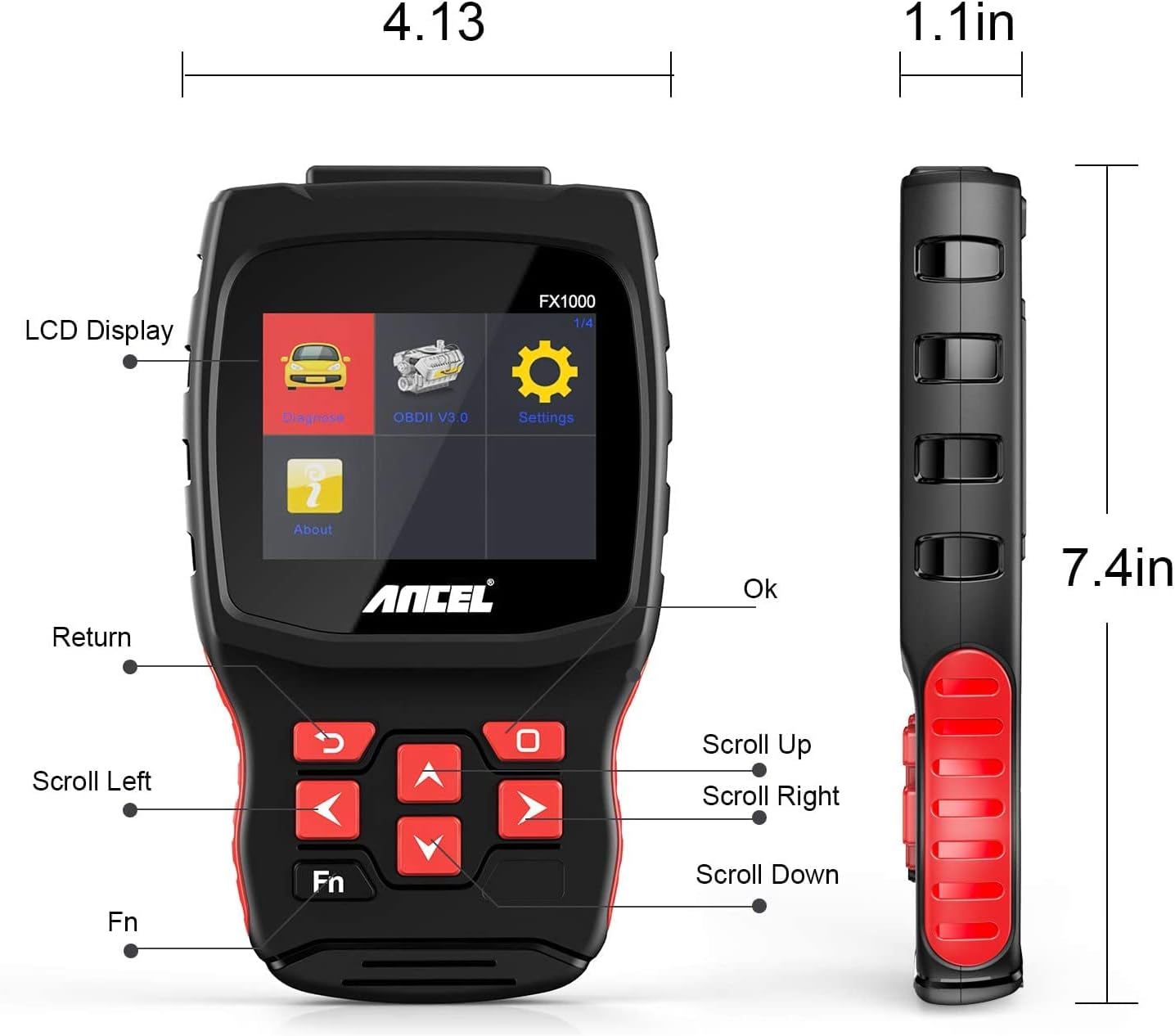
Image: A hand holding the ANCEL FX1000 connected to a vehicle's OBDII port, with the car's dashboard visible.
6. Навігація та налаштування
The ANCEL FX1000 features a user-friendly interface. Use the arrow buttons to navigate and the OK button to select.
- Діагностувати: Access vehicle-specific diagnostic functions.
- OBDII V3.0: Access general OBDII functions for all compatible vehicles.
- Налаштування: Налаштуйте параметри пристрою.
- про: View device information such as serial number, firmware version, and software version.
Параметри меню налаштувань:
- мова: Змініть мову дисплея.
- одиниця: Перемикайтеся між градусами Цельсія та Фаренгейта для вимірювання температури.
- Звуковий сигнал: Enable or disable audible feedback.
- запис: View recorded diagnostic data.
- Тест кнопки: Test the functionality of the device buttons.
- LCD Test: Test the LCD display.
7. Діагностика системи
The ANCEL FX1000 allows you to perform in-depth diagnostics on various vehicle systems. After selecting 'Diagnose' and your vehicle's manufacturer (e.g., Toyota), you can choose specific systems.
Image: Visual representation of systems diagnosed by FX1000, including Engine, ABS, TPMS, Transmission, Oil Service, Airbag, Battery, Audio, and Headlight Activate.
Діагностичні функції:
- Read Trouble Code: Retrieves current, pending, and history Diagnostic Trouble Codes (DTCs).
- Clear Trouble Code: Erases DTCs from the vehicle's computer.
- Читання потоку даних: Відображає параметри даних у режимі реального часу з датчиків автомобіля.
- Активний тест: Allows bidirectional control to test specific components.
- Спеціальні функції: Accesses advanced maintenance and service functions.
8. Спеціальні функції
The ANCEL FX1000 offers several special functions for vehicle maintenance:

Image: Visual representation of special functions including Oil Service Reset, ABS Bleeding, TPMS Reset, and EPB Reset.
- Скидання рівня масла: Скидає індикатор обслуговування оливи після заміни оливи.
- Кровотеча з абсцесів м'язів нижнього шлуночка (ABS): Виконує функції прокачування антиблокувальної гальмівної системи.
- Скидання EPB: Resets the Electronic Parking Brake system.
- Throttle Position Adaption: Adapts the throttle position sensor.
- Регенерація DPF: Запускає процес регенерації сажового фільтра.
- Заміна батареї: Реєструє нові заміни батарейок.
9. OBDII Functions (General)
The 'OBDII V3.0' menu provides general diagnostic functions compatible with all OBDII-compliant vehicles (1996 and newer).
- Read Current Trouble Code: Displays active DTCs.
- Clear Trouble Code: Erases all stored DTCs.
- Read Current Data: View live sensor data.
- Read Pending Trouble Code: Displays DTCs that have not yet fully matured.
- Зчитування даних стоп-кадру: Shows a snapshot of vehicle conditions when a DTC was set.
- Readiness Tests: Перевіряє стан моніторів, пов'язаних з викидами.
Readiness Test:
The Readiness Test is crucial for emissions inspections. It indicates whether various emission control systems have completed their self-tests. Look for 'Complete' or 'Supported' status for all monitors. If a monitor shows 'Not Complete' or 'Not Supported', it may indicate an issue or that the drive cycle has not been completed.
10. Clearing Trouble Codes
To clear trouble codes, navigate to the 'Clear Trouble Code' option within the relevant diagnostic menu. The device will prompt you to confirm. After clearing, it is recommended to cycle the vehicle's ignition off and on to ensure all related warning lights are reset.
Note: The ANCEL FX1000 can only read and clear SRS error codes; it does NOT support SRS reset functions.
11. Оновлення програмного забезпечення
To ensure your ANCEL FX1000 has the latest vehicle coverage and features, regular software updates are recommended. The device offers lifetime free online updates.
- Connect the device to your computer using the provided Micro USB cable.
- Follow the instructions in the 'Download Guide' included in your package to install the update software on your computer.
- Register your device using the serial number and your email address.
- Select the specific car manufacturer software you need for your device.
- Perform the update as prompted by the software.

Image: ANCEL FX1000 connected via USB cable to a laptop, illustrating the update process.
12. Вирішення проблем
If you encounter issues while using your ANCEL FX1000, refer to the following common scenarios:
-
Пов'язані документи - FX1000

Посібник користувача ANCEL VD500: Посібник з діагностичного інструменту OBD2
Вичерпний посібник користувача для діагностичного сканера ANCEL VD500 OBD2. Дізнайтеся про запобіжні заходи, функції, експлуатацію, технічні характеристики та гарантійну інформацію для вашого автомобільного діагностичного інструменту.
Посібник користувача ANCEL VOD700 - Багатосистемний сканер Volvo
Вичерпний посібник користувача для багатосистемного сканера ANCEL VOD700, що містить детальні інструкції для автомобілів Volvo, включаючи діагностику, спеціальні функції, налаштування інструментів та оновлення.
Посібник користувача ANCEL DS160, DS100, DS200 - Автомобільні діагностичні інструменти
Інструкція користувача для автомобільних діагностичних інструментів ANCEL DS160, DS100 та DS200. Охоплює характеристики, параметри, використання, функції, поширені запитання та гарантію на ці OBD2 сканери.
Інструкція користувача сканера ANCEL BD300 OBD2
Вичерпний посібник користувача для сканера ANCEL BD300 OBD2. Дізнайтеся, як завантажити застосунок ANCEL, підключитися через Bluetooth, виконати діагностику автомобіля, оновити програмне забезпечення та використовувати спеціальні функції, такі як скидання налаштувань EPB, CBS, ABS та подушок безпеки. Підтримує повну діагностику системи BMW та інших автомобілів.
Посібник користувача ANCEL FD500: Вичерпний посібник з діагностики автомобіля
Відкрийте для себе ANCEL FD500, комплексний багатосистемний сканер OBD2 сірого кольору, розроблений для автомобілів Ford, Lincoln та Mercury. Цей посібник користувача містить детальні інструкції щодо його функцій, запобіжних заходів та діагностики, включаючи двигун, ABS, SRS, трансмісію, системи повного приводу, електроприводну систему гальмування (EPB), скидання рівня оливи та реєстрацію акумулятора.
Посібник користувача та короткий посібник користувача ANCEL BD300
Вичерпний посібник користувача для діагностичного пристрою ANCEL BD300 Bluetooth OBD2, що охоплює налаштування, експлуатацію та функції для автомобілів BMW/Mini. Містить інструкції щодо підключення до програми, діагностики системи та скидання налаштувань сервісу.