1. Вступ і даліview
The OSD Audio MX1680 GEN2 is a high-performance, multi-channel amplifier designed for distributed audio systems. This Class D amplifier provides 16 channels across 8 independent zones, delivering 80 Watts per channel into 4 Ohms or 50 Watts per channel into 8 Ohms. It is suitable for both residential and commercial audio installations, serving as a main amplifier for multi-room audio or integrating into home theater systems.
Key features include front-panel on/off buttons for each zone, efficient Class D amplification for low distortion, and built-in protection circuitry against thermal overload and short circuits. Its slim, 2U rack-mountable design (hardware included) allows for flexible installation.

Зображення 1.1: Передня та задня частини view of the OSD Audio MX1680 GEN2 Multi-Zone Digital Ampліфірник.
2. Інформація про безпеку
Будь ласка, прочитайте та зрозумійте всі інструкції з техніки безпеки перед використанням цього пристрою. Зберігайте цей посібник для подальшого використання.
- Джерело живлення: Підключіть ampпідключайте пристрій лише до типу джерела живлення, зазначеного на пристрої. Переконайтеся, що гучністьtage is correct for your region.
- Вентиляція: Do not block any ventilation openings. Install in accordance with the manufacturer's instructions. Maintain adequate space around the unit for proper airflow.
- Вода і вологість: Не піддавайте цей прилад впливу дощу або вологи. Не ставте на пристрій предмети, наповнені рідинами, такі як вази.
- Тепло: Не встановлюйте поблизу будь-яких джерел тепла, таких як радіатори, обігрівачі, печі або інші пристрої (включаючи ampліфікатори), які виробляють тепло.
- Заземлення: This appliance must be grounded. Ensure the power cord is connected to a properly grounded outlet.
- Обслуговування: Не намагайтеся самостійно обслуговувати цей виріб. Зверніть усі послуги до кваліфікованого обслуговуючого персоналу.
- Прибирання: Перед чищенням від’єднайте пристрій від мережі. Використовуйте для чищення суху тканину.
3. Налаштування та встановлення
3.1 Розпакування
Обережно вийміть amplifier from its packaging. Verify that all components listed in the 'What's in the Box' section are present. This includes the MX1680 GEN2 amplifier and the Quick Start Guide.
3.2 Розміщення
The MX1680 GEN2 is designed for rack mounting (2U height) or placement on a flat, stable surface. Ensure adequate ventilation around the unit to prevent overheating. Avoid placing it near other heat-generating equipment.
3.3 Підключення
Refer to the rear panel diagram for all input and output connections.
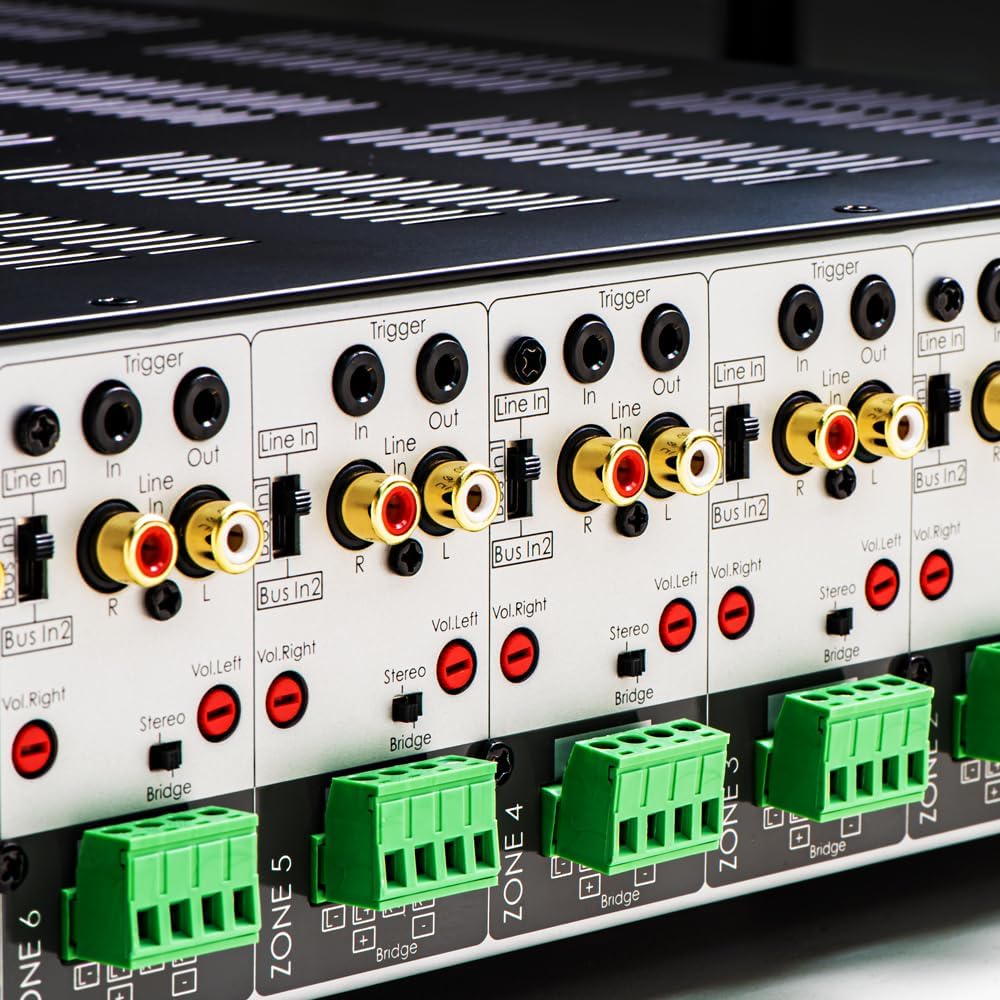
Зображення 3.1: Детальний опис view of the rear panel input and output connections.
- Виходи для динаміків: Connect your speakers to the corresponding zone terminals. Ensure correct polarity (+ to + and - to -). The amplifier supports both 4-ohm and 8-ohm speakers. For bridged mode operation, refer to section 4.3.
- Лінійні входи (RCA): Each zone has a dedicated stereo RCA Line In. Connect your audio sources (e.g., pre-amplifier, media player) to these inputs.
- Bus Inputs (RCA): The amplifier features two stereo Bus Inputs (Bus In 1, Bus In 2). These allow a single audio source to be distributed to multiple zones.
- Лінійні виходи (RCA): Each zone also has a stereo RCA Line Out, allowing the audio signal from that zone to be passed to another amplifier або аудіопристрій.
- Тригер вхід/вихід: The 12V Trigger In allows the amplifier to be turned on/off by an external device. The 12V Trigger Out can be used to control other devices.
- Вхід живлення змінного струму: Connect the supplied power cord to the AC IN receptacle and then to a suitable wall outlet.

Зображення 3.2: Детальний опис view of Bus inputs and Trigger connections on the rear panel.
4. Інструкція з експлуатації
4.1 Увімкнення/вимкнення живлення
Press the main power button on the front panel to turn the amplifier on or off. A red LED indicator will illuminate when the unit is powered on.

Image 4.1: Front panel power button.
4.2 Zone Control
Each of the 8 zones has a dedicated button on the front panel. Pressing a zone button will activate or deactivate that specific audio zone. The corresponding LED will indicate the zone's status.

Image 4.2: Front panel zone selection buttons.
4.3 Input Selection and Volume Adjustment
On the rear panel, each zone features switches for input selection and rotary controls for volume adjustment:
- Селектор введення: A slide switch allows you to select the audio input for each zone: Рядок в (dedicated input for that zone), Bus In 1, або Bus In 2.
- Регулятори гучності: Separate rotary controls for Left and Right channels (Vol. Left, Vol. Right) allow for precise volume balancing within each zone.
- Stereo/Bridge Switch: A switch allows you to configure the zone for stereo operation or bridged mono operation. In bridged mode, two amplifier channels combine to deliver higher power to a single speaker. Ensure the speaker impedance is appropriate for bridged mode (typically 8 ohms minimum).
4.4 Audio Sensing
The amplifier incorporates an audio sense feature that automatically activates a zone when an input signal is detected and turns it off after a period of no signal. This helps conserve power and prolong the unit's lifespan.

Зображення 4.3: Наприкладample of multi-zone audio distribution with the ampліфірник.
5. Технічне обслуговування
The OSD Audio MX1680 GEN2 amplifier requires minimal maintenance. Follow these guidelines to ensure optimal performance and longevity:
- Прибирання: Periodically wipe the exterior surfaces with a soft, dry cloth. Do not use liquid cleaners or aerosol sprays, as they may damage the finish or internal components.
- Вентиляція: Ensure that the ventilation openings on the top and sides of the unit remain clear of dust and obstructions. Dust accumulation can impede airflow and lead to overheating.
- Підключення: Occasionally check all cable connections to ensure they are secure and free from corrosion. Loose connections can lead to signal loss or degradation.
- Зберігання: Якщо зберігати amplifier for an extended period, disconnect it from power and store it in a cool, dry place, away from direct sunlight and extreme temperatures.
6. Вирішення проблем
If you experience issues with your MX1680 GEN2 amplifier, consult the following troubleshooting guide. For problems not resolved here, please contact OSD Audio support.
| проблема | Можлива причина | Рішення |
|---|---|---|
| Немає живлення | Power cord disconnected; Power outlet faulty; Amplifier fuse blown | Check power cord connection; Test outlet with another device; Contact service for fuse replacement. |
| No sound from a zone | Zone not activated; Incorrect input selected; Source device off/muted; Speaker wires loose/incorrectly connected; Volume too low | Press the zone button on the front panel; Verify input selector switch position; Check source device; Inspect speaker connections; Adjust zone volume controls. |
| Спотворений звук | Input signal too high; Speaker impedance mismatch; Faulty speaker cable; Ampперегрів ліфтера | Reduce source device output level; Ensure correct speaker impedance (4 or 8 ohms, or 8 ohms for bridged); Check speaker cables; Ensure proper ventilation. |
| Amplifier shuts off unexpectedly | Overheating; Short circuit in speaker wiring; Protection circuit activated | Ensure proper ventilation; Check all speaker wiring for shorts; Allow unit to cool down before restarting. |
7. Технічні характеристики
| Особливість | Специфікація |
|---|---|
| Номер моделі | MX1680-GEN2 |
| Канали | 16 Channels (8 Zones) |
| Вихідна потужність (4 Ом) | 80 Watts per channel (1KHz) |
| Вихідна потужність (8 Ом) | 50 Watts per channel (1KHz) |
| Ampлібератор класу | клас D |
| Розміри продукту (Д x Ш x В) | 16.81 x 16.14 x 3.46 дюймів |
| Вага товару | 23 фунта |
| Стійка монтажна | Yes (2U, hardware included) |
| Виробник | Звук екранного меню |
| Дата першої доступності | 31 січня 2020 р |
8. Інформація про гарантію
Warranty information for the OSD Audio MX1680 GEN2 amplifier is typically provided with your purchase documentation or can be found on the official OSD Audio webсайт. Будь ласка, зверніться до цих ресурсів для отримання детальної інформації щодо гарантійного покриття, умов та положень.
9. Підтримка
For technical assistance, product inquiries, or service requests, please contact OSD Audio customer support. You can typically find contact information, including phone numbers and email addresses, on the official OSD Audio webсайт:
Please have your model number (MX1680-GEN2) and purchase details ready when contacting support.


