вступ
Thank you for choosing the TOPTECH Jet-4 Portable Bluetooth Speaker. This manual provides essential information for setting up, operating, and maintaining your speaker to ensure optimal performance and longevity. Please read this manual thoroughly before using the product.

Image: The TOPTECH Jet-4 Bluetooth Speaker, showcasinзавдяки компактному дизайну та яскравому світлодіодному освітленню.
Інформація про безпеку
To prevent fire or shock hazards, always follow basic safety precautions when using this product:
- Не піддавайте динамік впливу дощу або вологи.
- Do not disassemble or modify the speaker. Refer all servicing to qualified personnel.
- Тримайте динамік подалі від прямих сонячних променів, джерел тепла та екстремальних температур.
- Уникайте падіння та сильних ударів динаміка.
- Використовуйте лише зазначений зарядний кабель та адаптер живлення.
Вміст упаковки
- TOPTECH Jet-4 Bluetooth Speaker
- USB-кабель для зарядки
- Посібник користувача
Продукт закінченийview
Елементи керування та порти
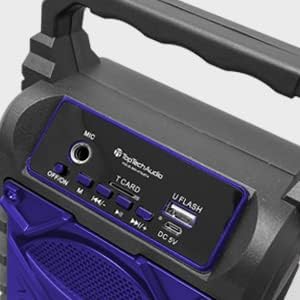
Зображення: Детальне view of the speaker's top control panel, showing various buttons and input ports.
- Мікрофонний вхід: Connect an external microphone for karaoke.
- Перемикач ВИМК/УВІМК: Power the speaker on or off.
- Кнопка M (режим): Switch between Bluetooth, AUX, USB, and TF Card modes.
- Previous / Volume Down Button: Коротке натискання для попереднього треку, довге натискання для зменшення гучності.
- Кнопка відтворення / паузи: Відтворення або призупинення відтворення аудіо.
- Next / Volume Up Button: Коротке натискання для наступного треку, довге натискання для збільшення гучності.
- T CARD Slot: Insert a TF (MicroSD) card for direct audio playback.
- U FLASH (USB) Port: Insert a USB flash drive for direct audio playback.
- Порт DC 5V: Connect the USB charging cable to power and charge the speaker.
Ключові характеристики

Image: An infographic showing the TOPTECH Jet-4 speaker with icons representing its key features: easy portability, mic port, mode karaoke, disco light, TF card port, and USB port.
- Потужний звук: Dual-driver stereo output delivers crisp highs and deep bass for a premium audio experience.
- Багаторежимне відтворення: Supports Bluetooth, AUX, USB, and TF card input for versatile music streaming.
- Караоке готове: Built-in karaoke mode with light effects and mic support makes any party more fun.
- TWS Pairing Support: Connect two speakers wirelessly for immersive, room-filling sound.
- Тривалий термін служби батареї: Enjoy up to 6 hours of playtime with a rechargeable battery, perfect for all-day events.
Налаштування
Початкова плата
Before first use, fully charge the speaker. Connect the provided USB charging cable to the DC 5V port on the speaker and the other end to a USB power adapter (not included) or a computer USB port.

Image: A visual representation of a fully charged battery, symbolizing the speaker's long battery life.
The charging indicator light will illuminate during charging and turn off or change color when fully charged. A full charge typically takes a few hours.
Інструкція з експлуатації
Bluetooth-парування
- Turn on the speaker by sliding the OFF/ON switch to the 'ON' position. The speaker will enter Bluetooth pairing mode automatically, indicated by a flashing LED light and an audible prompt.
- Увімкніть Bluetooth на своєму смартфоні, планшеті або іншому пристрої з підтримкою Bluetooth.
- шукати available Bluetooth devices and select "JET-4" from the list.
- Once connected, the speaker will provide an audible confirmation, and the LED light will stop flashing.
- Тепер ви можете відтворювати аудіо з вашого пристрою через динамік.
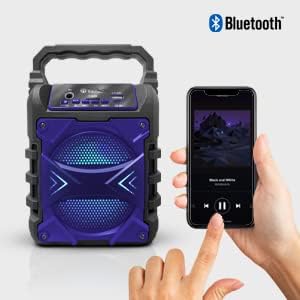
Image: The TOPTECH Jet-4 speaker positioned next to a smartphone, illustrating the seamless Bluetooth connection process.
Playback Modes (AUX, USB, TF Card)
Натискайте кнопку «M» (режим), щоб перемикатися між доступними режимами відтворення:
- Режим AUX: Connect an external audio device using a 3.5mm audio cable (not included) to the AUX input.
- Режим USB: Insert a USB flash drive into the 'U FLASH' port. The speaker will automatically detect and play compatible audio files.
- Режим картки TF: Insert a TF (MicroSD) card into the 'T CARD' slot. The speaker will automatically detect and play compatible audio files.
Режим караоке
To use the karaoke function, connect a microphone (not included) to the 'MIC' input port. Adjust the microphone volume as needed. The speaker's built-in light effects will enhance the karaoke experience.
Сполучення TWS (справжнє бездротове стерео)
For an enhanced stereo sound experience, you can pair two TOPTECH Jet-4 speakers together:
- Ensure both Jet-4 speakers are powered on and not connected to any Bluetooth device.
- On one speaker (this will be the primary speaker), long press the 'M' (Mode) button until you hear a pairing tone.
- Два динаміки автоматично підключаться один до одного. Після підключення ви почуєте звуковий сигнал підтвердження.
- Now, connect your Bluetooth device to the primary speaker as described in the 'Bluetooth Pairing' section. Audio will play through both speakers in stereo.

Image: Two TOPTECH Jet-4 speakers wirelessly connected to a smartphone, demonstrating the True Wireless Stereo (TWS) pairing feature for expanded sound.
Технічне обслуговування
- Протирайте динамік м’якою сухою тканиною. Не використовуйте абразивні засоби для чищення або розчинники.
- Зберігайте динамік у прохолодному сухому місці, коли він не використовується.
- Avoid prolonged exposure to extreme temperatures or humidity.
Усунення несправностей
| проблема | Рішення |
|---|---|
| Динамік не вмикається. | Переконайтеся, що акумулятор заряджений. Підключіть динамік до джерела живлення за допомогою USB-кабелю. |
| Немає звуку з динаміка. | Перевірте рівень гучності як на динаміку, так і на підключеному пристрої. Переконайтеся, що вибрано правильний режим відтворення. |
| Не вдається з'єднати Bluetooth. | Ensure the speaker is in pairing mode. Turn off Bluetooth on your device and turn it back on. Try restarting both the speaker and your device. Make sure no other devices are connected to the speaker. |
| Погана якість звуку. | Перемістіть динамік ближче до вашого Bluetooth-пристрою, щоб зменшити перешкоди. Переконайтеся, що джерело звуку має хорошу якість. |
Технічні характеристики
| Особливість | Деталь |
|---|---|
| Бренд | ТОПТЕХ |
| Номер моделі | JET-4-BLUE |
| Джерело живлення | Працює від батареї |
| Технологія підключення | Bluetooth, USB |
| Аудіо вхід | Guitar Input, Karaoke Input, USB |
| Кількість каналів | 2 |
| матеріал | Пластик, Метал |
| Вага товару | 1.54 фунта |
| Розміри упаковки | 9.29 x 6.38 x 4.17 дюймів |
| UPC | 689259338593 |
Гарантія та підтримка
For warranty information and customer support, please refer to the contact details provided on the product packaging or visit the official TOPTECH webсайт. Зберігайте чек про покупку як підтвердження покупки для будь-яких гарантійних претензій.


