1. Продукт закінчивсяview
The Lindy Single Display Short Bracket with Pole and Desk Clamp, Model 40656, provides a robust solution for mounting a single monitor to a standard office desk or table. This mount allows for easy adjustment of the display, including tilt, pivot, and rotation, to achieve an optimal viewing angle. It is compatible with most monitors adhering to VESA standards of 75 x 75mm or 100 x 100mm.
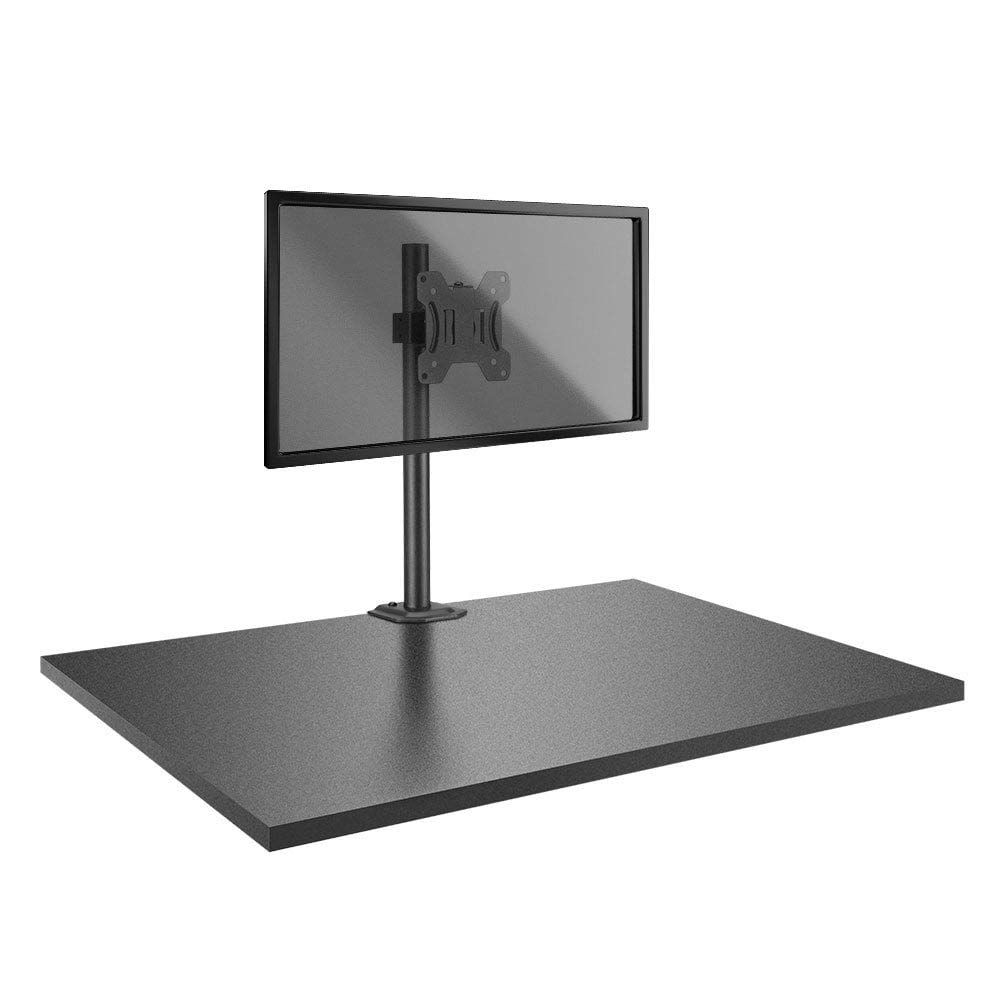
Image: The Lindy Single Display Short Bracket with Pole and Desk Clamp, Model 40656, shown installed on a desk with a monitor (monitor not included).
Ключові характеристики:
- Mounts a single monitor to a standard office desk.
- Allows tilt, pivot, or rotate for simple maneuverability.
- Conforms to VESA standards (75 x 75mm and 100 x 100mm).
- Constructed with a robust, lightweight metal pole and an aluminum powder-coated bracket.
2. Інформація про безпеку
Please read and understand all instructions before attempting installation. Failure to follow these instructions may result in property damage, injury, or product malfunction.
- Ensure the desk surface is stable and can safely support the combined weight of the mount and your monitor.
- Do not exceed the maximum weight capacity of the mount. Refer to the 'Specifications' section for details.
- Ensure all screws are securely tightened to prevent accidental detachment of the monitor.
- Тримайте дітей та домашніх тварин подалі від місця встановлення під час складання.
- Avoid placing the mount in areas with excessive vibration, direct sunlight, or high humidity.
- Використовуйте лише надане обладнання або замінники, схвалені виробником.
3. Вміст упаковки
Перед початком встановлення перевірте наявність усіх компонентів:
- Pole with integrated desk clamp
- Short VESA bracket
4. Інструкції з налаштування
Follow these steps to properly install your Lindy Single Display Short Bracket:
Step 1: Attach Desk Clamp до столу
- Розташуйте парту клamp base on the edge of your desk, ensuring it is stable and flush.
- Затягніть клamp screw firmly until the mount is securely fastened to the desk. Do not overtighten.

Зображення: Збоку view of the pole with the desk clamp, illustrating how it attaches to a desk surface.
Step 2: Assemble Pole and Bracket
- Slide the short VESA bracket onto the pole.
- Position the bracket at your desired height and secure it using the integrated locking mechanism or screws.

Image: The pole and desk clamp assembly with the short VESA bracket positioned on the pole.
Step 3: Attach VESA Bracket to Monitor
- Обережно покладіть монітор екраном донизу на м’яку, чисту поверхню, щоб запобігти подряпинам.
- Align the VESA mounting holes on the back of your monitor with the holes on the short bracket.
- Secure the bracket to the monitor using the appropriate screws (typically M4 or M5, not included with mount). Ensure they are tightened firmly but do not overtighten.

Зображення: Крупний план view of the VESA mounting plate, showing the screw holes for monitor attachment.
Step 4: Mount Monitor to Pole
- With assistance, carefully lift the monitor (with the attached bracket) and slide the bracket onto the pole.
- Ensure the bracket is securely seated on the pole and tighten any locking screws on the bracket to prevent vertical movement.
5. Інструкція з експлуатації
Once installed, the Lindy Single Display Short Bracket allows for flexible monitor positioning:
- Регулювання нахилу: Loosen the tilt knob on the VESA bracket, adjust the monitor to your desired vertical angle (up to 12 degrees), and then re-tighten the knob to secure the position.
- Регулювання повороту: The monitor can be rotated 360 degrees around the VESA plate, allowing for easy switching between landscape and portrait orientations.
- Регулювання обертання: The entire monitor assembly can be rotated around the pole for horizontal viewрегулювання кутів.
6. Технічне обслуговування
To ensure the longevity and safe operation of your monitor mount:
- Регулярно перевіряйте всі гвинти та з'єднання, щоб переконатися, що вони міцно затягнуті. За потреби підтягуйте.
- Clean the mount with a soft, dry cloth. Avoid using abrasive cleaners, solvents, or chemical sprays.
- Inspect the mount periodically for any signs of wear, damage, or corrosion. If damage is found, discontinue use and contact support.
7. Вирішення проблем
If you encounter issues with your monitor mount, refer to the following common problems and solutions:
- Monitor is wobbly:
- Переконайтеся, що стіл клamp надійно закріплений на столі.
- Check all screws connecting the VESA bracket to the pole and the monitor.
- Monitor does not stay in desired position (e.g., tilts down):
- Tighten the tilt adjustment knob on the VESA bracket.
- Difficulty rotating or pivoting the monitor:
- Ensure no cables are obstructing the movement of the monitor or bracket.
- Check for any overtightened screws that might restrict motion.
8. Технічні характеристики
| Особливість | Деталь |
|---|---|
| Бренд | Лінді |
| Номер моделі | 40656 |
| Вага товару | 4.4 фунта |
| Розміри продукту | 4.17 x 4.33 x 20.08 дюймів |
| матеріал | Алюміній, Метал |
| Тип монтажу | Настільне кріплення |
| Тип руху | Rotate, Tilt |
| Сумісні пристрої | Monitors (Television) |
| Максимальний кут нахилу | 12 градусів |
| Сумісність VESA | 75 х 75 мм, 100 х 100 мм |
9. Гарантія та підтримка
Інформація про гарантію:
This Lindy product is covered by a Гарантія 2 рік з дати покупки. Будь ласка, збережіть чек про покупку для гарантійного обслуговування.
Підтримка клієнтів:
For technical assistance, troubleshooting, or to make a warranty claim, please contact Lindy customer support. Visit the official Lindy website for up-to-date contact information and support resources.


