1. Вступ
The Apitor STEM Robot Toy 6-in-1 Building Kit, Model Robot J, provides an engaging platform for learning robotics, engineering, and coding. This kit allows users to construct six different robot models using 480 building blocks, a control module with two high-speed motors, and two multicolor LED lights. The robot can be controlled via a dedicated application, offering various modes and graphical coding functionalities.

Image 1.1: Apitor Robot J, showcasing its primary form and five other possible configurations, alongside the app interface.
2. Інформація про безпеку
Цей виріб містить дрібні деталі та є не підходить для дітей віком до 3 років or any individuals who may place inedible objects in their mouths. Adult supervision is recommended during assembly and play.
3. Що в коробці
Перед початком складання перевірте наявність усіх компонентів:
- 480 будівельних блоків
- 1 x Control Module (with 2 built-in high-speed motors)
- 2 x Multicolor LED Lights
- 1 x Building Instructions Manual
- 1 x Посібник користувача
- 1 x Sorting Tray

Зображення 3.1: закінченоview of the kit contents, including the control module, sorting tray, and manuals.
4. Налаштування
4.1. Building Your Robot
The kit includes 480 colorful blocks that snap together without the need for screws or additional tools. You can build any of the six available models. The primary model, Robot J, has dedicated paper instructions. For other models, detailed step-by-step instructions are available within the Apitor Kit application.
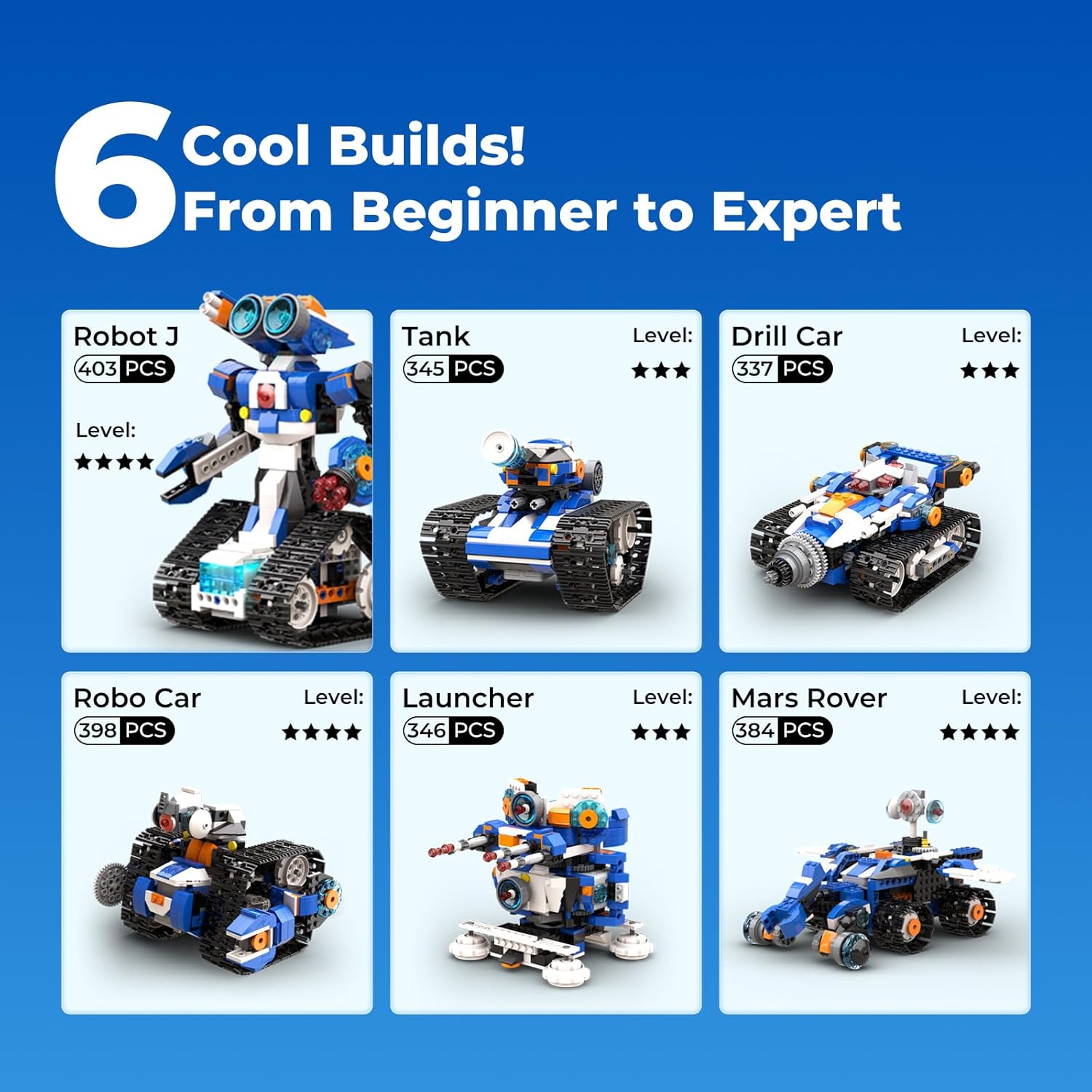
Image 4.1: Six distinct robot models achievable with the Apitor kit.

Image 4.2: The Apitor Kit app provides easy-to-follow assembly instructions.
4.2. Встановлення батареї
The control module requires 3 батарейки АА (not included). Carefully open the battery compartment on the control module and insert the batteries, ensuring correct polarity. Close the compartment securely.
4.3. Завантаження програми та підключення
Завантажте безкоштовно Apitor Kit application from your device's app store. The app is compatible with both iOS and Android devices. Once installed, open the app and follow the on-screen prompts to connect your robot via Bluetooth. Ensure the robot's control module is powered on during the connection process.
Відео 4.1: Попереднійview of the Apitor Robot J in action, demonstrating its dynamic capabilities and app control.
This video showcases the robot's movement and interaction, providing a visual guide to its functionality.
5. Operating Your Robot
5.1. Режими керування додатками
Додаток Apitor Kit пропонує чотири зручні режими керування:
- Режим двох двигунів: Control each motor independently for precise movement.
- Режим одного двигуна: Simplified control for basic forward/backward movement.
- Режим гіроскопа: Використовуйте гіроскоп вашого пристрою, щоб керувати роботом.
- Режим шляху: Draw a path on your screen for the robot to follow.

Image 5.1: The four distinct app control modes for the Apitor robot.
5.2. Dynamic Movement
The robot is designed for dynamic movement, capable of moving in all directions (left, right, forward, backward) and performing 360-degree stunts. Its lively LED eyes and flexible hand joints enhance interactive play.
5.3. Learning Coding Through Play
The Apitor Kit app features an intuitive, icon-based graphical coding interface. Users can drag and drop coding blocks to create sequences, explore concepts like loops and variables, and solve problems. This approach develops critical thinking and logical skills.

Image 5.2: The intuitive icon-based coding interface within the Apitor Kit app.

Image 5.3: Developing logical thinking skills by programming the robot's actions.
Video 5.1: A child demonstrates building and controlling the Apitor Robot J, highlighting the ease of assembly and app-based remote control.
This video illustrates the hands-on building process and the functionality of the app for controlling the robot.
Video 5.2: A parent and child assemble and program the Apitor Robot J, showcasing the educational and engaging aspects of the kit.
This video demonstrates the collaborative building experience and the graphical coding interface for creating custom robot movements.
6. Технічне обслуговування
To ensure the longevity and optimal performance of your Apitor robot, follow these maintenance guidelines:
- Прибирання: Use a soft, dry cloth to wipe down the blocks and control module. Avoid using harsh chemicals or abrasive materials.
- Зберігання: Store the robot and its components in the provided sorting tray or a similar container to prevent loss and damage. Keep it in a cool, dry place away from direct sunlight.
- Догляд за акумулятором: Remove batteries from the control module if the robot will not be used for an extended period to prevent leakage.
7. Вирішення проблем
If you encounter issues with your Apitor robot, consider the following:
- Робот не рухається: Check if the batteries are correctly installed and charged. Ensure the control module is powered on and properly connected via Bluetooth to the app.
- Проблеми з підключенням програми: Verify that Bluetooth is enabled on your device and the robot is within range. Try restarting both the app and the robot's control module.
- Incorrect Movement: Review your coding sequence in the app for any errors. Ensure all blocks are securely connected.
- Відсутні частини: Refer to the 'What's in the Box' section and contact Apitor customer support if any essential parts are missing.
8. Технічні характеристики
| Особливість | Деталь |
|---|---|
| Бренд | Апітор |
| Номер моделі | робот Дж |
| Розміри продукту | 12.01 x 8.27 x 2.48 дюймів |
| Вага товару | 1.76 фунта |
| Кількість штук | 480 |
| Рекомендований вік | 7 - 12 років |
| Джерело живлення | 3 батарейки АА (не входять в комплект) |
| Спосіб контролю | APP Remote Control (Bluetooth) |
9. Гарантія та підтримка
For warranty information, technical support, or assistance with missing parts, please visit the official Apitor website or contact Apitor customer service directly. Contact details can typically be found on the product packaging or the Apitor brand store online.


