1. Вступ
This manual provides detailed instructions for the safe and effective use of the ANENG V01B Digital Multimeter. This device is a battery-powered, true-RMS, auto-ranging digital multimeter featuring a 4000-count LCD display with backlight and flashlight functions. It is designed for measuring various electrical parameters in automotive and general electrical applications.
2. Інформація про безпеку
Read all safety warnings and instructions carefully before using this multimeter. Failure to follow these instructions may result in electric shock, fire, or damage to the instrument.
- Не вводити обtage at the Current Mode, Resistance Mode, Diode Mode, Continuity Mode, or Temperature Mode.
- Не вводити обtage exceeding 36V DC or 25V AC when you are in the setting of measuring current.
- Always ensure the test leads are properly connected and the function switch is set to the correct range before making any measurements.
- Disconnect power to the circuit and discharge all high-voltagконденсатори перед вимірюванням опору, перевірки цілісності кола, діодів або ємності.
- Будьте обережні при роботі з обtagвище 30 В змінного струму RMS, 42 В пікового значення або 60 В постійного струму. Ці значенняtagце небезпека ураження електричним струмом.
- Замініть батарейки, коли з'явиться індикатор низького рівня заряду батарейки, щоб забезпечити точність показань.
- Не використовуйте глюкометр, якщо він виглядає пошкодженим або якщо корпус відкритий.
3. Продукт закінчивсяview
The ANENG V01B is a compact and versatile digital multimeter.
3.1. Розміри товару

The multimeter measures approximately 119.5mm (4.70in) in length, 61.7mm (2.43in) in width, and 31.9mm (1.25in) in thickness. Note: Manual measurement may have an error of 10-20 mm.
3.2. Функції задньої панелі

The back of the multimeter features a battery slot for easy access and a retractable bracket for convenient positioning. It also includes a high-brightness flashlight to assist in measurements in low-light conditions.

The back of the product also houses the NCV (Non-Contact Voltage) sensing point and the LED lighting for the flashlight function.
4. Налаштування
4.1. Встановлення батареї
The ANENG V01B multimeter requires batteries for operation.
- Locate the battery slot cover on the back of the multimeter.
- Використовуйте викрутку, щоб відкрутити гвинт, що кріпить кришку батарейного відсіку.
- Обережно зніміть кришку акумулятора.
- Insert the required batteries (typically AAA, refer to the battery compartment for specific type and polarity) ensuring correct polarity.
- Встановіть кришку акумулятора та закріпіть її гвинтом.
5. Інструкція з експлуатації
5.1. Вступ до функцій панелі
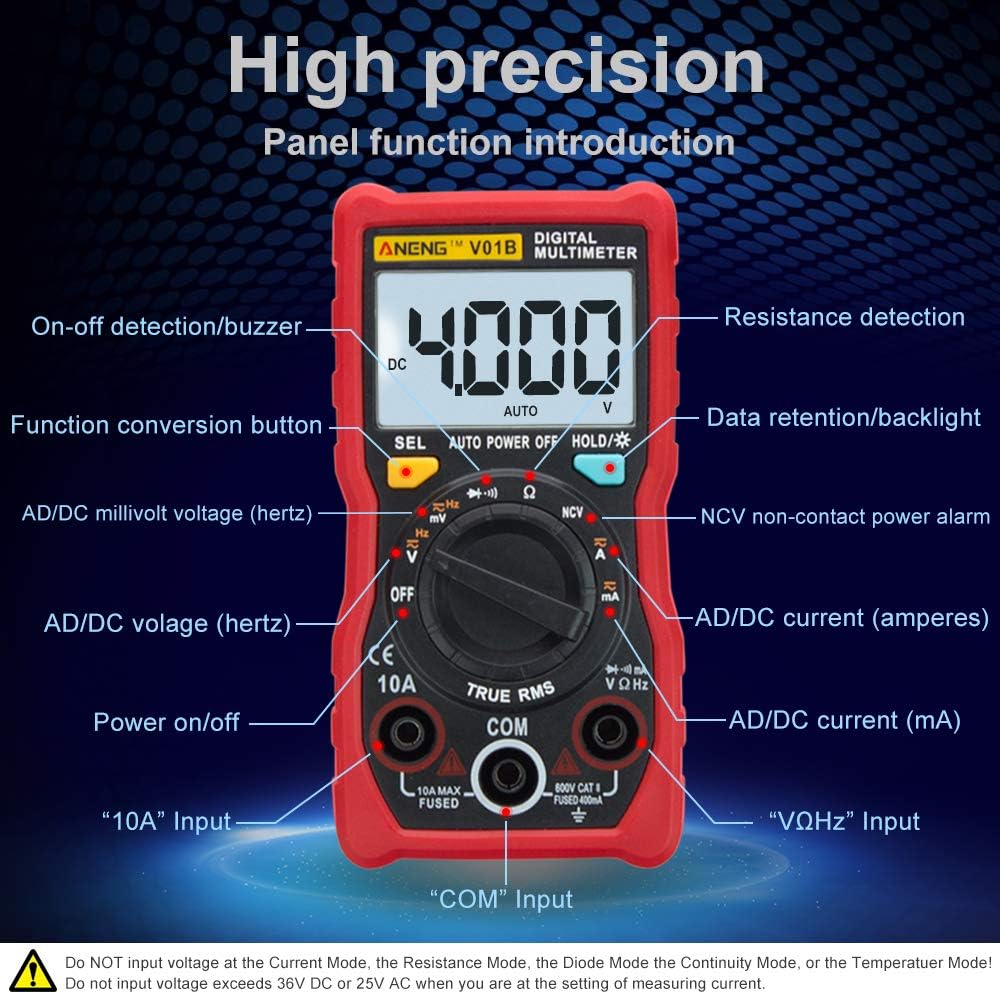
The front panel of the ANENG V01B multimeter features a rotary switch for function selection, an LCD display, and various input jacks.
- Дисплей: 4000 counts LCD for reading measurements.
- On-off detection/Buzzer: For continuity testing.
- Function conversion button (SEL): Used to switch between different functions within a single rotary switch position (e.g., AC/DC voltagе., діод/безперервність кола).
- AD/DC millivolt voltage (hertz): Measures small AC/DC voltages and frequency.
- ВИМКНЕНО: Turns the multimeter off.
- AD/DC voltage (hertz): Measures standard AC/DC voltages and frequency.
- Увімкнення/вимкнення живлення: Головний вимикач живлення.
- "10A" Input: Input jack for high current measurements (up to 10A).
- "COM" Input: Common (negative) input jack for all measurements.
- "VΩHz" Input: Вхідний роз'єм для гучностіtage, resistance, frequency, capacitance, diode, and continuity measurements.
- AD/DC current (mA): Measures small AC/DC currents (milliamperes).
- AD/DC current (amperes): Measures standard AC/DC currents (amperes).
- NCV non-contact power alarm: Виявляє AC voltage без прямого контакту.
- Data retention/Backlight (HOLD/*): Holds the current reading on the display and activates/deactivates the backlight.
- Resistance detection: Вимірює електричний опір.
5.2. Measuring Current Safely
Важливе попередження про безпеку: Incorrect current measurement can damage the instrument.
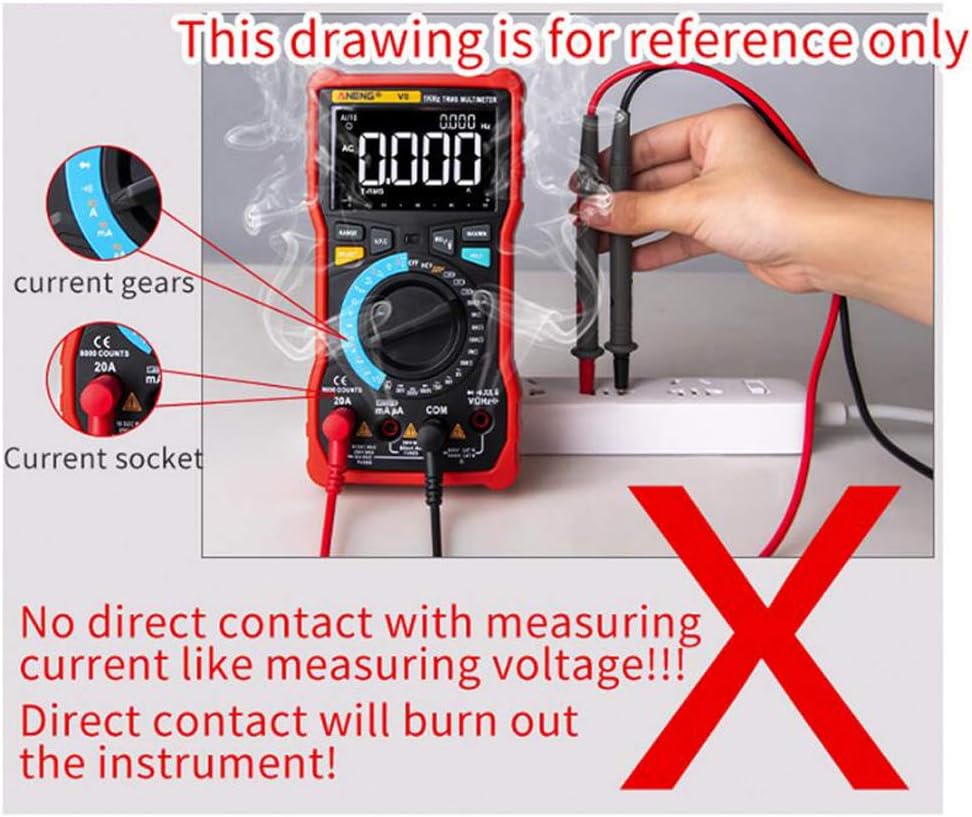
Do not directly contact a live circuit to measure current like measuring voltage. Direct contact will burn out the instrument. This drawing is for reference only to illustrate an incorrect method.
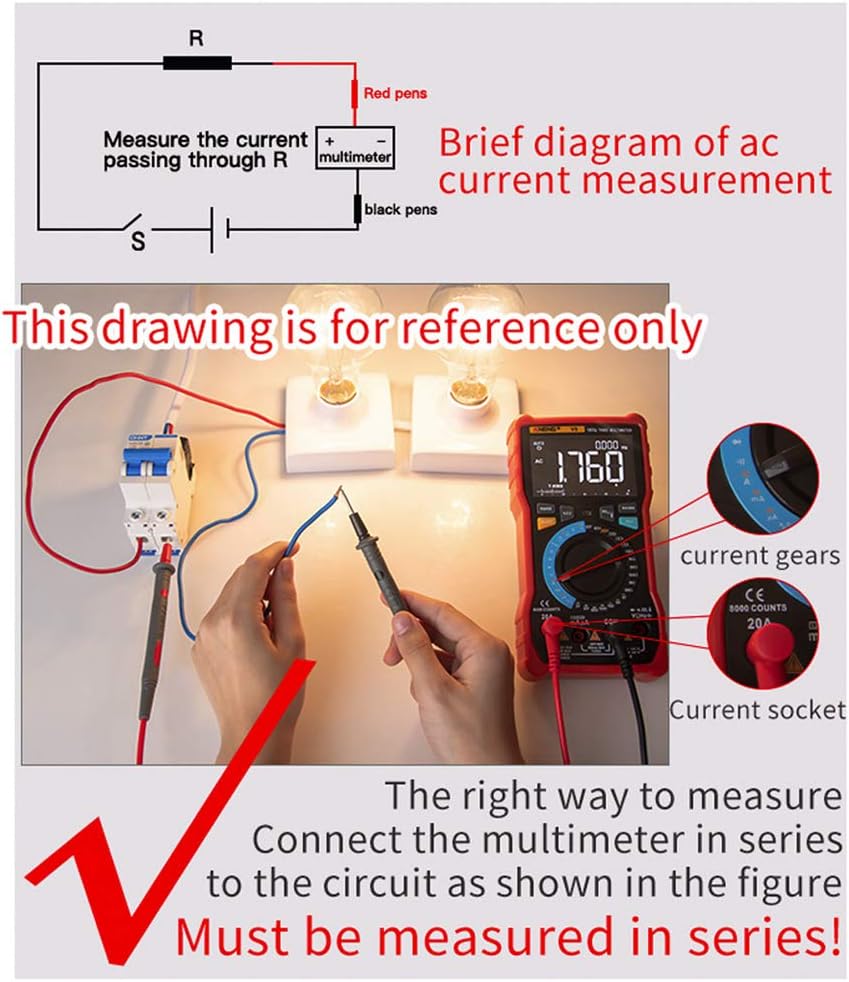
To measure current correctly, the multimeter must be connected in серії with the circuit. This means the circuit must be broken, and the multimeter inserted into the break so that the current flows through the multimeter.
Steps for Current Measurement:
- Вимкніть живлення ланцюга.
- Break the circuit where you want to measure current.
- Connect the red test lead to the appropriate current input jack (e.g., "10A" or "mA") on the multimeter.
- Connect the black test lead to the "COM" input jack.
- Connect the test leads in series with the circuit, ensuring the current flows through the multimeter.
- Select the appropriate current range on the rotary switch.
- Restore power to the circuit and read the measurement.
- After measurement, turn off power, disconnect the multimeter, and restore the circuit.
6. Технічне обслуговування
6.1. Загальний догляд
Тримайте мультиметр сухим. Якщо він намокне, негайно витріть його насухо.
Use and store the multimeter in normal temperature environments. Extreme temperatures can shorten the life of electronic devices.
Handle the multimeter gently and carefully. Dropping it can damage circuit boards and cases.
Keep the multimeter away from dust and dirt, which can cause corrosion of electronic components.
Протріть мультиметр рекламоюamp час від часу тканину, щоб вона виглядала як нова. Не використовуйте агресивні хімікати, розчинники для чищення або сильні мийні засоби.
6.2. Заміна батареї
When the low battery indicator appears on the display, replace the batteries promptly to ensure accurate readings and proper operation. Refer to the "Battery Installation" section for instructions.
7. Вирішення проблем
7.1. Millivolt Value Jump
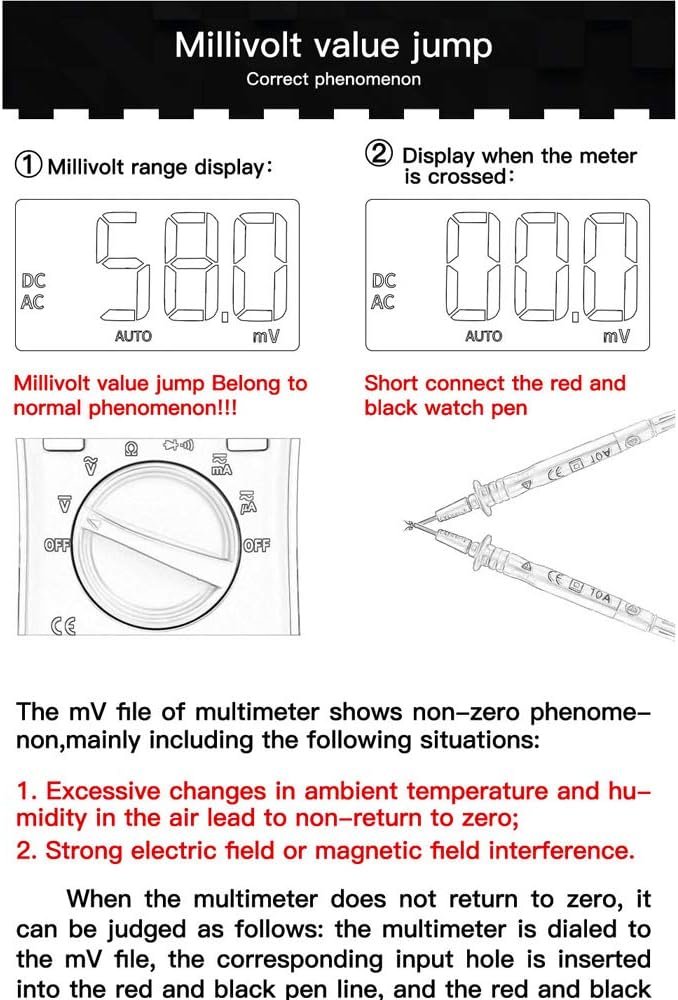
A "millivolt value jump" (non-zero reading) when the multimeter is set to the mV range and no input is connected is a normal phenomenon.
This can occur due to:
- Excessive changes in ambient temperature and humidity in the air, leading to a non-return to zero.
- Strong electric field or magnetic field interference.
If the multimeter does not return to zero in the mV file, you can short the red and black test leads together. The display should then show zero or a very small, stable value. If the issue persists, ensure the environment is free from strong interference.
8. Технічні характеристики
| Особливість | Специфікація |
|---|---|
| Бренд | ANENG |
| Модель | V01B |
| Дисплей | РК-дисплей на 4000 відліків |
| Джерело живлення | Працює від батареї |
| Тип вимірювання | Multimeter (True-RMS, Auto-Ranging) |
| особливості | Backlight, Flashlight, NCV |
| UPC | 630282728844 |
| ASIN | B0831BXWGC |
9. Гарантія та підтримка
Information regarding warranty coverage and customer support for the ANENG V01B Digital Multimeter is not available in this document. Please refer to the product packaging or contact the retailer/manufacturer directly for details.