вступ
This instruction manual provides detailed information on the installation, operation, and maintenance of your Blaupunkt DENVER 212 DAB BT car radio. Please read this manual thoroughly before using the device to ensure proper functionality and to prevent damage. Keep this manual for future reference.

Image: Blaupunkt DENVER 212 DAB BT product banner.
Інформація про безпеку
- Ensure proper installation by a qualified professional to avoid electrical hazards or damage to your vehicle.
- Не використовуйте пристрій таким чином, щоб це відволікало вас від керування автомобілем. Завжди ставте безпеку дорожнього руху на перше місце.
- Уникайте впливу екстремальних температур, прямих сонячних променів або вологи на пристрій.
- Використовуйте лише схвалені аксесуари та деталі.
- Disconnect the vehicle's battery before installation to prevent short circuits.
Вміст упаковки
Перевірте наявність усіх елементів в упаковці:
- Blaupunkt DENVER 212 DAB BT Car Radio Unit
- Монтажна рамка
- Wiring Harness (ISO connector)
- DAB+ Antenna (if included with specific models)
- Зовнішній мікрофон
- Disassembly Keys
- Посібник користувача (цей документ)
Продукт закінченийview
The Blaupunkt DENVER 212 DAB BT is a 1-DIN car radio featuring DAB+ digital radio, Bluetooth hands-free calling, and media streaming. It offers a robust design and short installation depth for versatile vehicle compatibility.

Image: Front panel of the Blaupunkt DENVER 212 DAB BT, showing display, control knobs, and buttons.
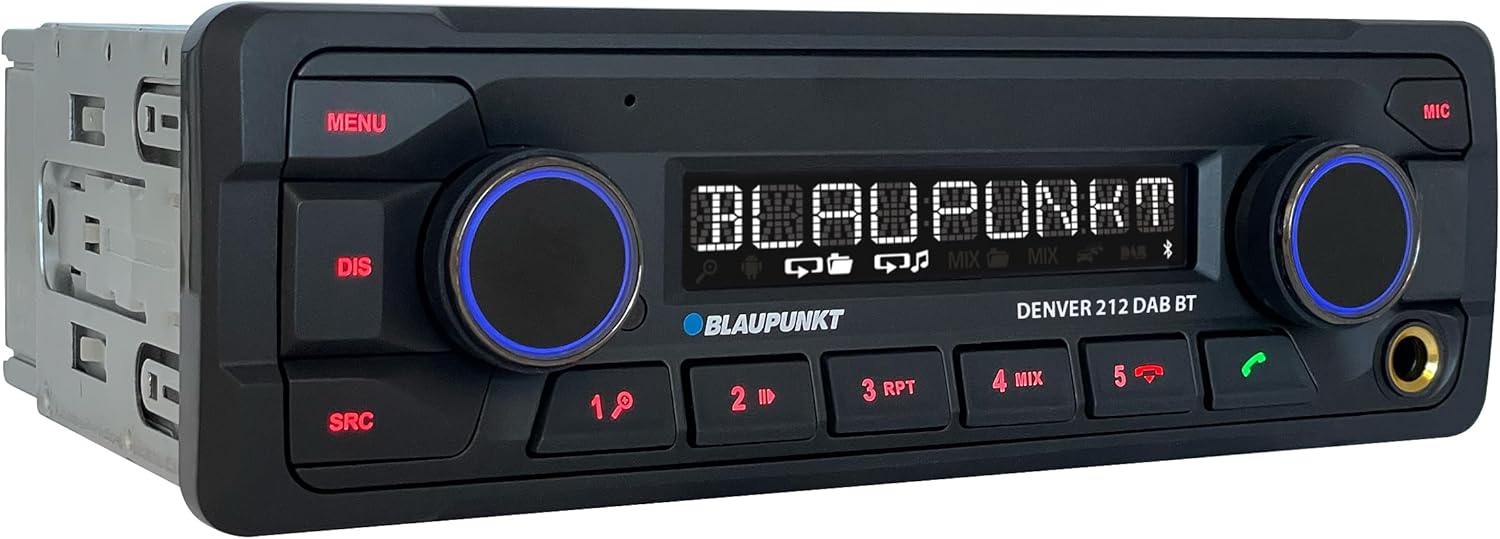
Зображення: Кутове view of the Blaupunkt DENVER 212 DAB BT, highlighting its compact design.
Елементи керування передньої панелі:
- Кнопка МЕНЮ: Доступ до системних налаштувань та опцій.
- Кнопка DIS: Зміни відображаються на екрані.
- Кнопка SRC: Selects audio source (Radio, DAB, Bluetooth, USB, AUX).
- Volume Knob (Left): Adjusts audio volume. Press to mute/unmute.
- Selection Knob (Right): Навігація по меню та вибір опцій.
- Кнопки попередньо встановлених налаштувань (1-6): Store and recall radio stations, control media playback.
- Call Buttons (Green/Red): Answer/end Bluetooth calls.
- Порт USB: Підключіть USB-накопичувачі для відтворення медіафайлів.
- AUX-вхід (роз'єм 3.5 мм): Підключіть зовнішні аудіоджерела.
Налаштування та встановлення
Кроки встановлення:
- Приготування: Від'єднайте негативну клему акумулятора вашого автомобіля.
- Монтаж: Insert the supplied mounting frame into the vehicle's 1-DIN opening. Bend the tabs to secure it.
- Електропроводка: Connect the wiring harness according to the diagram below. Ensure all connections are secure.
- Підключення антени: Connect the FM antenna and the DAB+ antenna (if applicable) to the corresponding inputs on the rear of the radio.
- Підключення мікрофона: Connect the external microphone to the designated input for optimal hands-free call quality.
- Вставити одиницю: Slide the radio unit into the mounting frame until it clicks into place.
- Остаточна перевірка: Знову підключіть акумулятор автомобіля та перевірте пристрій.
Wiring Diagram (General):
| Колір дроту | функція |
|---|---|
| Жовтий | Постійна напруга 12 В (акумулятор) |
| Червоний | Комутований 12 В (запалювання) |
| чорний | Земля |
| Синій | Силова антена / Amplifier Remote |
| Помаранчевий/білий | освітлення |
| Speaker Wires (e.g., White, Grey, Green, Purple pairs) | Connect to vehicle speakers (Front Left, Front Right, Rear Left, Rear Right) |
| Вхід керування кермом | Connect to vehicle's steering wheel control interface (if applicable) |
Note: Specific wire colors may vary. Always refer to your vehicle's wiring diagram and the radio's included diagram for precise connections.

Image: The Blaupunkt DENVER 212 DAB BT car radio seamlessly integrated into a vehicle's dashboard.
Інструкція з експлуатації
1. Основні функції:
- Увімкнення/вимкнення живлення: Press the volume knob (left) briefly to turn the unit on. Press and hold to turn off.
- Регулювання гучності: Rotate the volume knob (left) to adjust the sound level.
- Вибір джерела: Натисніть SRC button repeatedly to cycle through available audio sources (FM, DAB, Bluetooth Audio, USB, AUX).
- Навігація по меню: Натисніть МЕНЮ button to enter the main menu. Use the right knob to navigate and select options.
2. Radio (FM/DAB+):
- Selecting Radio Mode: Прес SRC until FM or DAB is selected.
- Автоматичне налаштування: In FM/DAB mode, press and hold the right knob or seek buttons (if available) to automatically search for stations.
- Ручна настройка: Briefly press the right knob or seek buttons to fine-tune frequencies.
- Зберігання пресетів: Tune to a desired station, then press and hold one of the numeric preset buttons (1-6) until you hear a confirmation beep.
- Згадуючи пресети: Коротко натисніть кнопку попереднього налаштування з цифрою (1-6), щоб викликати збережену станцію.
3. Робота Bluetooth:
- Сполучення пристрою:
- Переконайтеся, що Bluetooth увімкнено на вашому мобільному пристрої.
- Select "Bluetooth" as the source on the car radio. The display will show "PAIRING".
- On your mobile device, search for Bluetooth devices and select "BLAUPUNKT DENVER".
- Підтвердьте сполучення на обох пристроях, якщо буде запропоновано.
- Дзвінки в режимі Hands-Free:
- Відповідь на дзвінок: Натисніть зелену кнопку виклику.
- Завершення дзвінка: Натисніть червону кнопку виклику.
- Здійснення дзвінка: Dial from your phone; audio will transfer to the car radio.
- Потокове передавання аудіо через Bluetooth: Once paired, select "Bluetooth Audio" as the source. Play music from your mobile device, and it will stream through the car radio. Use the preset buttons (e.g., 4 for MIX, 5 for RPT) for playback control (play/pause, skip tracks).
4. USB and AUX Input:
- Відтворення через USB: Insert a USB storage device into the front USB port. The unit will automatically switch to USB mode and begin playback.
- Вхід AUX: Connect an external audio device (e.g., MP3 player) to the 3.5mm AUX input jack using an audio cable. Select "AUX" as the source.
5. Sound Settings (Equalizer):
- Натисніть МЕНЮ button, then navigate to "AUDIO" or "EQ" settings.
- Adjust bass, treble, balance, and fader settings to your preference.
- Pre-set equalizer modes (e.g., Pop, Rock, Classic) may be available.
Відео: Оверview of the Blaupunkt DENVER 212 DAB BT car radio's features and basic operation.
Технічне обслуговування
- Прибирання: Використовуйте м’яку суху тканину для очищення передньої панелі пристрою. Не використовуйте абразивні засоби для чищення або розчинники.
- Порт USB: Тримайте USB-порт чистим від пилу та сміття.
- Оновлення прошивки: Перевірте офіційний Blaupunkt webперіодично перевіряйте на сайті наявність оновлень прошивки для вашої моделі.
Усунення несправностей
| проблема | Можлива причина | Рішення |
|---|---|---|
| Немає живлення | Blown fuse; incorrect wiring (constant/switched 12V); loose connection. | Check vehicle fuses and the radio's fuse. Verify wiring connections, especially constant and ignition power. Ensure the unit is properly seated. |
| Ні звуку | Занадто низька гучність; увімкнено вимкнення звуку; неправильне підключення динаміків; ampпроблеми lifier. | Increase volume. Check if mute is active. Verify speaker connections. If an external ampЯкщо використовується зарядний пристрій, перевірте його живлення та з'єднання. |
| Poor radio reception (FM/DAB) | Антена не підключена; пошкоджена антена; зона слабкого сигналу. | Ensure antenna is securely connected. Check antenna for damage. Consider a stronger antenna or signal booster if in a weak signal area. For DAB+, ensure the DAB antenna is correctly installed and positioned. |
| Проблеми з підключенням Bluetooth | Device not in pairing mode; incorrect wiring (ignition+ and constant+); interference. | Ensure both devices are in pairing mode. Delete previous pairings and try again. Verify that the constant 12V and switched 12V wires are correctly connected to the radio, as improper wiring can affect Bluetooth stability. Move away from other Bluetooth devices. |
| USB не розпізнається | Не підтримується file format; USB drive not formatted correctly; damaged USB drive. | Забезпечити звук files are in supported formats (e.g., MP3, WMA). Format the USB drive to FAT32. Try a different USB drive. |
Технічні характеристики
| Особливість | Деталь |
|---|---|
| Бренд | BLAUPUNKT |
| Номер моделі | Denver 212 DAB BT |
| Колір | чорний |
| Технологія підключення | Bluetooth, USB |
| Тип роз'єму | 3.5-мм роз'єм, USB |
| Особливості | DAB, RDS, Equalizer, Bluetooth Hands-free |
| Сумісні пристрої | Смартфон |
| Загальна кількість портів USB | 1 |
| Режим аудіовиходу | Стерео |
| Конфігурація каналу об’ємного звуку | 4.0 |
| Розміри продукту | 12 Г x 17.8 Ш x 5.2 В сантиметрів |
| Виробник | Blaupunkt |
| Наявність запасних частин | 1 рік |
Гарантія та підтримка
This Blaupunkt product comes with a manufacturer's warranty. For specific warranty terms and conditions, please refer to the warranty card included with your product or visit the official Blaupunkt website. For technical support, troubleshooting assistance, or spare parts inquiries, please contact Blaupunkt customer service through their official channels.
Spare parts are generally available for 1 year from the date of purchase.
Офіційний Blaupunkt Webсайт: www.blaupunkt.com


