1. Вступ
This manual provides detailed instructions for the safe and effective operation of the MCH OS-3040A 40MHz Dual Channel Analogue Oscilloscope. The OS-3040A is designed for laboratory and testing applications, featuring a 6-inch rectangular screen with an internal graticule and multiple display modes for waveform analysis. Please read this manual thoroughly before using the instrument.
2. Інформація про безпеку
To prevent electric shock or personal injury, and to avoid damage to the instrument or connected equipment, observe the following safety precautions:
- Заземлення приладу: Ensure the oscilloscope is properly grounded using the supplied power cord.
- Джерело живлення: Connect the instrument to a power source within the specified voltage range (110V/220V AC, 50/60Hz).
- Уникайте вологих умов: Не використовуйте осцилограф у вологих абоamp середовищ.
- Не працюйте з підозрілими несправностями: If the instrument appears damaged or is not operating correctly, do not use it. Refer servicing to qualified personnel.
- Вентиляція: Забезпечте належну вентиляцію, щоб запобігти перегріву. Не закривайте вентиляційні отвори.
- Use Proper Probes: Використовуйте лише зонди, розраховані на об'ємtage and current of the measurement.
3. Вміст упаковки
Перевірте, чи всі перелічені нижче предмети входять до вашої упаковки. Якщо будь-які предмети відсутні або пошкоджені, зверніться до постачальника.

Рисунок 3.1: Комплектація. This image displays the standard accessories: a power cord, a user manual, a screwdriver with color-coded rings, and two oscilloscope probes.
- MCH OS-3040A Analogue Oscilloscope Unit
- Шнур живлення
- Посібник користувача
- Щупи осцилографа (x2)
- Adjustment Tool (Screwdriver)
4. Продукт закінчивсяview
The MCH OS-3040A is a 40MHz dual-channel analogue oscilloscope. Familiarize yourself with the main components and controls.
4.1 Передня панель
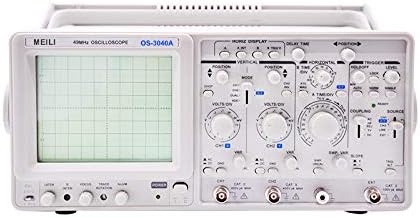
Рисунок 4.1: Передня панель. This image shows the front panel of the oscilloscope, featuring the CRT display on the left and various control knobs and input connectors on the right.
- CRT Display: 6-inch rectangular screen with internal graticule (8x10 divisions).
- Vertical Controls (CH1/CH2): VOLTS/DIV, POSITION, AC/DC/GND coupling, MODE (CH1, CH2, DUAL, ADD).
- Горизонтальні елементи керування: TIME/DIV, POSITION, X-Y mode.
- Елементи керування тригерами: LEVEL, MODE (AUTO, NORM, TV-V, TV-H), SOURCE (CH1, CH2, LINE, EXT), COUPLING (AC, DC, HF REJ, LF REJ).
- Вхідні роз'єми: CH1, CH2, EXT TRIG.
- Calibration Output: Для компенсації зонда.
- Вимикач живлення: Управління включення/вимкнення.
4.2 Задня панель

Рисунок 4.2: Задня панель. This image shows the rear panel of the oscilloscope, including the power input, fuse holder, and various warning labels.
- Вхід живлення змінного струму: Роз'єм для шнура живлення.
- Тримач запобіжника: Містить захисний запобіжник.
- томtage Селектор: Allows selection between 110V and 220V AC operation.
- Z-AXIS Input: For external intensity modulation.
- CAL Output: Calibration signal output.
5. Налаштування
- Розпакування та перевірка: Carefully remove the oscilloscope from its packaging. Inspect the instrument for any signs of physical damage.
- Підключення живлення:
- Переконайтеся, що перемикач живлення знаходиться в положенні ВИМК.
- Перевірте томtage selector on the rear panel matches your local power supply (110V or 220V).
- Connect the supplied power cord to the AC power input on the rear panel and then to a grounded power outlet.
- Підключення зонда: Connect the oscilloscope probes to the CH1 and/or CH2 input BNC connectors on the front panel.
- Компенсація зонда: Before taking measurements, compensate your probes. Connect the probe tip to the CAL output terminal and the ground clip to the ground terminal. Adjust the probe's compensation trimmer (usually on the probe body) until a stable, square waveform is displayed on the screen.
6. Інструкція з експлуатації
This section outlines the basic operation of the MCH OS-3040A oscilloscope.
6.1 Увімкнення та початковий дисплей
- Увімкніть живлення.
- Allow a few moments for the display to stabilize. Adjust the INTENSITY and FOCUS knobs for a clear trace.
- Set the vertical MODE to CH1, horizontal TIME/DIV to a mid-range setting (e.g., 1ms), and trigger MODE to AUTO.
6.2 Vertical System (CH1, CH2)
- VOLTS/DIV: Selects the vertical sensitivity (voltage per division). Rotate to adjust the amplitude of the displayed waveform.
- ПОСАДА: Moves the waveform vertically on the screen.
- AC/DC/GND Coupling:
- кондиціонер: Blocks DC components, displaying only the AC portion of the signal.
- DC: Displays both AC and DC components of the signal.
- GND: Disconnects the input signal and grounds the input amplifier, displaying a zero-volt reference line.
- РЕЖИМ: Selects the display mode for multiple channels.
- СН1: Displays only the signal from Channel 1.
- СН2: Displays only the signal from Channel 2.
- DUAL (ALT/CHOP): Displays both CH1 and CH2.
- ALT (Альтернативний): Displays channels alternately, suitable for higher frequencies.
- CHOP (Chopped): Displays channels by rapidly switching between them, suitable for lower frequencies.
- ДОДАТИ: Displays the algebraic sum of CH1 and CH2 signals.
6.3 Горизонтальна система
- TIME/DIV: Selects the horizontal sweep speed (time per division). Rotate to adjust the time scale of the displayed waveform.
- ПОСАДА: Moves the waveform horizontally on the screen.
- Режим XY: Used for displaying Lissajous figures or phase relationships between two signals. CH1 typically controls the X-axis, and CH2 controls the Y-axis.
6.4 Система спускового гачка
The trigger system synchronizes the horizontal sweep with a specific point on the input signal, providing a stable waveform display.
- РІВЕНЬ: Регулює гучністьtagрівень, на якому відбувається спрацьовування.
- РЕЖИМ:
- АВТО: Provides a free-running sweep if no trigger signal is present, ensuring a trace is always visible.
- NORM (Normal): Requires a trigger signal to initiate a sweep. If no trigger is present, no trace will be displayed.
- TV-V (TV-Vertical): For triggering on vertical sync pulses of video signals.
- TV-H (TV-Horizontal): For triggering on horizontal sync pulses of video signals.
- ДЖЕРЕЛО: Selects the signal source for triggering.
- СН1: Triggers from the Channel 1 signal.
- СН2: Triggers from the Channel 2 signal.
- ЛІНІЯ: Triggers from the AC power line frequency.
- EXT: Triggers from an external signal connected to the EXT TRIG input.
- З'ЄДНАННЯ: Determines how the trigger signal is coupled.
- кондиціонер: AC couples the trigger signal, blocking DC components.
- DC: DC couples the trigger signal, including DC components.
- HF REJ (High Frequency Reject): Filters out high-frequency components from the trigger signal.
- LF REJ (Low Frequency Reject): Filters out low-frequency components from the trigger signal.
7. Технічне обслуговування
- Прибирання: Clean the exterior of the oscilloscope with a soft, damp тканину. Не використовуйте абразивні засоби для чищення або розчинники. Перед чищенням переконайтеся, що прилад вимкнено та відключено від мережі.
- Заміна запобіжника: If the oscilloscope does not power on, check the fuse located on the rear panel. Replace it only with a fuse of the same type and rating. Refer to the specifications for fuse details.
- Зберігання: Store the oscilloscope in a clean, dry environment, away from direct sunlight and extreme temperatures.
- Обслуговування: Internal adjustments or repairs should only be performed by qualified service personnel.
8. Вирішення проблем
| проблема | Можлива причина | Рішення |
|---|---|---|
| Немає дисплея/немає живлення | Power cord disconnected, fuse blown, power switch off. | Check power cord connection, replace fuse if necessary, ensure power switch is ON. |
| No trace on screen | INTENSITY too low, FOCUS out of adjustment, POSITION off-screen, trigger MODE set to NORM with no signal. | Adjust INTENSITY and FOCUS, center POSITION controls, set trigger MODE to AUTO or ensure a valid trigger signal is present. |
| Нестабільна форма хвилі | Incorrect trigger settings (LEVEL, MODE, SOURCE, COUPLING), probe compensation incorrect. | Adjust trigger LEVEL, MODE, SOURCE, and COUPLING. Perform probe compensation. |
| Спотворена форма сигналу | Incorrect VOLTS/DIV or TIME/DIV settings, probe attenuation mismatch, input signal exceeding limits. | Adjust VOLTS/DIV and TIME/DIV. Ensure probe attenuation matches oscilloscope setting. Verify input signal is within instrument limits. |
9. Технічні характеристики
The following are the technical specifications for the MCH OS-3040A Analogue Oscilloscope:
| Параметр | Специфікація |
|---|---|
| Модель | ОС-3040А |
| Пропускна здатність | 40 MHz (Vertical) |
| Канали | Подвійний канал |
| CRT Display | 6-inch Rectangular, Internal Graticule, 8x10 divisions (1 div = 1 cm) |
| Вертикальна чутливість | 5mV/div to 5V/div (10 steps) |
| Час підйому | ≤17.5 нс |
| Вхідний опір | 1 MΩ ±2%, 25 pF ±5 pF |
| Макс. Вхідний об'ємtage | 400 В (DC+AC пік) |
| Режими відображення | CH1, CH2, DUAL (ALT/CHOP), ADD |
| Horizontal Sweep Time | 0.2 µs/div to 0.5 s/div (20 steps) |
| Збільшення розгортки | x10 |
| X-Y Phase Difference | ≤3° DC-50 kHz |
| Режими тригера | AUTO, NORM, TV-V, TV-H |
| Джерело тригера | CH1, CH2, LINE, EXT |
| Тригерна муфта | AC, DC, HF REJ, LF REJ |
| Calibration Output | 0.5 Vp-p ±10%, 1 kHz ±20% |
| Джерело живлення | 110V/220V AC ±10%, 50/60Hz |
| Споживана потужність | Прибл. 40 Вт |
| Розміри (Ш×В×Г) | 310 × 130 × 370 мм |
| вага | 8.5 кг (нетто) |

Рисунок 9.1: Детальні характеристики. This image provides a comprehensive table of technical specifications for the OS-3040A model.
Примітка. Специфікації можуть бути змінені без попереднього повідомлення.
10. Гарантія та підтримка
For warranty information, technical support, or service inquiries, please contact your authorized MCH dealer or the point of purchase. Keep your purchase receipt as proof of purchase for warranty claims.


