1. Вступ і даліview
The Escort EDM 1111A is a versatile digital multimeter designed for accurate measurement of various electrical parameters. This device is essential for electricians, technicians, and hobbyists for testing circuits, components, and power sources. It features a clear digital display and a rotary dial for selecting different measurement functions.

The Escort EDM 1111A Digital Multimeter with red and black test leads connected, ready for use.
Ключові функції включають:
- DC Voltage (DCV) measurement
- AC Voltage (ACV) measurement
- DC Current (DCA) measurement
- AC Current (ACA) measurement
- Вимірювання опору (Ω).
- Capacitance (CX) measurement
- Diode and Transistor (hFE) testing
2. Налаштування
2.1 Встановлення батареї
The Escort EDM 1111A requires a DC 9V 006P battery for operation. To install or replace the battery:
- Переконайтеся, що мультиметр вимкнено.
- Знайдіть відсік для батарейок на задній панелі пристрою.
- Carefully slide open or unscrew the battery cover.
- Insert a new 9V 006P battery, observing the correct polarity (+/-).
- Надійно закрийте кришку акумулятора.

Задній view of the Escort EDM 1111A Digital Multimeter, showing the battery compartment cover and the product label.
2.2 Підключення вимірювальних щупів
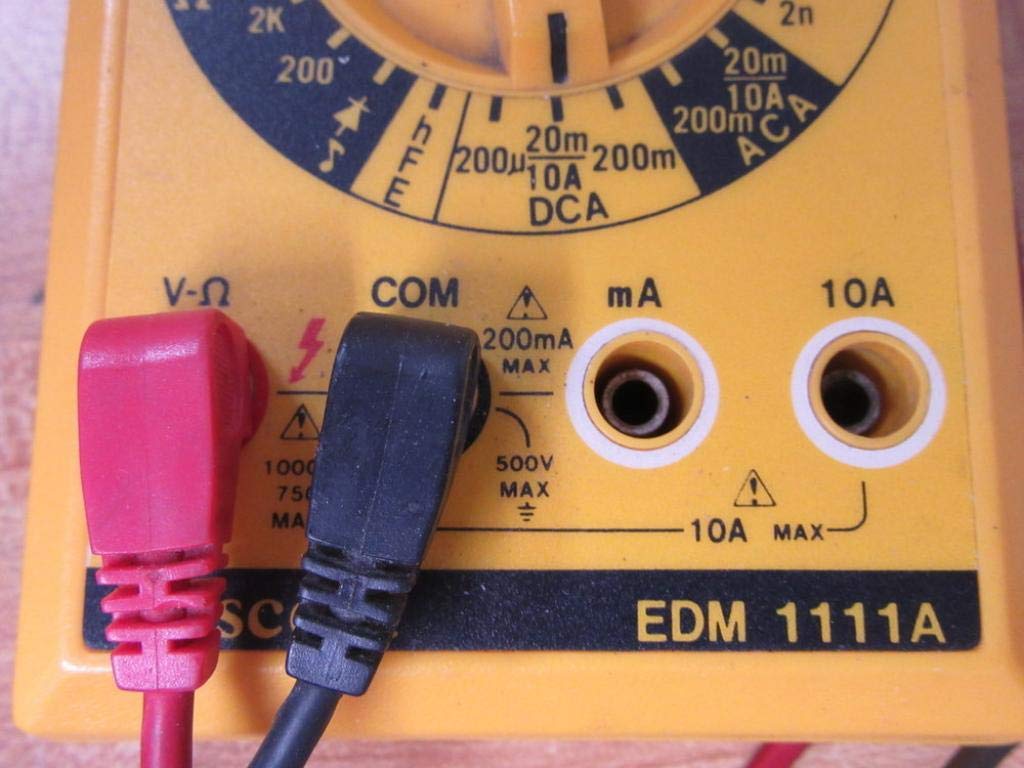
The multimeter comes with two test leads, typically one red (positive) and one black (negative/common). Proper connection is crucial for accurate and safe measurements.
- Для більшості об'ємівtage, resistance, and low current measurements, connect the black lead to the 'COM' (Common) jack.
- Connect the red lead to the 'V-Ω-mA' jack for voltage, resistance, and milliampпоточні вимірювання.
- For high current measurements (up to 10A), connect the red lead to the '10A' jack. Always ensure the correct jack is used to prevent damage to the meter or circuit.

A closer look at the input jacks (V-Ω, COM, mA, 10A) and the lower portion of the rotary dial, indicating current measurement ranges.

The red and black test probes (leads) used with the Escort EDM 1111A Digital Multimeter, featuring pointed tips for electrical contact.
3. Інструкція з експлуатації
Before taking any measurements, ensure the test leads are correctly connected and the rotary dial is set to the appropriate function and range.

Детальний view of the rotary selector dial on the Escort EDM 1111A Digital Multimeter, displaying various measurement functions such as DCV, ACV, Ω, DCA, ACA, and CX.
3.1 Вимірювання постійного струму Voltagе (DCV)
- Set the rotary dial to the desired DCV range (e.g., 200m, 2, 20, 200, 1000). Choose a range higher than the expected voltage.
- Connect the red lead to the positive (+) side of the circuit and the black lead to the negative (-) side.
- Прочитайте томtage значення на дисплеї.
3.2 Вимірювання AC Voltagе (ACV)
- Set the rotary dial to the desired ACV range (e.g., 200m, 2, 20, 200, 750). Choose a range higher than the expected voltage.
- Підключіть вимірювальні дроти до клем змінного струму.tage source. Polarity does not matter for AC voltage.
- Прочитайте томtage значення на дисплеї.
3.3 Вимірювання опору (Ом)
- Перед вимірюванням опору переконайтеся, що коло або компонент знеструмлені.
- Set the rotary dial to the desired Ω range (e.g., 200, 2K, 20K, 200K, 2M, 20M, 200M).
- Підключіть вимірювальні щупи до компонента, який потрібно виміряти.
- Зчитайте значення опору на дисплеї.
3.4 Вимірювання постійного струму (DCA)
- Переконайтеся, що ланцюг знеструмлений.
- Set the rotary dial to the desired DCA range (e.g., 200µ, 2m, 20m, 200m, 10A).
- Важливо: For currents up to 200mA, use the 'V-Ω-mA' jack for the red lead. For currents up to 10A, use the '10A' jack.
- Break the circuit and connect the multimeter in series with the load. The current must flow through the multimeter.
- Re-energize the circuit and read the current value.
3.5 Вимірювання змінного струму (ЗС)
- Переконайтеся, що ланцюг знеструмлений.
- Set the rotary dial to the desired ACA range (e.g., 200µ, 2m, 20m, 200m, 10A).
- Важливо: For currents up to 200mA, use the 'V-Ω-mA' jack for the red lead. For currents up to 10A, use the '10A' jack.
- Розімкнути коло та підключити мультиметр послідовно до навантаження.
- Re-energize the circuit and read the current value.
3.6 Measuring Capacitance (CX)
- Перед випробуванням переконайтеся, що конденсатор повністю розряджений.
- Set the rotary dial to the CX range (e.g., 2n, 20n, 200n, 2µ, 20µ).
- Підключіть вимірювальні щупи до клем конденсатора.
- Зчитайте значення ємності на дисплеї.
3.7 Diode and Transistor (hFE) Testing
Refer to the specific markings on the dial for diode and transistor testing functions. Typically, diode test mode allows checking the forward voltage drop of a diode, and hFE mode is used for measuring the DC current gain of transistors.
4. Технічне обслуговування
4.1 Заміна батареї
Replace the 9V 006P battery when the low battery indicator appears on the display or if the multimeter fails to power on. Follow the instructions in Section 2.1.
4.2 Очищення
Для очищення мультиметра використовуйте м'яку губкуamp тканиною. Не використовуйте абразивні засоби для чищення або розчинники, оскільки вони можуть пошкодитиasing or display. Ensure the device is turned off and disconnected from any circuits before cleaning.
4.3 Зберігання
When not in use for extended periods, store the multimeter in a cool, dry place, away from direct sunlight and extreme temperatures. Consider removing the battery to prevent leakage, which could damage the internal components.
5. Вирішення проблем
| проблема | Можлива причина | Рішення |
|---|---|---|
| Немає дисплея або дисплей тьмяний | Низький або розряджений акумулятор | Replace the 9V 006P battery. |
| Неправильні показання | Incorrect range selected Poor lead connection Damaged test leads Incorrect input jack used | Виберіть відповідний діапазон. Ensure leads are firmly connected. Inspect and replace damaged leads. Verify leads are in the correct V-Ω-mA or 10A jack. |
| Відображається "OL" (перевантаження) | Measurement exceeds selected range | Переключіться на вищий діапазон. |
| Немає звукового сигналу про безперервність | Continuity function not selected Розімкнуте коло | Ensure dial is on continuity/diode test. Check the circuit for breaks. |
6. Технічні характеристики
| Параметр | Значення |
|---|---|
| Модель | EDM 1111A |
| Розміри продукту (Д x Ш x В) | 8 x 4 x 2 дюймів |
| Вага товару | 1.84 фунта |
| Джерело живлення | DC 9V 006P Battery |
| Тип вимірювання | мультиметр |
| Виробник | Ескорт |
| Дата першої доступності | 21 листопада 2019 р |
| DC Voltage Діапазони | 200 мВ, 2 В, 20 В, 200 В, 1000 В |
| AC Voltage Діапазони | 200 мВ, 2 В, 20 В, 200 В, 750 В |
| Діапазони постійного струму | 200 мкА, 2 мА, 20 мА, 200 мА, 10 А |
| Діапазони змінного струму | 200 мкА, 2 мА, 20 мА, 200 мА, 10 А |
| Діапазони опору | 200Ω, 2KΩ, 20KΩ, 200KΩ, 2MΩ, 20MΩ, 200MΩ |
| Capacitance Ranges | 2nF, 20nF, 200nF, 2µF, 20µF |
7. Інформація про гарантію
For specific warranty details regarding your Escort EDM 1111A Digital Multimeter, please refer to the documentation provided at the time of purchase or contact the manufacturer directly. Warranty terms typically cover defects in materials and workmanship under normal use.
8. Підтримка клієнтів
If you encounter any issues or have questions not covered in this manual, please contact Escort customer support. Have your product model number (EDM 1111A) and serial number (if applicable, found on the back label) ready when contacting support for faster assistance.
The product label on the back of the Escort EDM 1111A, indicating 'DIGITAL MULTIMETER DC 9V 006P BATTERY', serial number, and 'MADE IN TAIWAN R.O.C.'.


