вступ
Дякуємо за покупкуasing the Caliber Alarm Clock with QI Charging Station. This device combines a digital alarm clock with a convenient wireless charging pad and a USB charging port, designed to simplify your bedside setup. It also features an adjustable night light and a large LED display for clear visibility.
This manual provides detailed instructions on how to set up, operate, maintain, and troubleshoot your new alarm clock. Please read it thoroughly before use to ensure optimal performance and longevity of the product.
Налаштування
Розпакування: Carefully remove the alarm clock from its packaging. Ensure all components are present: the alarm clock unit and the power adapter.
Підключення живлення: Connect the provided power adapter to the DC input port on the back of the alarm clock. Plug the other end of the adapter into a standard wall outlet. The display will illuminate.
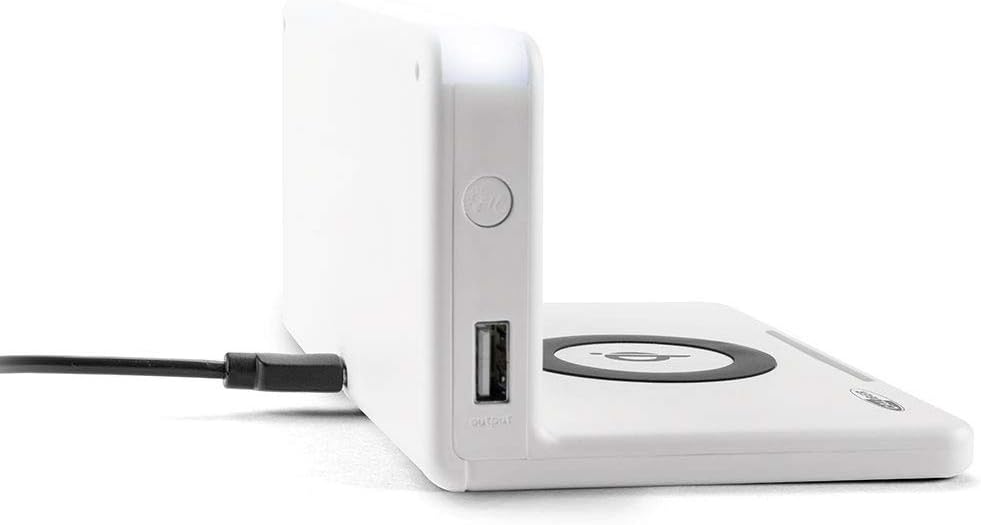
Зображення: Збоку view of the alarm clock, illustrating the power input port (left) and the USB output port (right).
Battery Installation (Backup): The unit includes 1 Lithium Ion battery for backup. This battery maintains time settings during power outages. No user installation is typically required for this pre-installed battery.
Початкове налаштування часу: Upon first power-up, the clock may display a default time or require manual setting. Refer to the "Operating" section for detailed instructions on setting the time.
Інструкція з експлуатації
Налаштування часу та дати
- Натисніть і утримуйте ВСТАНОВИТИ ЧАС button (location may vary, typically on the back or top) until the hour digits flash.
- Використовуйте + or - кнопки для налаштування години.
- Прес ВСТАНОВИТИ ЧАС знову, щоб перейти до хвилин, а потім налаштуйте за допомогою + or -.
- Repeat for year, month, and day if applicable.
- Прес ВСТАНОВИТИ ЧАС ще раз для підтвердження та виходу.
Налаштування будильників
- Натисніть і утримуйте НАБОР ТРИВОГИ button (or similar) until the alarm hour digits flash.
- Налаштуйте годину та хвилини будильника за допомогою + or - кнопки.
- Прес НАБОР ТРИВОГИ для підтвердження.
- Щоб увімкнути/вимкнути будильник, натисніть кнопку ТРИВОГА УВІМК. / ВИМК кнопка. На дисплеї з’явиться/зникне значок тривоги.
- Коли пролунає будильник, натисніть кнопку СНОЙЗ button for a temporary pause, or any other button to turn it off for the day.
Using the QI Wireless Charging Station
The alarm clock features a built-in QI wireless charging pad for compatible devices.
- Переконайтеся, що будильник увімкнено.
- Place your QI-compatible smartphone or device directly onto the charging pad, centering it over the Логотип QI.
- A charging indicator (e.g., an LED light or on-screen icon) will illuminate to confirm charging has begun. If charging does not start, reposition your device.

Image: A smartphone placed on the QI charging pad of the alarm clock, showing the charging interface on the phone screen.

Image: The alarm clock with a phone positioned on its wireless charging surface, indicating active charging.
Використання зарядного USB-порту
A USB output port is available on the side of the unit for charging non-QI compatible devices or for faster wired charging.
- Connect your device's USB charging cable to the USB output port on the alarm clock.
- Підключіть інший кінець кабелю до вашого пристрою. Заряджання розпочнеться автоматично.
Adjusting Display Brightness and Night Light
- The alarm clock features adjustable display brightness. Look for a ДИММЕР or ЯСКРАВІСТЬ button, typically on the back or top. Press it repeatedly to cycle through brightness levels.
- To activate or adjust the night light, locate the dedicated НІЧНИК button. Press it to turn the light on/off or cycle through different brightness settings if available.
Технічне обслуговування
- Прибирання: Disconnect the power adapter before cleaning. Use a soft, dry cloth to wipe the surface of the alarm clock. Do not use abrasive cleaners, waxes, or solvents as they may damage the finish.
- Зберігання: Якщо пристрій зберігатиметься протягом тривалого часу, від’єднайте його від живлення та зберігайте у прохолодному сухому місці.
- Обробка: Avoid dropping the unit or subjecting it to strong impacts. Keep it away from water and high humidity.
Усунення несправностей
| проблема | Можлива причина | Рішення |
|---|---|---|
| Дисплей годинника порожній. | Немає підключення до живлення. | Переконайтеся, що адаптер живлення надійно підключений до пристрою та робочої розетки. |
| QI charging not working. | Device not QI-compatible; device not properly aligned; foreign objects on pad; phone case too thick. | Verify device compatibility. Reposition device on the center of the pad. Remove any foreign objects. Remove thick phone cases. |
| Сигналізація не звучить. | Будильник не увімкнено; гучність занадто низька; неправильний час будильника. | Ensure the alarm icon is displayed. Check alarm volume settings. Verify the alarm time is set correctly. |
| Час неправильний. | Time not set correctly; power interruption. | Reset the time manually. If power was interrupted, the backup battery should maintain time, but a manual check is recommended. |
Технічні характеристики
| Особливість | Деталь |
|---|---|
| Бренд | Калібр |
| Номер моделі | HCG018QI/W |
| Колір | Білий |
| Тип дисплея | цифровий |
| Особливість | Night light, QI charging station, USB charging port |
| Джерело живлення | Провідний електричний |
| Розміри продукту | 7.09 x 4.25 x 3.86 дюймів |
| Вага товару | 7.9 унції (225 грама) |
| Акумулятори | 1 Lithium Ion battery (included, for backup) |
| GTIN | 08714505047157 |
Гарантія та підтримка
This Caliber product is designed for reliability and performance. For information regarding warranty coverage, please refer to the warranty card included with your purchase or visit the official Caliber webсайт.
Should you encounter any issues not covered in the troubleshooting section, or require further assistance, please contact Caliber customer support. Contact details can typically be found on the product packaging or the manufacturer's official webсайт.


