1. Продукт закінчивсяview
The EARISE M37 is a portable 100W PA system designed for various audio applications, including home parties, small events, and karaoke. It features a wooden cabinet for enhanced acoustics, built-in Bluetooth connectivity, and comes with two wireless microphones for immediate use. The system supports multiple audio inputs including AUX and USB, offering versatile playback options.

Image: The EARISE M37 PA system, showcasing its wooden box design and two included wireless microphones.
2. Інформація про безпеку
- Не піддавайте пристрій впливу дощу або вологи, щоб запобігти пожежі або ураженню електричним струмом.
- Do not open the cabinet. There are no user-serviceable parts inside. Refer all servicing to qualified personnel.
- Забезпечте належну вентиляцію навколо пристрою. Не блокуйте вентиляційні отвори.
- Уникайте розміщення пристрою поблизу джерел тепла, таких як радіатори, обігрівачі, печі або інші прилади (включаючи ampліфікатори), які виробляють тепло.
- Захищайте шнур живлення від наступання або защемлення, особливо біля вилок, розеток і в місці виходу з пристрою.
- Відключайте цей пристрій від мережі під час грози або якщо він не використовується протягом тривалого часу.
3. Вміст упаковки
Будь ласка, перевірте упаковку на наявність наступних предметів:
- EARISE M37 PA System Unit
- 2 x бездротові мікрофони
- Пульт дистанційного керування
- Адаптер живлення
- Посібник користувача (цей документ)

Image: A visual representation of key features and included accessories: wireless microphone, Bluetooth 4.2, USB auto-play, and remote controller.
4. Характеристики та компоненти продукту
Familiarize yourself with the main components and controls of your EARISE M37 PA System.

Image: The control panel of the EARISE M37, showing various inputs and adjustment knobs. Key controls include: Mode, Previous/Next Track, Play/Pause, Record, EQ, Light, Mic 1/2 inputs, AUX In/Out, USB, TF card slot, DC Power In, ON/OFF switch, Charging indicator, ECHO, DELAY, MIC VOL, MASTER VOL, TREBLE, EXTRA BASS, and BASS.
Функції панелі керування:
- РЕЖИМ: Перемикання між режимами входу (Bluetooth, AUX, USB, TF-карта).
- Попередній/наступний трек: Navigates tracks during media playback.
- Відтворення/пауза: Керує відтворенням медіа.
- запис: Initiates or stops recording (requires USB/TF storage).
- EQ: Налаштовує параметри еквалайзера.
- світло: Controls the integrated LED lighting.
- МІКРОФОН 1 / МІКРОФОН 2: Inputs for wired microphones (if used).
- AUX IN / AUX OUT: Audio input and output jacks for external devices.
- USB: USB port for media playback or recording.
- TF: TF (MicroSD) card slot for media playback or recording.
- DC Power IN: Power input for charging and operation.
- УВІМКНЕНО ВИМКНЕНО: Power switch for the unit.
- Індикатор зарядки: Світловий індикатор стану зарядки.
- ЕХО: Налаштовує ефект луни для мікрофонів.
- ЗАТРИМКА: Налаштовує ефект затримки для мікрофонів.
- ГУЧНІСТЬ MIC: Adjusts the volume of the microphones.
- MASTER VOL: Controls the overall master volume of the system.
- СЛІД: Регулює високочастотний аудіовихід.
- EXTRA BASS: Покращує вихід низькочастотного звуку.
- БАС: Регулює низькочастотний аудіовихід.
5. Налаштування
5.1 Charging the PA System
Before first use, fully charge the PA system. Connect the provided power adapter to the "DC Power IN" port on the unit and plug it into a standard wall outlet. The charging indicator light will show the charging status. A full charge provides up to 7 hours of play time.

Image: Illustration highlighting the 3600mAh battery capacity, providing up to 7 hours of continuous play time.
5.2 Налаштування бездротового мікрофона
The two wireless microphones are pre-paired with the PA system. Insert AA batteries (not included) into each microphone. Turn on the microphones using their respective power switches. They should automatically connect to the PA system.
5.3 Підключення аудіоджерел
Підключення Bluetooth:
- Turn on the EARISE M37 PA system.
- Натисніть РЕЖИМ button until the display shows "Bluetooth" or a Bluetooth icon.
- На мобільному пристрої (смартфоні, планшеті тощо) увімкніть Bluetooth та виконайте пошук доступних пристроїв.
- Select "EARISE M37" from the list. Once connected, you will hear a confirmation sound.

Image: A hand holding a smartphone displaying a Bluetooth connection screen, indicating the ease of pairing with the EARISE M37 PA system.
Відтворення з картки USB/TF:
Вставте USB-флеш-накопичувач або карту TF (MicroSD), що містить аудіофайли у форматі MP3 files into the respective port. The system will automatically detect and begin playing music. Use the Previous/Next Track and Play/Pause buttons to control playback.
Вхід AUX:
Підключіть зовнішній аудіопристрій (наприклад, MP3-плеєр, комп’ютер) до AUX IN port using a 3.5mm audio cable (not included). Press the РЕЖИМ button until AUX input is selected.
6. Інструкція з експлуатації
6.1 Увімкнення/вимкнення живлення
To turn the unit on or off, use the УВІМК./ВИМК switch located on the control panel.
6.2 Adjusting Volume and Effects
- MASTER VOL: Rotate this knob to adjust the overall volume of the PA system.
- ГУЧНІСТЬ MIC: Регулює гучність підключених мікрофонів.
- ECHO / DELAY: Use these knobs to add or reduce echo and delay effects to the microphone sound.
- TREBLE / BASS / EXTRA BASS: Adjust these knobs to fine-tune the high and low frequencies of the audio output.
6.3 Using Microphones
Once the wireless microphones are powered on and connected, speak into them. Adjust the ГУЧНІСТЬ МІКРОФОНА, ЛУНА, і ЗАТРИМКА knobs on the PA system to achieve the desired sound. For optimal performance, hold the microphone a few inches from your mouth.

Image: Two individuals enjoying karaoke with the EARISE M37 PA system and its wireless microphones, demonstrating typical usage.
6.4 Функція запису
To record audio (e.g., microphone input or music playback), ensure a USB flash drive or TF card is inserted into the corresponding slot. Press the ЗАПИС button to start recording. Press it again to stop. Recorded fileбудуть збережені на вставленому носії інформації.
7. Технічне обслуговування
- Протирайте пристрій м’якою сухою тканиною. Не використовуйте абразивні засоби для чищення або розчинники.
- Зберігайте систему гучномовця в прохолодному, сухому місці, подалі від прямих сонячних променів та екстремальних температур.
- If the unit will not be used for an extended period, fully charge the battery before storage and recharge it every few months to maintain battery health.
8. Вирішення проблем
| проблема | Можлива причина | Рішення |
|---|---|---|
| Немає живлення | Розряджена батарея; кабель живлення не підключено. | Зарядіть пристрій; переконайтеся, що кабель живлення надійно підключено. |
| Немає звуку з мікрофонів | Microphones off; Batteries low/dead; MIC VOL too low. | Turn on microphones; Replace batteries; Increase MIC VOL. |
| Bluetooth не підключається | PA system not in Bluetooth mode; Device too far; Interference. | Press MODE button to select Bluetooth; Move device closer; Restart both devices. |
| USB/TF-карта не відтворюється | Невірно file формат; Карта/диск вставлено неправильно; Пошкоджено files. | Забезпечити files are MP3; Reinsert card/drive; Try different files/device. |
9. Технічні характеристики
| Особливість | Деталь |
|---|---|
| Бренд | ЕРИЗЕ |
| Модель | M37 |
| Вихідна ватtage | 100 Вт |
| Джерело живлення | Працює від батареї |
| Технологія підключення | Bluetooth, USB, AUX |
| Версія Bluetooth | 4.2 (from image) |
| Аудіо вхід | Wireless Microphone, AUX |
| Кількість каналів | 2 |
| Вага товару | 11.62 фунта |
| Розміри упаковки | 18.7 x 12 x 11.9 дюймів |
| Розміри виробу (приблизно) | 32.5 cm (12.8 in) H x 25.5 cm (10 in) W x 23.8 cm (9.4 in) D |
| Колір | чорний |
| Тип монтажу | Стільниця |
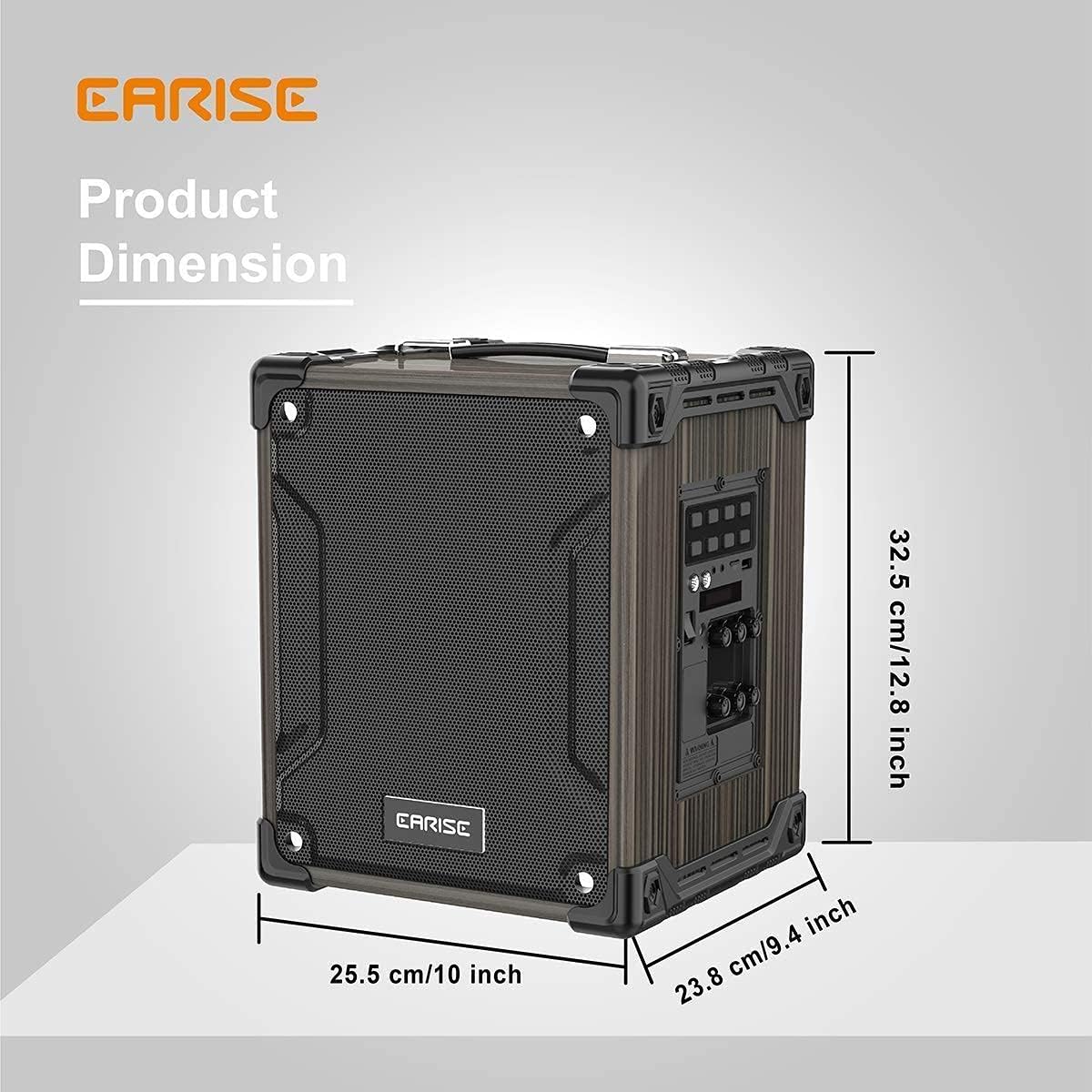
Image: Product dimensions of the EARISE M37, measuring approximately 32.5 cm (12.8 inches) in height, 25.5 cm (10 inches) in width, and 23.8 cm (9.4 inches) in depth.
10. Гарантія та підтримка
For warranty information or technical support, please refer to the contact details provided with your purchase or visit the official EARISE webсайт. Зберігайте чек про покупку для гарантійних претензій.


