вступ
Дякуємо за покупкуasing the Trexonic Retro Record Player. This versatile audio system combines vintage aesthetics with modern functionality, allowing you to enjoy your favorite music from various sources including vinyl records, CDs, Bluetooth devices, AM/FM radio, and USB/SD cards. This manual provides detailed instructions for setup, operation, and maintenance to ensure optimal performance and longevity of your device.

Image: The Trexonic Retro Record Player, showcasing its classic design with the turntable lid open and a vinyl record in place.
Важлива інформація з безпеки
Будь ласка, уважно прочитайте ці інструкції з техніки безпеки перед початком експлуатації пристрою. Зберігайте цей посібник для подальшого використання.
- Не піддавайте цей прилад впливу дощу або вологи.
- Не блокуйте вентиляційні отвори. Встановлюйте відповідно до інструкцій виробника.
- Не встановлюйте поблизу будь-яких джерел тепла, таких як радіатори, обігрівачі, печі або інші пристрої (включаючи ampліфікатори), які виробляють тепло.
- Захищайте шнур живлення від наступання або защемлення, особливо біля вилок, розеток і в місці виходу з пристрою.
- Використовуйте лише насадки/аксесуари, зазначені виробником.
- Відключайте цей пристрій від мережі під час грози або якщо він не використовується протягом тривалого часу.
- Звертайтеся до кваліфікованого сервісного персоналу. Обслуговування потрібне, якщо пристрій було пошкоджено будь-яким чином, наприклад, пошкоджено шнур живлення або вилка, була пролита рідина або всередину пристрою потрапили предмети, пристрій піддався впливу дощу або вологи, не працює належним чином , або було видалено.
Особливості продукту
The Trexonic Retro Record Player is equipped with a variety of features for a comprehensive audio experience:
- 3-швидкісний програвач з ремінним приводом: Plays 33 1/3, 45, and 78 RPM vinyl records.
- Вбудований Bluetooth: Бездротова потокова передача музики із сумісних пристроїв.
- CD плеєр: Supports standard audio CDs.
- AM/FM радіо: Integrated tuner with backlit display.
- Вхід USB/SD: For MP3 playback and recording vinyl to MP3.
- Допоміжний вхід (3.5 мм): Підключіть зовнішні аудіопристрої.
- Роз'єм для навушників: Для приватного прослуховування.
- RCA Line-Out: Підключення до зовнішніх динаміків або аудіосистем.
- Alarm Clock with Timer: Programmable alarm and sleep timer functions.
- Вбудовані стереодинаміки: For immediate audio playback.
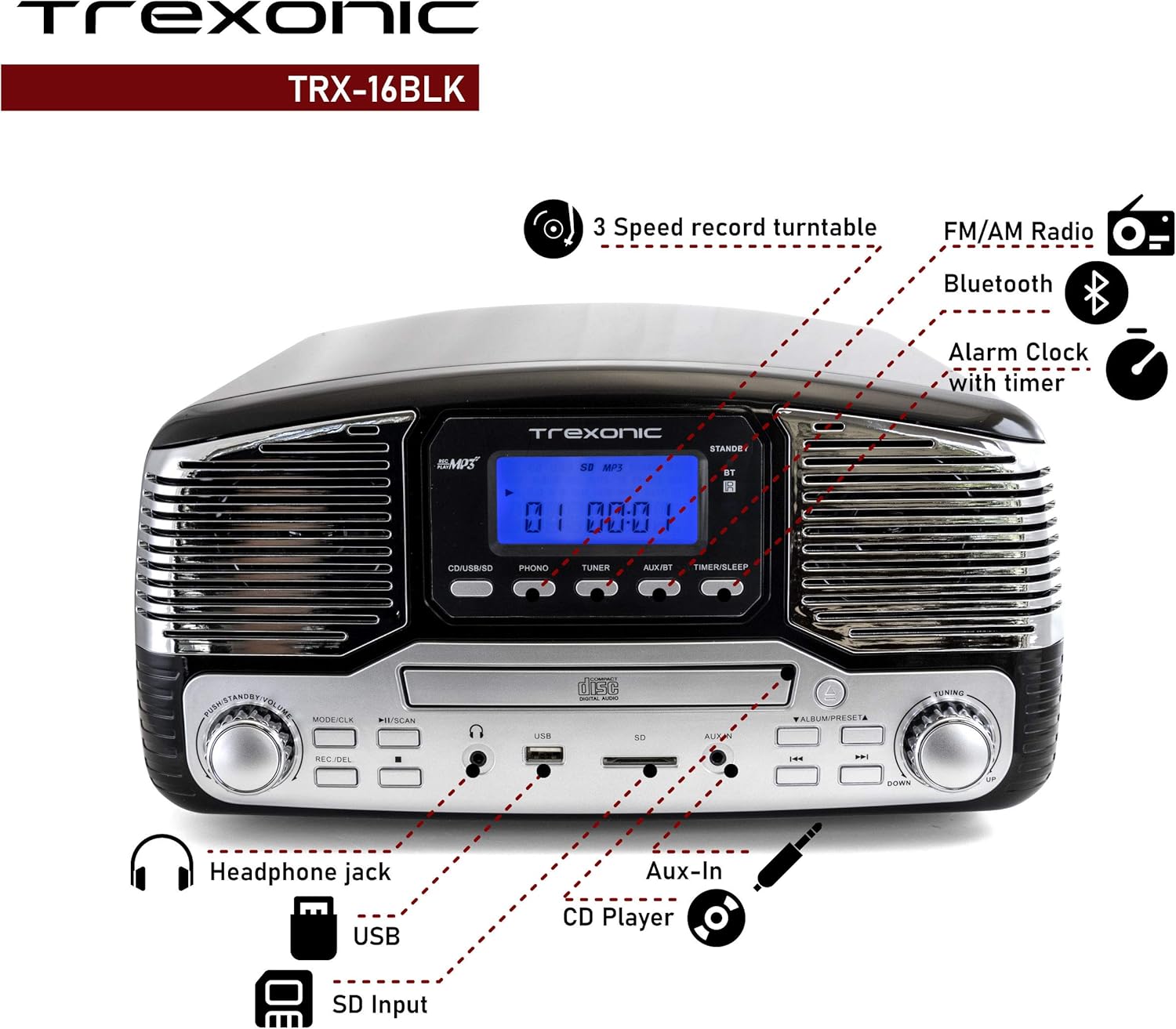
Image: A detailed diagram highlighting the key features and control locations on the Trexonic Retro Record Player.
Елементи керування та функції
Familiarize yourself with the various controls and ports on your Trexonic Retro Record Player:

Зображення: Крупний план view of the digital display and mode selection buttons (CD/USB/SD, PHONO, TUNER, AUX/BT, TIMER/SLEEP).
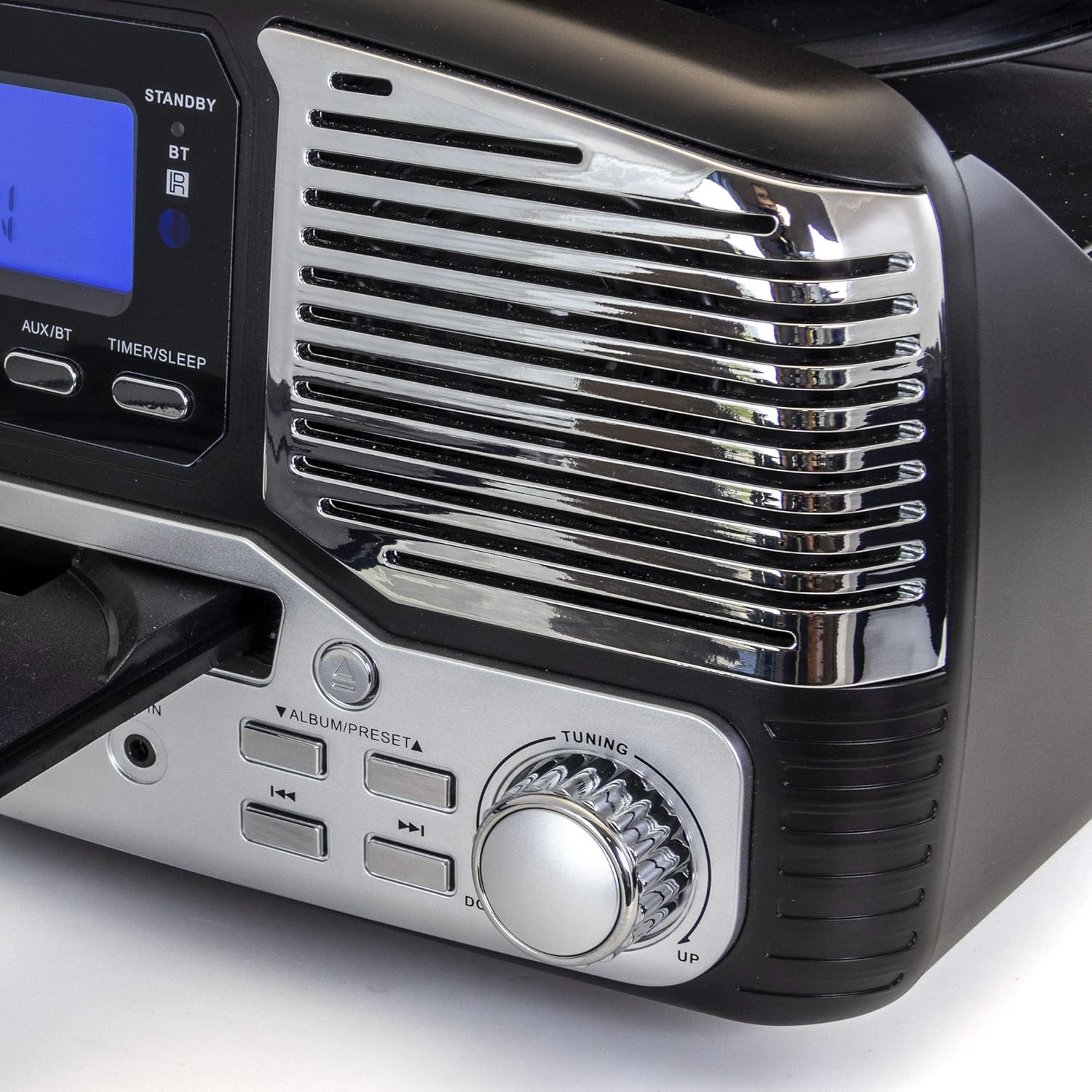
Зображення: Крупний план view of the tuning knob and track navigation buttons (SCAN, ALBUM/PRESET, UP, DOWN).
Ключові елементи керування включають:
- Ручка живлення/гучності: Вмикає/вимикає пристрій та регулює гучність.
- Mode/CLK Button: Selects audio source (CD/USB/SD, PHONO, TUNER, AUX/BT) and sets clock.
- REC/DEL Button: Initiates recording to USB/SD or deletes files.
- Кнопки відтворення/паузи, зупинки, пропуску: Standard playback controls for CD/USB/SD.
- Ручка налаштування: Для ручного вибору радіостанції.
- Timer/Sleep Button: Activates sleep timer or alarm settings.
- Роз'єм для навушників: 3.5-мм вихід для навушників.
- Порт USB: Для USB-флеш-накопичувачів.
- Слот для SD-карти: Для карт пам'яті SD.
- AUX IN Джек: 3.5-мм вхід для підключення зовнішніх аудіопристроїв.
- RCA Line Out (Rear): Підключається до зовнішнього ampпідсилювачі або потужні динаміки.
- FM Antenna (Rear): Для прийому FM-радіо.
Початкове налаштування
Follow these steps to set up your Trexonic Retro Record Player:
- Розпакування: Обережно вийміть пристрій з упаковки. Зберігайте пакувальні матеріали для подальшого транспортування або зберігання.
- Розміщення: Розмістіть пристрій на рівній, стійкій поверхні подалі від прямих сонячних променів, джерел тепла та надмірного пилу чи вологи.
- Підключення живлення: Connect the AC power adapter to the DC 12V IN (1000mA) jack on the rear of the unit, then plug the adapter into a standard wall outlet.
- FM антена: Extend the FM wire antenna located at the back of the unit for optimal radio reception.
- Зовнішні підключення (необов'язково): If connecting to external speakers or an amplifier, use RCA cables to connect the LINE OUT jacks on the rear of the unit to the corresponding input jacks on your external audio equipment.

Image: The rear panel of the Trexonic Retro Record Player, illustrating the connection points for power, FM antenna, and RCA line-out.
Інструкція з експлуатації
Відтворення вінілових платівок
This unit supports 33 1/3, 45, and 78 RPM records.
- Підніміть пилозахисну кришку.
- Помістіть платівку на програвач програвача. Якщо ви відтворюєте сингл зі швидкістю 45 об/хв, встановіть адаптер 45 об/хв, що входить до комплекту, на центральну шпиндель.
- Set the speed selector switch to the appropriate speed (33, 45, or 78 RPM) for your record.
- Натисніть РЕЖИМ/CLK button repeatedly until "PHONO" is displayed.
- Gently lift the tone arm from its rest and move it over the record. The platter will begin to rotate.
- Обережно опустіть тонарм на потрібну доріжку платівки.
- Відрегулюйте гучність за допомогою Потужність / гучність ручка.
- When the record finishes, the tone arm will automatically return to its rest (for most records). Lift the tone arm and return it to its rest manually if needed.

Зображення: Крупний план view of the turntable in operation, showing the stylus tracking a vinyl record.
Playing Compact Discs (CD)
- Натисніть РЕЖИМ/CLK button repeatedly until "CD" is displayed.
- Натисніть ВІДКРИТИ/ЗАКРИТИ кнопку, щоб відкрити лоток для компакт-дисків.
- Вставте компакт-диск у лоток етикеткою догори.
- Натисніть ВІДКРИТИ/ЗАКРИТИ button again to close the tray. The unit will read the CD and begin playback automatically.
- Використовуйте ВІДТВОРЕННЯ/ПАУЗА, СТІЙ, і ПРОПУСТИТИ кнопки для керування відтворенням.

Image: The Trexonic Retro Record Player with its CD tray extended, ready for disc insertion or removal.
Підключення через Bluetooth
- Натисніть РЕЖИМ/CLK button repeatedly until "BT" (Bluetooth) is displayed. The unit will enter pairing mode, indicated by a flashing Bluetooth icon on the display.
- Увімкніть Bluetooth на зовнішньому пристрої (смартфоні, планшеті тощо) та здійсніть пошук доступних пристроїв.
- Select "Trexonic" or "TRX-16BLK" from the list of devices.
- Once paired, the Bluetooth icon will stop flashing and remain solid. You can now stream audio wirelessly to the unit.
Використання AM/FM-радіо
- Натисніть РЕЖИМ/CLK button repeatedly until "TUNER" is displayed.
- Обертайте Тюнінг knob to manually select your desired AM or FM radio station.
- For better FM reception, adjust the position of the FM wire antenna on the rear of the unit.
USB/SD Card Functions (Playback & Recording)
The unit supports MP3 playback from USB flash drives and SD cards, and can record audio from vinyl to MP3 format.
- Відтворення: Insert a USB flash drive into the USB port or an SD card into the SD card slot. Press the РЕЖИМ/CLK button until "USB" or "SD" is displayed. The unit will automatically detect and play MP3 files. Use playback controls to navigate.
- Recording (Vinyl to MP3):
- Переконайтеся, що вставлено USB-накопичувач або SD-карту.
- Select "PHONO" mode.
- Start playing your vinyl record.
- Натисніть ЗАПИС/ВИДАЛЕННЯ кнопку, щоб розпочати запис. На дисплеї відобразиться стан запису.
- Прес ЗАПИС/ВИДАЛЕННЯ again to stop recording. The recorded MP3 file will be saved to the USB drive or SD card.
Connecting External Devices (AUX-In)
- Connect one end of a 3.5mm audio cable (not included) to the AUX IN jack on the front of the unit.
- Підключіть інший кінець кабелю до роз'єму для навушників або аудіовиходу вашого зовнішнього пристрою (наприклад, MP3-плеєра, смартфона).
- Натисніть РЕЖИМ/CLK button repeatedly until "AUX" is displayed.
- Play audio from your external device. The sound will be routed through the Trexonic Retro Record Player's speakers.
Setting the Alarm and Sleep Timer
Detailed instructions for setting the alarm and sleep timer are typically found in the full product manual. Generally, these functions are accessed via the ТАЙМЕР/СОН button and navigation controls.
- Налаштування годинника: Натисніть і утримуйте РЕЖИМ/CLK to enter clock setting mode, then use navigation buttons to adjust time.
- Налаштування будильника: Прес ТАЙМЕР/СОН to cycle through alarm settings (e.g., alarm time, source).
- Таймер сну: Прес ТАЙМЕР/СОН repeatedly to set a countdown timer for the unit to automatically turn off.
Технічне обслуговування
Proper care will ensure the longevity of your Trexonic Retro Record Player.
- Очищення пристрою: Протріть зовнішню частину м’якою сухою тканиною. Не використовуйте абразивні засоби для чищення або розчинники.
- Очищення стилуса: Use a soft brush (not included) to gently brush the stylus from back to front to remove dust. Do not touch the stylus with your fingers.
- Пилозахисний чохол: Тримайте пилозахисну кришку закритою, коли програвач не використовується, щоб захистити його від пилу та сміття.
- Догляд за записами: Keep your vinyl records clean and stored vertically in their sleeves to prevent warping and dust accumulation.
Посібник з усунення несправностей
If you encounter any issues, please refer to the following table before seeking professional service.
| проблема | Можлива причина | Рішення |
|---|---|---|
| Немає живлення | Шнур живлення ненадійно підключений. | Переконайтеся, що шнур живлення щільно підключений до пристрою та розетки. |
| Немає звуку з динаміків | Гучність занадто низька або вимкнена. Вибрано неправильний режим. | Increase volume. Press РЕЖИМ/CLK to select the correct audio source. |
| Програвач не обертається або звук спотворюється | Speed setting incorrect. Stylus dirty or damaged. Tone arm not properly lowered. | Check the speed selector. Clean or replace stylus. Ensure tone arm is fully lowered onto the record. |
| Компакт-диск не відтворюється | CD inserted incorrectly or disc is scratched/dirty. Incorrect mode. | Ensure CD is inserted label-side up. Clean or try another CD. Select "CD" mode. |
| Проблеми зі створенням пари Bluetooth | Device too far. Bluetooth not enabled on external device. | Move devices closer. Ensure Bluetooth is enabled and "Trexonic" is selected. |
| Поганий радіоприйом | FM-антена не висунута або не розташована належним чином. | Повністю розгорніть та відрегулюйте дротову FM-антену. Спробуйте змінити положення пристрою. |
Технічні характеристики
| Особливість | Специфікація |
|---|---|
| Номер моделі | TRX-16BLK |
| Вхідна потужність | DC 12V, 1000mA (via AC adapter) |
| Швидкість поворотного столу | 33 1/3, 45, 78 об/хв |
| Підключення | Bluetooth, Wired (AUX-In, RCA Line-Out) |
| Підтримка ЗМІ | Vinyl Records, Audio CDs, USB (MP3), SD Card (MP3) |
| Радіочастоти | AM/FM |
| Розміри (прибл.) | 13 x 12 x 6 дюймів (розміри упаковки) |
| Вага (прибл.) | 8 фунта |
| матеріал | пластик |
Інформація про гарантію та підтримку клієнтів
Trexonic products are designed and manufactured to the highest quality standards. For specific warranty details, please refer to the warranty card included with your purchase or visit the official Trexonic website. If you require technical assistance or have questions regarding your product, please contact Trexonic customer support through their official channels.
Зберігайте підтвердження покупки для гарантійних претензій.


