1. Вступ
This manual provides essential information for the safe and efficient operation of your OMNITRONIC PM-322P 3-Channel DJ Mixer. Please read these instructions thoroughly before using the device to ensure proper functionality and to prevent damage.
The OMNITRONIC PM-322P is a robust and versatile 3-channel DJ mixer designed for various audio mixing applications, featuring integrated Bluetooth connectivity and a USB MP3 player.

малюнок 1: Під кутом view of the OMNITRONIC PM-322P DJ Mixer, showcasing its compact design and accessible controls.
2. Техніка безпеки
- Прочитайте всі інструкції перед використанням пристрою.
- Збережіть цей посібник для подальшого використання.
- Не піддавайте пристрій впливу дощу або вологи.
- Забезпечте належну вентиляцію; не блокуйте вентиляційні отвори.
- Only connect to a grounded power outlet with the specified voltage (240 вольти).
- Не відкривайте пристрій casing; звертайтеся до кваліфікованого персоналу з усіма видами обслуговування.
- Уникайте розміщення пристрою поблизу джерел тепла або під прямими сонячними променями.
- Чистіть тільки сухою ганчіркою.
3. Ключові характеристики
- 3 вхідних каналів: Each channel features gain control, a 3-band equalizer (High, Mid, Low), a Cue button for pre-listening, and a smooth channel fader.
- Integrated Bluetooth Audio Streaming: Seamlessly stream music wirelessly from your Bluetooth-enabled portable devices directly to the mixer.
- DJ Microphone Channel: Dedicated microphone input with independent volume control and a 2-band equalizer for vocal adjustments.
- MP3 Player with USB Port: Відтворити аудіо files directly from a USB storage device, with track information displayed on a clear blue LCD.
- Міцна конструкція: Розроблено для довговічності та надійної роботи.
4. Елементи управління та підключення
4.1 Елементи керування передньої панелі

малюнок 2: Топ view of the OMNITRONIC PM-322P DJ Mixer, highlighting the main control surface.
- Порт USB: For connecting USB storage devices to the integrated MP3 player.
- MP3/Bluetooth Module: Includes LCD display, playback controls (Play/Stop, Skip), and Pairing button for Bluetooth.
- Channel Gain Controls (CH 1-3): Налаштуйте рівень вхідного сигналу для кожного каналу.
- 3-Band Equalizer (High, Mid, Low): Tone controls for each channel.
- Cue Buttons (CH 1-3): Activates pre-listening for the respective channel through headphones.
- Channel Faders (CH 1-3): Adjust the volume level of each channel in the mix.
- Microphone Level Control (MIC LEVEL): Регулює гучність підключеного мікрофона.
- Microphone 2-Band Equalizer (MIC HIGH, MIC LOW): Tone controls for the microphone input.
- X-Fader Reverse Switch: Reverses the direction of the crossfader.
- X-Fader Curve Control: Adjusts the crossfader curve from sharp to smooth.
- Crossfader (CH 2/CH 3): Blends between channels 2 and 3.
- Master Level Control: Регулює загальну гучність виводу.
- Cue Level Control: Регулює гучність виходу навушників.
- Cue Mix/PGM Control: Blends between the Cued signal and the Program (Master) signal in the headphones.
- Світлодіодні вимірювачі рівня: Visual indication of output levels.
- Headphone Output (1/4" TRS): Для підключення навушників для моніторингу.
4.2 Підключення задньої панелі
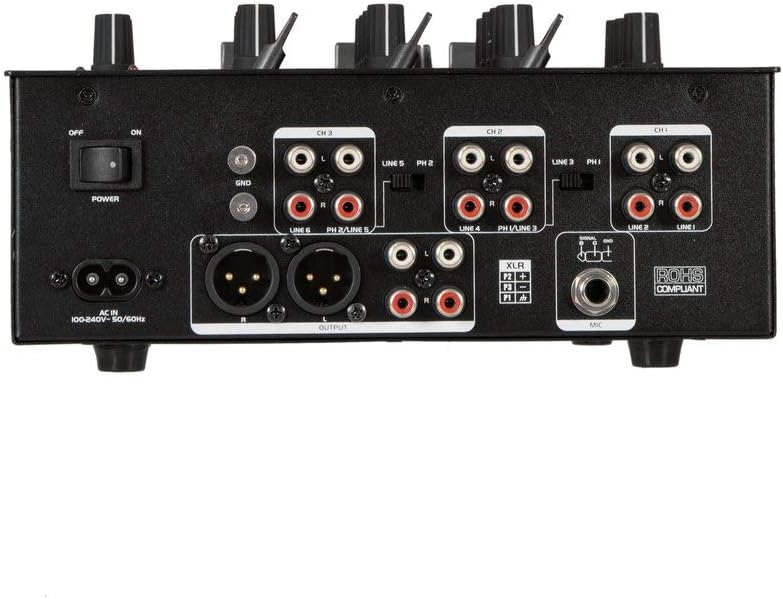
малюнок 3: Rear panel of the OMNITRONIC PM-322P DJ Mixer, showing all input and output ports.
- Перемикач живлення (ON/OFF): Вмикає або вимикає змішувач.
- AC IN: Power input for the included power cable (100-240V AC, 50/60Hz).
- Заземлювальний вивід (GND): Для підключення заземлювального проводу програвача.
- Channel 3 Inputs (LINE 5/PH 2, LINE 6): RCA inputs for line-level devices (CD players, media players) and phono-level devices (turntables).
- Channel 2 Inputs (LINE 3/PH 1, LINE 4): RCA inputs for line-level devices and phono-level devices.
- Channel 1 Inputs (PLAYER/LINE 1, LINE 2): RCA inputs for line-level devices.
- Master Output (XLR, RCA): Balanced XLR and unbalanced RCA outputs for connecting to a power amplifier або активні колонки.
- Мікрофонний вхід (XLR): Збалансований вхід XLR для підключення динамічного мікрофона.
5. Налаштування
- Підключення живлення: Connect the provided power cable to the AC IN socket on the rear panel and then to a suitable grounded power outlet (240V).
- Вихідне підключення: Connect the MASTER OUTPUT (XLR or RCA) to your amplifier or active speaker system.
- Пристрої введення:
- Connect turntables to the PHONO inputs (CH 2 or CH 3) and ensure the PH/LINE switch is set to PH. Connect the turntable's ground wire to the GND terminal.
- Connect CD players, media players, or other line-level devices to the LINE inputs (CH 1, CH 2, or CH 3). Ensure the PH/LINE switch is set to LINE for channels 2 and 3.
- Connect a microphone to the XLR MIC input on the rear panel.
- Навушники: Connect your headphones to the 1/4" TRS HEADPHONE output on the front panel.
- Початкові налаштування: Before powering on, ensure all channel faders are down, gain controls are at minimum, and the Master Level is at minimum.
- Увімкнення: Перемкніть перемикач POWER на задній панелі в положення ON.
6. Операція
6.1 Playing Audio from Input Channels
- Select the desired input source (LINE or PHONO) using the switch on the rear panel for Channels 2 and 3. Channel 1 is LINE only.
- Start playback on your connected audio source (turntable, CD player).
- Slowly increase the GAIN control for the selected channel until the LED level meter shows a strong signal without clipping (red LEDs).
- Adjust the 3-band EQ (HIGH, MID, LOW) to shape the sound of the channel.
- Raise the channel fader to bring the audio into the main mix.
- Adjust the MASTER LEVEL control to set the overall output volume.
- Use the CUE button to pre-listen to a channel through your headphones before fading it into the mix. Adjust CUE LEVEL and CUE MIX/PGM as needed.
6.2 Using the MP3 Player (USB)
- Insert a USB storage device (formatted as FAT32) containing MP3 files в порт USB.
- The LCD display will show track information.
- Use the PLAY/STOP button to start or pause playback.
- Use the SKIP buttons (<< / >>) to navigate between tracks.
- The MP3 player typically routes to Channel 1. Adjust Channel 1's GAIN, EQ, and FADER controls as described above.
6.3 Потокове передавання аудіо через Bluetooth
- Press the PAIRING button on the MP3/Bluetooth module. The Bluetooth indicator will flash, indicating it's in pairing mode.
- On your Bluetooth-enabled device (smartphone, tablet), search for available Bluetooth devices and select "OMNITRONIC PM-322P".
- Once paired, the Bluetooth indicator will glow steadily.
- Start playing audio on your connected device. The Bluetooth audio will route to Channel 1.
- Adjust Channel 1's GAIN, EQ, and FADER controls to mix the Bluetooth audio.
6.4 Використання мікрофона
- Connect a dynamic microphone to the XLR MIC input on the rear panel.
- Speak into the microphone and slowly increase the MIC LEVEL control until the desired volume is achieved without distortion.
- Use the MIC HIGH and MIC LOW controls to adjust the tone of your voice.
7. Технічне обслуговування
- Прибирання: Disconnect the device from power before cleaning. Use a soft, dry cloth to wipe the surface. Do not use liquid cleaners or solvents.
- Зберігання: Якщо міксер не використовується протягом тривалого часу, зберігайте його в сухому, безпиловому середовищі.
- Сервіс: Всередині немає деталей, що обслуговуються користувачем. Зверніть усі послуги до кваліфікованого обслуговуючого персоналу.
8. Вирішення проблем
| проблема | Можлива причина | Рішення |
|---|---|---|
| Немає живлення | Power cable disconnected; Power switch off; Outlet fault. | Перевірте підключення кабелю живлення; переконайтеся, що вимикач живлення увімкнено; протестуйте розетку з іншим пристроєм. |
| Немає звуку | Master Level too low; Channel fader down; Gain too low; Amplifier/speakers off or disconnected. | Increase Master Level; Raise channel fader; Increase channel Gain; Check ampпідключення та живлення аудіоадаптера/динаміків. |
| Спотворений звук | Gain too high (clipping); Input signal too strong; Faulty cable. | Reduce channel Gain; Check input signal level; Replace cables. |
| Bluetooth не з’єднується | Mixer not in pairing mode; Device too far; Device already paired to another unit. | Press PAIRING button; Move device closer; Disconnect from other Bluetooth devices. |
| USB MP3-плеєр не працює | USB device not formatted correctly (FAT32); No MP3 files; USB device faulty. | Ensure USB is FAT32 and contains MP3s; Try a different USB device. |
9. Технічні характеристики
| модель: | ПМ-322П |
| Виробник: | Steinigke Showtechnic GmbH |
| Кількість каналів: | 3 |
| Технологія підключення: | Bluetooth, USB |
| Джерело живлення: | Електричний кабель |
| томtage: | 240 Вольт змінного струму |
| Вага товару: | 3.18 кілограма |
| Аудіо вхід: | XLR (Microphone), RCA (Line/Phono) |
| Тип вихідного роз'єму: | XLR, TRS 1/4", RCA |
| Model Number (Manufacturer): | 8283410 |
| UPC: | 04026397653403 |
10. Гарантія та підтримка
For warranty information and technical support, please contact the manufacturer, Steinigke Showtechnic GmbH, or your authorized dealer. Keep your proof of purchase for any warranty claims.
For further assistance, please visit the official OMNITRONIC webсайт або зверніться до місцевого дистриб'ютора.


