вступ
Welcome to the user manual for your CHACON 54671 Mini Remote Control Smart Plugs. This manual provides essential information for the safe and efficient operation of your device. Please read it thoroughly before use and retain it for future reference.
Вміст упаковки
- 4 x CHACON Mini Remote Control Plugs
- 1 x Remote Control (with 1 CR2032 battery included)
- 1 x Посібник користувача (цей документ)
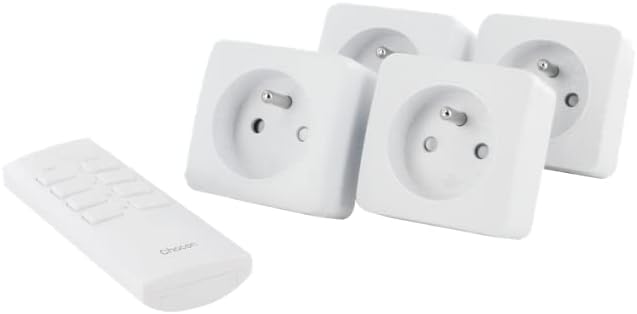
Image: The CHACON set includes four mini remote control plugs and one remote control unit.
Важлива інформація з безпеки
- Тільки для внутрішнього використання.
- Do not exceed the maximum load of 2300W.
- Ensure the plugs are fully inserted into the wall socket.
- Не занурюйте у воду та не піддавайте дії надмірної вологи.
- Зберігати в недоступному для дітей місці.
- Не намагайтеся розібрати чи відремонтувати пристрій.
Налаштування та сполучення
Your CHACON Mini Remote Control Plugs are pre-paired from the factory. If re-pairing is necessary or if you wish to change the assigned channel, follow these steps:
- Plug the mini remote control plug into a wall socket. The LED indicator on the plug will flash.
- Within 6 seconds of plugging in, press the desired "ON" button (1, 2, 3, or 4) on the remote control.
- The LED indicator on the plug will stop flashing and remain lit for a moment, then turn off, indicating successful pairing.
- Repeat for each plug and desired remote control channel.

Image: A single CHACON mini plug shown next to the remote control, illustrating the components involved in the pairing process.
Операція
The remote control allows you to switch connected devices ON and OFF wirelessly.
Використання пульта дистанційного керування
- Each pair of "ON" and "OFF" buttons (1-4) corresponds to a specific plug.
- To turn a device ON: Press the corresponding "ON" button (e.g., "1 ON").
- To turn a device OFF: Press the corresponding "OFF" button (e.g., "1 OFF").
Ручне перевизначення
Each plug has a manual button on its side. Pressing this button will toggle the power state (ON/OFF) of the connected device.

Image: Close-up of the CHACON remote control, showing the numbered ON/OFF buttons.
Технічне обслуговування
прибирання
Wipe the plugs and remote control with a dry, soft cloth. Do not use abrasive cleaners or solvents.
Заміна батареї пульта дистанційного керування
Пульт дистанційного керування використовує одну батарейку CR2032.
- Знайдіть батарейний відсік на задній панелі пульта дистанційного керування.
- Відкрийте відділення за допомогою маленької викрутки або монети.
- Remove the old battery and insert a new CR2032 battery, ensuring correct polarity (+/-).
- Надійно закрийте батарейний відсік.
Усунення несправностей
| проблема | Можлива причина | Рішення |
|---|---|---|
| Plug does not respond to remote. | Неправильно підключено до пари. | Re-pair the plug with the remote control (see Setup section). |
| Plug does not respond to remote. | Батарейка пульта дистанційного керування низький або розряджена. | Замініть батарейку CR2032 у пульті дистанційного керування. |
| Plug does not respond to remote. | Obstruction or distance. | Ensure the remote is within the 30m range and there are no major obstructions. |
| Device connected to plug does not turn on. | Device is faulty or switched off manually. | Check the device's power switch and ensure it is functioning correctly. |
| Plug LED does not light up. | Немає живлення в розетці. | Check the wall socket with another device. |

Image: A CHACON mini plug inserted into a wall socket, demonstrating typical installation.
Технічні характеристики
- Бренд: ШАКОН
- Номер моделі: 54671
- колір: Білий
- Розміри (Д x Ш x В): 7 х 6 х 6 см
- вага: 470 g (total for set)
- матеріал: пластик
- Радіочастота: 433.92 МГц
- Відстань передачі: До 30 метрів (відкрите поле)
- Максимальна потужність: 2300 Вт
- Джерело живлення: Cable Electric (for plugs), 1 x CR2032 battery (for remote)
- Особливість: Розетки з дистанційним керуванням
Гарантія та підтримка
For warranty information or technical support, please refer to the contact details provided by your retailer or visit the official CHACON webсайт. Зберігайте чек про покупку для гарантійних претензій.


