1. Вступ
Thank you for choosing the LTS Hand Held Electric Concrete Vibrator. This manual provides essential information for the safe and efficient operation, maintenance, and troubleshooting of your new concrete vibrator. Please read this manual thoroughly before initial use and keep it for future reference.
This product is designed to remove air bubbles from freshly poured concrete, ensuring a denser, stronger, and more uniform concrete finish. It is suitable for various construction applications.
2. Техніка безпеки
Завжди дотримуйтесь основних запобіжних заходів під час використання електроінструментів, щоб зменшити ризик пожежі, ураження електричним струмом та травмування.
Загальна безпека
- Безпека на робочому місці: Тримайте робоче місце чистим і добре освітленим. Захаращені або темні місця призводять до нещасних випадків. Не використовуйте електроінструменти у вибухонебезпечних середовищах, наприклад, у присутності легкозаймистих рідин, газів або пилу.
- Електрична безпека: Вилки електроінструментів повинні відповідати розетці. Ніколи не модифікуйте вилку будь-яким чином. Не зловживайте шнуром. Ніколи не використовуйте шнур для перенесення, витягування або відключення електроінструмента від мережі. Тримайте шнур подалі від тепла, олії, гострих країв або рухомих частин.
- Особиста безпека: Stay alert, watch what you are doing, and use common sense when operating a power tool. Do not use a power tool while you are tired or under the influence of drugs, alcohol, or medication. Always wear appropriate personal protective equipment (PPE), including safety glasses, hearing protection, and sturdy footwear.
- Використання та догляд за інструментом: Не застосовуйте силу до електроінструменту. Використовуйте правильний електроінструмент для вашого застосування. Від’єднайте штекер від джерела живлення, перш ніж виконувати будь-які налаштування, змінювати аксесуари або зберігати електроінструменти.
Specific Concrete Vibrator Safety
- Ensure the vibrator hose is securely attached to the motor unit before operation.
- Не занурюйте блок двигуна у воду чи будь-яку іншу рідину.
- Avoid bending the vibrator hose excessively, as this can damage the internal shaft.
- Operate the vibrator only in well-ventilated areas.
- Do not touch the vibrating poker head during operation or immediately after use, as it may be hot.
3. Вміст упаковки
Ваш пакет повинен містити такі предмети:
- 2 x LTS Hand Held Electric Concrete Vibrator Motor Units
- 2 x 1.5m Long, 35mm Diameter Vibrating Poker Hoses
- 1 x Посібник користувача (цей документ)

Image 3.1: Two complete LTS Hand Held Electric Concrete Vibrator units, each consisting of a motor unit and an attached vibrating poker hose.
4. Налаштування
Follow these steps to prepare your concrete vibrator for use:
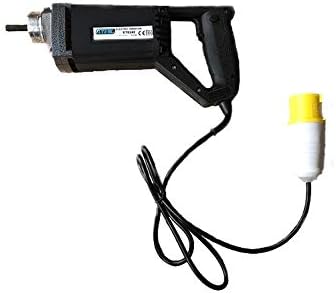
Image 4.1: The LTS Hand Held Electric Concrete Vibrator motor unit.
- Розпакуйте компоненти: Обережно вийміть усі компоненти з упаковки. Перевірте на наявність пошкоджень під час транспортування.
- Attach Vibrator Hose:
- Align the threaded end of the vibrating poker hose with the corresponding threaded port on the motor unit.
- Screw the hose onto the motor unit clockwise until it is hand-tight.
- Ensure a secure connection to prevent detachment during operation.
- Підключення живлення: Plug the power cord into a suitable 110V electrical outlet. Ensure the outlet is properly grounded.
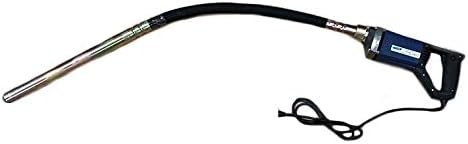
Image 4.2: The LTS Hand Held Electric Concrete Vibrator with the 1.5m long vibrating poker hose securely attached.
5. Інструкція з експлуатації
Proper operation is crucial for achieving optimal concrete consolidation and extending the life of your tool.
- Перевірка перед початком роботи: Before starting, ensure all connections are secure and the power cord is free from damage.
- Starting the Vibrator: Turn on the power switch located on the motor unit. The vibrator head will begin to vibrate.
- Vibrating Concrete:
- Slowly insert the vibrating poker head into the freshly poured concrete.
- Penetrate the concrete vertically or at a slight angle, ensuring the poker reaches the bottom of the formwork or the previous lift.
- Keep the poker submerged for approximately 5-15 seconds, or until air bubbles stop rising to the surface and the concrete surface becomes smooth and glossy.
- Slowly withdraw the poker, allowing the concrete to flow back into the void created by the poker.
- Overlap vibration areas by about 50% to ensure complete consolidation.
- Avoid touching the formwork with the vibrator head, as this can damage the forms or create surface imperfections.
- Stopping the Vibrator: Turn off the power switch on the motor unit when finished or when moving to a new section.
Tips for Effective Vibration:
- Do not over-vibrate concrete, as this can lead to segregation of aggregates.
- Maintain a consistent rhythm and pattern for uniform results.
- For deep pours, vibrate in layers, ensuring each layer is properly consolidated before adding the next.
6. Технічне обслуговування
Regular maintenance will ensure the longevity and optimal performance of your concrete vibrator.
- Прибирання: After each use, clean the vibrator head and hose thoroughly to remove any concrete residue. Use a stiff brush and water. Do not use harsh chemicals or solvents that could damage the hose material. Ensure the motor unit remains dry.
- Огляд: Regularly inspect the power cord for cuts, fraying, or damage. Check the vibrator hose for cracks, kinks, or excessive wear. Ensure the connection between the hose and motor unit is secure.
- Зберігання: Store the concrete vibrator in a clean, dry place, away from direct sunlight and extreme temperatures. Coil the hose loosely to prevent kinks.
- Motor Unit Care: Keep the ventilation openings on the motor unit clear of dust and debris to prevent overheating.
7. Вирішення проблем
This section addresses common issues you might encounter with your concrete vibrator.
| проблема | Можлива причина | Рішення |
|---|---|---|
| Вібратор не запускається. | No power supply; Power switch off; Damaged cord/plug; Motor fault. | Check power outlet and circuit breaker; Ensure power switch is ON; Inspect cord/plug for damage (replace if necessary); Contact customer support. |
| Слабка вібрація. | Loose hose connection; Worn internal shaft/bearings; Motor overheating. | Tighten hose connection; Allow motor to cool down; Contact customer support for repair. |
| Excessive noise or unusual sounds. | Internal mechanical issue; Loose components. | Discontinue use immediately; Contact customer support. |
| Motor unit gets hot quickly. | Blocked ventilation; Overload; Prolonged continuous use. | Clear ventilation openings; Do not overload the tool; Allow for cooling breaks during extended use. |
If you encounter problems not listed here or if the suggested solutions do not resolve the issue, please contact LTS customer support.
8. Технічні характеристики
Technical specifications for the LTS Hand Held Electric Concrete Vibrator:
| Особливість | Специфікація |
|---|---|
| Бренд | LTS |
| Модель | Hand Held Electric Concrete Vibrator |
| Вхідний об'ємtage | 110 В |
| Частота | 60 Гц |
| потужність | 580 Вт |
| Maximum Load RPM | 4500 об/хв |
| Довжина шланга | 1.5 метрів |
| Діаметр шланга | 35mm (Note: Product description states 32mm, title states 35mm. Using 35mm as per title for consistency, but noting discrepancy.) |
| Вага товару (за одиницю) | Approx. 10 kg (Total 20 kg for 2 units) |
| Колір | May Vary (Blue or Black) |
9. Гарантія та підтримка
This LTS Hand Held Electric Concrete Vibrator comes with a 2 роки гарантії з дати покупки.
The warranty covers defects in materials and workmanship under normal use. It does not cover damage resulting from misuse, abuse, accidents, unauthorized repairs, or normal wear and tear.
For warranty claims, technical support, or spare parts, please contact your retailer or the manufacturer directly. Please have your purchase receipt and product model information ready when contacting support.
Виробник: LTS
Обслуговування клієнтів: Зверніться до документації щодо придбання, щоб отримати конкретну контактну інформацію.


