1. Продукт закінчивсяview
The Schneider SC600SND is a versatile 2.0 channel soundbar designed to enhance your audio experience. It offers a total output power of 30W (15W x 2) and supports multiple connectivity options including Bluetooth, HDMI (ARC), Optical, and Aux. A unique feature of this soundbar is its convertible design, allowing it to be used as a single horizontal unit or split into two vertical speaker columns.

Image 1.1: The Schneider SC600SND Soundbar in its standard monoblock configuration.
2. Налаштування
2.1 Розпакування та розміщення
Carefully remove all components from the packaging. Ensure you have the soundbar unit, remote control, and 3.5mm Jack cable.
The SC600SND soundbar offers two primary placement options:
- Monoblock Configuration: Use the soundbar as a single horizontal unit, ideal for placing below your television.
- Split Column Configuration: The soundbar can be separated into two vertical speaker columns. This allows for flexible placement on either side of your television or entertainment unit. To split, gently twist and pull the two halves apart at the central connection point. Attach the provided bases to each column for stability.

Image 2.1: Detail of the central connection point, allowing the soundbar to be split into two columns.
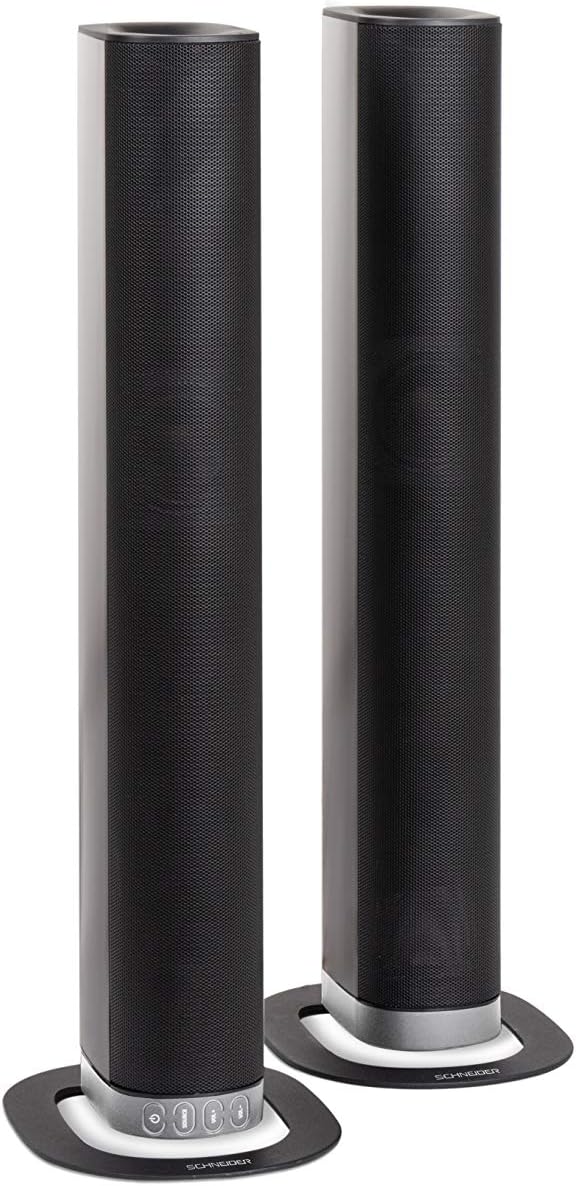
Image 2.2: The soundbar configured as two independent vertical speaker columns.
2.2 Підключення до живлення
Connect the power cable to the soundbar's power input and then to a suitable wall outlet. The soundbar will enter standby mode.
2.3 Аудіопідключення
Виберіть один із наведених нижче способів підключення джерела аудіо:
- HDMI (ARC): For optimal audio quality and control, connect an HDMI cable from the soundbar's HDMI ARC port to your TV's HDMI ARC port. This allows your TV remote to control the soundbar's volume.
- Оптичний: Connect an optical cable from the soundbar's OPTICAL input to your TV's optical output.
- AUX: Use the included 3.5mm Jack cable to connect the soundbar's AUX input to the headphone jack or audio output of your device (e.g., TV, smartphone, MP3 player).
- Bluetooth: For wireless connection, refer to the Bluetooth pairing instructions in the Operating section.
3. Інструкція з експлуатації
3.1 Увімкнення/вимкнення живлення
Натисніть потужність кнопку на саундбарі або пульті дистанційного керування, щоб увімкнути або вимкнути пристрій.
3.2 Вибір джерела
Натисніть ДЖЕРЕЛО button on the soundbar or the remote control to cycle through the available input sources: Bluetooth (BT), HDMI (ARC), Optical, and AUX.

Image 3.1: On-unit control buttons for power, source selection, and volume adjustment.
3.3 Регулювання гучності
Використовуйте ГУЧНІСТЬ+ і VOL- buttons on the soundbar or remote control to adjust the volume. Press the ВИМКНЕНО кнопку на пульті дистанційного керування, щоб тимчасово вимкнути звук.
3.4 Створення пари Bluetooth
- Select Bluetooth as the source input. The soundbar will enter pairing mode, indicated by a flashing LED.
- На мобільному пристрої (смартфоні, планшеті тощо) увімкніть Bluetooth та виконайте пошук доступних пристроїв.
- Select "SC600SND" from the list of devices.
- Once paired, the LED indicator on the soundbar will stop flashing and remain solid. You can now play audio wirelessly from your device.
3.5 режими звуку
The remote control includes dedicated buttons for different sound modes to optimize your listening experience:
- НОВИНИ: Enhances vocal clarity for news broadcasts and dialogue.
- ФІЛЬМ: Provides a more immersive soundstagе для фільмів.
- МУЗИКА: Оптимізує звук для відтворення музики.

Image 3.2: The included remote control with dedicated buttons for power, source, volume, mute, and sound modes.
4. Технічне обслуговування
Щоб забезпечити довговічність та оптимальну роботу вашої звукової панелі, дотримуйтесь цих інструкцій з обслуговування:
- Прибирання: Use a soft, dry cloth to clean the exterior surfaces of the soundbar. Do not use liquid cleaners, aerosols, or abrasive materials, as these can damage the finish or internal components.
- Вентиляція: Ensure that the soundbar's ventilation openings are not blocked. Proper airflow prevents overheating.
- Зберігання: If storing the soundbar for an extended period, disconnect it from power and store it in a cool, dry place, away from direct sunlight and extreme temperatures.
- Обробка: Уникайте падіння саундбара та сильних ударів.
5. Вирішення проблем
If you encounter issues with your SC600SND soundbar, refer to the following common problems and solutions:
- Немає живлення:
- Ensure the power cable is securely connected to both the soundbar and a working power outlet.
- Перевірте справність розетки, підключивши інший пристрій.
- Немає звуку:
- Verify that the correct input source (HDMI, Optical, AUX, Bluetooth) is selected on the soundbar.
- Increase the volume on both the soundbar and your connected audio source (e.g., TV, smartphone).
- Переконайтеся, що звук саундбара не вимкнено.
- Check all audio cables for secure connections and damage. Try a different cable if possible.
- Якщо ви використовуєте HDMI ARC, переконайтеся, що функція HDMI ARC увімкнена в налаштуваннях вашого телевізора.
- Poor Sound Quality / Distorted Audio:
- Adjust the volume levels to avoid distortion.
- Try switching between the different sound modes (NEWS, MOVIE, MUSIC) to see if one improves the audio for your content.
- Ensure the soundbar is placed on a stable surface and not vibrating excessively.
- If using Bluetooth, ensure your device is within range and there are no obstructions causing interference.
- Проблеми зі сполученням Bluetooth:
- Ensure the soundbar is in Bluetooth pairing mode (flashing LED).
- Make sure your device's Bluetooth is enabled and it is searching for new devices.
- Перемістіть пристрій ближче до саундбара.
- Якщо пристрій було сполучено раніше, спробуйте розірвати пару та повторно підключити його.
- Пульт дистанційного керування не працює:
- Перевірте та замініть батарейки в пульті дистанційного керування.
- Переконайтеся, що між пультом дистанційного керування та датчиком саундбара немає перешкод.
- Направте пульт прямо на звукову панель.
6. Технічні характеристики
| Особливість | Специфікація |
|---|---|
| Номер моделі | SC600SND |
| Канали | 2.0 |
| Вихідна потужність | 30 Вт (15 Вт x 2) |
| Технологія підключення | Bluetooth, HDMI (ARC), Optical, Aux |
| Бездротовий зв'язок | Bluetooth |
| Спосіб контролю | Пульт дистанційного керування |
| Тип динаміка | Саундбар |
| Розмір динаміка | 2 дюймів |
| Джерело живлення | Електричний кабель |
| Product Dimensions (Monoblock) | 80.5 х 6.2 х 9 см |
| Вага продукту | 2.5 кілограма |
| Включені компоненти | Remote Control, 3.5mm Jack Cable |
| Колір | чорний |
7. Гарантія та підтримка
7.1 Обмежена гарантія
This Schneider SC600SND Soundbar is covered by a Limited Warranty. Please refer to the warranty card included with your product or contact your retailer for specific terms and conditions regarding warranty coverage and duration.
7.2 Підтримка клієнтів
For technical assistance, troubleshooting beyond this manual, or warranty claims, please contact the retailer where you purchased the product or visit the official Schneider webсайт для отримання інформації про підтримку.


