1. Вступ
Thank you for choosing the Kungfuking Surge Protector Power Strip with USB Ports. This device is designed to provide convenient power access and surge protection for your electronic devices. It features two AC outlets and two USB ports, along with a 6.56 ft extension cord and a flat plug for versatile placement. This manual provides essential information for safe installation, operation, and maintenance of your power strip.

Figure 1: Kungfuking Surge Protector Power Strip (Model: Kungfuking 2AC+2USB)
2. Важливі інструкції з техніки безпеки
Будь ласка, прочитайте та зрозумійте всі інструкції з безпеки перед використанням цього виробу. Недотримання цих інструкцій може призвести до ураження електричним струмом, пожежі або серйозних травм.
- НЕ РОБИТЬ exceed the electrical ratings of 120V, 12A, 60Hz, and 2.1A for USB ports.
- НЕ РОБИТЬ use in wet environments or near water.
- НЕ РОБИТЬ disassemble or modify the device.
- НЕ РОБИТЬ use with aquariums or other water-related products.
- НЕ РОБИТЬ підключіть до іншого переміщуваного крана.
- НЕ РОБИТЬ use if the cord or plug is damaged.
- Зберігати в недоступному для дітей місці.
- Переконайтеся, що вилка повністю вставлена в розетку.
- Цей продукт призначений лише для використання в приміщенні.
3. Особливості продукту
The Kungfuking Surge Protector Power Strip is designed for convenience and safety, offering multiple power options in a compact form factor.
- 2 розетки змінного струму: Provides standard power for electronic devices.
- 2 порти USB-A: Delivers 5V/2.1A for charging smartphones, tablets, and other USB-powered devices.
- Подовжувач 6.56 футів: Offers flexibility in placement, reaching distant outlets.
- Конструкція плоскої вилки: Minimizes obstruction and allows furniture to be placed closer to the wall.
- Захист від перенапруги: Захищає підключені пристрої від стрибків напруги.
- Міцна конструкція: Built with fireproof ABS+PC materials for enhanced safety.
- Монтажна конструкція: Can be easily mounted on or under desks, walls, or other surfaces.

Рисунок 2: Основні характеристики та технічні характеристики

Figure 3: All-in-One Charging Station in use
4. Налаштування та встановлення
The power strip can be installed in various locations to suit your needs. Mounting screws are included for secure installation.
4.1 Варіанти монтажу
The power strip offers flexible mounting options:
- Under Desk/Table: Mount horizontally or vertically under a desk or table to keep surfaces clear.
- Настінне кріплення: Secure to a wall for convenient access, such as near a TV or bedside.
- Side of Cabinets/Headboards: Install vertically on the side of furniture for discreet power access.

Figure 4: Installation Options and Dimensions
4.2 Етапи встановлення
- Виберіть місце розташування: Select a flat, stable surface for mounting, ensuring it is within reach of a wall outlet and your devices.
- Позначте отвори для гвинтів: Place the power strip in the desired position and mark the locations for the mounting screws using a pencil.
- Просвердліть пілотні отвори (необов'язково): For wood surfaces, you may pre-drill small pilot holes to prevent wood splitting.
- Закріпіть подовжувач: Use the provided screws to firmly attach the power strip to the surface. Ensure it is securely fastened before use.
- Підключення до живлення: Plug the power strip's flat plug into a standard 120V wall outlet. The flat plug design allows for placement behind furniture.
4.3 Прикладampінсталяції
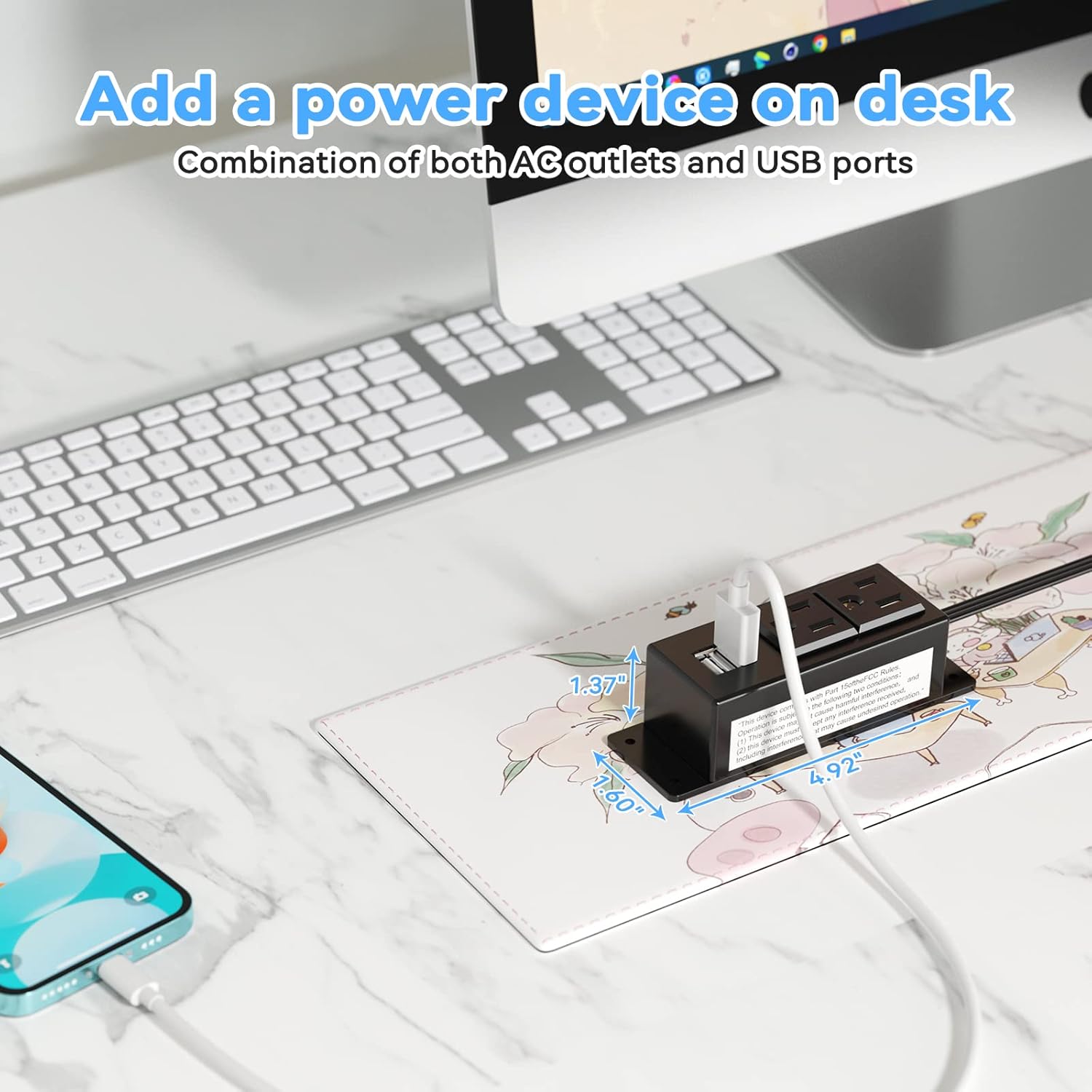
Figure 5: Desk Surface Installation

Figure 6: Under-Desk Installation

Figure 7: Wall-Mounted for TV

Figure 8: Nightstand Installation

Figure 9: Kitchen Cabinet Installation

Figure 10: Flat Plug for Space-Saving Placement
5. Інструкція з експлуатації
Using your Kungfuking Surge Protector Power Strip is straightforward:
- Підключіть до розетки: Ensure the power strip's flat plug is securely connected to a grounded 120V AC wall outlet.
- Підключення пристроїв змінного струму: Insert the power cords of your electronic devices into the two AC outlets.
- Підключіть USB-пристрої: Plug your USB charging cables into the two USB-A ports to charge compatible devices.
- Увімкнення: The power strip is designed for continuous operation once plugged in. There is no on/off switch.
- Використання монітора: Avoid overloading the power strip by ensuring the total power consumption of connected devices does not exceed the rated capacity (12A, 120V).
6. Вирішення проблем
Якщо у вас виникли проблеми з подовжувачем, зверніться до наступних поширених проблем та способів їх вирішення:
| проблема | Можлива причина | Рішення |
|---|---|---|
| No power from AC outlets or USB ports. |
|
|
| USB-пристрої не заряджаються. |
|
|
| Power strip feels hot. |
|
|
7. Технічні характеристики
| Особливість | Деталь |
|---|---|
| Модель | Kungfuking 2AC+2USB |
| Розетки змінного струму | 2 |
| USB порти | 2 (USB-A) |
| Вхідний об'ємtage | 120 В змінного струму |
| Номінальний струм змінного струму | 12А |
| Частота | 60 Гц |
| Вихід USB | 5V / 2.1A (Total) |
| Довжина шнура | 6.56 футів (2 метра) |
| Тип вилки | Плоска вилка |
| матеріал | Вогнестійкий ABS+PC |
| Розміри (прибл.) | 4.92 x 3.74 x 1.37 дюймів (Д x Ш x В) |
| Вага (прибл.) | 10.5 унції |
| Особливості | Surge Protection, Mountable Design |
8. Технічне обслуговування
Proper maintenance ensures the longevity and safe operation of your power strip:
- Прибирання: Disconnect the power strip from the wall outlet before cleaning. Use a dry, soft cloth to wipe the exterior. Do not use liquid cleaners or sprays.
- Огляд: Periodically inspect the power cord, plug, and housing for any signs of damage, such as cuts, fraying, or cracks. If damage is found, discontinue use immediately.
- Зберігання: Якщо подовжувач не використовується протягом тривалого часу, зберігайте його в прохолодному, сухому місці, подалі від прямих сонячних променів та вологи.
9. Гарантія та підтримка
Kungfuking products are designed for reliability and performance. For warranty information, technical support, or any questions regarding your product, please refer to the contact information provided at the point of purchase or visit the official Kungfuking webсайт.
Зберігайте підтвердження покупки для гарантійних претензій.